1
Warning
The operating description in this Instruction Manual is for use by qualified personnel
only. To avoid electrical shock, do not perform any servicing of this unit other than that
contained in the operating instructions, unless you are qualified and certified to do so
by Omnitron Systems Technology, Inc.
Warranty
This product is warranted to the original purchaser against defects in material and
workmanship for a period of TWO YEARS from the date of shipment. A LIFETIME
warranty may be obtained by the original purchaser by REGISTERING this product
with Omnitron within 90 days from the date of shipment. TO REGISTER, COMPLETE
AND MAIL OR FAX THE ENCLOSED REGISTRATION FORM TO THE INDICATED
ADDRESS. Or you may register your product on the Internet at http://www.omnitronsystems.com. During the warranty period, Omnitron will, at its option, repair or replace
a product which is proven to be defective.
For warranty service, the product must be sent to an Omnitron designated facility, at
Buyer’s expense. Omnitron will pay the shipping charge to return the product to Buyer’s
designated US address using Omnitron’s standard shipping method.
Limitation of Warranty
The foregoing warranty shall not apply to defects resulting from improper or inadequate
use and/or maintenance of the equipment by Buyer, Buyer-supplied equipment, Buyersupplied interfacing, unauthorized modifications or tampering with equipment (including
removal of equipment cover by personnel not specifically authorized and certified by
Omnitron), or misuse, or operating outside the environmental specification of the product
(including but not limited to voltage, ambient temperature, radiation, unusual dust, etc.),
or improper site preparation or maintenance.
No other warranty is expressed or implied. Omnitron specifically disclaims the implied
warranties of merchantability and fitness for any particular purpose.
miConverter S-Series User Manual
S/GXT and S/FXT
Product Overview
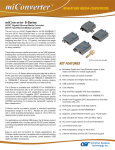
The miConverter S/GXT Gigabit fiber to 10/100/1000BASE-T
and the S/FXT Fast Ethernet fiber to 10/100/1000BASE-T
media converters are ideal for mobile applications where
light weight, compact size and low power are critical
requirements.
The miConverter S-Series delivers plug-and-play set up with an RJ-45 port that autonegotiates the speed, duplex mode and cross-over functions for laptops with 10BASE-T,
100BASE-TX or 1000BASE-T Ethernet.
Installation Procedure
1) Connect Cables
a. The miConverter S/GXT and S/FXT can be wall mounted using the optional wall
mount bracket (1691-0) or placed on a flat level surface.
To power the module using the USB cable, connect the USB Standard Type A
connector to a USB port on the computer. Then connect the USB Micro-B connector
at the other end of the cable to the connector on the back of the miConverter. Confirm
that the module has powered up properly by checking the power status LED located
on the top of the module.
To power the module using the AC/DC adapter, connect the USB Standard Type A
connector to the AC/DC adapter and connect the AC/DC adapter to the AC outlet.
Then connect the USB Micro-B connector at the end of the cable to the connector
on the back of the miConverter. Confirm that the module has powered up properly
by checking the power status LED located on the top of the module.
Exclusive Remedies
The remedies provided herein are the Buyer’s sole and exclusive remedies. Omnitron
shall not be liable for any direct, indirect, special, incidental, or consequential damages,
whether based on contract, tort, or any legal theory.
b. Connect the UTP port via a Category 5 or better cable to a 10BASE-T, 100BASE-TX
or 1000BASE-T Ethernet device.
c. When using fixed fiber port models, connect the appropriate multimode or singlemode fiber cable to the fiber port of the installed module. It is important to ensure
that the transmit (Tx) is attached to the receive side of the device at the other end and
the receive (Rx) is attached to the transmit side. Single-fiber (SF) media converter
models operate in pairs. The Tx wavelength must match the Rx wavelength at
the other end and the Rx wavelength must match the Tx wavelength at the other
end.
When using an SFP model, insert the SFP Fiber transceiver into the Port 1 SFP
receptacle on the module.
NOTE: The release latch of the SFP Fiber transceiver must be in the closed (up)
position before insertion.
2) Verify Operation
Once the module has been installed, verify the module is operational by viewing the
LED indicators.
040-01600-001B 1/12
Omnitron Systems Technology * 140 Technology Dr., * Irvine, CA 92618
949.250.6510 tel * 949.250.6514 fax * www.omnitron-systems.com
Page 1
LED Function
“Legend”
Color
Power
“PWR”
Green
OFF State
ON/Blinking State
No power
ON: Module has power
Fiber Link Activity
“F/O”
Green
No fiber link
ON: Fiber link
Blinking: Data activity
UTP Link Activity
“10”
Green
No UTP link
ON: Port linked at 10M
Blinking: Data activity
UTP Link Activity
“1000”
Green
No UTP link
ON: Port linked at 1000M
Blinking: Data activity
No UTP link
ON: Port linked at 100M
Blinking: Data activity
UTP Link Activity
“10” and “1000”
Green
Specifications
Model
Description
Protocols
miConverter S/GXT
miConverter S/FXT
1000BASE-X Fiber to
10/100/1000BASE-T UTP Converter
100BASE-FX Fiber to
10/100/1000BASE-T UTP Converter
10BASE-T, 100BASE-TX, 1000BASE-T,
1000BASE-X
10BASE-T, 100BASE-TX, 1000BASE-T,
100BASE-FX
Frame Size
10,240 byte max frame size
Compliance
UL, CE, FCC 15 Class B
UTP Cable
Fiber Cable
EIA/TIA 568A/B, Cat 5 and higher
Multimode: 50/125, 62.5/125, 100/140um
Single-mode: 9/125um
Copper Connector
Fiber Connector
RJ45
SFP: LC
Dual Fiber: SC, ST
Single-Fiber: SC
Ordering Information
Fiber
Type
Distance
Connector Type
ST
ST Metal
SC
SFP (LC)
miConverter S/FXT Fast Ethernet Fiber Media Converter
SFP
-
-
-
-
1619-0-x
MM/DF
5km
1600-0-x
1600M-0-x
1602-0-x
-
SM/DF
30km
1601-1-x
1601M-1-x
1603-1-x
-
SM/SF*
20km
-
-
1610-1-x
-
20km
-
-
1611-1-x
-
SM/SF*
miConverter S/GXT Gigabit Ethernet Fiber Media Converter
SFP
-
-
-
-
1639-0-x
MM/DF
220m/550m
1620-0-x
1620M-0-x
1622-0-x
-
SM/DF
12km
1621-1-x
1621M-1-x
1623-1-x
-
SM/DF
34km
-
-
1623-2-x
-
SM/SF*
20km
-
-
1630-1-x
-
SM/SF*
20km
-
-
1631-1-x
-
When choosing power options, replace (-x) in the model number with the suffix
number that corresponds to the selected power adapter.
-1
Includes US AC/DC power adapter and USB power cable
-1T
Includes US AC/DC power adapter, USB power cable and travel case
-3
Includes European AC/DC power adapter and USB power cable
-4
Includes UK AC/DC power adapter and USB power cable
-5
Includes Australian AC/DC power adapter and USB power cable
LED Display
Pwr, F/O, UTP
-6
NO AC/DC power adapter. Includes USB power cable
Dimensions
W: 1.75” x L: 2.25” x H: 0.84”
-6T
NO AC/DC power adapter. Includes USB power cable and travel case
-8
Includes Japan AC/DC power adapter and USB power cable
-8T
Includes Japan AC/DC power adapter, USB power cable and travel case
Weight
without AC/DC adapter: 2.5 oz.
with USB cable: 3.8 oz.
with AC/DC adapter (US) and USB: 5.4 oz.
DC Power Input
Connector
USB Micro-B
Example: 1623-2-4 = SM / DF / 34km with UK AC/DC power adapter and USB power
cable.
DC Power
Requirements
0.5A @ 5VDC
AC Power
Requirements (US)
100-120VAC
50-60Hz
0.02A @ 120V
*Single-Fiber converters must be used in pairs. The Tx wavelength on one end has to
match the Rx wavelength on the other. For wide temperature models (-40 to 65° C), add
a “W” to the end of the model number. Contact Omnitron for other configurations.
AC Power
Requirements (Univ.)
Temperature
100-240VAC
50-60Hz
0.02A @ 120VAC
Standard: 0 to 50°C
Wide: -40 to 65°C
Storage: -40 to 80°C
Model No.
Description
9146-1
Spare US/USB AC/DC adapter and 3ft. USB power cable
9146-3
Spare Euro/USB AC/DC adapter and 3ft. USB power cable
9146-4
Spare UK/USB AC/DC adapter and 3ft. USB power cable
9146-5
Spare Aus/USB AC/DC adapter and 3ft. USB power cable
9146-8
Spare Japan/USB AC/DC adapter and 3ft. USB power cable
Humidity
5 to 95% (non-condensing)
9146-6
3ft. USB power cable (standard Type A plug to micro-B plug)
Altitude
-100m to 4000m
1691-0
miConverter S-Series wall mount bracket
1692-0
Spare miConverter S-Series travel case
MTBF (hrs)
without AC/DC adapter: 1,300,000
US AC/DC adapter: 50,000
Univ AC/DC adapter: 200,000
Page 2
Page 3