1
Table of Contents
Table of Contents
Introduction ........................................................................................................1
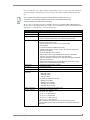
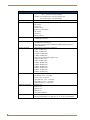
CV7 Specifications .................................................................................................... 3
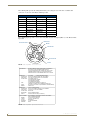
CV7 Panels - Connector Layout................................................................................. 6
CV7 Touch Panel Accessories .............................................................................7
Overview .................................................................................................................. 7
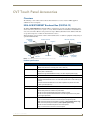
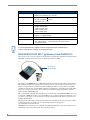
NXA-AVB/ETHERNET Breakout Box (FG2254-10) .................................................... 7
Product Specifications .................................................................................................... 7
Installing the NXA-AVB/ETHERNET ................................................................................ 8
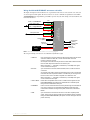
Wiring the NXA-AVB/ETHERNET connectors and cables ................................................ 9
Wiring the NXA-AVB/ETHERNET for Unbalanced Audio............................................... 10
Wiring the NXA-AVB/ETHERNET for Balanced Audio ................................................... 10
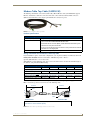
Modero Table Top Cable (CA2250-50) ................................................................... 11
Product Specifications .................................................................................................. 11
Wiring information for the Modero Table Top cable..................................................... 11
NXA-WC80211B/CF 802.11b Wireless Card (FG2255-03) ...................................... 13
NXA-WC80211GCF 802.11g Wireless Card (FG2255-07) ....................................... 14
NXA-CFSP Compact Flash (FG2116-3x) .................................................................. 17
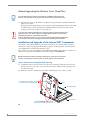
Before Upgrading the Wireless Card - Read This.................................................... 18
Installation and Upgrade of the Internal NXT Components .................................... 18
Step 1: Remove the existing NXT Outer Housing ......................................................... 18
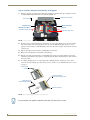
Step 2: Install the Compact Flash Memory card upgrade ............................................. 20
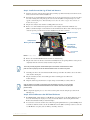
Step 3: Install the new 802.11g CF Card and Antenna ................................................. 21
Step 4: Close and Resecure the NXT Panel Enclosure................................................... 21
Installation and Upgrade of the Internal NXD Components ................................... 22
Step 1: Remove the existing NXD Outer Housing ........................................................ 22
Step 2: Install the new Compact Flash Memory card (NXD).......................................... 23
Step 3: Install the new 802.11g Wireless Compact Flash card (NXD) ........................... 23
Step 4: Close and Resecure the NXD Panel Enclosure .................................................. 23
NXT-BP Power Pack (FG2255-10) ........................................................................... 24
NXA-BASE/1 Battery Base Kit (FG2255-05K).......................................................... 24
Checking the NXT-BP charge ........................................................................................ 25
Installing an NXT-BP into the NXA-BASE/1 ................................................................... 25
Installing the NXA-BASE/1 below an NXT-CV7 Panel ................................................... 26
Charging the NXT-BP using the NXA-BASE/1 ............................................................... 27
NXT-CHG Battery Charger Kit (FG2255-50K) ......................................................... 28
Powering the NXT-CHG ................................................................................................ 28
Reading the NXT-CHG LED Indicator ............................................................................ 29
7" Modero Touch Panels
i