1
INST
ALLA
TION
INSTALLA
ALLATION
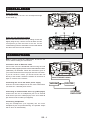
Using the stand
It is already fixed to the unit. You can adjust the angle
of the stand (1).
1
2
3
2
Using the wall mounting bracket
Remove the stand from the unit by sliding it back and
slightly lifing the clip. Use the screws to attach the two
cross-pieces (2) onto the back of the unit. Fix the
central base (3) onto the wall with the screws and dowels
and then click the unit onto the base.
1
CONNECTIONS
Note: In order to avoid any malfunctions, do not turn the
unit on before making the connections.
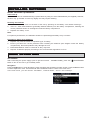
Connection with an Ethernet cable
Connect the unit to the broadband Internet using an RJ45
Ethernet cable (supplied) via the router and broadband modem
(cable/DSL) as illustrated. Follow the instructions given in
your router’smanual to ensure a proper Internet connection.
If you do not have a router, you should connect the unit
directly to the modem. Switch the modem off and back on
again to connect to the Internet.
Connecting the unit to the mains power supply
Insert the AC mains adapter into an AC mains outlet with a
100-240V AC ~ 50/60Hz power source.
Connecting an external audio device (e.g. MP3 player)
Connect the line out or headphones jack on an external
audio device (such as a MP3 player) to the unit’s AUX IN
jack with an AUX IN cable (not supplied).
Connecting headphones
Plug the headphones (not supplied) into the unit’s
headphones jack for private listening. The speaker output
will be shut off automatically.
GB - 4
RJ45 ETHERNET CABLE
MODEM
ROUTER
INTERNET
DATA PORT