1
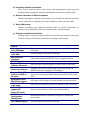
Appendix A – Troubleshooting
This appendix provides problem-solving information you may find useful in case
you need to troubleshoot your ENH202. It also includes information about
contacting technical support.
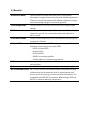
A.1 Problem Solving
Question
Answer
How do I reset the ENH202?
There are two ways to reset the ENH202, a
hardware method and a software method.
Both methods return the ENH202 to its
factory default configuration.
To use the hardware method, press reset
button behind the hole of the PoE injector
for 10 seconds; open the cover on the
bottom panel of the ENH202 and find the
Reset button (see section 2.1). Using a flat
object such as a pencil, press the Reset
button for approximately 10 seconds and
then stop pressing.
To use the software method, click Restore
to Factory Default in the Management
menu.
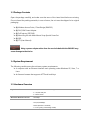
Why do I not see traffic pass after I connect
the ENH202 to a PoE switch?
The ENH202 uses a proprietary PoE injector
and will not work with standard
802.3af-compliant PoE switches.
What is the default IP address of the
ENH202?
The default IP address is 192.168.1.1
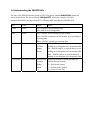
I plugged the PoE to the Ethernet port on
the back of ENH202 but the unit is not on,
how come?
You need to plug the Ethernet cable
connect to PoE injector, and connect the
power adapter comes with the package to
the “DC IN” port on the PoE injector
When I install the PoE connection to the
The ENH202 uses a proprietary PoE injector
ENH202, what kind of PoE should I use?
and will not work with standard
802.3af-compliant PoE switches.