1
APPENDIX
Controller with onboard LAN port, you can directly plug an Ethernet
cable to the controller LAN port, then enter the McBIOS RAID
manager to configure the network setting. After network setting
configured and saved, you can find the current IP address in the
McBIOS RAID manager "System Information" page.
From a remote pc, you can directly open a web browser and enter
the IP address. Then enter user name and password to login and
start your management. You can find the firmware update feature
from the "Raid system Console" on the "System Controls" option.
A-3 Upgrading Firmware Through nflash DOS Utility
Areca now offers an alternative means communication for the 6Gb/s
SAS RAID controller – Upgrade the all files (BIOS, BOOT, FIRM and
MBR0) without necessary system starting up to running the ArcHttp
proxy server. The nflash utility program is a DOS application, which
runs in the DOS operating system. Be sure of ensuring properly to
communicate between 6Gb/s SAS RAID controller and nflash DOS
utility. Please make a bootable DOS floppy diskette or UBS devices
from other Windows operating system and boot up the system from
those bootable devices.
• Starting the nflash Utility
You do not need to short any jumper cap on running nflash utility.
The nflash utility provides an on-line table of contents, brief
descriptions of the help sub-commands. The nflash utility put on
the <CD-ROM>\Firmware directory. You can run the <nflash> to
get more detailed information about the command usage.
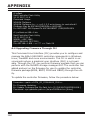
Typical output looks as below:
159