1
4
Command Line Interface
Understanding Command Modes
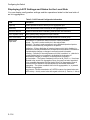
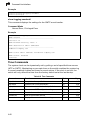
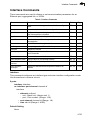
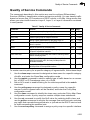
The command set is divided into Exec and Configuration classes. Exec commands
generally display information on system status or clear statistical counters.
Configuration commands, on the other hand, modify interface parameters or enable
certain switching functions. These classes are further divided into different modes.
Available commands depend on the selected mode. You can always enter a
question mark “?” at the prompt to display a list of the commands available for the
current mode. The command classes and associated modes are displayed in the
following table:
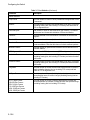
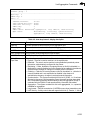
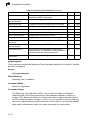
Table 4-1 Command Modes
Class
Mode
Exec
Normal
Privileged
Configuration
Global*
Access Control List
Class Map
Interface
Line
Multiple Spanning Tree
Policy Map
VLAN Database
* You must be in Privileged Exec mode to access the Global configuration mode.
You must be in Global Configuration mode to access any of the other configuration modes.
Exec Commands
When you open a new console session on the switch with the user name and
password “guest,” the system enters the Normal Exec command mode (or guest
mode), displaying the “Console>” command prompt. Only a limited number of the
commands are available in this mode. You can access all commands only from the
Privileged Exec command mode (or administrator mode). To access Privilege Exec
mode, open a new console session with the user name and password “admin.” The
system will now display the “Console#” command prompt. You can also enter
Privileged Exec mode from within Normal Exec mode, by entering the enable
command, followed by the privileged level password “super” (page 4-77).
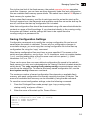
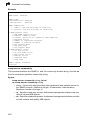
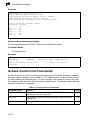
To enter Privileged Exec mode, enter the following user names and passwords:
Username: admin
Password: [admin login password]
CLI session with the ES4524M-PoE is opened.
To end the CLI session, enter [Exit].
Console#
4-6