1
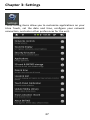
Chapter 3: Settings
Allows you to set your network location and password for
security purposes.
Applications
Manage the applications installed on Libre Touch, including
unknown source applications, and installed applications.
SD card & internal storage
Allows you to format SD card memory and restore to default
factory setttings, you can also view the memory status of SD card
and internal storage.
Date & Time
Allows you to set date, clock, time zone and display format.
Note: Time zone setting is needed to calculate the expiry
duration for borrowed ebooks.
Region and text
Allows you to set region and language, text input and
auto-correction.
Touch screen calibration
Carefully press and hold finger on the center of target briefly.
Repeat as the target around the screen to calibrate touch screen.
39