1
Setting Up Your Computer
This chapter will guide you in installing necessary and additional components to
maximimize the system performance of your All-in-One PC.
Connecting External Devices
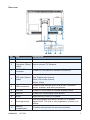
The I/O (input/output) ports on the device allow you to connect peripheral devices. All
devices listed here are for reference only.
Connecting USB Devices
This computer provides USB ports for connecting various USB devices, such as
mouse, keyboard, digital camera, printer, and external storage device. To connect
these devices, connect the devices to the computer, and then install the drivers if
necessary. This computer is capable to auto detect the USB devices installed, and
if there is no detection of the devices, please manually enable the USB devices by
going to Start > Control Panel > Hardware and Sound > Add a device to add the
new device.
VGA
HDMI
Video
ViewSonic
VPC220
7