1
OnCell G3111/G3151/G3211/G3251 Series
User’s Manual
Second Edition, September 2010
www.moxa.com/product
2010 Moxa Inc. All rights reserved.
Reproduction without permission is prohibited.
OnCell G3111/G3151/G3211/G3251 Series
User’s Manual
The software described in this manual is furnished under a license agreement and may be used only in
accordance with the terms of that agreement.
Copyright Notice
Copyright 2010 Moxa Inc.
All rights reserved.
Reproduction without permission is prohibited.
Trademarks
MOXA is a registered trademark of Moxa Inc.
All other trademarks or registered marks in this manual belong to their respective manufacturers.
Disclaimer
Information in this document is subject to change without notice and does not represent a commitment on the
part of Moxa.
Moxa provides this document “as is,” without warranty of any kind, either expressed or implied, including, but
not limited to, its particular purpose. Moxa reserves the right to make improvements and/or changes to this
manual, or to the products and/or the programs described in this manual, at any time.
Information provided in this manual is intended to be accurate and reliable. However, Moxa assumes no
responsibility for its use or for any infringements on the rights of third parties that may result from its use.
This product may include unintentional technical or typographical errors. Changes are periodically made to the
information herein to correct such errors, and these changes are incorporated into new editions of the
publication.
Technical Support Contact Information
www.moxa.com/support
Moxa Americas:
Toll-free: 1-888-669-2872
Tel: +1-714-528-6777
Fax: +1-714-528-6778
Moxa China (Shanghai office):
Toll-free: 800-820-5036
Tel: +86-21-5258-9955
Fax: +86-21-5258-5505
Moxa Europe:
Tel: +49-89-3 70 03 99-0
Fax: +49-89-3 70 03 99-99
Moxa Asia-Pacific:
Tel: +886-2-8919-1230
Fax: +886-2-8919-1231
Table of Contents
Chapter 1
Chapter 2
Chapter 3
Chapter 4
Introduction ............................................................................................... 1-1
Overview .............................................................................................................................. 1-2
Package Checklist ................................................................................................................. 1-2
Product Features ................................................................................................................... 1-3
Product Specifications .......................................................................................................... 1-3
Getting Started .......................................................................................... 2-1
Panel Layout ......................................................................................................................... 2-2
OnCell G3111/G3151/G3211/G3251 ........................................................................... 2-2
Connecting the Hardware ..................................................................................................... 2-3
Wiring Requirements .................................................................................................... 2-3
SIM Card Installation ................................................................................................... 2-4
DIN-Rail Mounting ...................................................................................................... 2-5
Connecting the Power ................................................................................................... 2-5
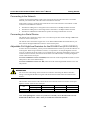
Connecting to the Network ........................................................................................... 2-6
Connecting to a Serial Device ...................................................................................... 2-6
Adjustable Pull High/Low Resistors for the RS-485 Port (G3151/G3251) .................. 2-6
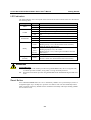
LED Indicators ............................................................................................................. 2-7
Reset Button ................................................................................................................. 2-7
Initial IP Address Configuration ............................................................... 3-1
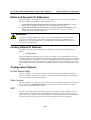
Static and Dynamic IP Addresses ......................................................................................... 3-2
Factory Default IP Address ................................................................................................... 3-2
Configuration Options .......................................................................................................... 3-2
OnCell Search Utility ................................................................................................... 3-2
Web Console ................................................................................................................ 3-2
ARP .............................................................................................................................. 3-2
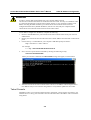
Telnet Console .............................................................................................................. 3-3
Serial Console ............................................................................................................... 3-8
Introducing Serial Port Operation Modes ............................................... 4-1
Overview .............................................................................................................................. 4-2
Device Control Applications ................................................................................................ 4-3
Real COM Modes ......................................................................................................... 4-3
Types of Real COM Connection .................................................................................. 4-4
Reverse Real COM Modes ........................................................................................... 4-5
Types of Reverse Real COM Connection ..................................................................... 4-5
RFC 2217 Mode ........................................................................................................... 4-6
Socket Applications .............................................................................................................. 4-6
TCP Server Modes........................................................................................................ 4-6
Types of TCP Server Connection ................................................................................. 4-7
TCP Client Modes ........................................................................................................ 4-8
Types of TCP Client Connection .................................................................................. 4-9
UDP Mode .................................................................................................................. 4-10
Types of UDP Connection .......................................................................................... 4-10
Ethernet Modem Mode ........................................................................................................4-11
SMS Tunnel Mode .............................................................................................................. 4-12
Disabled Mode.................................................................................................................... 4-12
Chapter 5
Chapter 6
Chapter 7
Chapter 8
Chapter 9
Chapter 10
Introducing OnCell Central and Ethernet Operation Modes ................. 5-1
OnCell Central Management Software ................................................................................. 5-2
OnCell Central Serial Device Connection ............................................................................ 5-2
OnCell Central Ethernet Device Connection ........................................................................ 5-3
Cellular-Enabling Ethernet Device ....................................................................................... 5-3
Using the Web Console ............................................................................ 6-1
Using Your Web Browser ..................................................................................................... 6-2
Browser Cookie Settings .............................................................................................. 6-2
Trusted Site Settings ..................................................................................................... 6-3
Opening the Web Console ............................................................................................ 6-4
Web Console Navigation ...................................................................................................... 6-5
Basic Settings ....................................................................................................................... 6-6
Server Settings .............................................................................................................. 6-6
Time Settings ................................................................................................................ 6-6
Network Settings .................................................................................................................. 6-8
Basic Network Settings................................................................................................. 6-8
DNS Settings ................................................................................................................ 6-9
Advanced Network Settings ....................................................................................... 6-10
Auto IP Report Settings .............................................................................................. 6-10
GuaranLink Settings (Pending) ...........................................................................................6-11
Overview .................................................................................................................... 6-11
Background................................................................................................................. 6-12
Common Settings ....................................................................................................... 6-12
GuaranLink Check Settings ........................................................................................ 6-12
Cellular Network Settings ......................................................................... 7-1
GSM GPRS Settings............................................................................................................. 7-2
GSM Operation Mode .................................................................................................. 7-2
GPRS Operation Mode ................................................................................................. 7-4
SMS Operation mode ................................................................................................... 7-5
Configuring Serial Port Operation Modes ............................................... 8-1
Port Setting Basics ................................................................................................................ 8-2
Device Control Applications ................................................................................................ 8-2
Real COM Mode .......................................................................................................... 8-2
Reverse Real COM Mode ............................................................................................. 8-5
RFC2217 Mode ............................................................................................................ 8-8
Socket Applications ............................................................................................................ 8-10
TCP Server Mode ....................................................................................................... 8-10
TCP Client Mode ........................................................................................................ 8-13
UDP Mode .................................................................................................................. 8-16
Ethernet Modem Mode ....................................................................................................... 8-18
SMS Tunnel Mode .............................................................................................................. 8-21
Disabled Mode.................................................................................................................... 8-23
Configuring the Cellular-Enabling Ethernet Device ............................ 9-1
Host to OnCell via Cellular .................................................................................................. 9-2
Configuring OnCell Central Management Software .......................... 10-1
Step 1: Server Settings ........................................................................................................ 10-2
System Requirements ................................................................................................. 10-2
Installing OnCell Central Manager ............................................................................. 10-3
Using OnCell Central Manager .................................................................................. 10-7
Step 2: OnCell Device Web Console Settings .................................................................. 10-13
OnCell Central Settings ............................................................................................ 10-13
OnCell Central Server .............................................................................................. 10-14
Step 3: Host Settings and Management ............................................................................ 10-15
OnCell Central Web Console ................................................................................... 10-21
Server................................................................................................................................ 10-22
Overview .................................................................................................................. 10-22
Control Ports/User Ports info.................................................................................... 10-22
Account Settings ....................................................................................................... 10-23
Device............................................................................................................................... 10-23
All Devices ............................................................................................................... 10-23
All User Ports ........................................................................................................... 10-25
Service Forwarding (not available with G3111/G3151/G3211/G3251) ................... 10-26
Device’s Settings and Maintenance .......................................................................... 10-27
Overview .................................................................................................................. 10-28
User Ports ................................................................................................................. 10-28
Service Forwarding (not available with G3111/G3151/G3211/G3251) ................... 10-29
Maintenance ............................................................................................................. 10-30
Logout .............................................................................................................................. 10-31
Chapter 11
Additional Serial Port Settings ............................................................... 11-1
Chapter 12
System Management Settings ............................................................... 12-1
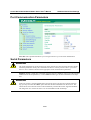
Port Communication Parameters .........................................................................................11-2
Serial Parameters .................................................................................................................11-2
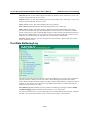
Port Data Buffering/Log ......................................................................................................11-3
Port Chipher Settings ...........................................................................................................11-4
Misc. Network Settings ...................................................................................................... 12-2
Accessible IP List ....................................................................................................... 12-2
SNMP Agent Settings ................................................................................................. 12-3
DDNS ......................................................................................................................... 12-4
Host Table .................................................................................................................. 12-5
System Log Settings ................................................................................................... 12-5
Auto Warning Settings ........................................................................................................ 12-6
Event Settings ............................................................................................................. 12-6
Serial Event Settings ................................................................................................... 12-7
E-mail Alert ................................................................................................................ 12-8
SNMP Trap ................................................................................................................. 12-9
SMS Alert ................................................................................................................... 12-9
Maintenance ..................................................................................................................... 12-10
Console Setting ......................................................................................................... 12-10
Ping ........................................................................................................................... 12-11
Firmware Upgrade .................................................................................................... 12-12
Configuration Import/Export .................................................................................... 12-13
Load Factory Defaults .............................................................................................. 12-14
Change Password ...................................................................................................... 12-14
Certificate ......................................................................................................................... 12-15
Ethernet SSL Certificate Import ............................................................................... 12-15
Certificate/Key Delete .............................................................................................. 12-16
System Monitoring ........................................................................................................... 12-16
Serial to Network Connections ................................................................................. 12-16
Serial Port Status ...................................................................................................... 12-17
Serial Port Error Count ............................................................................................. 12-17
Serial Port Settings ................................................................................................... 12-18
Chipher Usage Status................................................................................................ 12-18
System Status.................................................................................................................... 12-19
Serial Data Log ......................................................................................................... 12-19
System Log ............................................................................................................... 12-19
Network Status ................................................................................................................. 12-20
Network Connections ............................................................................................... 12-20
Network Statistics ..................................................................................................... 12-20
Routing ..................................................................................................................... 12-21
Save Configuration ........................................................................................................... 12-21
Restart............................................................................................................................... 12-22
Restart System .......................................................................................................... 12-22
Restart Ports.............................................................................................................. 12-22
Chapter 13
Appendix A
Appendix B
Appendix C
Software Installation/Configuration ....................................................... 13-1
Overview ............................................................................................................................ 13-2
OnCell Windows Driver Manager ...................................................................................... 13-2
Installing OnCell Windows Driver Manager .............................................................. 13-2
Using OnCell Windows Driver Manager ................................................................... 13-5
OnCell Search Utility ....................................................................................................... 13-17
Installing OnCell Search Utility ............................................................................... 13-17
Configuring OnCell Search Utility ........................................................................... 13-19
Moxa OnCell Linux Real TTY Driver.............................................................................. 13-23
Basic Procedure ........................................................................................................ 13-23
Hardware Setup ........................................................................................................ 13-23
Installing Linux Real TTY Driver Files ................................................................... 13-24
Mapping TTY Ports .................................................................................................. 13-24
Removing Mapped TTY Ports.................................................................................. 13-25
Removing Linux Driver Files ................................................................................... 13-25
Moxa OnCell UNIX Fixed TTY Driver ........................................................................... 13-25
Installing the UNIX Driver ....................................................................................... 13-25
Configuring the UNIX Driver .................................................................................. 13-26
Pinouts and Cable Wiring ........................................................................ A-1
Port Pinout Diagrams .......................................................................................................... A-2
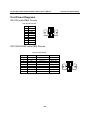
RS-232 (male DB9) Pinouts ........................................................................................ A-2
RS-232/422/485 (male DB9) Pinouts .......................................................................... A-2
Cable Wiring Diagrams ....................................................................................................... A-3
Serial Cables ................................................................................................................ A-3
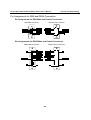
Pin Assignments for DB9 and DB25 Connectors ........................................................ A-4
RFC2217 .................................................................................................... B-1
Dynamic Domain Name Server ............................................................... C-1
Overview .............................................................................................................................. C-1
Configuration........................................................................................................................ C-3
Appendix D
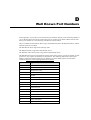
Well Known Port Numbers ...................................................................... D-1
Appendix E
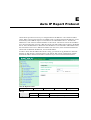
Auto IP Report Protocol ........................................................................... E-1
Appendix F
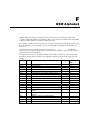
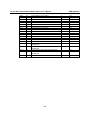
GSM Alphabet ............................................................................................F-1
Appendix G
Default Settings ........................................................................................ G-1
1
Chapter 1
Introduction
The G3111/G3151/G3211/G3251 series of cellular IP gateways have many exceptional features.
There are currently four models in the G3111/G3151/G3211/G3251 series of IP gateways: the
OnCell G3111, OnCell G3151, OnCell G3211, and OnCell G3251. The main differences between
the models are the serial interface types. Cellular IP gateways give you an easy way to connect your
serial devices to cellular mobile networks.
The following topics are covered in this chapter:
Overview
Package Checklist
Product Features
Product Specifications
OnCell G3111/G3151/G3211/G3251 Series User’s Manual
Introduction
Overview
OnCell G3111/G3151/G3211/G3251 gateways can be used to connect any serial device to a cellular
network and support a number of different operation modes. The OnCell COM driver turns the
OnCell G3111/G3151/G3211/G3251’s serial ports into virtual COM ports that allow you to
communicate with your serial device remotely over the cellular network. The OnCell
G3111/G3151/G3211/G3251 comes pre-installed with the TCP/IP protocol suite to transmit data
back and forth between the serial device and GSM/GPRS network.
For some applications, serial data must be delivered reliably even if communication is disrupted.
The OnCell G3111/G3151/G3211/G3251 provides a function to ensure that serial data is buffered
in case of a communication failure. When a communication failure occurs, the serial data is
buffered in the OnCell G3111/G3151/G3211/G3251 until communication is resumed, at which
point the buffered data is sent to its destination.
Package Checklist
Each OnCell G3111/G3151/G3211/G3251 serial cellular IP Gateway is shipped in a separate box
with standard accessories. In addition, several optional accessories can be ordered separately.
When you receive your shipment, please check the contents of the box carefully, and notify your
Moxa sales representative if any of the items are missing or appear to be damaged.
G3111/G3151/G3211/G3251 cellular IP gateways are shipped with the following items:
Standard Accessories
Document & Software CD.
Rubber SMA antenna (model name: ANT-CQB-ASM-1).
Din-Rail Kit.
Rubber stand.
DC Power Supply (screw-on).
Product warranty statement.
Quick Installation Guide.
Optional Accessories
ANT-CQB-AHSM-00-3m: Omni 0dBi/10cm, magnetic SMA quad-band antenna
(impedance = 50 ohms), 3 m
ANT-CQB-AHSM-03-3m: Omni 3dBi/25cm, magnetic SMA quad-band antenna
(impedance = 50 ohms), 3 m
ANT-CQB-AHSM-05-3m: Omni 5dBi/37cm, magnetic SMA quad-band antenna
(impedance = 50 ohms), 3 m
1-2
OnCell G3111/G3151/G3211/G3251 Series User’s Manual
Introduction
Product Features
All models in the G3111/G3151/G3211/G3251 have the following features:
Quad-band 900/1800, 850/1900 MHz GSM/GPRS.
Versatile operation modes, including Real COM, Reverse Real COM, RFC2217, TCP Server,
TCP Client, UDP, Ethernet Modem, and SMS Tunnel.
Private IP management software.
Port buffering function to prevent loss of serial data when communication is disrupted.
Adjustable baudrate feature for easy configuration of custom baudrates.
LED indicators for status and signal level.
Product Specifications
Cellular Interface
Standards
Band Options
GPRS Multi-slot Class
GPRS Terminal Device Class
GPRS Coding Schemes
Tx Power
SIM Control
LAN Interface
Number of Ports
Ethernet
Magnetic Isolation Protection
SIM Interface
Number of SIMs
SIM Control
Serial Interface
Number of Ports
Serial Standards
GSM/GPRS
Quad-band 850/900 and 1800/1900 MHz
Class 10
Class B
CS1 to CS4
1 watt GSM 1800/1900, 2 watts EGSM 850/900
3V
1 (for configuration only)
10/100 Mbps, RJ45 connector, Auto MDI/MDIX
1.5 KV built-in
1
3V
1 or 2
G3111: 1 RS-232 port
G3151: 1 RS-232/422/485 port
G3211: 2 RS-232 ports
G3251: 2 RS-232/422/485 ports
15 KV
ESD Protection
Power EFT/
2 KV
Surge Protection
Serial Communication Parameters
Parity
None, Even, Odd, Space, Mark
Data Bits
5, 6, 7, 8
Stop Bit(s)
1, 1.5, 2 (when parity = None)
Flow Control
RTS/CTS, XON/XOFF
Baudrate
50 bps to 921.6 Kbps
1-3
OnCell G3111/G3151/G3211/G3251 Series User’s Manual
Serial Signals
RS-232
RS-422
RS-485-4w
RS-485-2w
Management Software
OnCell Central Manager
Physical Characteristics
Housing
Dimensions
Power Requirements
Number of Power Inputs
Input Voltage
Data Link
Environmental Limits
Operating Temperature
Operating Humidity
Storage Temperature
Regulatory Approvals
EMC
Warranty
Warranty Period
Introduction
TxD, RxD, RTS, CTS, DTR, DSR, DCD, GND
Tx+, Tx-, Rx+, Rx-, GND
Tx+, Tx-, Rx+, Rx-, GND
Data+, Data-, GND
Centralized management solution for accessing private IPs
from the Internet
Aluminum, providing IP30 protection
111 x 77 x 26 mm (4.37 x 3.03 x 1.02 in)
1 power jack
12 to 48 VDC
335 to 900 mA (peak) @ 12 V
-30 to 55°C (-22 to 131°F)
5 to 95% RH
-40 to 75°C (-40 to 167°F)
CE Class A , FCC Class A, UL
5 years
1-4
2
Chapter 2
Getting Started
This chapter covers the hardware installation of the OnCell G3111/G3151/G3211/G3251. Software
installation is covered in the next chapter.
The following topics are covered in this chapter:
Panel Layout
Connecting the Hardware
Wiring Requirements
SIM Card Installation
DIN-Rail Mounting
Connecting the Power
Connecting to the Network
Connecting to a Serial Device
Adjustable Pull High/Low Resistors for the RS-485 Port (G3151/G3251)
LED Indicators
Reset Button
OnCell G3111/G3151/G3211/G3251 Series User’s Manual
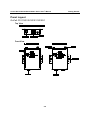
Panel Layout
OnCell G3111/G3151/G3211/G3251
Top View
Front View
2-2
Getting Started
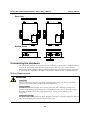
OnCell G3111/G3151/G3211/G3251 Series User’s Manual
Getting Started
Rear View
Bottom Views
Connecting the Hardware
This section describes how to connect the OnCell G3111/G3151/G3211/G3251 cellular IP Gateway
to a host PC or serial device for first time testing purposes. We cover topics such as: Wiring
Requirements, SIM Installation, Wall and DIN-Rail Mounting, Connecting the Power, Connecting
to a Serial Device, Adjustable Pull High/Low Resistors for the RS-485 Port, and LED Indicators.
Wiring Requirements
ATTENTION
Safety First!
Be sure to disconnect the power cord before installing and/or wiring your device. The OnCell
G3111/G3151/G3211/G3251 should be secured at one location.
Wiring Caution!
Calculate the maximum possible current in each power wire and common wire. Observe all
electrical codes dictating the maximum current allowable for each wire size. If the current goes
above the maximum ratings, the wiring could overheat, causing serious damage to your
equipment.
Temperature Caution!
Be careful when handling the device. When plugged in, the device’s internal components generate
heat, and consequently the casing may feel hot to the touch.
2-3
OnCell G3111/G3151/G3211/G3251 Series User’s Manual
Getting Started
You should also heed the following guidelines:
Use separate paths to route wiring for power and devices. If power wiring and device wiring
paths must cross, make sure the wires are perpendicular at the intersection point.
NOTE: Do not run signal or communication wiring and power wiring in the same wire conduit.
To avoid interference, wires with different signal characteristics should be routed separately.
Use the type of signal transmitted through a wire to determine which wires should be kept
separate. The rule of thumb is that wiring that shares similar electrical characteristics can be
bundled together.
Keep input wiring and output wiring separate.
Where necessary, it is advisable to label the wiring to all devices in the system.
SIM Card Installation
In order to protect the SIM card, the SIM card slot is located inside the OnCell
G3111/G3151/G3211/G3251’s casing. You will need to unscrew and remove the outer SIM card
cover before installing or removing the SIM card.
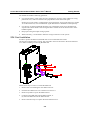
Follow these steps to remove or install the SIM card:
1. Remove the screw holding the outer SIM card cover.
2. Push the outer SIM card cover to the down to remove it.
3. Rotate it upwards to expose the SIM card slot.
4. (a) Remove the SIM card from the SIM card slot, or
(b) Insert the SIM card into the SIM card slot.
5. Reverse the above steps to replace the outer SIM card cover.
2-4
OnCell G3111/G3151/G3211/G3251 Series User’s Manual
Getting Started
ATTENTION
If the modem is in GSM/GPRS mode, SIGNAL LEDs will not be illuminated if the phone
number or APN is incorrect. Check the GSM/GPRS LED if the SIM card is installed correctly.
The GSM/GPRS LEDs on the front panel provide a convenient way of checking if the SIM card
is installed properly. If the antenna is installed and the network is operating normally, then at least
one of the three SIGNAL LEDs should be illuminated at all times. If none of the GSM/GPRS and
SIGNAL LEDs are illuminated, then the SIM card may not be installed properly. This is because
the PIN code is stored on the SIM card; if the PIN code cannot be accessed, then the modem will
not be accessible over the network.
DIN-Rail Mounting
The OnCell G3111/G3151/G3211/G3251 gateways have built-in “ears” for
attaching the IP Gateway to a wall or the inside of a cabinet. We suggest
using two screws per ear to attach the IP Gateway to a wall or the inside of
a cabinet. The heads of the screws should be less than 6.0 mm in diameter,
and the shafts should be less than 3.5 mm in diameter, as shown in the
figure at the right.
Connecting the Power
Connect the 12 to 48 VDC power cord with the OnCell G3111/G3151/G3211/G3251’s power input.
If the power is properly supplied, the “PWR” LED will glow a solid green color to indicate that the
system is ready.
2-5
OnCell G3111/G3151/G3211/G3251 Series User’s Manual
Getting Started
Connecting to the Network
Connect one end of the Ethernet cable to the OnCell G3111/G3151/G3211/G3251’s 10/100M
Ethernet port and the other end of the cable to the Ethernet network.
If the cable is properly connected, the OnCell G3111/G3151/G3211/G3251 will indicate a valid
connection to the Ethernet as follows:
The Ethernet LED glows a solid green when connected to a 100 Mbps Ethernet network.
The Ethernet LED glows a solid orange when connected to a 10 Mbps Ethernet network.
The Ethernet LED flashes when Ethernet packets are being transmitted or received.
Connecting to a Serial Device
The OnCell G3111 and G3211 support one or two RS-232 port that connects through a DB9 male
connector on the bottom panel.
The OnCell G3151 and G3251 support one or two RS-232/RS-422/RS-485-4w/RS-485-2w port
that connects through a DB9 male connector on the bottom panel.
Adjustable Pull High/Low Resistors for the RS-485 Port (G3151/G3251)
In some critical environments, you may need to add termination resistors to prevent the reflection of
serial signals. When using termination resistors, it is important to set the pull high/low resistors
correctly so that the electrical signal is not corrupted. Since a particular pull high/low resistor value
cannot fit all environments, the OnCell G3151/G3251 uses DIP switches to set the pull high/low
resistor values for the serial port.
To set the termination resistor to 150 KΩ, make sure both of the assigned DIP switches are in the
OFF position. This is the default setting.
To set the termination resistor to 1 KΩ, make sure both of the assigned DIP switches are in the
ON position.
ATTENTION
Do not use the 1 KΩ setting on the OnCell G3151/G3251 when using the RS-232 interface.
Doing so will degrade the RS-232 signals and shorten the maximum allowed communication
distance.
DIP switches on the bottom of the OnCell G3111/G3151/G3211/G3251 are used to set the pull
high/low resistor value for each serial port.
SW
ON
OFF
1
Pull High
1 KΩ
150 KΩ
2
Pull Low
1 KΩ
150 KΩ
3
Terminator
120 KΩ
---
4
-------
Note: If the pull high/low resistor on your device is already set for RS-485, make sure the
default SW for RS-232 is “OFF” when you switch back to RS-232 interface.
2-6
OnCell G3111/G3151/G3211/G3251 Series User’s Manual
Getting Started
LED Indicators
The LED indicators on the front panel of the OnCell G3111/G3151/G3211/G3251 are described in
the following table.
Type
PWR
TX/RX
Color
Green
Off
Green
Amber
Off
GSM/GPRS
Green
Amber
Off
Green
Ready
Red
(Over
Green)
Off
Signal
(3 LEDs)
Green
LED Function
Activation of DC Power.
Power is off, or power error condition exists.
The serial port is transmitting data
The serial port is receiving data.
No data is being transmitted or received through the serial
port.
GSM is connected.
GPRS is connected.
GSM/GPRS is disconnected.
Steady on: Software Ready.
Blinking slowly (1 sec): The OnCell has been located by
Ready the OnCell Search Utility.
Steady on: Booting up, or IP fault.
Blinking rapidly (0.5 sec): IP conflict.
Blinking slowly (1 sec): Cannot get an IP address from the
DHCP server.
Booting up or there is no error condition.
Number of lit LEDs indicates signal level
(at least 2 LEDs must illuminated for data transmission)
ATTENTION
GSM/GPRS LED:
OFF: Cannot register with cellular providers using GSM/GPRS mode, due to wrong PIN code,
no cellular provider available, wrong APN, or wrong username/password.
ON: Registered with cellular provider using GSM/GPRS mode. GSM/GPRS Signal LEDs will
be on.
Reset Button
Press and hold the Reset button for 5 sec to load factory defaults: Use a pointed object, such as a
straightened paper clip or toothpick, to press the reset button. This will cause the Ready LED to
blink on and off. The factory defaults will be loaded once the Ready LED stops blinking (default
IP: 192.168.127.254).
2-7
3
Chapter 3
Initial IP Address Configuration
When setting up the OnCell G3111/G3151/G3211/G3251 for the first time, the first thing you
should do is configure its IP address. This chapter introduces the different methods that can be used.
Please refer to Chapter 10, System Management Settings, for more details about network settings.
The following topics are covered in this chapter:
Static and Dynamic IP Addresses
Factory Default IP Address
Configuration Options
OnCell Search Utility
Web Console
ARP
Telnet Console
Serial Console
OnCell G3111/G3151/G3211/G3251 Series User’s Manual
Initial IP Address Configuration
Static and Dynamic IP Addresses
Determine whether your OnCell G3111/G3151/G3211/G3251 needs to use a static IP address or
dynamic IP address (either DHCP or BOOTP application).
If your OnCell G3111/G3151/G3211/G3251 is used in a static IP environment, you must
assign a specific IP address using one of the tools described in this chapter.
If your OnCell G3111/G3151/G3211/G3251 is used in a dynamic IP environment, the IP
address will be assigned automatically from over the network. In this case, set the IP
configuration mode to DHCP or BOOTP.
ATTENTION
Consult your network administrator on how to reserve a fixed IP address for your OnCell
G3111/G3151/G3211/G3251 in the MAC-IP mapping table when using a DHCP Server or
BOOTP Server. For most applications, you should assign a fixed IP address to your OnCell
G3111/G3151/G3211/G3251.
Factory Default IP Address
The OnCell G3111/G3151/G3211/G3251 is configured with the following default private IP
address:
192.168.127.254
Note that IP addresses that begin with “192.168” are referred to as private IP addresses. Devices
configured with a private IP address are not directly accessible from a public network. For example,
you would not be able to ping a device with a private IP address from an outside Internet connection.
If your application requires sending data over a public network, such as the Internet, your OnCell
G3111/G3151/G3211/G3251 will need a valid public IP address, which can be leased from a local
ISP.
Configuration Options
OnCell Search Utility
You may configure your OnCell G3111/G3151/G3211/G3251 with the bundled OnCell Search
Utility for Windows. Please refer to Chapter 11, Software Installation/Configuration, for details on
how to install and use OnCell Search Utility.
Web Console
You may configure your OnCell G3111/G3151/G3211/G3251 using a standard web browser. Please
refer to Chapter 5, Using the Web Console, for details on how to access and use the OnCell
G3111/G3151/G3211/G3251 web console.
ARP
You may use the ARP (Address Resolution Protocol) command to set up an IP address for your
OnCell G3111/G3151/G3211/G3251. The ARP command tells your computer to associate the
OnCell G3111/G3151/G3211/G3251’s MAC address with an IP address. Afterwards, use Telnet to
access the OnCell G3111/G3151/G3211/G3251 and its IP address will be reconfigured.
3-2
OnCell G3111/G3151/G3211/G3251 Series User’s Manual
Initial IP Address Configuration
ATTENTION
In order to use the ARP setup method, both your computer and the OnCell
G3111/G3151/G3211/G3251 must be connected to the same LAN. You may use a Ethernet cable
to connect the OnCell G3111/G3151/G3211/G3251 directly to your computer’s Ethernet card.
Before executing the ARP command, your OnCell G3111/G3151/G3211/G3251 must be
configured with the factory default IP address (192.168.127.254) and your computer and the
OnCell G3111/G3151/G3211/G3251 must be on the same subnet.
To use ARP to configure the IP address, complete the following:
1. Obtain a valid IP address for your OnCell G3111/G3151/G3211/G3251 from your network
administrator.
2. Obtain your OnCell G3111/G3151/G3211/G3251’s MAC address from the label on the bottom
panel.
3. Execute the arp -s command from your computer’s MS-DOS prompt as follows:
arp -s <IP address> <MAC address>
For example,
C:\> arp -s 192.168.200.100 00-90-E8-04-00-11
4. Next, execute a special Telnet command by entering the following exactly:
telnet 192.168.200.100 6000
When you enter this command, a Connect failed message will appear, as shown below.
5. After the OnCell G3111/G3151/G3211/G3251 reboots, its IP address will be assigned to the
new address and you can reconnect using Telnet to verify that the update was successful.
Telnet Console
Depending on how your computer and network are configured, you may find it convenient to use
network access to set up your OnCell G3111/G3151/G3211/G3251’s IP address. This can be done
using Telnet.
3-3
OnCell G3111/G3151/G3211/G3251 Series User’s Manual
Initial IP Address Configuration
ATTENTION
Figures in this section were taken from the OnCell G3111/G3151/G3211/G3251’s Telnet console.
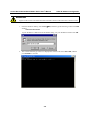
1. From the Windows desktop, select Start Run, and then type the following content in the Run
window:
telnet 192.168.127.254
If your IP address is different from the default setting, use your IP address instead. Click OK.
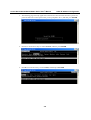
2. The console terminal type selection is displayed as shown. Enter 1 for ansi/vt100, and then
press ENTER to continue.
3-4
OnCell G3111/G3151/G3211/G3251 Series User’s Manual
Initial IP Address Configuration
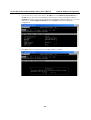
3. The following page will only appear if the OnCell G3111/G3151/G3211/G3251 is password
protected. Enter the console password if you are prompted to do so, and then press ENTER.
4. Press N or use the arrow keys to select Network, and then press ENTER.
5. Press B or use the arrow keys to select Basic, and then press ENTER.
3-5
OnCell G3111/G3151/G3211/G3251 Series User’s Manual
Initial IP Address Configuration
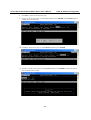
6. Use the arrow keys to move the cursor to IP address. Use the DELETE, BACKSPACE, or
SPACE keys to erase the current IP address, and then type in the new IP address and press
ENTER. Note that if you are using a dynamic IP configuration (BOOTP, DHCP, etc.), you will
need to go to the IP configuration field and press ENTER to select the appropriate
configuration.
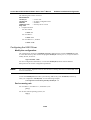
7. Press ESC twice to return to the previous page. Press Y to confirm.
3-6
OnCell G3111/G3151/G3211/G3251 Series User’s Manual
Initial IP Address Configuration
8. Press ESC to return to the previous page.
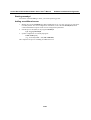
9. Press A or use the arrow keys to select Save and then press ENTER. Press ENTER again to
confirm the save command.
10. Press R or use the arrow keys to select Restart and then press ENTER.
11. Press S or use the arrow keys to select System and then press ENTER to restart the OnCell
G3111/G3151/G3211/G3251.
3-7
OnCell G3111/G3151/G3211/G3251 Series User’s Manual
Initial IP Address Configuration
Serial Console
The OnCell G3111/G3151/G3211/G3251 supports configuration through the serial console, which
is the same as the Telnet console but accessed through the RS-232 console port rather than over the
network. Once you have entered the serial console, the configuration options and instructions are the
same as if you were using the Telnet console.
The following instructions and screenshots show how to enter the serial console using PComm
Terminal Emulator, which is available free of charge as part of the PComm Lite suite. You may use a
different terminal emulator utility, although your actual screens and procedures may vary slightly
from the following instructions.
1. Turn off the power to the OnCell G3111/G3151/G3211/G3251. Use a serial cable to connect the
OnCell G3111/G3151/G3211/G3251’s serial console port to your computer’s RS-232 serial
port.
2. From the Windows desktop select Start All Programs PComm Lite Terminal
Emulator.
3. The PComm Terminal Emulator window should appear. From the Port Manager menu, select
Open, or simply click the Open icon as shown below:
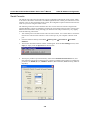
4. The Property window opens automatically. Select the Communication Parameter tab, and
then select the appropriate COM port for the connection (COM4 in this example). Configure the
parameters for 115200, 8, N, 1 (115200 for Baudrate, 8 for Data Bits, None for Parity, and 1 for
Stop Bits).
3-8
OnCell G3111/G3151/G3211/G3251 Series User’s Manual
Initial IP Address Configuration
5. From the Property window’s Terminal page, select ANSI or VT100 for Terminal Type and
then click OK.
6. If you are using the OnCell G3111/G3151/G3211/G3251, you may power it up at this point and
hold down the “grave accent key” (`) while powering it up, as shown below. Note that the grave
accent key (sometimes called “backwards apostrophe”) is NOT the apostrophe key—it is the
key usually found next to the number 1 key.
7. If the OnCell G3111/G3151/G3211/G3251 has been set up for password protection, you will be
prompted to enter the password. After you enter the password, or if password protection was not
enabled, you will be prompted to select the terminal mode. Press 1 for ansi/vt100 and then press
ENTER.
3-9
OnCell G3111/G3151/G3211/G3251 Series User’s Manual
Initial IP Address Configuration
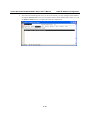
8. The main menu should appear. Once you are in the console, you may configure the IP address
through the Network menu item, just as with the Telnet console. Please refer to steps 4 to 11 in
the Telnet Console section to complete the initial IP configuration.
3-10
4
Chapter 4
Introducing Serial Port Operation
Modes
In this chapter, we describe the various operation modes of the OnCell
G3111/G3151/G3211/G3251. The OnCell G3111/G3151/G3211/G3251 modes are grouped by
type of application, such as Device Control. The options include an operation mode that relies on a
driver installed on the host computer, and operation modes that rely on TCP/IP socket
programming concepts. After selecting the proper operation mode, please refer to Chapter 5, Using
the Web Console, for detailed information on configuration parameters.
This chapter covers the following topics:
Overview
Device Control Applications
Real COM Modes
Types of Real COM Connection
Reverse Real COM Modes
Types of Reverse Real COM Connection
RFC 2217 Mode
Socket Applications
TCP Server Modes
Types of TCP Server Connection
TCP Client Modes
Types of TCP Client Connection
UDP Mode
Types of UDP Connection
Ethernet Modem Mode
SMS Tunnel Mode
Disabled Mode
OnCell G3111/G3151/G3211/G3251 Series User’s Manual
Serial Port Operation Modes
Overview
The OnCell G3111/G3151/G3211/G3251 cellular IP gateway enables traditional serial
(RS-232/422/485) devices for transmitting data over the cellular network. The IP gateway is a tiny
computer equipped with a CPU and TCP/IP protocols that can bi-directionally translate data
between the serial and IP formats. With the OnCell G3111/G3151/G3211/G3251, your computer
will be able to access, manage, and configure remote facilities and equipment over the cellular
network from anywhere in the world.
Traditional SCADA and data collection systems rely on serial ports to collect data from various
kinds of instruments. Since the OnCell G3111/G3151/G3211/G3251 cellular IP gateway
network-enables instruments equipped with an RS-232, RS-422, or RS-485 communication port,
your SCADA and data collection system will be able to access all instruments connected to a
standard TCP/IP network, regardless of whether the devices are used locally or at a remote site.
The OnCell G3111/G3151/G3211/G3251 is an external IP-based network device that allows you to
expand a serial port for a host computer on demand. As long as your host computer supports the
TCP/IP protocol, you will not be limited by the host computer’s bus limitation (such as ISA or
PCI), nor will you be limited if you do not have drivers for various operating systems.
In addition to providing socket access, the OnCell G3111/G3151/G3211/G3251 also comes with a
Real COM/TTY driver and a Reverse Real COM/TTY driver that transmits all serial signals intact.
This enables you to preserve your existing COM/TTY-based software without needing to invest in
additional software.
Three different socket modes are available: TCP Server, TCP Client, and UDP. The main
difference between the TCP and UDP protocols is that TCP guarantees delivery of data by
requiring the recipient to send an acknowledgement to the sender. UDP does not require this type
of verification, making it possible to offer faster delivery. UDP also allows you to unicast data to
one IP, or multicast the data to a group of IP addresses.
4-2
OnCell G3111/G3151/G3211/G3251 Series User’s Manual
Serial Port Operation Modes
Device Control Applications
The OnCell G3111/G3151/G3211/G3251 offers the following modes for device control applications:
Real COM, Reverse Real COM, and RFC2217 modes.
Real COM Modes
The OnCell G3111/G3151/G3211/G3251 comes bundled with Moxa drivers for Windows
98/ME/NT/ 2000/XP/2003/2008/Vista systems and TTY drivers for Linux and Unix systems. (For
Windows systems, this option is only supported for Windows 2000, XP x86/x64, 2003 x86/x64,
Vista x86/x64, and 2008 x86/x64.)
In Real COM mode, the bundled drivers are able to establish a transparent connection between a
host and a serial device by mapping the serial port on the OnCell G3111/G3151/G3211/G3251 to a
local COM/TTY port on the host computer. Real COM mode supports up to 2 simultaneous
connections that enable 2 hosts to simultaneously collect data from the same serial device.
One of the major conveniences of using Real COM mode is that it allows you to use software that
was written for pure serial communication applications. The OnCell COM driver intercepts data
sent to the host’s COM port, packs it into a TCP/IP packet, and then redirects it through the host’s
Ethernet card to the Internet. At the other end of the connection, the OnCell
G3111/G3151/G3211/G3251 accepts the IP frame from the cellular network, unpacks the TCP/IP
packet, and then transparently sends the data through the serial port to the attached serial device.
4-3
OnCell G3111/G3151/G3211/G3251 Series User’s Manual
Serial Port Operation Modes
Types of Real COM Connection
This section illustrates the types of RealCOM connections you can use, depending on the service
you obtain from your local cellular service provider.
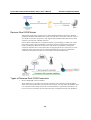
1. Fixed Public IP for OnCell.
If your cellular service provider offers a fixed public IP address after you connect to the
cellular network, you can access the OnCell G3111/G3151/G3211/G3251 via a host PC using
either a private IP or public IP.
2. Utilize Auto IP report.
If your cellular service provider offers a dynamic public IP address after you connect to the
cellular network, you can access the OnCell G3111/G3151/G3211/G3251 via a host PC using
a fixed public IP. Since the IP address of the OnCell G3111/G3151/G3211/G3251 is changed
each time it is connected to the cellular network, the host IP can be notified of the change by
an Auto IP Report message sent from the OnCell G3111/G3151/G3211/G3251. Please refer to
Appendix E to see the format of the Auto IP Report Protocol.
3. Domain name with DDNS.
If your cellular service provider offers a public IP address after you connect to the cellular
network, you can also access the OnCell G3111/G3151/G3211/G3251 using the domain name.
To do this, you will need to register with a DDNS service provider and then enable the DDNS
function in the OnCell G3111/G3151/G3211/G3251. Please refer to Appendix C for more
information.
4-4
OnCell G3111/G3151/G3211/G3251 Series User’s Manual
Serial Port Operation Modes
Reverse Real COM Modes
The OnCell G3111/G3151/G3211/G3251 comes bundled with Moxa drivers for Windows
98/ME/NT/2000/XP/2003/2008/Vista systems and TTY drivers for Linux and Unix systems.
(For Windows systems, this option is only supported for Windows 2000, XP x86/x64, 2003
x86/x64, Vista x86/x64, and 2008 x86/x64.)
Reverse Real COM mode uses a mechanism similar to port mapping to enable your remote
device that is using a private IP address to remain accessible to external hosts. When this
mode is enabled, the Moxa driver that comes with the device establishes a transparent
connection from the device to the remote host by mapping the device’s serial port to a local
COM port on the remote host. Reverse Real COM mode supports up to 2 simultaneous
connections that enable serial devices to send data to 2 hosts simultaneously.
Types of Reverse Real COM Connection
1. Reverse RealCOM to PC’s IP address.
Most cellular service providers only provide customers with a dynamic private IP address,
which means that the OnCell G3111/G3151/G3211/G3251 will only obtain an IP address once
it is connected to the cellular network. Reverse RealCOM is a great feature that allows a PC
host to access an OnCell G3111/G3151/G3211/G3251 configured with a private IP address.
4-5
OnCell G3111/G3151/G3211/G3251 Series User’s Manual
Serial Port Operation Modes
2. Reverse RealCOM to PC’s domain name.
With Reverse RealCOM mode, you can connect to a PC host using the PC’s IP address. You
can also connect to your PC host with the PC’s domain name, if you have one. Please refer to
Appendix C for more information.
RFC 2217 Mode
RFC-2217 mode is similar to Real COM mode in that a driver is used to establish a transparent
connection between a host computer and a serial device by mapping the serial port on the OnCell
G3111/G3151/G3211/G3251 to a local COM port on the host computer. RFC2217 defines general
COM port control options based on the Telnet protocol. Third party drivers supporting RFC-2217
are widely available on the Internet and can be used to implement virtual COM mapping to your
OnCell G3111/G3151/G3211/G3251’s serial port. Please refer to Appendix B for more information.
Socket Applications
The OnCell G3111/G3151/G3211/G3251 offers the following modes for socket applications: TCP
Server, TCP Client, and UDP.
TCP Server Modes
In TCP Server mode, the serial port on the OnCell G3111/G3151/G3211/G3251 is assigned a port
number. The host computer initiates contact with the OnCell G3111/G3151/G3211/G3251,
establishes the connection, and receives data from the serial device. This operation mode also
supports up to 2 simultaneous connections, enabling multiple hosts to collect data from the same
serial device at the same time.
As illustrated in the figure, data transmission proceeds as follows: The host requests a connection
from the OnCell G3111/G3151/G3211/G3251, which is configured for TCP Server mode. Once
the connection is established, data can be transmitted in both directions between the host and the
OnCell G3111/G3151/G3211/G3251.
4-6
OnCell G3111/G3151/G3211/G3251 Series User’s Manual
Serial Port Operation Modes
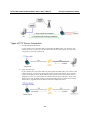
Types of TCP Server Connection
1. Fixed Public IP for the OnCell.
If your cellular service provider offers a fixed public IP address after you connect to the
cellular network, you can access the OnCell G3111/G3151/G3211/G3251 from a host PC
using either a private IP or public IP.
2. Using Auto IP report.
If your cellular service provider offers a dynamic public IP address after you connect to the
cellular network, you can access the OnCell G3111/G3151/G3211/G3251 from a host PC
using a fixed public IP. Since the IP address of the OnCell G3111/G3151/G3211/G3251 is
changed every time it is connected to the cellular network, the host IP can be aware of the
change by the Auto IP Report message sent from the OnCell G3111/G3151/G3211/G3251.
Please refer to Appendix E for the format of the Auto IP Report Protocol.
4-7
OnCell G3111/G3151/G3211/G3251 Series User’s Manual
Serial Port Operation Modes
3. Domain name with DDNS.
If your cellular service provider offers a public IP address after you connect to the cellular
network, you can also use the domain name to access the OnCell G3111/G3151/G3211/G3251.
You would need to register with a DDNS service provider and then enable the DDNS function
in the OnCell G3111/G3151/G3211/G3251. Please refer to Appendix C for more information.
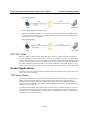
4. Connecting TCP client and TCP server within the same cellular service provider.
In order to connect properly, the IP addresses of the two OnCell devices must belong to the
same subnetwork. To ensure that this is the case, use the same cellular service provider to
connect the devices to the network. In addition, you will need to request that the cellular
service provider provide you with two private IP addresses (e.g., 192.168.1.1 and
192.168.1.2).
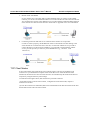
TCP Client Modes
In TCP Client mode, the OnCell G3111/G3151/G3211/G3251 can actively establish a TCP
connection to a pre-defined host computer when serial data arrives. After the data has been
transferred, the OnCell G3111/G3151/G3211/G3251 can automatically disconnect from the host
computer by using the Inactivity time settings.
As illustrated in the figure below, data transmission proceeds as follows:
(1) The OnCell G3111/G3151/G3211/G3251, configured for TCP Client mode, requests a
connection to the host.
(2) Once the connection is established, data can be transmitted in both directions between the host
and the OnCell G3111/G3151/G3211/G3251.
4-8
OnCell G3111/G3151/G3211/G3251 Series User’s Manual
Serial Port Operation Modes
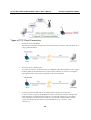
Types of TCP Client Connection
1. TCP Client to PC’s IP address.
The OnCell G3111/G3151/G3211/G3251 will only be able to connect to a host PC if the PC is
using a public IP address.
2. TCP Client to PC’s domain name.
To connect to a host PC, the host PC must be configured with public IP address. If it is using a
dynamic public IP, then the OnCell G3111/G3151/G3211/G3251 can connect to it using the
host’s domain name. Please refer to Appendix C for more information.
3. Connecting TCP client and TCP server within the same cellular service provider.
In order to connect properly, the IP addresses of the two OnCell devices must belong to the
same subnetwork. To ensure that this is the case, use the same cellular service provider to
connect the devices to the network. In addition, you will need to request that the cellular
service provider provide you with two private IP addresses (e.g., 192.168.1.1 and
192.168.1.2).
4-9
OnCell G3111/G3151/G3211/G3251 Series User’s Manual
Serial Port Operation Modes
UDP Mode
Compared to TCP communication, UDP is faster and more efficient. In UDP mode, you can
unicast to one host or multicast to multiple hosts and the serial device can receive data from one or
multiple host computers. These traits make UDP mode especially well suited for message display
applications.
Types of UDP Connection
1. Fixed Public IPs for both OnCell and Host PC.
If your cellular service provider offers a fixed public IP address after you connect to the
cellular network, you can access the OnCell G3111/G3151/G3211/G3251 from a host PC that
has a fixed public IP.
4-10
OnCell G3111/G3151/G3211/G3251 Series User’s Manual
Serial Port Operation Modes
2. Domain name with DDNS.
If your cellular service provider assigns a public IP address after you connect to the cellular
network, you can also access the OnCell G3111/G3151/G3211/G3251 using the domain name.
If your service provider assigns a public IP address (either fixed or dynamic) to your cellular
device and your control center is the side that initiates the connection, you can enable the
DDNS function and UDP mode to allow other devices on the Internet to connect to your
device using its domain name. This will ensure that your device will remain reachable even
when its public IP address is updated. Note that you will need to register your device with a
DDNS server. Please refer to Appendix C for more information.
Ethernet Modem Mode
Ethernet Modem mode is designed for use with legacy operating systems, such as MS-DOS, that
do not support TCP/IP networks. By connecting a properly configured OnCell
G3111/G3151/G3211/G3251 serial port to the MS-DOS computer’s serial port, it is possible to use
legacy software to transmit data over the cellular network, even if the software was originally
designed to transmit data through a modem. In this case, the AT commands are converted into IP
format.
4-11
OnCell G3111/G3151/G3211/G3251 Series User’s Manual
Serial Port Operation Modes
SMS Tunnel Mode
A major benefit of GSM technology is that it supports short messages (SMS) for easy
communication over the mobile network. Moxa’s proprietary SMS Tunnel Mode allows you to
expand your applications and reduce cost. For example, SMS Tunnel Mode can be used to update
the message on a highway display panel, place refill orders for vending machines, handle
maintenance for remote rental equipment, or even help create an SMS alarm by directly
transforming text, binary, or unicode data from a legacy device to short messages. SMS Tunnel
Mode is particularly suitable for devices that communicate infrequently, or lack access to the local
network. SMS Tunnel Mode converts ASCII, binary code, and UCS2 data to short messages
transparently (both back and forth). In addition, the caller ID (phone number) identification can be
used to block messages sent from uncertified users, broadcast messages, and unwanted SMS
advertisements.
Moxa’s proprietary SMS Tunnel Mode has the following features:
1. Transparently converts serial data to short message, and vise versa.
2. Text, binary, and Unicode formats are supported.
3. Verification of Incoming Caller ID calls is implemented to block uncertified users.
Disabled Mode
You can disable any port on the OnCell G3111/G3151/G3211/G3251 by setting the operation mode
to Disabled.
4-12
5
Chapter 5
Introducing OnCell Central and
Ethernet Operation Modes
In this chapter, we introduce OnCell Central Management Software for host and device sites in the
private IP domain. We also describe the Ethernet operation modes of the OnCell G3100. The OnCell
G3100 not only connects serial devices to cellular networks, but Ethernet devices as well. After
selecting the proper operation mode, please refer to Chapters 9, 10, 11, and 14 for detailed
information on configuration.
This chapter covers the following topics:
OnCell Central Management Software
OnCell Central Serial Device Connection
OnCell Central Ethernet Device Connection
Cellular-Enabling Ethernet Device
OnCell G3111/G3151/G3211/G3251 Series User’s Manual
Serial Port Operation Modes
OnCell Central Management Software
In the cellular world, most service providers only offer private IP addresses to mobile devices due to
the limited availability of public addresses. Mobile devices configured with a private IP address can
access resources on the Internet, but the mobile devices cannot be managed or accessed directly
from the Internet since the private IP address is hidden. The mechanism we developed uses an
OnCell server configured with a public IP address to solve this private IP problem. The OnCell
server accepts connections from both Ethernet and serial mobile devices and remote hosts. Once a
connection is established, the mobile device and remote host can communicate with each other over
the pre-established connection. This software can be installed by a customer or hosted by Moxa (for
demonstration or testing purposes only) and can be accessed from anywhere across an IP network,
including the Internet.
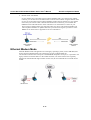
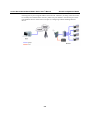
To illustrate, the following network configuration example shows several OnCell devices, labeled as
“OnCell G3100.” These OnCell devices are all connected to the OnCell Central Server. The host
device is located in the same control center as the OnCell Central Server. Please refer to Chapter 11
to configure the OnCell Central Management Software.
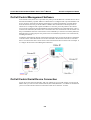
OnCell Central Serial Device Connection
If your device uses the serial interface, and your cellular service provider assigns you a private IP
address after you connect to the cellular network, Real COM, RFC2217, or TCP Server mode allows
you to access the OnCell G3100 via an OnCell Central Server from the host PC.
5-2
OnCell G3111/G3151/G3211/G3251 Series User’s Manual
Serial Port Operation Modes
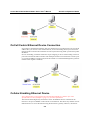
OnCell Central Ethernet Device Connection
If your device uses Ethernet interface, and your cellular service provider assigns you a private IP
address after you connect to the cellular network, service forwarding allows you to access the
OnCell G3100 via an OnCell Central Server from any host PC using either a private IP or public
IP address.
Service forwarding, sometimes referred to as port mapping, is the act of forwarding a network
port from one network node to another. This technique can allow an external user to reach a port
on a private IP address (inside a LAN) from the outside via a NAT-enabled IP gateway (OnCell
G3100’s NAT original is enabled).
Cellular-Enabling Ethernet Device
Note: This function is only supported by the OnCell G3100 Rev.2.0. Please refer to the
Specifications section of Chapter 1 (page 1-3) for more information.
The OnCell G3100 IP gateway works like a router. All Ethernet devices connected to the
OnCell’s LAN port are hidden via the OnCell’s NAT function. This allows any number of local
Ethernet devices to access the Internet using the OnCell as a gateway. However, the OnCell
5-3
OnCell G3111/G3151/G3211/G3251 Series User’s Manual
Serial Port Operation Modes
G3100 appears as just a single IP address on the Internet. Therefore, incoming connections must
be manually forwarded from the OnCell’s public TCP port number to the internal ports of the
local Ethernet devices. Please refer to Chapter 9, Configuring Cellular-Enabling Ethernet
Device.
5-4
6
Chapter 6
Using the Web Console
The web console is the most user-friendly method available to configure the OnCell
G3111/G3151/G3211/G3251. With a standard web browser, you have easy and intuitive access to all
settings and options. In this chapter, we introduce the web console and go through the basic
configuration options. The same configuration options are also available through the Telnet and
serial console.
This chapter covers the following topics:
Using Your Web Browser
Browser Cookie Settings
Trusted Site Settings
Opening the Web Console
Web Console Navigation
Basic Settings
Server Settings
Time Settings
Network Settings
Basic Network Settings
DNS Settings
Advanced Network Settings
Auto IP Report Settings
OnCell G3111/G3151/G3211/G3251 Series User’s Manual
Using the Web Console
Using Your Web Browser
Browser Cookie Settings
Verify that cookies are enabled for your browser. If the cookies are disabled, you will not be able to
use the web console. (Cookies are only used for password transmission.)
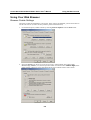
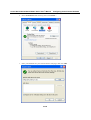
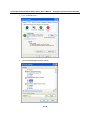
1. For Internet Explorer, enable cookies by selecting Internet Options from the Tools menu:
2. Select the Privacy tab. There are six levels of privacy setting: Block All Cookies, High,
Medium High, Medium, Low, and Accept All Cookies. Users must select Medium High (as the
image shows) or below to access the OnCell G3111/G3151/G3211/G3251 web console.
6-2
OnCell G3111/G3151/G3211/G3251 Series User’s Manual
Using the Web Console
ATTENTION
If you are not using Internet Explorer, cookies are usually enabled through a web browser setting
such as “allow cookies that are stored on your computer” or “allow per-session cookies.”
Trusted Site Settings
Windows 2003 users may need to add the OnCell G3111/G3151/G3211/G3251’s IP address to their
browser’s list of trusted sites.
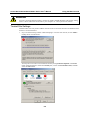
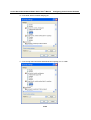
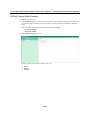
1. If you see the following window while attempting to view the web console, click on Add to
modify the list of trusted sites.
You may also access the list of trusted sites directly through Internet Options in the Tools
menu of Internet Explorer. Select the Security tab, click on the Trusted Sites icon, and then
select the Sites button.
6-3
OnCell G3111/G3151/G3211/G3251 Series User’s Manual
Using the Web Console
2. In either case, the window below should appear, showing the list of sites that you have
configured Internet Explorer to trust. Add the IP address of your OnCell
G3111/G3151/G3211/G3251 here (the factory default IP address is 192.168.127.254).
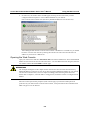
After adding the OnCell G3111/G3151/G3211/G3251’s IP address as a trusted site, you should
be able to view the web console by entering the OnCell G3111/G3151/G3211/G3251’s IP
address in your browser’s address bar.
Opening the Web Console
Open your web browser and enter 192.168.127.254 in the website address line. This is the default IP
address for the OnCell G3111/G3151/G3211/G3251—if a new address has been assigned, enter the
new address instead. Press ENTER to load the page.
ATTENTION
The examples and figures in this chapter use the OnCell G3111/G3151/G3211/G3251 factory
default IP address of 192.168.127.254. If you have assigned a different IP address to your OnCell
G3111/G3151/G3211/G3251, be sure to adjust accordingly when following these directions.
Please refer to Chapter 3, Initial IP Address Configuration, for details on how to configure the IP
address.
Enter the console password if prompted. (This will not apply if you did not enable password
protection for your OnCell G3111/G3151/G3211/G3251.) The password will be transmitted with
MD5 encryption over the Internet.
6-4
OnCell G3111/G3151/G3211/G3251 Series User’s Manual
Using the Web Console
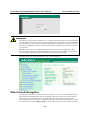
ATTENTION
If you forget your password, the ONLY way to configure the OnCell G3111/G3151/G3211/G3251
is by using the reset button to reset all settings and load the factory defaults. If you have disabled
the reset button in your OnCell G3111/G3151/G3211/G3251 configuration, you may still use it to
load the factory defaults within the first 60 seconds that the OnCell G3111/G3151/G3211/G3251
is powered on.
Remember to back up your configuration by exporting it to a file. Your configuration can be
easily restored by importing the file to the OnCell G3111/G3151/G3211/G3251. This will save
time if you have forgotten the password and need to reload the factory defaults.
The OnCell G3111/G3151/G3211/G3251’s web console will appear.
Web Console Navigation
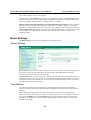
The left panel of the OnCell G3111/G3151/G3211/G3251’s web console is the navigation panel,
and contains an expandable menu tree for navigating among the various settings and categories.
When you click on a menu item in the navigation panel, the main window will display the
corresponding options for that item. Configuration changes can then be made in the main window.
For example, if you click on Basic Settings in the navigation panel, the main window will show a
6-5
OnCell G3111/G3151/G3211/G3251 Series User’s Manual
Using the Web Console
page of basic settings that you can configure.
You must click on the Submit button to keep your configuration changes. The Submit button will
be located at the bottom of every page that has configurable settings. If you navigate to another page
without clicking the Submit button, your settings will not be retained.
Changes will not take effect until they are saved and the OnCell is restarted! You may complete
this in one step by clicking on the Save/Restart option after you submit a change. If you need to
make several changes before restarting, you may save your changes without restarting by selecting
Save Configuration in the navigation panel. If you restart the OnCell G3111/G3151/G3211/G3251
without saving your configuration, the OnCell G3111/G3151/G3211/G3251 will discard all
submitted changes.
Basic Settings
The Basic Settings screen can be accessed from the navigation panel.
Server Settings
Server name: This is an optional free text field for your own use; it does not affect the operation of
the OnCell G3111/G3151/G3211/G3251, and can be used to help differentiate one OnCell
G3111/G3151/G3211/G3251 server from another.
Server location: This is an optional free text field for your own use; it does not affect the operation
of the OnCell G3111/G3151/G3211/G3251, and is useful for assigning or describing the location of
an OnCell G3111/G3151/G3211/G3251. In a network environment of multiple servers, this can be a
valuable aid when doing maintenance.
Time Settings
The OnCell G3111/G3151/G3211/G3251 has a built-in Real-Time Clock for time calibration
functions. Functions such as Auto Warning Email or SNMP Trap can add real-time information to
messages.
Before making any adjustments to the time, first select the correct time zone and submit the
change. The console will display the real time according to the time zone. To modify the real time
clock, click on Modify next to the Local time field. Once you submit the new time, the OnCell
G3111/G3151/G3211/G3251’s firmware will modify the GMT time according to your time zone
and local time settings.
6-6
OnCell G3111/G3151/G3211/G3251 Series User’s Manual
Using the Web Console
ATTENTION
There is a risk of explosion if the real-time clock battery is replaced with the wrong type!
The OnCell G3111/G3151/G3211/G3251’s real time clock is powered by a lithium battery. We
strongly recommend that you do not attempt to replace the lithium battery without help from a
qualified Moxa support engineer. If you need to change the battery, please contact the Moxa RMA
service team.
Time zone (default=GMT Greenwich Mean Time): This field shows the currently selected time
zone and allows you to select a different time zone.
Local time: This field shows the time that you last opened or refreshed the browser. To set the local
time for the OnCell G3111/G3151/G3211/G3251, click on the Modify button, update the date and
time, and then click on submit.
Time server: The OnCell G3111/G3151/G3211/G3251 uses SNTP (RFC-1769) for auto time
calibration. You may enter a time server IP address or domain name in this optional field. Once the
OnCell G3111/G3151/G3211/G3251 is configured with the correct time server address, it will
request time information from the time server every 10 minutes.
6-7
OnCell G3111/G3151/G3211/G3251 Series User’s Manual
Using the Web Console
Network Settings
Basic Network Settings
You can access Basic Network Settings by expanding the Network Settings item in the navigation
panel. Basic Network Settings is where you assign the OnCell G3111/G3151/G3211/G3251’s IP
address, netmask, Gateway, and other parameters for the Ethernet interface.
NOTE: You must assign a valid IP address to your OnCell G3111/G3151/G3211/G3251 before it
will work in your network environment. Your network system administrator should provide you
with a unique IP address and related settings for your network. First-time users can refer to Chapter
3, Initial IP Address Configuration, for more information.
IP configuration (default=Static): You can choose from four possible IP configuration modes.
Option
Static
DHCP
Description
User-defined IP address, netmask, and gateway.
DHCP server-assigned IP address, netmask, gateway, and DNS
DHCP server-assigned IP address, netmask, gateway, and DNS, or BOOTP
DHCP/BOOTP
server-assigned IP address (if the DHCP server does not respond)
BOOTP server-assigned IP address
BOOTP
IP Address (default=192.168.127.254): Enter the IP address that will be assigned to your OnCell
G3111/G3151/G3211/G3251. All ports on the OnCell G3111/G3151/G3211/G3251 will share this
IP address. An IP address is a number assigned to a network device (such as a computer) as a
permanent address on the network. Computers use the IP address to identify and talk to each other
over the network. Choose a proper IP address that is unique and valid for your network environment.
Netmask (default=255.255.255.0): Enter the subnet mask. A subnet mask represents all of the
network hosts at one geographic location, in one building, or on the same local area network. When
a packet is sent out over the network, the OnCell G3111/G3151/G3211/G3251 will use the subnet
mask to check whether the desired TCP/IP host specified in the packet is on the local network
segment. If the address is on the same network segment as the OnCell G3111/G3151/G3211/G3251,
a connection is established directly from the OnCell G3111/G3151/G3211/G3251. Otherwise, the
connection is established through the given default gateway.
6-8
OnCell G3111/G3151/G3211/G3251 Series User’s Manual
Using the Web Console
Gateway: Enter the IP address of the gateway if applicable. A gateway is a network computer that
acts as an entrance to another network. Usually, the computers that control traffic within the network
or at the local Internet service provider are gateway nodes. The OnCell G3111/G3151/G3211/G3251
needs to know the IP address of the default gateway computer in order to communicate with the
hosts outside the local network environment. For correct gateway IP address information, consult
the network administrator.
ATTENTION
In dynamic IP environments, the firmware will try to get the network settings from the DHCP or
BOOTP server 3 times every 30 seconds until network settings are assigned by the DHCP or
BOOTP server. The first try times out after 1 second, the second after 3 seconds, and the third
after 5 seconds.
If the DHCP/BOOTP server is unavailable, the firmware will use the default IP address
(192.168.127.254), netmask, and gateway settings.
WINS function (default=enable): Enable or disable the WINS (Windows Internet Naming Service)
server.
WINS server: If a WINS Server is connected to the network, enter the WINS Server’s IP address in
this field. TCP/IP uses IP addresses to identify hosts, but users often use symbolic names, such as
computer names. The WINS Server, which uses NetBIOS over TCP/IP, contains a dynamic database
to map computer names to IP addresses.
LAN speed (default=Auto): You may configure the network speed for the built-in Ethernet
connection on the OnCell G3111/G3151/G3211/G3251. IEEE802.3 Ethernet supports auto
negotiation of transfer speed. However, some switches/hubs require that the communication speed
be fixed at 100 Mbps or 10 Mbps.
DNS Settings
6-9
OnCell G3111/G3151/G3211/G3251 Series User’s Manual
Using the Web Console
DNS server 1: This is an optional field. If your network has access to a DNS server, you may
enter the DNS server’s IP address in this field. This allows the OnCell
G3111/G3151/G3211/G3251 to use domain names instead of IP addresses to access hosts.
The Domain Name System (DNS) is used to identify Internet domain names, and translate the
names into IP addresses. A domain name is an alphanumeric name, such as www.moxa.com, that it
is usually easier to remember than the numeric IP address. A DNS server is a host that translates
this kind of text-based domain name into the actual IP address used to establish a TCP/IP
connection.
When the user wants to visit a particular website, the user’s computer sends the domain name (e.g.,
www.moxa.com) to a DNS server to request that website’s numeric IP address. When the IP
address is received from the DNS server, the user’s computer uses that information to connect to
the website’s web server. The OnCell G3111/G3151/G3211/G3251 plays the role of a DNS client,
in the sense that it actively queries the DNS server for the IP address associated with a particular
domain name. The following functions in the OnCell G3111/G3151/G3211/G3251’s web console
support the use of domain names in place of IP addresses: Time Server, Destination IP Address (in
TCP Client mode), Mail Server, SNMP Trap Server, and SMTP Server.
DNS server 2: This is an optional field. The IP address of another DNS server may be entered in
this field for times when DNS server 1 is unavailable.
Advanced Network Settings
Access Advanced Network Settings by expanding the Network Settings item in the navigation
panel. Advanced Network Settings is where the gratuitous ARP is configured.
Gratuitous ARP: In some applications, you may need the OnCell G3111/G3151/G3211/G3251 to
send broadcast packets to update the ARP table on the server. If you enable this function and set
the send period, the OnCell G3111/G3151/G3211/G3251 will periodically send broadcast packets
at the specified time interval.
Auto IP Report Settings
Access Auto IP Report Settings by expanding the Network Settings item in the navigation panel.
When the OnCell G3111/G3151/G3211/G3251 products are used in a dynamic IP environment,
users must spend more time with IP management tasks. For example, if the OnCell works as a
server (TCP or UDP), then the host, which acts as a client, must know the IP address of the server.
If the DHCP server assigns a new IP address to OnCell, the host must have some way of
determining OnCell’s new IP address.
6-10
OnCell G3111/G3151/G3211/G3251 Series User’s Manual
Using the Web Console
OnCell G3111/G3151/G3211/G3251 products help out by periodically reporting their IP address to
the IP location server, in case the dynamic IP has changed. The parameters shown below are used
to configure the Auto IP report function. There are two ways to develop an “Auto IP report Server”
to receive the OnCell’s Auto IP report.
1. Use the OnCell Search Utility’s IP Address Report function. Please refer to OnCell Search
Utility Configuration in Chapter 14.
2. “Auto IP report protocol,” which can automatically receive the Auto IP report on a regular
basis, is also available to help you develop your own software. Refer to Appendix E for the
“Auto IP report protocol.”
Auto IP report to host: Reports generated by the Auto report function will be sent
automatically to this IP address or host name.
Report to UDP port (default=63100): This is the UDP port number assignment for the serial
port on the OnCell G3111/G3151/G3211/G3251.
Report period (default=99): You can use this option to set how often the IP address is
automatically reported.
ATTENTION
To use the OnCell Search Utility to receive the auto IP report message sent from the OnCell
G3111/G3151/G3211/G3251, please also install OnCell Windows Driver Manager. OnCell
Windows Driver Manger helps dispatch messages to the OnCell Search Utility.
GuaranLink Settings (Pending)
Overview
Wireless connection failures can be caused by a number of different factors, including loss of
cellular signal, interference, or termination by the operator for unknown reasons. Typically,
cellular routers will not be alerted when a connection is terminated due to inactivity. Maintaining a
stable cellular connection is important for a number of obvious reasons. This is why OnCell
6-11
OnCell G3111/G3151/G3211/G3251 Series User’s Manual
Using the Web Console
cellular routers offer the GuaranLink function, which ensures your wireless connection will be
there whenever you need it.
Background
1. “Register to network” and “Establish PPP with ISP” are two steps for establishing connection
with the ISP.
2. If GuaranLink determines that the OnCell cannot establish connection with the ISP, it reboots
the OnCell in order to allow the OnCell to retry the connection once rebooted.
Common Settings
GuaranLink (default=Disable): Enable this setting to start the GuaranLink function.
Register to network timeout (min) (default=10): This setting specifoes how long
GuaranLink should wait to register to the network before the OnCell reboots itself.
PPP retry count (default=3 mins) This setting specifies how many times GuaranLink should
retry to establish PPP with the ISP before the OnCell reboots itself.
DNS/Ping remote host 1 and DNS/Ping remote host 2: This setting is for “Cellular
connection alive check” and “Packet-level connection check.” It specifies the target host
of the DNS lookup and Ping action. It could be either a domain name or an IP address.
GuaranLink Check Settings
ISP initial connection check (default=Disable): This function is to ensure that the OnCell can
establish connection with an ISP after it reboots.
Cellular connection alive check (default=Disable): Some ISPs may disable the connection if
there is no data transmitted in a specific period of time, depending on the ISP’s settings. This
function ensures that the cellular connection will be kept alive even if no data is transmitted for
a period of time by performing the check action of DNS lookup or ping action of DNS/Ping
remote host 1 or DNS/Ping remote host 2. If the check action fails after the retry count number
specified in “Cellular connection alive check retry count”, the OnCell will re-establish a
connection with the ISP.
Cellular connection alive check interval (min) (default=5 min): This setting specifies the
idle time before GuaranLink performs the check action.
Cellular connection alive check retry count (default=3 sec): This setting specifies the
number of attempts to reach the remote target(s) before the OnCell re-establishes a connection.
Packet-level connection check (default=Disable): This function checks if the cellular
network can be accessed by performing the check action of lookup DNS or ping action of
DNS/Ping remote host 1 or DNS/Ping remote host 2. If the check action fails after the retry
count number specified in “Packet-level connection check retry count.” the OnCell will
re-establish a connection with ISP.
Packet-level connection check action (default=DNS and PING): This setting specifies
whether the check action is successful when both of the DNS lookup and the ping action
succeed, or if it is successful even if only one of them succeed.
Packet-level connection check interval (min) (default=5 min): This setting specifies the
interval between two check actions.
Packet-level connection check retry count (default=3 sec): This setting specifies the number
of attempts to reach the remote target(s) before the OnCell re-establishes a connection.
6-12
7
Chapter 7
Cellular Network Settings
In this chapter, we describe how to set up cellular networks, including GSM, GPRS, and SMS. The
configuration options discussed here are also available from the Telnet and serial consoles.
This chapter covers the following topics:
GSM GPRS Settings
GSM Operation Mode
GPRS Operation Mode
SMS Operation mode
OnCell G3111/G3151/G3211/G3251 Series User’s Manual
Cellular Network Settings
GSM GPRS Settings
From the left navigation panel, click Network Settings GSM GPRS Settings to configure the
GSM/GPRS/SMS Settings. The various configuration items are described below:
Type: The OnCell G3111/G3151/G3211/G3251 supports 3 types of operation modes. You may
choose from GSM, GPRS, and SMS.
SIM PIN: This is a pin code that locks the SIM card until you enter the correct code. Use the pin
to protect your account. The default code is set by the Service Provider. Note that a cell phone
must be used to change the PIN.
Band: Although GSM-900 and GSM-1800 are used in most parts of the world, operators in United
States, Canada, and many other countries in the Americas use GSM-850 or GSM-1900. The
GSM/GPRS band of GSM/GPRS module will automatically select the band for you.
Additional settings for each of the three modes are described in the following subsections.
GSM Operation Mode
7-2
OnCell G3111/G3151/G3211/G3251 Series User’s Manual
Cellular Network Settings
PPP Mode: PPP provides standard PPP dial-out service.
PPPD Mode: PPPD (PPP Daemon) is used for dial-in services, since it provides PPP services only
when receiving a request from a remote PC.
Destination IP address:
If you do not configure these three parameters, they will be filled in
Source IP address:
automatically by the remote side of the connection.
IP netmask:
TCP/IP compression (default=Disable): The setting of this field depends on whether the remote
user’s application requests compression.
Inactivity time (default=0 ms): This field specifies the idle time setting for auto-disconnection. A
setting of 0 ms will cause the port to remain connected even if idle.
Link quality report (default=Disable): Setting this field to Enable allows the OnCell
G3111/G3151/G3211/G3251 to disconnect a connection if the link noise exceeds a certain
threshold.
Outgoing PAP ID: This is the dial-out user ID account.
PAP password: This is the dial-out user password.
Incoming PAP check (default=None): This field allows you to configure the method used, if any,
to verify a user’s ID and authorization.
Option
Local
None
Description
Verify the ID against the OnCell G3111/G3151/G3211/G3251
password. The user name for the OnCell
G3111/G3151/G3211/G3251 is fixed to “admin.”
Authentication is not required.
Phone number: Use this field to configure the number used to dial out.
Connection control
Always on/None
Periodically
connect/inactivity time
Connect Rule
Always on after power on
Periodically connect (based on the
connection interval setting) to
GSM after power on.
Remote host fail/remote Remote Ethernet host has failed.
host recovered
The OnCell
G3111/G3151/G3211/G3251 will
keep pinging the remote host over
the Ethernet every 3 seconds after
powering on. After failing to
connect 5 times in a row, the data
from the serial device will be sent
through the GSM connection.
Disconnect Rule
None
Inactivity time is up
GSM
Trunk
Trunk
When the remote
Backup
Ethernet host returns
to normal, data will
revert to being sent
over Ethernet after 5
continuous
successful pings.
Connection interval (default= 5 min): The time interval of the periodically connect function.
Ping remote host: Key in the IP address or Domain name of the remote host.
7-3
OnCell G3111/G3151/G3211/G3251 Series User’s Manual
Cellular Network Settings
GPRS Operation Mode
TCP/IP compression (default=Disable): The setting of this field depend on whether or not the
remote user’s application requests compression.
Inactivity time (default=0 ms): This field specifies the idle time setting for auto-disconnection. A
setting of 0 ms will cause the port to remain connected even if idle.
Link quality report (default=Disable): Setting this field to Enable will:
(1) Disconnect a connection if the link noise exceeds a certain threshold.
(2) If the OnCell device does not receive any data from the host for 3 minutes, the OnCell will
then ping the host 4 times. If all pings fail, the OnCell will automatically reboot.
Initial string: Use this field to configure the initial string that the modem will use to establish the
connection.
Username: This is the user ID account.
Password: This is the user password.
APN: Before using the GPRS also need APN (Access Point Name) must be added as a modem
initialization command. Detailed instructions are shown below.
Connection control
Always on/None
Periodically connect/
inactivity time
Remote host fail/
remote host recovered
Connect Rule
Always on after power on
Periodically connect (based on the
connection interval setting) attempt
to connect to GPRS after powering
on.
Remote Ethernet host has failed.
The OnCell
G3111/G3151/G3211/G3251 will
keep pinging the remote host over
the Ethernet every 3 seconds after
powering on. After failing to
connect 5 times in a row, the data
from the serial device will be sent
through the GPRS connection.
7-4
Disconnect Rule
None
Inactivity time is up
GPRS
Trunk
Trunk
When the remote
Backup
Ethernet host returns
to normal, data will
revert to being sent
over Ethernet after 5
continuous
successful pings.
OnCell G3111/G3151/G3211/G3251 Series User’s Manual
Cellular Network Settings
Connection interval (default = 5 min): The time interval of the periodic connect function.
Ping remote host: Key in the IP address of the remote host.
SMS Operation mode
Short Message Service (SMS) is a telecommunications protocol that allows sending “short” (160
characters or less) text messages. It is available on most digital mobile phones and some personal
digital assistants with built-in wireless capability.
GSM technology offers the benefit of using SMS (short message service) as an easy way to
communicate over the mobile network. In the next chapter, we explain how to use SMS with the
OnCell G3111/G3151/G3211/G3251.
7-5
8
Chapter 8
Configuring Serial Port Operation
Modes
In this chapter, we explain how to configure the individual serial port modes.
This chapter covers the following topics:
Port Setting Basics
Device Control Applications
Real COM Mode
Reverse Real COM Mode
RFC2217 Mode
Socket Applications
TCP Server Mode
TCP Client Mode
UDP Mode
Ethernet Modem Mode
Dial-in
Dial-out
Disconnection request from local site
Disconnection request from remote site
AT Commands
S Registers
SMS Tunnel Mode
Disabled Mode
OnCell G3111/G3151/G3211/G3251 Series User’s Manual
Serial Port Operation Modes
Port Setting Basics
To configure the operation mode and settings for a port, expand Serial Port Settings in the
navigation panel, and then expand the port that you would like to configure. Individual port settings
are grouped into three categories in the navigation panel: Operation Modes, Communication
Parameters, and Data Buffering/Log.
Select Operation Modes in the navigation panel to select and configure the mode for each serial
port.
Application: Select an application for the serial port from among the choices. Your application will
determine the modes that are available.
Mode: Once you have chosen an application, select the mode. The available configuration settings
will vary depending on the mode that you have selected.
Device Control Applications
Real COM Mode
8-2
OnCell G3111/G3151/G3211/G3251 Series User’s Manual
Serial Port Operation Modes
TCP alive check time (default=7 min): This field specifies how long the OnCell
G3111/G3151/G3211/G3251 will wait for a response to “keep alive” packets before closing the TCP
connection. The OnCell G3111/G3151/G3211/G3251 checks connection status by sending periodic
“keep alive” packets. If the remote host does not respond to the packet within the time specified in
this field, the OnCell G3111/G3151/G3211/G3251 will force the existing TCP connection to close.
For socket and device control modes, the OnCell G3111/G3151/G3211/G3251 will listen for
another TCP connection from another host after closing the connection. If TCP alive check time is
set to 0, the TCP connection will remain open and will not send any “keep alive” packets.
Max connection (default=1): This field is used if you need to receive data from different hosts
simultaneously. When set to 1, only one specific host can access this port of the OnCell
G3111/G3151/G3211/G3251, and the OnCell COM driver on that host will have full control over
the port. When set to 2, the specified number of hosts’ OnCell COM driver may open this port at
the same time. When multiple hosts’ OnCell COM driver open the port at the same time, the COM
driver only provides a pure data tunnel --no control ability unless “Allow Driver Control” is
enabled. The serial port parameters will use firmware settings instead of depending on your
application program (AP).
Application software that is based on the COM driver will receive a driver response of “success”
when the software uses any of the Win32 API functions. The firmware will only send data back to
the driver on the host.
Data will be sent first-in-first-out when data comes into the OnCell G3111/G3151/G3211/G3251
from the Cellular or Ethernet interface.
ATTENTION
When Max connection is greater than 1, the OnCell G3111/G3151/G3211/G3251 will use a multi
connection application (i.e., 2 hosts are allowed access to the port at the same time). When using
a multi connection application, the OnCell G3111/G3151/G3211/G3251 will use the serial
communication parameters as defined here in the web console, and all hosts connected to the port
must use identical serial settings. If one of the hosts opens the COM port with different serial
settings, data will not be transmitted properly.
Ignore jammed IP (default=Disable): This option determines how the port will proceed if multiple
hosts are connected and one or more of the hosts stops responding as the port is transmitting data. If
you select Disable, the port will wait until the data has been transmitted successfully to all hosts
before transmitting the next group of data. If you select Enable, the port will ignore the host that
stopped responding and continue data transmission to the other hosts.
Allow driver control (default=Disable): This option determines how the port will proceed if driver
control commands are received from multiple hosts that are connected to the port. If Disable is
selected, driver control commands will be ignored. If Enable is selected, control commands will be
accepted, with the most recent command received taking precedence.
Connection goes down (default=always high): You can configure what happens to the RTS and
DTR signals when the Cellular or Ethernet connection goes down. For some applications, serial
devices need to know the Cellular or Ethernet link status through RTS or DTR signals sent through
the serial port. Use “always low” if you want the RTS and DTR signal to change their state to low
when the Cellular or Ethernet connection gets disconnected. Use “always high” if you do not want
the cellular or Ethernet connection status to affect the RTS or DTR signals.
8-3
OnCell G3111/G3151/G3211/G3251 Series User’s Manual
Serial Port Operation Modes
Packet length (default=0): The Packet length setting refers to the maximum amount of data that is
allowed to accumulate in the serial port buffer before sending. At the default of 0 for packet length,
no maximum amount is specified and data in the buffer will be sent as specified by the delimiter
settings or when the buffer is full. When a packet length between 1 and 1024 bytes is specified,
data in the buffer will be sent as soon it reaches the specified length.
Delimiter 1 and Delimiter 2 (default=None): When Delimiter 1 is enabled, the serial port will
queue the data in the buffer and send the data to the Cellular or Ethernet port when a specific
character, entered in hex format, is received. A second delimiter character may be enabled and
specified in the Delimiter 2 field, so that both characters act as the delimiter to control when data
should be sent.
ATTENTION
In order to enable a delimiter, packet length must be set to 0. Delimiter 2 should only be enabled
in conjunction with Delimiter 1 and never on its own; otherwise there may be data errors. Even
when a delimiter is enabled, the OnCell G3111/G3151/G3211/G3251 will still pack and send the
data when the amount of data exceeds 1 KB.
Delimiter process (default=Do Nothing): The Delimiter process field determines how the data is
handled when a delimiter is received. Delimiter 1 must be enabled for this field to have effect. If
Delimiters 1 and 2 are both enabled, both characters must be received for the delimiter process to
take place.
Do Nothing: Data in the buffer will be transmitted when the delimiter is received.
Delimiter + 1: Data in the buffer will be transmitted after 1 additional byte is received following
the delimiter.
Delimiter + 2: Data in the buffer will be transmitted after 2 additional bytes are received
following the delimiter.
Strip Delimiter: Data in the buffer is first stripped of the delimiter before being transmitted.
Force transmit (default=0 ms): This parameter defines how large a gap in serial communication the
OnCell G3111/G3151/G3211/G3251 will allow before packing the serial data in its internal buffer
for network transmission.
As data is received through the serial port, it is stored by the OnCell G3111/G3151/G3211/G3251 in
the internal buffer. The OnCell G3111/G3151/G3211/G3251 transmits data stored in the buffer via
TCP/IP, but only when the internal buffer is full or as specified by the force transmit time. When set
to 0, the force transmit time is disabled, and transmission is determined solely by the data in the
internal buffer. At 1 to 65535, the TCP/IP protocol software will pack the serial data received after
there is a gap in serial communication that exceeds the specified force transmit time.
The optimal force transmit time depends on your application, but it must be at least larger than one
character interval within the specified baudrate. For example, assume that the serial port is set to
1200 bps, 8 data bits, 1 stop bit, and no parity. In this case, the total number of bits needed to send a
character is 10 bits, and the time required to transfer one character is
(10 (bits) / 1200 (bits/s)) × 1000 (ms/s) = 8.3 ms.
Therefore, you should set the force transmit time to be greater than 8.3 ms, so in this case, it must be
greater than or equal to 10 ms.
If it is necessary to send a series of characters in the same packet, the serial device will need to send
that series of characters within the specified force transmit time, and the total length of data must be
less than or equal to the OnCell G3111/G3151/G3211/G3251’s internal buffer size (1 KB per port).
8-4
OnCell G3111/G3151/G3211/G3251 Series User’s Manual
Serial Port Operation Modes
Reverse Real COM Mode
TCP alive check time (default=7 min): This field specifies how long the OnCell
G3111/G3151/G3211/G3251 will wait for a response to “keep alive” packets before closing the
TCP connection. The OnCell G3111/G3151/G3211/G3251 checks the connection status by
sending periodic “keep alive” packets. If the remote host does not respond to the packet within the
time specified in this field, the OnCell G3111/G3151/G3211/G3251 will force the existing TCP
connection to close. For socket and device control modes, the OnCell G3111/G3151/G3211/G3251
will listen for another TCP connection from another host after closing the connection. If TCP alive
check time is set to 0, the TCP connection will remain open and will not send any “keep alive”
packets.
Max connection (default=1): This field is used if you need to receive data from different hosts
simultaneously. When set to 1, only one specific host can access this port of the OnCell
G3111/G3151/G3211/G3251, and the OnCell COM driver on that host will have full control over
the port. When set to 2, the specified number of hosts’ OnCell COM driver may open this port at
the same time. When multiple hosts’ OnCell COM driver open the port at the same time, the COM
driver only provides a pure data tunnel with no control ability. The serial port parameters will use
firmware settings instead of depending on your application program (AP).
Application software that is based on the COM driver will receive a driver response of “success”
when the software uses any of the Win32 API functions. The firmware will only send data back to
the driver on the host. Data will be sent first-in-first-out when data comes into the OnCell
G3111/G3151/G3211/G3251 from the Cellular or Ethernet interface.
8-5
OnCell G3111/G3151/G3211/G3251 Series User’s Manual
Serial Port Operation Modes
ATTENTION
When Max connection is greater than 1, the OnCell G3111/G3151/G3211/G3251 will use a multi
connection application (i.e., 2 hosts are allowed access to the port at the same time). When using
a multi connection application, the OnCell G3111/G3151/G3211/G3251 will use the serial
communication parameters as defined here in the web console, and all hosts connected to the port
must use identical serial settings. If one of the hosts opens the COM port with different serial
settings, data will not be transmitted properly.
Ignore jammed IP (default=Disable): This option determines how the port will proceed if
multiple hosts are connected and one or more of the hosts stops responding as the port is
transmitting data. If you select Disable, the port will wait until the data has been transmitted
successfully to all hosts before transmitting the next group of data. If you select Enable, the port
will ignore the host that stopped responding and continue data transmission to the other hosts.
Allow driver control (default=Disable): This option determines how the port will proceed if
driver control commands are received from multiple hosts that are connected to the port. If
Disable is selected, driver control commands will be ignored. If Enable is selected, control
commands will be accepted, with the most recent command received taking precedence.
Destination address 1 through 2 (default=None): Specifying an IP address allows the OnCell
G3111/G3151/G3211/G3251 to connect actively to the remote host. At least one destination must
be provided.
TCP port (default=63950): This is the TCP port number assignment for the remote host/server. It
is the port number that the OnCell G3111/G3151/G3211/G3251’s serial port uses to establish
connections with a remote host/server. To avoid conflicts with well known TCP ports, the default
is set to 63950.
Command port (default=63966): The Command port is the COM port for listening to SSDK
commands from the host. In order to prevent a COM port conflict with other applications, the user
can set the Command port to another port if needed.
ATTENTION
Up to 2 connections can be established between OnCell G3111/G3151/G3211/G3251 hosts.
Port 63950 might be blocked by a firewall. You should make sure the port is NOT blocked before
you start using it.
ATTENTION
The destination IP address parameter can be the IP address, domain name, or the name defined in
the host table.
8-6
OnCell G3111/G3151/G3211/G3251 Series User’s Manual
Serial Port Operation Modes
Designated local port 1 through 2 (default=7010 through 7320): Use these fields to specify the
designated local ports.
Connection goes down (default=always high): You can configure what happens to the RTS and
DTR signals when the Cellular or Ethernet connection goes down. For some applications, serial
devices need to know the Cellular or Ethernet link status through RTS or DTR signals sent through
the serial port. Use “always low” if you want the RTS and DTR signal to change their state to low
when the Cellular or Ethernet connection gets disconnected. Use “always high” if you do not want
the cellular or Ethernet connection status to affect the RTS or DTR signals.
Packet length (default=0): The Packet length setting refers to the maximum amount of data that
is allowed to accumulate in the serial port buffer before sending. At the default of 0 for packet
length, no maximum amount is specified and data in the buffer will be sent as specified by the
delimiter settings or when the buffer is full. When a packet length between 1 and 1024 bytes is
specified, data in the buffer will be sent as soon it reaches the specified length.
Delimiter 1 and Delimiter 2 (default=None): When Delimiter 1 is enabled, the serial port will
queue the data in the buffer and send the data to the Cellular or Ethernet port when a specific
character, entered in hex format, is received. A second delimiter character may be enabled and
specified in the Delimiter 2 field, so that both characters act as the delimiter to control when data
should be sent.
ATTENTION
In order to enable a delimiter, packet length must be set to 0. Delimiter 2 should only be enabled
in conjunction with Delimiter 1 and never on its own; otherwise there may be data errors. Even
when a delimiter is enabled, the OnCell G3111/G3151/G3211/G3251 will still pack and send the
data when the amount of data exceeds 1 KB.
Delimiter process (default=Do Nothing): The Delimiter process field determines how the data is
handled when a delimiter is received. Delimiter 1 must be enabled for this field to have effect. If
Delimiters 1 and 2 are both enabled, both characters must be received for the delimiter process to
take place.
Do Nothing: Data in the buffer will be transmitted when the delimiter is received.
Delimiter + 1: Data in the buffer will be transmitted after 1 additional byte is received
following the delimiter.
Delimiter + 2: Data in the buffer will be transmitted after 2 additional bytes are received
following the delimiter.
Strip Delimiter: Data in the buffer is first stripped of the delimiter before being transmitted.
Force transmit (default=0 ms): This parameter defines how large a gap in serial communication
the OnCell G3111/G3151/G3211/G3251 will allow before packing the serial data in its internal
buffer for network transmission.
As data is received through the serial port, it is stored by the OnCell G3111/G3151/G3211/G3251
in the internal buffer. The OnCell G3111/G3151/G3211/G3251 transmits data stored in the buffer
via TCP/IP, but only when the internal buffer is full or as specified by the force transmit time.
When set to 0, the force transmit time is disabled, and transmission is determined solely by the
data in the internal buffer. At 1 to 65535, the TCP/IP protocol software will pack the serial data
received after there is a gap in serial communication that exceeds the specified force transmit time.
8-7
OnCell G3111/G3151/G3211/G3251 Series User’s Manual
Serial Port Operation Modes
The optimal force transmit time depends on your application, but it must be at least larger than one
character interval within the specified baudrate. For example, assume that the serial port is set to
1200 bps, 8 data bits, 1 stop bit, and no parity. In this case, the total number of bits needed to send
a character is 10 bits, and the time required to transfer one character is
(10 (bits) / 1200 (bits/s)) × 1000 (ms/s) = 8.3 ms.
Therefore, you should set the force transmit time to be greater than 8.3 ms, so in this case, it must
be greater than or equal to 10 ms.
If it is necessary to send a series of characters in the same packet, the serial device will need to
send that series of characters within the specified force transmit time, and the total length of data
must be less than or equal to the OnCell G3111/G3151/G3211/G3251’s internal buffer size (1 KB
per port).
RFC2217 Mode
TCP alive check time (default=7 min): This field specifies how long the OnCell
G3111/G3151/G3211/G3251 will wait for a response to “keep alive” packets before closing the TCP
connection. The OnCell G3111/G3151/G3211/G3251 checks connection status by sending periodic
“keep alive” packets. If the remote host does not respond to the packet within the time specified in
this field, the OnCell G3111/G3151/G3211/G3251 will force the existing TCP connection to close.
For socket and device control modes, the OnCell G3111/G3151/G3211/G3251 will listen for
another TCP connection from another host after closing the connection. If TCP alive check time is
set to 0, the TCP connection will remain open even if there is no response to the “keep alive”
packets.
TCP port (default=4001): This is the TCP port number assignment for the serial port on the OnCell
G3111/G3151/G3211/G3251. It is the port number that the serial port uses to listen to connections,
and that other devices must use to contact the serial port. To avoid conflicts with well known TCP
ports, the default is set to 4001.
Packet length (default=0): The Packet length setting refers to the maximum amount of data that is
allowed to accumulate in the serial port buffer before sending. At the default of 0 for packet length,
no maximum amount is specified and data in the buffer will be sent as specified by the delimiter
settings or when the buffer is full. When a packet length between 1 and 1024 bytes is specified, data
in the buffer will be sent as soon it reaches the specified length.
Delimiter 1 and Delimiter 2 (default=None): When Delimiter 1 is enabled, the serial port will clear
the buffer and send the data to the Ethernet port when a specific character, entered in hex format, is
received. A second delimiter character may be enabled and specified in the Delimiter 2 field, so that
8-8
OnCell G3111/G3151/G3211/G3251 Series User’s Manual
Serial Port Operation Modes
both characters act as the delimiter to indicate when data should be sent.
ATTENTION
In order to enable a delimiter, packet length must be set to 0. Delimiter 2 should only be enabled
in conjunction with Delimiter 1 and never on its own; otherwise there may be data errors. Even
when a delimiter is enabled, the OnCell G3111/G3151/G3211/G3251 will still pack and send the
data when the amount of data exceeds 1 KB.
Delimiter process (default=Do Nothing): The Delimiter process field determines how the data is
handled when a delimiter is received. Delimiter 1 must be enabled for this field to have effect. If
Delimiters 1 and 2 are both enabled, both characters must be received for the delimiter process to
take place.
Do Nothing: Data in the buffer will be transmitted when the delimiter is received.
Delimiter + 1: Data in the buffer will be transmitted after 1 additional byte is received
following the delimiter.
Delimiter + 2: Data in the buffer will be transmitted after 2 additional bytes are received
following the delimiter.
Strip Delimiter: Data in the buffer is first stripped of the delimiter before being transmitted.
Force transmit (default=0 ms): This parameter defines how large a gap in serial communication the
OnCell G3111/G3151/G3211/G3251 will allow before packing the serial data in its internal buffer
for network transmission.
As data is received through the serial port, it is stored by the OnCell G3111/G3151/G3211/G3251 in
the internal buffer. The OnCell G3111/G3151/G3211/G3251 transmits data stored in the buffer via
TCP/IP, but only when the internal buffer is full or as specified by the force transmit time. When set
to 0, the force transmit time is disabled, and transmission is determined solely by the data in the
internal buffer. At 1 to 65535, the TCP/IP protocol software will pack the serial data received after
there is a gap in serial communication that exceeds the specified force transmit time.
The optimal force transmit time depends on your application, but it must be at least larger than one
character interval within the specified baudrate. For example, assume that the serial port is set to
1200 bps, 8 data bits, 1 stop bit, and no parity. In this case, the total number of bits needed to send a
character is 10 bits, and the time required to transfer one character is
(10 (bits) / 1200 (bits/s)) × 1000 (ms/s) = 8.3 ms.
Therefore, you should set the force transmit time to be larger than 8.3 ms, so in this case, it must be
greater than or equal to 10 ms.
If it is necessary to send a series of characters in the same packet, the serial device will need to send
that series of characters within the specified force transmit time, and the total length of data must be
less than or equal to the OnCell G3111/G3151/G3211/G3251’s internal buffer size (1 KB per port).
8-9
OnCell G3111/G3151/G3211/G3251 Series User’s Manual
Serial Port Operation Modes
Socket Applications
TCP Server Mode
TCP alive check time (default=7 min): This field specifies how long the OnCell
G3111/G3151/G3211/G3251 will wait for a response to “keep alive” packets before closing the TCP
connection. The OnCell G3111/G3151/G3211/G3251 checks connection status by sending periodic
“keep alive” packets. If the remote host does not respond to the packet within the time specified in
this field, the OnCell G3111/G3151/G3211/G3251 will force the existing TCP connection to close.
For socket and device control modes, the OnCell G3111/G3151/G3211/G3251 will listen for
another TCP connection from another host after closing the connection. If TCP alive check time is
set to 0, the TCP connection will remain open even if there is no response to the “keep alive”
packets.
ATTENTION
You should make sure the inactivity time value used here is less than the inactivity time value on
the GSM/GPRS configuration page. The GSM/GPRS connection must be maintained in order to
achieve the inactivity time behavior of the TCP connection.
Inactivity time (default=0 ms): This field specifies how long the OnCell
G3111/G3151/G3211/G3251 will wait for incoming and outgoing data through the serial port before
closing the TCP connection. The TCP connection is closed if there is no incoming or outgoing data
through the serial port for the specified Inactivity time. If this field is set to 0, the TCP connection is
kept active until a connection close request is received.
8-10
OnCell G3111/G3151/G3211/G3251 Series User’s Manual
Serial Port Operation Modes
ATTENTION
If used, the Inactivity time setting should be greater than the Force transmit time. To prevent
the unintended loss of data due to the session being disconnected, it is highly recommended that
this value is set large enough so that the intended data transfer is completed.
Max connection (default=1): This field is used if you need to receive data from different hosts
simultaneously. When set to 1, only a single host may open the TCP connection to the serial port.
When set to 2, the specified number of hosts may open this port at the same time. When multiple
hosts establish a TCP connection to the serial port at the same time, the OnCell
G3111/G3151/G3211/G3251 will duplicate the serial data and transmit it to all the hosts. Cellular
or Ethernet data is sent on a first-in first-out basis to the serial port when data comes into the
OnCell G3111/G3151/G3211/G3251 from the Cellular or Ethernet interface.
Ignore jammed IP (default=Disable): This option determines how the port will proceed if multiple
hosts are connected and one or more of the hosts stops responding as the port is transmitting data. If
you select Disable, the port will wait until the data has been transmitted successfully to all hosts
before transmitting the next group of data. If you select Enable, the port will ignore the host that
stopped responding and continue data transmission to the other hosts.
Allow driver control (default=Disable): This option determines how the port will proceed if driver
control commands are received from multiple hosts that are connected to the port. If Disable is
selected, driver control commands will be ignored. If Enable is selected, control commands will be
accepted, with the most recent command received taking precedence.
TCP port (default=4001): This is the TCP port number assignment for the serial port on the OnCell
G3111/G3151/G3211/G3251. It is the port number that the serial port uses to listen to connections,
and that other devices must use to contact the serial port. To avoid conflicts with well known TCP
ports, the default is set to 4001.
Command port (default=966): The Command port is the TCP port for listening to SSDK
commands from the host. In order to prevent a TCP port conflict with other applications, the user can
set the Command port to another port if needed.
Packet length (default=0): The Packet length setting refers to the maximum amount of data that
is allowed to accumulate in the serial port buffer before sending. At the default of 0 for packet
length, no maximum amount is specified and data in the buffer will be sent as specified by the
delimiter settings or when the buffer is full. When a packet length between 1 and 1024 bytes is
specified, data in the buffer will be sent as soon it reaches the specified length.
Delimiter 1 and Delimiter 2 (default=None): When Delimiter 1 is enabled, the serial port will clear
the buffer and send the data to the Ethernet port when a specific character, entered in hex format, is
received. A second delimiter character may be enabled and specified in the Delimiter 2 field, so that
both characters act as the delimiter to indicate when data should be sent.
ATTENTION
In order to enable a delimiter, packet length must be set to 0. Delimiter 2 should only be enabled
in conjunction with Delimiter 1 and never on its own; otherwise there may be data errors. Even
when a delimiter is enabled, the OnCell G3111/G3151/G3211/G3251 will still pack and send the
data when the amount of data exceeds 1 KB.
8-11
OnCell G3111/G3151/G3211/G3251 Series User’s Manual
Serial Port Operation Modes
Delimiter process (default=Do Nothing): The Delimiter process field determines how the data is
handled when a delimiter is received. Delimiter 1 must be enabled for this field to have effect. If
Delimiters 1 and 2 are both enabled, both characters must be received for the delimiter process to
take place.
Do Nothing: Data in the buffer will be transmitted when the delimiter is received.
Delimiter + 1: Data in the buffer will be transmitted after 1 additional byte is received
following the delimiter.
Delimiter + 2: Data in the buffer will be transmitted after 2 additional bytes are received
following the delimiter.
Strip Delimiter: Data in the buffer is first stripped of the delimiter before being transmitted.
Force transmit (default=0 ms): This parameter defines how large a gap in serial communication the
OnCell G3111/G3151/G3211/G3251 will allow before packing the serial data in its internal buffer
for network transmission.
As data is received through the serial port, it is stored by the OnCell G3111/G3151/G3211/G3251 in
the internal buffer. The OnCell G3111/G3151/G3211/G3251 transmits data stored in the buffer via
TCP/IP, but only when the internal buffer is full or as specified by the force transmit time. When set
to 0, the force transmit time is disabled, and transmission is determined solely by the data in the
internal buffer. At 1 to 65535, the TCP/IP protocol software will pack the serial data received after
there is a gap in serial communication that exceeds the specified force transmit time.
The optimal force transmit time depends on your application, but it must be at least larger than one
character interval within the specified baudrate. For example, assume that the serial port is set to
1200 bps, 8 data bits, 1 stop bit, and no parity. In this case, the total number of bits needed to send a
character is 10 bits, and the time required to transfer one character is
(10 (bits) / 1200 (bits/s)) × 1000 (ms/s) = 8.3 ms.
Therefore, you should set the force transmit time to be larger than 8.3 ms, so in this case, it must be
greater than or equal to 10 ms.
If it is necessary to send a series of characters in the same packet, the serial device will need to send
that series of characters within the specified force transmit time, and the total length of data must be
less than or equal to the OnCell G3111/G3151/G3211/G3251’s internal buffer size (1 KB per port).
8-12
OnCell G3111/G3151/G3211/G3251 Series User’s Manual
Serial Port Operation Modes
TCP Client Mode
TCP alive check time (default=7 min): This field specifies how long the OnCell
G3111/G3151/G3211/G3251 will wait for a response to “keep alive” packets before closing the TCP
connection. The OnCell G3111/G3151/G3211/G3251 checks connection status by sending periodic
“keep alive” packets. If the remote host does not respond to the packet within the time specified in
this field, the OnCell G3111/G3151/G3211/G3251 will force the existing TCP connection to close.
For socket and device control modes, the OnCell G3111/G3151/G3211/G3251 will listen for
another TCP connection from another host after closing the connection. If TCP alive check time is
set to 0, the TCP connection will remain open even if there is no response to the “keep alive”
packets.
ATTENTION
You should make sure the inactivity time value used here is less than the inactivity time value on
the GSM/GPRS configuration page. The GSM/GPRS connection must be maintained in order to
achieve the inactivity time behavior of the TCP connection.
Inactivity time (default=0 ms): This field specifies how long the OnCell
G3111/G3151/G3211/G3251 will wait for incoming and outgoing data through the serial port before
closing the TCP connection. The TCP connection is closed if there is no incoming or outgoing data
through the serial port for the specified Inactivity time. If this field is set to 0, the TCP connection is
kept active until a connection close request is received.
ATTENTION
If used, the Inactivity time setting should be greater than the Force transmit time. To prevent
the unintended loss of data due to the session being disconnected, it is highly recommended that
this value is set large enough so that the intended data transfer is completed.
8-13
OnCell G3111/G3151/G3211/G3251 Series User’s Manual
Serial Port Operation Modes
ATTENTION
Inactivity time is ONLY active when Connection Control (see below) is set to Any
character/Inactivity time.
Ignore jammed IP (default=Disable): This option determines how the port will proceed if multiple
hosts are connected and one or more of the hosts stops responding as the port is transmitting data. If
you select Disable, the port will wait until the data has been transmitted successfully to all hosts
before transmitting the next group of data. If you select Enable, the port will ignore the host that
stopped responding and continue data transmission to the other hosts.
Destination address 1 through 4 (default=None): Specifying an IP address allows the OnCell
G3111/G3151/G3211/G3251 to connect actively to the remote host. At least one destination must be
provided.
TCP port (default=4001): This is the TCP port number assignment for the serial port on the OnCell
G3111/G3151/G3211/G3251. It is the port number that the serial port uses to make a connection,
and that serial port must use to contact the other devices. To avoid conflicts with well known TCP
ports, the default is set to 4001.
ATTENTION
Up to 4 connections can be established between the OnCell G3111/G3151/G3211/G3251 and
hosts. The connection speed or throughput may be low if any one of the four connections is slow,
since the one slow connection will slow down the other 3 connections.
ATTENTION
The Destination IP address parameter can be the IP address, domain name, or the name defined
in the host table. For some applications, the user may need to send the data actively to the remote
destination domain name.
Designated local port 1 through 4 (default=5010 through 5013): Use these fields to specify the
designated local ports.
Connection control (default=Startup/None): This setting determines the parameters under which a
TCP connection is established or disconnected. The different options are given in the following table.
In general, both the Connect condition and Disconnect conditions are given.
8-14
OnCell G3111/G3151/G3211/G3251 Series User’s Manual
Option
Serial Port Operation Modes
Description
Startup/None (default) A TCP connection will be established on startup, and will remain active
indefinitely.
Any Character/None
A TCP connection will be established when any character is received
from the serial interface, and will remain active indefinitely.
Any Character/
Inactivity Time
A TCP connection will be established when any character is received
from the serial interface, and will be disconnected when Inactivity time
is reached.
DSR On/DSR Off
A TCP connection will be established when a DSR signal of OnCell is
“On”, and will remain active indefinitely.
DSR On/None
A TCP connection will be established when a DSR “On” signal is
received, and will remain active indefinitely.
DCD On/DCD Off
A TCP connection will be established when a DCD signal of OnCell is
“On”, and will remain active indefinitely.
DCD On/None
A TCP connection will be established when a DCD “On” signal is
received, and will remain active indefinitely.
Packet length (default=0): This field refers to the maximum amount of data that is allowed to
accumulate in the serial port buffer before sending. At the default of 0 for packet length, no
maximum amount is specified and data in the buffer will be sent as specified by the delimiter
settings or when the buffer is full. When a packet length between 1 and 1024 bytes is specified, data
in the buffer will be sent as soon it reaches the specified length.
Delimiter 1 and Delimiter 2 (default=None): When Delimiter 1 is enabled, the serial port will clear
the buffer and send the data to the Ethernet port when a specific character, entered in hex format, is
received. A second delimiter character may be enabled and specified in the Delimiter 2 field, so that
both characters act as the delimiter to indicate when data should be sent.
ATTENTION
In order to enable a delimiter, packet length must be set to 0. Delimiter 2 should only be enabled
in conjunction with Delimiter 1 and never on its own; otherwise there may be data errors. Even
when a delimiter is enabled, the OnCell G3111/G3151/G3211/G3251 will still pack and send the
data when the amount of data exceeds 1 KB.
Delimiter process (default=Do Nothing): The Delimiter process field determines how the data is
handled when a delimiter is received. Delimiter 1 must be enabled for this field to have effect. If
Delimiters 1 and 2 are both enabled, both characters must be received for the delimiter process to
take place.
Do Nothing: Data in the buffer will be transmitted when the delimiter is received.
Delimiter + 1: Data in the buffer will be transmitted after 1 additional byte is received
following the delimiter.
Delimiter + 2: Data in the buffer will be transmitted after 2 additional bytes are received
following the delimiter.
Strip Delimiter: Data in the buffer is first stripped of the delimiter before being transmitted.
Force transmit (default=0 ms): This parameter defines how large a gap in serial communication the
OnCell G3111/G3151/G3211/G3251 will allow before packing the serial data in its internal buffer
for network transmission.
As data is received through the serial port, it is stored by the OnCell G3111/G3151/G3211/G3251 in
8-15
OnCell G3111/G3151/G3211/G3251 Series User’s Manual
Serial Port Operation Modes
the internal buffer. The OnCell G3111/G3151/G3211/G3251 transmits data stored in the buffer via
TCP/IP, but only when the internal buffer is full or as specified by the force transmit time. When set
to 0, the force transmit time is disabled, and transmission is determined solely by the data in the
internal buffer. At 1 to 65535, the TCP/IP protocol software will pack the serial data received after
there is a gap in serial communication that exceeds the specified force transmit time.
The optimal force transmit time depends on your application, but it must be at least larger than one
character interval within the specified baudrate. For example, assume that the serial port is set to
1200 bps, 8 data bits, 1 stop bit, and no parity. In this case, the total number of bits needed to send a
character is 10 bits, and the time required to transfer one character is
(10 (bits) / 1200 (bits/s)) × 1000 (ms/s) = 8.3 ms.
Therefore, you should set the force transmit time to be larger than 8.3 ms, so in this case, it must be
greater than or equal to 10 ms.
If it is necessary to send a series of characters in the same packet, the serial device will need to send
that series of characters within the specified force transmit time, and the total length of data must be
less than or equal to the OnCell G3111/G3151/G3211/G3251’s internal buffer size (1 KB per port).
UDP Mode
Destination address 1 through 4 (default=None): In UDP mode, you may specify up to 4 ranges of
IP addresses for the serial port to connect to. At least one destination range must be provided.
ATTENTION
The maximum selectable IP address range is 64 addresses. However, when using multicast, you
may enter IP addresses of the form xxx.xxx.xxx.255 in the Begin field. For example, enter
192.168.127.255 to allow the OnCell G3111/G3151/G3211/G3251 to broadcast UDP packets to
all hosts with IP addresses between 192.168.127.1 and 192.168.127.254.
Local listen port (default=4001): This is the UDP port that the OnCell G3111/G3151/G3211/G3251
listens to and that other devices must use to contact the OnCell G3111/G3151/G3211/G3251. To
avoid conflicts with well known UDP ports, the default is set to 4001.
Packet length (default=0): The Packet length setting refers to the maximum amount of data that
is allowed to accumulate in the serial port buffer before sending. At the default of 0 for packet
length, no maximum amount is specified and data in the buffer will be sent as specified by the
8-16
OnCell G3111/G3151/G3211/G3251 Series User’s Manual
Serial Port Operation Modes
delimiter settings or when the buffer is full. When a packet length between 1 and 1024 bytes is
specified, data in the buffer will be sent as soon it reaches the specified length.
Delimiter 1 and Delimiter 2 (default=None): When Delimiter 1 is enabled, the serial port will clear
the buffer and send the data to the Ethernet port when a specific character, entered in hex format, is
received. A second delimiter character may be enabled and specified in the Delimiter 2 field, so that
both characters act as the delimiter to indicate when data should be sent.
ATTENTION
In order to enable a delimiter, packet length must be set to 0. Delimiter 2 should only be enabled
in conjunction with Delimiter 1 and never on its own; otherwise there may be data errors. Even
when a delimiter is enabled, the OnCell G3111/G3151/G3211/G3251 will still pack and send the
data when the amount of data exceeds 1 KB.
Delimiter process (default=Do Nothing): The Delimiter process field determines how the data is
handled when a delimiter is received. Delimiter 1 must be enabled for this field to have effect. If
Delimiters 1 and 2 are both enabled, both characters must be received for the delimiter process to
take place.
Do Nothing: Data in the buffer will be transmitted when the delimiter is received.
Delimiter + 1: Data in the buffer will be transmitted after 1 additional byte is received
following the delimiter.
Delimiter + 2: Data in the buffer will be transmitted after 2 additional bytes are received
following the delimiter.
Strip Delimiter: Data in the buffer is first stripped of the delimiter before being transmitted.
Force transmit (default=0 ms): This parameter defines how large a gap in serial communication the
OnCell G3111/G3151/G3211/G3251 will allow before packing the serial data in its internal buffer
for network transmission.
As data is received through the serial port, it is stored by the OnCell G3111/G3151/G3211/G3251 in
the internal buffer. The OnCell G3111/G3151/G3211/G3251 transmits data stored in the buffer via
TCP/IP, but only when the internal buffer is full or as specified by the force transmit time. When set
to 0, the force transmit time is disabled, and transmission is determined solely by the data in the
internal buffer. At 1 to 65535, the TCP/IP protocol software will pack the serial data received after
there is a gap in serial communication that exceeds the specified force transmit time.
The optimal force transmit time depends on your application, but it must be at least larger than one
character interval within the specified baudrate. For example, assume that the serial port is set to
1200 bps, 8 data bits, 1 stop bit, and no parity. In this case, the total number of bits needed to send a
character is 10 bits, and the time required to transfer one character is
(10 (bits) / 1200 (bits/s)) × 1000 (ms/s) = 8.3 ms.
Therefore, you should set the force transmit time to be larger than 8.3 ms, so in this case, it must be
greater than or equal to 10 ms.
If it is necessary to send a series of characters in the same packet, the serial device will need to send
that series of characters within the specified force transmit time, and the total length of data must be
less than or equal to the OnCell G3111/G3151/G3211/G3251’s internal buffer size (1 KB per port).
8-17
OnCell G3111/G3151/G3211/G3251 Series User’s Manual
Serial Port Operation Modes
Ethernet Modem Mode
The OnCell G3111/G3151/G3211/G3251 accepts the AT command ATD IP address:TCP port (for
example, ATD 192.168.127.1:4001) from the serial port and then requests a TCP connection from
the remote Ethernet Modem or PC. Here IP address is the IP address of the remote Ethernet modem
or PC, and TCP port is the TCP port number of the remote Ethernet modem or PC. Once the remote
unit accepts this TCP connection, the OnCell G3111/G3151/G3211/G3251 will send out the
“CONNECT baud” signal via the serial port and then enter data mode.
TCP alive check time (default=7 min): This field specifies how long the OnCell
G3111/G3151/G3211/G3251 will wait for a response to “keep alive” packets before closing the TCP
connection. The OnCell G3111/G3151/G3211/G3251 checks connection status by sending periodic
“keep alive” packets. If the remote host does not respond to the packet within the time specified in
this field, the OnCell G3111/G3151/G3211/G3251 will force the existing TCP connection to close.
For socket and device control modes, the OnCell G3111/G3151/G3211/G3251 will listen for
another TCP connection from another host after closing the connection. If TCP alive check time is
set to 0, the TCP connection will remain open even if there is no response to the “keep alive”
packets.
TCP port (default=4001): This is the TCP port number assignment for the serial port on the OnCell
G3111/G3151/G3211/G3251. It is the port number that the serial port uses to listen to connections,
and that other devices must use to contact the serial port. To avoid conflicts with well known TCP
ports, the default is set to 4001.
Dial-in
The OnCell G3111/G3151/G3211/G3251 listens for a TCP/IP connection request from the remote
Ethernet modem or host. The OnCell G3111/G3151/G3211/G3251’s response depends on the ATS0
value, as follows.
ATS0=0:
The OnCell G3111/G3151/G3211/G3251 will temporarily accept the TCP connection and then send
the RING signal out through the serial port. The serial controller must reply with ATA within 2.5
seconds to accept the connection request, after which the OnCell G3111/G3151/G3211/G3251
enters data mode. If no ATA command is received, the OnCell G3111/G3151/G3211/G3251 will
disconnect after sending three RING signals.
8-18
OnCell G3111/G3151/G3211/G3251 Series User’s Manual
Serial Port Operation Modes
ATS0≧1:
The OnCell G3111/G3151/G3211/G3251 will accept the TCP connection immediately and then
send the “CONNECT baud” command to the serial port, in which baud represents the baudrate of
the OnCell G3111/G3151/G3211/G3251’s serial port. After that, the OnCell
G3111/G3151/G3211/G3251 immediately enters data mode.
Dial-out
The OnCell G3111/G3151/G3211/G3251 accepts the AT command “ATD IP:TCP port” from the
serial port and then requests a TCP connection from the remote Ethernet Modem or PC. Here IP is
the IP address of the remote Ethernet modem or PC, and TCP port is the TCP port number of the
remote Ethernet modem or PC. Once the remote unit accepts this TCP connection, the OnCell
G3111/G3151/G3211/G3251 will send out the CONNECT baud” signal via the serial port and then
enter data mode.
Disconnection request from local site
When the OnCell G3111/G3151/G3211/G3251 is in data mode, the user can initiate disconnection
by sending “+++” from the local serial port to the OnCell G3111/G3151/G3211/G3251. Some
applications allow you to set the DTR signal to off, which will also initiate disconnection. The
OnCell G3111/G3151/G3211/G3251 will enter command mode, and after 1 second, you can then
enter ATH to shut down the TCP connection. The OnCell G3111/G3151/G3211/G3251 will return a
NO CARRIER via the serial port.
NOTE
The “+++” command cannot be divided. The “+” character can be changed in register S2, and the
guard time, which prefixes and suffixes the “+++” in order to protect the raw data, can be changed
in register S12.
Disconnection request from remote site
After the TCP connection has been shut down by the remote Ethernet modem or PC, the OnCell
G3111/G3151/G3211/G3251 will send the NO CARRIER signal via the serial port and then return
to command mode.
AT Commands
The OnCell G3111/G3151/G3211/G3251 supports the following common AT commands as used
with a typical modem:
No.
AT command
1
ATA
2
ATD <IP>:<Port>
3
ATE
4
ATH
5
6
7
8
9
10
11
ATI, ATI0, ATI1, ATI2
ATL
ATM
ATO
ATP, ATT
ATQ0, ATQ1
ATSr=n
Description
Answer manually
Dial up the IP address : Port No.
ATE0=Echo OFF
ATE1=Echo ON (default)
ATH0=On-hook (default)
ATH1=Off-hook
Modem version
Speaker volume option
Speaker control option
On line command
Set Pulse/Tone Dialing mode
Quiet command (default=ATQ0)
Change the contents of S register
8-19
Remarks
reply “OK” only
reply “OK” only
reply “OK” only
reply “OK” only
See “S registers”
OnCell G3111/G3151/G3211/G3251 Series User’s Manual
12
13
ATSr?
ATV
14
ATZ
15
AT&C
16
17
18
19
20
21
AT&F
AT&G
AT&R
AT&S
AT&V
AT&W
Serial Port Operation Modes
Read the contents of S register
Result code type
ATV0 for digit code,
ATV1 for text code (default)
0=OK
1=connect
2=ring
3=No carrier
4=error
Reset (disconnect, enter command mode
and restore the flash settings)
Serial port DCD control
AT&C0=DCD always on
AT&C1=DTE detects connection by DCD
on/off (default)
Restore manufacturer’s settings
Select guard time
Serial port RTS option command
Serial port DSR control
View settings
Write current settings to flash for next
boot up
See “S registers”
reply “OK” only
reply “OK” only
reply “OK” only
S Registers
No.
1
2
3
4
5
6
7
8
9
10
S Register
S0
S1
S2
S3
S4
S5
S6
S7
S8
S9
11
S10
12
S11
13
S12
Description & default value
Ring to auto-answer (default=0)
Ring counter (always=0)
Escape code character (default=43 ASCII “+”)
Return character (default=13 ASCII)
Line feed character (default=10 ASCII)
Backspace character (default= 8 ASCII)
Wait time for dial tone (always=2, unit=sec)
Wait time for carrier (default=3, unit=sec)
Pause time for dial delay (always=2, unit=sec)
Carrier detect response time
(always=6, unit 1/10 sec)
Delay for hang up after carrier
(always=14, unit 1/10 sec)
DTMF duration and spacing
(always=100 ms)
Escape code guard time
(default=50, unit 1/50 sec)
to control the idle time for “+++”
8-20
Remarks
no action applied
no action applied
no action applied
no action applied
no action applied
no action applied
OnCell G3111/G3151/G3211/G3251 Series User’s Manual
Serial Port Operation Modes
SMS Tunnel Mode
SMS IN enable (default=Disable): To allow forwarding incoming short message to the OnCell
G3111/G3151/G3211/G3251’s serial port as data.
Auth type (default=none): To allow Caller ID Authentication
Caller ID (1 through 4): Phone number should be specified.
SMS OUT enable (default=Disable): To allow data received from the attached serial devices to
be transmitted as short messages.
Target Phone Number (1 through 4): Phone number should be specified.
Encode Format
Text ASCII (7 bits) (default)
Binary
Unicode
.
SMS Data Format
7-bit text format (160 bytes per packet)
8-bit binary (140 bytes per packet)
16-bit Unicode (UCS2) format (70 bytes per packet)
ATTENTION
1. The Target Phone Number must be specified if SMS-OUT is activated.
2. The Target Phone Number and Caller ID can be written in either international format, starting
with “+” followed by the country code, or local format, starting with local area code.
3. If you don’t use Caller ID authentication, the OnCell G3111/G3151/G3211/G3251 will allow
all incoming short messages as serial data to be forwarded to its serial port. This includes
system broadcasts and advertisements.
8-21
OnCell G3111/G3151/G3211/G3251 Series User’s Manual
Serial Port Operation Modes
Packet length (default=0): The Packet length setting refers to the maximum amount of data that
is allowed to accumulate in the serial port buffer before sending. At the default of 0 for packet
length, no maximum amount is specified and data in the buffer will be sent as specified by the
delimiter settings or when the buffer is full. When a packet length between 1 and 160 bytes is
specified, data in the buffer will be sent as soon it reaches the specified length.
Delimiter 1 and Delimiter 2 (default=None): When Delimiter 1 is enabled, the serial port will
queue the data in the buffer and send the data to the Cellular or Ethernet port when a specific
character, entered in hex format, is received. A second delimiter character may be enabled and
specified in the Delimiter 2 field, so that both characters act as the delimiter to control when data
should be sent.
ATTENTION
In order to enable a delimiter, packet length must be set to 0. Delimiter 2 should only be enabled
in conjunction with Delimiter 1 and never on its own; otherwise there may be data errors. Even
when a delimiter is enabled, the OnCell G3111/G3151/G3211/G3251 will still pack and send the
data when the amount of data exceeds 1 KB.
Delimiter process (default=Do Nothing): The Delimiter process field determines how the data is
handled when a delimiter is received. Delimiter 1 must be enabled for this field to have effect. If
Delimiters 1 and 2 are both enabled, both characters must be received for the delimiter process to
take place.
Do Nothing: Data in the buffer will be transmitted when the delimiter is received.
Delimiter + 1: Data in the buffer will be transmitted after 1 additional byte is received
following the delimiter.
Delimiter + 2: Data in the buffer will be transmitted after 2 additional bytes are received
following the delimiter.
Strip Delimiter: Data in the buffer is first stripped of the delimiter before being transmitted.
Force transmit (default=0 ms): This parameter defines how large a gap in serial communication the
OnCell G3111/G3151/G3211/G3251 will allow before packing the serial data in its internal buffer
for network transmission.
As data is received through the serial port, it is stored by the OnCell G3111/G3151/G3211/G3251 in
the internal buffer. The OnCell G3111/G3151/G3211/G3251 transmits data stored in the buffer via
SMS, but only when the internal buffer is full or as specified by the force transmit time. When set to
0, the force transmit time is disabled, and transmission is determined solely by the data in the
internal buffer. At 1 to 65535, the SMS protocol software will pack the serial data received after
there is a gap in serial communication that exceeds the specified force transmit time.
The optimal force transmit time depends on your application, but it must be at least larger than one
character interval within the specified baudrate. For example, assume that the serial port is set to
1200 bps, 8 data bits, 1 stop bit, and no parity. In this case, the total number of bits needed to send a
character is 10 bits, and the time required to transfer one character is
(10 (bits) / 1200 (bits/s)) × 1000 (ms/s) = 8.3 ms.
Therefore, you should set the force transmit time to be larger than 8.3 ms, so in this case, it must be
greater than or equal to 10 ms.
If it is necessary to send a series of characters in the same packet, the serial device will need to send
that series of characters within the specified force transmit time, and the total length of data must be
less than or equal to the OnCell G3111/G3151/G3211/G3251’s internal buffer size.
8-22
OnCell G3111/G3151/G3211/G3251 Series User’s Manual
Serial Port Operation Modes
Disabled Mode
When the Application is set to Disable, the relevant port will be disabled.
8-23
9
Chapter 9
Configuring the Cellular-Enabling
Ethernet Device
In this chapter, we explain how to configure the Cellular-enabling Ethernet device.
This chapter covers the following topics:
Host to OnCell via Cellular
OnCell G3111/G3151/G3211/G3251 Series User’s Manual
Serial Port Operation Modes
Host to OnCell via Cellular
Virtual Server Settings (default=Disable): This function allows remote users to access the Host or
FTP services via a public IP address, and automatically redirects them to local servers in the LAN
(Local Area Network).
The OnCell firewall feature filters out unrecognized packets to protect your LAN network when
computers networked with the OnCell are hidden from public view. If you wish, you can make
some of the LAN computers accessible from the Internet by enabling Virtual Server. Depending on
the requested service, the OnCell redirects the external service request to the appropriate server
within the LAN network.
The OnCell is also capable of port-redirection, meaning incoming traffic to a particular port may
be redirected to a different port on the server computer.
Public Port: The public port is the port seen from the Internet side. Public ports cannot be set to
ports used by OP modes (950, 966, 4001, …)
Internal IP: Enter the IP address of the host on your local network that you want to link the
incoming service to.
Internal Port: The internal port is the port being used by the application on the host within your
local network.
9-2
10
Chapter 10
Configuring OnCell Central
Management Software
In this chapter, we explain how to configure OnCell Central Management Software by OnCell
G3111/G3151/G3211/G3251 web console, install and set the OnCell Central Driver Manager, and
all the equipment specifications.
This chapter covers the following topics:
Step 1: Server Settings
System Requirements
Installing OnCell Central Manager
Using OnCell Central Manager
Step 2: OnCell Device Web Console Settings
OnCell Central Settings
OnCell Central Server
Step 3: Host Settings and Management
OnCell G3111/G3151/G3211/G3251 Series User’s Manual
Configuring OnCell Central Software
Step 1: Server Settings
System Requirements
Hardware Requirements
Please ensure that your host hardware meets the following minimum requirements:
Pentium III or above
500 MHz CPU (1 GHz recommended)
256 Mb RAM (1 GB recommended)
300 MB disk space
Software Requirements
OnCell Central Manager runs on a the following host systems:
– Microsoft Windows 2000 Server
– Microsoft Windows Server 2003
– Microsoft Windows Server 2008
– Internet Explorer 6.0 above is required.
Installation
Installing OnCell Central Manager software involves two main elements:
If needed, installing Adobe Flash.
Installing the OnCell Central Manager software.
10-2
OnCell G3111/G3151/G3211/G3251 Series User’s Manual
Configuring OnCell Central Software
Installing OnCell Central Manager
To install the OnCell Central Manager software, follow these steps. This procedure requires that
you have administrative privileges. Insert the OnCell Installation CD into the OnCell Central
Server.
1. Click the INSTALL OnCell Central Manager button in the OnCell Installation CD auto-run
window to install the OnCell Central Manager. Once the installation program starts running,
click Yes to proceed.
2. Click Next when the Welcome screen opens to proceed with the installation.
10-3
OnCell G3111/G3151/G3211/G3251 Series User’s Manual
Configuring OnCell Central Software
Click Next to install program files to the default directory, or click Browse to select an
alternate location.
3. Click Next to install the program’s shortcuts in the appropriate Start Menu folder.
10-4
OnCell G3111/G3151/G3211/G3251 Series User’s Manual
Configuring OnCell Central Software
4. Click Next to proceed with the installation. You will be prompted to select additional tasks.
5. Click Next to proceed with installation. Setup will display a summary of the installation
options.
10-5
OnCell G3111/G3151/G3211/G3251 Series User’s Manual
Configuring OnCell Central Software
6. Click Install to begin installation. The setup window will report the installation progress. To
change the installation settings, click Back and navigate to the previous screen.
7. Click Finish to complete the installation of the OnCell Central Manager.
10-6
OnCell G3111/G3151/G3211/G3251 Series User’s Manual
Configuring OnCell Central Software
Using OnCell Central Manager
After you install OnCell Central Manager, you can set up the OnCell
G3111/G3151/G3211/G3251’s OnCell Central Settings for your PC host. Make sure the settings
on your OnCell G3111/G3151/G3211/G3251 match the settings for OnCell Central Manager.
1. Go to Start OnCell Central OnCell Central to start the OnCell Central mapping
software.
You may need to install Adobe Flash before using this OnCell Central Server. The system will
give you the link for installation automatically. Alternatively, you may find the Adobe Flash in
the CD as well.
10-7
OnCell G3111/G3151/G3211/G3251 Series User’s Manual
Configuring OnCell Central Software
2. Click on Tool Control Ports Settings to modify the port number.
To modify the new configuration of control ports, you can make all configuration changes
here. The Control Ports Setting’s information must match the web console’s OnCell Central
Server Settings. Please refer to Step 2, OnCell Device Web Console Settings, for control port
information. Click Save if any modifications have been made.
10-8
OnCell G3111/G3151/G3211/G3251 Series User’s Manual
Configuring OnCell Central Software
3. Click on Tool User Ports Settings to modify the port number. Click Save if any
modifications have been made.
User Ports are used to connect the host and OnCell Central Server. The User Ports are
assigned by the OnCell Central Server to each OnCell device sequentially within the specified
port range.
Data port: ports used to communicate with serial devices connected to the OnCell.
Command port: the TCP port for listening to SSDK commands from the host.
Service forwarding: ports used to communicate with Ethernet devices connected to the
OnCell. (Not available for OnCell G3111/G3151/G3211/G3251)
Telnet port: The telnet port is the TCP listening port that allows the host to configure the
OnCell via Telnet.
NOTE: Enabling Remove registered ports will remove the already assigned port numbers
within the specified port range from the system.
10-9
OnCell G3111/G3151/G3211/G3251 Series User’s Manual
Configuring OnCell Central Software
4. If you need to import/add a long pre-defined device list to the OnCell Central Server, follow
the next step, otherwise skip directly to Step 9.
5. To import the configuration from a text file, click on Tool Import OnCell User
Ports/Service Forwarding.
Browse to locate the configuration file (file format can be .txt for the following import format)
and then click Import. (Same step as Import Service Forwarding.)
10-10
OnCell G3111/G3151/G3211/G3251 Series User’s Manual
Configuring OnCell Central Software
6. Alternatively, for OnCell User Ports and Service Forwarding, you can manually enter the
information. Click on Tool Add OnCell User Ports/Service Forwarding.
(Same step as Import Service Forwarding.)
10-11
OnCell G3111/G3151/G3211/G3251 Series User’s Manual
Configuring OnCell Central Software
7. In order to view the information you have been imported or added, click on View. (Same step
as Import Service Forwarding.)
8. To save All the configuration settings to an xml file format, select Export DataBase from the
OnCell Central menu. You will then be able to import this configuration file to another host
and use the same OnCell Central settings on the other host.
10-12
OnCell G3111/G3151/G3211/G3251 Series User’s Manual
Configuring OnCell Central Software
9. When all the configurations have been completed, return to the OnCell central main page. If
your OnCell Central Server has two LAN cards, you may need to select the IP that needs to
pass through the OnCell Connection and User Connection, and then click Startup.
For security reasons, we use 2 LAN cards for the server, one for the private IP domain in User
Connection, and another for the public IP domain in OnCell Connection. (OnCell Central must
be accessible from the public IP domain)
Step 2: OnCell Device Web Console Settings
OnCell Central Settings
From the left navigation panel, click Network Settings OnCell Central Settings OnCell
Central Server to configure the OnCell Central Settings. The configuration items are shown
below:
10-13
OnCell G3111/G3151/G3211/G3251 Series User’s Manual
Configuring OnCell Central Software
OnCell Central Server
Configuration
Server (default=Disable): If you select Enable, the OnCell will be ready to connect to the OnCell
Central Server
Server IP: Enter the IP address that will be assigned to your OnCell Central Server. The IP
address must be in the Public IP domain.
Auto reconnect period (default=10s): This field specifies the idle time setting for auto-reconnect.
Control Port
Management information port (default=63201): This port is used to transfer status information
of the OnCell to the OnCell Central Server. The port number must match the OnCell Central
Manager’s port number which install in the OnCell Central Server. In order to prevent port conflict
with other applications, the user can set the management information port to another port if
needed.
Management configuration port (default=63202): This port is used to transfer configurations
from the OnCell to the OnCell Central Server. The port number must match the OnCell Central
Manager’s port number which install in the OnCell Central Server. In order to prevent a port
conflict with other applications, the user can set the management information port to another port
if needed.
Telnet port (default=63203): The Telnet port is the TCP port that is listening for Telnet
connection from the host side. In order to prevent a TCP port conflict with other applications, the
user can set the Telnet port to another port if needed.
OP mode data port 1 (default=63211): This is the operation mode TCP port number assignment
for the serial port on the OnCell device. It is the port number that the serial port uses to listen for
connections. To avoid conflicts with well known TCP ports, the default is set to 63211.
OP mode cmd port 1 (default=63251): The operation mode command port is the TCP port for
listening to SSDK commands from the OnCell Central Server. In order to prevent a TCP port
conflict with other applications, the user can set the Command port to another port if needed.
10-14
OnCell G3111/G3151/G3211/G3251 Series User’s Manual
Configuring OnCell Central Software
Step 3: Host Settings and Management
Before you connect to OnCell Central’s Web, you must install Adobe Flash, which you can
download from Adobe Flash Web Site: http://get.adobe.com/flashplayer/
If you are using Microsoft Windows 2000 Server, Microsoft Windows 2008 Server, Microsoft
Windows Server 2003 platform, you may need to enable your ActiveX control on your platform.
For other version platform, can directly refer to the Host Settings.
1. Open Internet Explorer, click on Tool Internet Options…
10-15
OnCell G3111/G3151/G3211/G3251 Series User’s Manual
Configuring OnCell Central Software
2. Select Security Settings, select on Internet and then click on Custom Level.
3. Enable Download signed ActiveX controls.
10-16
OnCell G3111/G3151/G3211/G3251 Series User’s Manual
Configuring OnCell Central Software
4. Enable Run ActiveX controls and plug-ins.
5. Enable Script ActiveX controls marked safe for scripting, then click OK.
10-17
OnCell G3111/G3151/G3211/G3251 Series User’s Manual
Configuring OnCell Central Software
6. Select Trusted sites under Security, then click on Sites…
7. Enter your IP address for your OnCell Central’s web page, then click Add.
10-18
OnCell G3111/G3151/G3211/G3251 Series User’s Manual
8. Click on Custom Level…
9. Enable Download signed ActiveX controls
10-19
Configuring OnCell Central Software
OnCell G3111/G3151/G3211/G3251 Series User’s Manual
Configuring OnCell Central Software
10. Enable Run ActiveX controls and plug-ins
11. Enable Script ActiveX controls marked safe for scripting, then click OK
10-20
OnCell G3111/G3151/G3211/G3251 Series User’s Manual
Configuring OnCell Central Software
OnCell Central Web Console
1. Start the web browser.
2. In the Address input box, enter the OnCell Central’s web IP address follow with the 8080 port
(ex: 192.168.127.111:8080). Now you are able to see the OnCell Central Manager Welcome
page.
3. Enter the default username and password and then click Login.
Username: admin
Password: admin
4. The OnCell Central page opens:
From this page, you are able to change your view
Server
Device
Logout
10-21
OnCell G3111/G3151/G3211/G3251 Series User’s Manual
Configuring OnCell Central Software
Server
This section describes ways in which you can change the connection ports number for device and
host in order to establish the connection with OnCell Central Server. If you would like to change
your account settings, you are able to change in this section.
Overview
The page shows the OnCell Central Manager version number that you are using.
Control Ports/User Ports info.
Control Ports info.
The purpose for control ports are used to establish the connection of OnCell device to OnCell
Central Server. This section shows all the controls ports information that have been set.
User Ports info.
The purpose for user ports are used to establish the connection of host to OnCell Central Server.
This section shows all the user ports range that you have been set. Please refer this chapter 8 for
each user ports explanation.
10-22
OnCell G3111/G3151/G3211/G3251 Series User’s Manual
Configuring OnCell Central Software
Account Settings
For all changes to the OnCell Central’s admin and password protection settings, you will first need
to enter the old password. To set up a new password or change the existing password, enter your
desired password under both New password and Confirm password.
Device
This section describes ways in which you can monitor all of the device information that appears in
the Device List.
If this is the first time you are using OnCell Central, be aware that the list of groups in the left pane
and the Device List will be empty because you haven’t yet added any devices.
If you are managing hundreds of devices, the Device List can be very long. Going through the list
to locate a particular device among all the others can be inconvenient and time-consuming. By
using this All Devices, All User Ports and Service Forwarding all the information are appear on
the list, and easy for monitoring.
All Devices
This table describes All Devices which are connected to OnCell Central Server:
10-23
OnCell G3111/G3151/G3211/G3251 Series User’s Manual
Item
Device MAC
Device Name
WAN IP
Ethernet IP
OP mode
Serial No.
FW Version
Last Connected
Configuring OnCell Central Software
Description
Each Device has unique MAC ID that you can find on the
device lable or web/telnet/serial console
Device’s Name
Device’s WAN IP address
Device’s LAN IP address
Device’s operation mode
Each Device has unique serial no. that you can find on the
device lable or web/telnet/serial console
Device’s firmware version
Device’s last connection date, month, time
Refresh: The devices list is refreshed when this button is pressed. New online devices will be
shown at the top of list.
Auto Refresh (30 secs): If you checkmark this box, the new online device list will be updated
every 30 seconds.
Group Edit. When you create groups of devices, you can efficiently apply device settings or
perform maintenance tasks on multiple devices at the same time. To create a group, click the right
mouse button and select Group Edit.
10-24
OnCell G3111/G3151/G3211/G3251 Series User’s Manual
Configuring OnCell Central Software
After creating the group, you can copy the devices under All Devices folder to create a new folder
(e.g., South A).
Remove Device. To maintain the list, you can remove all offline devices. To activate this function,
click the right mouse button and select Remove Device.
Note: If a device is removed from the All Devices Folder then the same device will be removed
from all other new folders, too.
All User Ports
This table describes All User Ports which host is established the connection to OnCell Central
Server, and corresponding to the OnCell device.
10-25
OnCell G3111/G3151/G3211/G3251 Series User’s Manual
Item
Status
Device MAC
User Data Port
User Command Port
User Telnet Port
Configuring OnCell Central Software
Description
Show the status for User Data Port.
Closed: this mean the port is not connected
Registered: this mean the port is in the registering state
Connected: this mean the port is connected, and ready to use
Each Device has unique MAC ID that you can find on the
device lable or web/telnet/serial console
The port number is allowed host to establish the serial data
connection to OnCell Central which is mapping to OnCell
device
The port number is allowed host to establish the command
connection to OnCell Central which is mapping to OnCell
device
The port number is allowed host to establish the telnet
connection to OnCell Central which is mapping to OnCell
device
Service Forwarding (not available with G3111/G3151/G3211/G3251)
The list shows the Service Forwarding which host is established the Ethernet connection to
OnCell Central Server, and corresponding to the OnCell device.
10-26
OnCell G3111/G3151/G3211/G3251 Series User’s Manual
Item
Status
Device MAC
Service Port
Protocol
Device Name
Device IP
Port
Description
Configuring OnCell Central Software
Description
Show the status for User Service Port.
Closed: this mean the port is not connected
Registered: this mean the port is in the registering state
Connected: this mean the port is connected, and ready to use
Each Device has unique MAC ID that you can find on the device
lable or web/telnet/serial console
The port number is allowed host to establish the ethernet connection
to OnCell Central which is mapping to OnCell device
Protocol type for Service forwarding connection
Device’s Name
Device’s IP address
This is the local port number for Ethernet device
Device’s more detail description
Device’s Settings and Maintenance
From the left navigation panel, click All Device folder, then you will see all the devices are list
down. Select the device that you want to monitor or change settings.
10-27
OnCell G3111/G3151/G3211/G3251 Series User’s Manual
Configuring OnCell Central Software
Overview
The page shows the OnCell device information:
User Ports
Telnet Enable: If you click on the enable icon, this mean the telnet is enable for host to connect to
OnCell device.
Change User Port: If you are not satisfied with the system assign user port. You are able to
change the User Data Port, User Command Port, and Telnet Port in here.
Reset connection: This is used for drop out the occupy connection, maybe this connection is no
longer in the connected line.
10-28
OnCell G3111/G3151/G3211/G3251 Series User’s Manual
Configuring OnCell Central Software
Note: If the data or command port is occupied, an error message will appear at the bottom of the
window.
Service Forwarding (not available with G3111/G3151/G3211/G3251)
Item
Status
Service Port
Protocol
Device Name
Device IP
Port
Description
Description
Show the status for User Service Port.
Closed: this mean the port is not connected
Registered: this mean the port is in the registering state
Connected: this mean the port is connected, and ready to use
The port number is allowed host to establish the ethernet
connection to OnCell Central which is mapping to OnCell device
Protocol type for Service forwarding connection
Device’s Name
Device’s IP address
This is the local port number for Ethernet device
Device’s more detailed description
10-29
OnCell G3111/G3151/G3211/G3251 Series User’s Manual
Configuring OnCell Central Software
Del selected record: you are able to delete the device information under service forwarding that
you highlight.
Reset connection: This is used for drop out the occupy connection, maybe this connection is no
longer in the connected line.
Maintenance
Configuration Export
To save all the configurations to a xml file format. Select Configuration Export and then click
Download.
Configuration Import
You will be able to import this configuration file to another host and use the same OnCell Central
settings in the other host.
10-30
OnCell G3111/G3151/G3211/G3251 Series User’s Manual
Configuring OnCell Central Software
Restart OnCell Device
Click Restart to restart the OnCell G3111/G3151/G3211/G3251. Ensure that you save all of your
configuration changes before you restart the system or else these changes will be lost.
Logout
10-31
11
Chapter 11
Additional Serial Port Settings
In this chapter, we describe additional serial port settings for the OnCell
G3111/G3151/G3211/G3251. The same configuration options are also available through the Telnet
and serial consoles.
This chapter covers the following topics:
Port Communication Parameters
Serial Parameters
Port Data Buffering/Log
Port Chipher Settings
OnCell G3111/G3151/G3211/G3251 Series User’s Manual
Additional Serial Port Settings
Port Communication Parameters
Port alias: This optional field allows you to assign an alias to a port for easier identification.
Serial Parameters
ATTENTION
The serial parameters for the each serial port on the OnCell G3111/G3151/G3211/G3251 should
match the parameters used by the connected serial device. You may need to refer to your serial
device’s user’s manual to determine the appropriate serial communication parameters.
Baudrate (default=115200 bps): This field configures the port’s baudrate. Select one of the standard
baudrates from the dropdown box, or select Other and then type the desired baudrate in the input
box.
ATTENTION
If the port requires a special baudrate that is not listed, such as G3111/G3151/G3211/G325100
bps, you may can select the Other option and enter the desired baudrate into the text box. The
OnCell G3111/G3151/G3211/G3251 will automatically calculate the closest supported baudrate.
The margin for error will be less than 1.7% for all baudrates under 921600 bps.
11-2
OnCell G3111/G3151/G3211/G3251 Series User’s Manual
Additional Serial Port Settings
Data bits (default=8): This field configures the data bits parameter. Note: If data bits is set to 5 bits,
stop bits will automatically be set to 2 bits.
Stop bits (default=1): This field configures the stop bits parameter. Note: If data bits is set to 5 bits,
stop bits will automatically be set to 1.5 bits.
Parity (default=None): This field configures the parity parameter.
Flow control (default=RTS/CTS): This field configures the flow control type.
FIFO (default=Enable): This field enables or disables the 128-byte FIFO buffer. The OnCell
G3111/G3151/G3211/G3251 provides FIFO buffers for each serial port, for both the Tx and Rx
signals. Note, however, that you should disable the port’s FIFO setting if the attached serial device
does not have a FIFO buffer of its own. This is because a serial device that does not have its own
buffer may not be able to keep up with data sent from the OnCell’s FIFO buffer.
Interface (default=RS-232): You may configure the serial interface to RS-232, RS-422, RS-485
2-wire, or RS-485 4-wire.
Port Data Buffering/Log
The OnCell G3111/G3151/G3211/G3251 supports port buffering to prevent the loss of serial data
when the Cellular or Ethernet connection is down. Port buffering can be used in Real COM,
Secure Real COM, Reverse Real COM, Secure Reverse Real COM, RFC2217, TCP Server, Secure
TCP Server, TCP Client, Secure TCP Client, and SMS Tunnel modes. For other modes, the port
buffering settings will have no effect.
Port buffering (default=Disable): You may enable port buffering by setting this field to Enable.
Serial data logging (default=Disable): If this field is set to Yes, the OnCell
G3111/G3151/G3211/G3251 will store data logs on the system RAM for all serial ports. Note that
this data is not saved when the OnCell G3111/G3151/G3211/G3251 is powered off.
11-3
OnCell G3111/G3151/G3211/G3251 Series User’s Manual
Additional Serial Port Settings
Port Chipher Settings
Click Serial Port Settings Chipher Settings to set the port chipher settings.
11-4
12
Chapter 12
System Management Settings
In this chapter, we describe additional server settings on the OnCell G3111/G3151/G3211/G3251.
The same configuration options are also available through the Telnet and serial console.
This chapter covers the following topics:
Misc. Network Settings
Accessible IP List
SNMP Agent Settings
DDNS
Host Table
System Log Settings
Auto Warning Settings
Event Settings
Serial Event Settings
E-mail Alert
SNMP Trap
SMS Alert
Maintenance
Console Setting
Ping
Firmware Upgrade
Configuration Import/Export
Load Factory Defaults
Change Password
Certificate
Ethernet SSL Certificate Import
Certificate/Key Delete
System Monitoring
Serial to Network Connections
Serial Port Status
Serial Port Error Count
Serial Port Settings
Chipher Usage Status
System Status
Serial Data Log
System Log
Network Status
Network Connections
Network Statistics
Routing
Save Configuration
Restart
Restart System
Restart Ports
OnCell G3111/G3151/G3211/G3251 Series User’s Manual
System Management Settings
Misc. Network Settings
Accessible IP List
The OnCell G3111/G3151/G3211/G3251 uses an IP address-based filtering method to control
access to its serial ports.
The Accessible IP list allows you restrict network access to the OnCell G3111/G3151/G3211/G3251.
Access is controlled by IP address. When the accessible IP list is enabled, a host’s IP address must be
listed in order to gain access to the OnCell G3111/G3151/G3211/G3251. You may add a specific
address or range of addresses by using a combination of IP address and netmask, as follows:
To allow access to a specific IP address
Enter the IP address in the corresponding field; enter 255.255.255.255 for the netmask.
To allow access to hosts on a specific subnet
For both the IP address and netmask, use 0 for the last digit (e.g., 192.168.1.0 and 255.255.255.0).
To allow unrestricted access
Deselect the Enable the accessible IP list option.
Refer to the following table for more configuration examples.
Allowed hosts
Any host
192.168.1.120
192.168.1.1 to 192.168.1.254
192.168.0.1 to 192.168.255.254
192.168.1.1 to 192.168.1.126
192.168.1.129 to 192.168.1.254
Entered IP address/Netmask
Disable
192.168.1.120 / 255.255.255.255
192.168.1.0 / 255.255.255.0
192.168.0.0 / 255.255.0.0
192.168.1.0 / 255.255.255.128
192.168.1.128 / 255.255.255.128
12-2
OnCell G3111/G3151/G3211/G3251 Series User’s Manual
System Management Settings
SNMP Agent Settings
SNMP: To enable the SNMP Agent function, select the Enable option, and enter a community name
(e.g., public).
Read community string (default=public): This is a text password mechanism that is used to weakly
authenticate queries to agents of managed network devices.
Write community string (default=private): This is a text password mechanism that is used to
weakly authenticate changes to agents of managed network devices.
Contact name: The optional SNMP contact information usually includes an emergency contact
name and telephone or pager number.
Location: Use this optional field to specify the location string for SNMP agents such as the OnCell
G3111/G3151/G3211/G3251. This string is usually set to the street address where the OnCell
G3111/G3151/G3211/G3251 is physically located..
SNMP agent version: The OnCell G3111/G3151/G3211/G3251 supports SNMP V1, V2, and V3.
12-3
OnCell G3111/G3151/G3211/G3251 Series User’s Manual
System Management Settings
Read-only and Read/Write Access Control
The following fields allow you to define user names, passwords, and authentication parameters for
two levels of access: read-only and read/write. The name of the field will indicate which level of
access it refers to. For example, Read only authentication mode allows you to configure the
authentication mode for read-only access, whereas Read/write authentication mode allows you to
configure the authentication mode for read/write access. For each level of access, you may configure
the following:
User name: Use this optional field to identify the user name for the specified level of access.
Authentication mode (default=Disable): Use this field to select MD5 or SHA as the method of
password encryption for the specified level of access, or to disable authentication.
Privacy mode (default=Disable): Use this field to enable or disable DES_CBC data encryption for
the specified level of access.
Password: Use this field to set the password for the specified level of access.
Privacy: Use this field to define the encryption key for the specified level of access.
DDNS
Please refer to Appendix C, Dynamic Domain Name Server, for information on setting up DDNS
on your OnCell G3111/G3151/G3211/G3251.
12-4
OnCell G3111/G3151/G3211/G3251 Series User’s Manual
System Management Settings
Host Table
The Host Table can be used to simplify IP address entry in the OnCell G3111/G3151/G3211/G3251
console by assigning a Host Name to a Host IP Address. When you assign a Host Name to a Host IP
Address, you can then use the Host Name for some fields on the console rather than entering the IP
address. Up to 16 entries can be stored in the Host Table.
System Log Settings
System Log Settings allows the administrator to customize which network events are logged by the
OnCell G3111/G3151/G3211/G3251. Events are grouped into five categories, known as event
groups, and the administrator selects which groups to log under Local Log. The actual system events
that would be logged for each system group are listed under summary. For example, if System was
enabled, then System Cold Start events and System Warm Start events would be logged.
12-5
OnCell G3111/G3151/G3211/G3251 Series User’s Manual
Group
System Management Settings
Event
System
System Cold Start, System Warm Start, Power 1 DOWN, Power 2 DOWN,
Cell. module awake/fail, Cell. module close/over temperature range
Network
DHCP/BOOTP Get IP/Renew, NTP, Mail Fail, NTP Connect Fail, IP Conflict,
Network Link Down, Cell. module get/lost IP
Config
Login Fail, IP Changed, Password Changed, Config Changed, Firmware
Upgrade, SSL Key Import, Config Import, Config Export
OpMode
Connect, Disconnect, Restart
Auto Warning Settings
Event Settings
On the Event Settings page, you may configure how administrators are notified of certain system,
network, configuration, and cellular module events. Depending on the event, different options for
automatic notification are available, as shown above. Mail refers to sending an e-mail to a
specified address. Trap refers to sending an SNMP Trap. SMS refers to sending a message to a
specified phone number.
Cold start: This refers to starting the system from a power off state, or after upgrading your
firmware
Warm start: This refers to restarting the OnCell G3111/G3151/G3211/G3251 without turning the
power off.
Network Event: These settings configure the OnCell to change the status of the relay output and
SMS if the specified connection goes down.
Console (web/text) login auth fail: This field refers to a failed attempt to log in to a password
protected OnCell G3111/G3151/G3211/G3251 console.
IP changed: With this IP address change, the OnCell G3111/G3151/G3211/G3251 will send and
email or SMS warning after it reboots.
12-6
OnCell G3111/G3151/G3211/G3251 Series User’s Manual
System Management Settings
Password changed: With this option selected, the OnCell G3111/G3151/G3211/G3251 will
attempt to send an e-mail or SMS warning after it reboots with a new console password. If the
OnCell G3111/G3151/G3211/G3251 is unable to send an e-mail or SMS message to the mail
server within 15 seconds, it will still reboot without sending the e-mail or SMS.
Cell. module fail: When the cellular module fails to function, the OnCell
G3111/G3151/G3211/G3251 will attempt to send an e-mail, or trigger the digital output to inform
users.
Cell. close temperature range: When the temperature on the cellular module inside the OnCell
G3111/G3151/G3211/G3251 is close to the upper or lower limit, the OnCell
G3111/G3151/G3211/G3251 will attempt to send an e-mail, trigger the digital output, or send an
SMS message to inform users.
Cell. over temperature range: When the temperature on the cellular module inside the OnCell
G3111/G3151/G3211/G3251 is outside the normal temperature range, the OnCell
G3111/G3151/G3211/G3251 will attempt to send an e-mail, or trigger the digital output to inform
users.
Serial Event Settings
On the Serial Event Settings page, you may configure how administrators are notified of each
serial port’s DCD and DSR changes. Mail refers to sending an e-mail to a specified address. Trap
refers to sending an SNMP Trap. Dout refers to changing the status of the relay output. SMS refers
to sending a message to one or more specified phone numbers.
DCD changed
A change in the DCD (Data Carrier Detect) signal indicates that the modem connection status has
changed. For example, if the DCD signal changes to low, it indicates that the connection line is
down. When the DCD signal changes to low, the OnCell G3111/G3151/G3211/G3251 will
automatically send a warning to the administrator as configured on the Serial Event Settings page.
For relay output function, after the relay output status has been changed, administrators may reset
its status by selecting Acknowledge Event from the OnCell G3111/G3151/G3211/G3251 console,
or by correcting the DCD signal. Please refer to the section on System Monitoring later in this
chapter for more information.
DSR changed
A change in the DSR (Data Set Ready) signal indicates that the data communication equipment is
powered off. For example, if the DSR signal changes to low, it indicates that the data
12-7
OnCell G3111/G3151/G3211/G3251 Series User’s Manual
System Management Settings
communication equipment is powered down. When the DSR signal changes to low, the OnCell
G3111/G3151/G3211/G3251 will automatically send a warning to the administrator as configured
on the Serial Event Settings page.
For relay output function, after the relay output status has been changed, administrators may reset
its status by selecting Acknowledge Event from the OnCell G3111/G3151/G3211/G3251 console,
or by correcting the DSR signal. Please refer to the section on System Monitoring later in this
chapter for more information.
ATTENTION
SNMP indicates a change in DCD or DSR signals but does not differentiate between the two. A
change in either signal from “–” to “+” is indicated by “link up” and a change in either signal
from “+” to “–” is indicated by “link down.”
E-mail Alert
The E-mail Alert settings determine how e-mail warnings are sent for system and serial port events.
You may configure up to 4 e-mail addresses to receive automatic warnings.
ATTENTION
Consult your Network Administrator or ISP for the proper mail server settings. The Auto warning
function may not work properly if it is not configured correctly. The OnCell
G3111/G3151/G3211/G3251’s SMTP AUTH supports LOGIN, PLAIN, and CRAM-MD5 (RFC
2554).
Mail server: This field is for your mail server’s domain name or IP address.
User name: This field is for your mail server’s user name, if required.
Password: This field is for your mail server’s password, if required.
From e-mail address: This is the e-mail address from which automatic e-mail warnings will be
sent.
To e-mail address 1 to 4: This is the e-mail address or addresses to which the automatic e-mail
warnings will be sent.
12-8
OnCell G3111/G3151/G3211/G3251 Series User’s Manual
System Management Settings
SNMP Trap
SNMP trap server IP: Use this field to indicate the IP address to use for receiving SNMP traps.
Trap version (default=v1): Use this field to select the SNMP trap version.
Trap community (default=alert): Use this field to designate the SNMP trap community.
SMS Alert
To phone number 1 to 4: This is the phone number to which the automatic warnings message will
be sent.
12-9
OnCell G3111/G3151/G3211/G3251 Series User’s Manual
System Management Settings
Encode format:
Text ASCII (7 bits) (default)
Binary
Unicode
SMS Data Format
7 bits text format (160 bytes per packet)
8 bits binary (140 bytes per packet)
16 bits Unicode (UCS2) format (70 bytes per packet)
Maintenance
Console Setting
On this screen, access to different OnCell G3111/G3151/G3211/G3251 configuration console
options (HTTP, HTTPS, Telnet, SSH) can be enabled or disabled. Please refer to Change Password
later in this chapter for more information on passwords. Finally, you may also enable or disable the
reset button.
Enable(default) :
always workable
Disable after 60 sec: Reset button will not workable after 60 sec. This is protect reset button for
incidental press
12-10
OnCell G3111/G3151/G3211/G3251 Series User’s Manual
System Management Settings
Ping
You can ping an IP address from the OnCell G3111/G3151/G3211/G3251 web console in order to
test the Ethernet connection. Enter the IP address or domain name in the Destination field to make
sure that the connection is OK.
12-11
OnCell G3111/G3151/G3211/G3251 Series User’s Manual
System Management Settings
Firmware Upgrade
The OnCell G3111/G3151/G3211/G3251’s firmware can be upgraded though the web console,
serial console, or through OnCell Search Utility. If you have made any changes to your
configuration, remember to save the configuration first before upgrading the firmware. Please refer
to Save Configuration later in this chapter for more information. Any unsaved changes will be
discarded when the firmware is upgraded. To upgrade the firmware, simply enter the file name and
click Submit. The latest firmware can be downloaded from www.moxa.com.
12-12
OnCell G3111/G3151/G3211/G3251 Series User’s Manual
System Management Settings
Configuration Import/Export
The OnCell G3111/G3151/G3211/G3251 can share or back up its configuration by exporting all
settings to a file.
To import a configuration, go to System Management Maintenance Configuration Import.
Enter the configuration file path/name and click Submit. The OnCell
G3111/G3151/G3211/G3251’s configuration settings will be updated according to the configuration
file. If you also wish to import the IP configuration (i.e., the OnCell G3111/G3151/G3211/G3251’s
IP address, netmask, gateway, etc.), make sure that Import all configurations including IP
configurations is checked on.
To export a configuration, go to System Management Maintenance Configuration Export
and click Download. A standard download window will appear, and you will be able to download
the configuration into a file name and location of your choice.
12-13
OnCell G3111/G3151/G3211/G3251 Series User’s Manual
System Management Settings
Load Factory Defaults
This function will reset all of OnCell G3111/G3151/G3211/G3251’s settings to the factory default
values. All previous settings including the console password will be lost. If you wish to keep the
OnCell G3111/G3151/G3211/G3251 IP address, netmask, and other IP settings, make sure Keep IP
settings is checked off before loading the factory defaults.
Change Password
12-14
OnCell G3111/G3151/G3211/G3251 Series User’s Manual
System Management Settings
For all changes to the OnCell G3111/G3151/G3211/G3251’s password protection settings, you will
first need to enter the old password. Leave this blank if you are setting up password protection for
the first time. To set up a new password or change the existing password, enter your desired
password under both New password and Confirm password. To remove password protection,
leave the New password and Confirm password boxes blank.
ATTENTION
If you forget the password, the ONLY way to configure the OnCell G3111/G3151/G3211/G3251
is by using the reset button on the OnCell G3111/G3151/G3211/G3251’s casing to load the
factory defaults.
Before you set a password for the first time, it is a good idea to export the configuration to a file
when you have finished setting up your OnCell G3111/G3151/G3211/G3251. Your configuration
can then be easily imported back into the OnCell G3111/G3151/G3211/G3251 if you need to
reset the OnCell G3111/G3151/G3211/G3251 due to a forgotten password or for other reasons.
Please refer to the section on Configuration Import/Export earlier in this chapter for more details.
Certificate
Ethernet SSL Certificate Import
SSL certificate is used to ensure the website you are accessing is the one you trust, and to encrypt the
data transmitted between you and the website. The SSL certificate contains unique, authenticated
information about the certificate owner. It is issued by a Certificate Authority (CA), such as Verisign,
that verifies the identity of the certificate owner.
The OnCell G3111/G3151/G3211/G3251 will generate a new SSL certificate whenever a new IP is
used. However, the SSL certificate is issued by the OnCell itself. If you would like to import an SSL
certificate issued by a primary CA, you can do it from the “Ethernet SSL Certificate Import” page.
12-15
OnCell G3111/G3151/G3211/G3251 Series User’s Manual
System Management Settings
Certificate/Key Delete
You can delete an SSL certificate on this page. To do so, select the Delete option and then click on
the Submit button.
System Monitoring
Serial to Network Connections
Go to Serial to Network Connections under Serial Status to view the operation mode and status of
each connection for each serial port. All monitor functions will refresh automatically every 15
seconds.
12-16
OnCell G3111/G3151/G3211/G3251 Series User’s Manual
System Management Settings
Serial Port Status
Go to Serial Port Status under Serial Status to view the current status of each serial port. Serial
Port Status Buffering monitors port buffering usage (bytes) of the serial port. A green dot
indicates active, and a gray dot indicates inactive
Serial Port Error Count
Go to Serial Port Error Count under Serial Status to view the error count for each serial port.
12-17
OnCell G3111/G3151/G3211/G3251 Series User’s Manual
System Management Settings
Serial Port Settings
Go to Serial Port Settings under Serial Status to view a summary of the settings for each serial
port.
Chipher Usage Status
Click Serial Status Chipher Usage Status to monitor chipher usage and connection status of
each serial port. The Cipher Usage Status is dependent on the Chipher Settings.
12-18
OnCell G3111/G3151/G3211/G3251 Series User’s Manual
System Management Settings
System Status
Serial Data Log
Data logs for the serial port can be viewed in ASCII or HEX format. After selecting the serial port
and format, you may click Select all to select the entire log if you wish to copy and paste the
contents into a text file.
System Log
This option displays the system log. You may click Select all to select the entire log if you wish to
copy and paste the contents into a text file.
12-19
OnCell G3111/G3151/G3211/G3251 Series User’s Manual
System Management Settings
Network Status
Network Connections
Go to Network Connections under System Status to view network connection information.
Network Statistics
Go to Network Statistics under System Status to view network statistics.
12-20
OnCell G3111/G3151/G3211/G3251 Series User’s Manual
System Management Settings
Routing
Go to Routing under System Status to display the routing information.
Possible flags include:
U: route is up
D: route is down
G: use gateway
+: default gateway
T: static route
H: target is a host
Save Configuration
Go to Save Configuration and then click Save to save your submitted configuration changes to the
OnCell G3111/G3151/G3211/G3251’s flash memory. The configuration changes will be effective
when the OnCell G3111/G3151/G3211/G3251 is restarted. If you do not save your changes before
restarting, they will be discarded.
12-21
OnCell G3111/G3151/G3211/G3251 Series User’s Manual
System Management Settings
Restart
Restart System
Go to Restart System under Restart and then click Restart to restart the OnCell
G3111/G3151/G3211/G3251. Ensure that you save all of your configuration changes before you
restart the system or else these changes will be lost.
Restart Ports
Go to Restart Ports under Restart and then select the ports to be restarted. Click Select All to select
all the ports. Click Submit to restart the selected ports.
12-22
13
Chapter 13
Software Installation/Configuration
This chapter covers the following topics:
Overview
OnCell Windows Driver Manager
Installing OnCell Windows Driver Manager
Using OnCell Windows Driver Manager
OnCell Search Utility
Installing OnCell Search Utility
Configuring OnCell Search Utility
Moxa OnCell Linux Real TTY Driver
Basic Procedure
Hardware Setup
Installing Linux Real TTY Driver Files
Mapping TTY Ports
Removing Mapped TTY Ports
Removing Linux Driver Files
Moxa OnCell UNIX Fixed TTY Driver
Installing the UNIX Driver
Configuring the UNIX Driver
OnCell G3111/G3151/G3211/G3251 Series User’s Manual
Software Installation/Configuration
Overview
The Documentation & Software CD included with your OnCell G3111/G3151/G3211/G3251 is
designed to make the installation and configuration procedure easy and straightforward. This
auto-run CD includes OnCell Windows Driver Manager (for COM mapping), OnCell Search Utility
(to broadcast search for all OnCell G3111/G3151/G3211/G3251 gateways accessible over the
network), the OnCell G3111/G3151/G3211/G3251 User’s Manual, and the OnCell firmware
upgrade utility.
OnCell Windows Driver Manager
Installing OnCell Windows Driver Manager
OnCell Windows Driver Manager is intended for use with OnCell G3111/G3151/G3211/G3251
serial ports that are set to Real COM mode. The software manages the installation of drivers that
allow you to map unused COM ports on your PC to serial ports on the OnCell
G3111/G3151/G3211/G3251. These drivers are designed for use with Windows
98/ME/NT/2000/XP/2003/Vista/2008. When the drivers are installed and configured, devices that
are attached to serial ports on the OnCell G3111/G3151/G3211/G3251 will be treated as if they
were attached to your PC’s own COM ports.
1. Click the INSTALL COM Driver button in the OnCell Installation CD auto-run window to
install the OnCell Windows Driver. Once the installation program starts running, click Yes to
proceed.
2. Click Next when the Welcome screen opens, to proceed with the installation.
13-2
OnCell G3111/G3151/G3211/G3251 Series User’s Manual
Software Installation/Configuration
Click Next to install program files to the default directory, or click Browse to select an alternate
location.
3. Click Next to install the program’s shortcuts in the appropriate Start Menu folder.
4. Click Next to proceed with the installation. The installer then displays a summary of the
installation options.
13-3
OnCell G3111/G3151/G3211/G3251 Series User’s Manual
Software Installation/Configuration
5. Click Install to begin the installation. The setup window will report the progress of the
installation. To change the installation settings, click Back and navigate to the previous screen.
On Windows XP, the installer will display a message that the software has not passed Windows
Logo testing. This is shown as follows:
Click Continue Anyway to finish the installation.
6. Click Finish to complete the installation of the OnCell Windows Driver Manager.
13-4
OnCell G3111/G3151/G3211/G3251 Series User’s Manual
Software Installation/Configuration
Using OnCell Windows Driver Manager
After you install OnCell Windows Driver Manager, you can set up the OnCell
G3111/G3151/G3211/G3251’s serial ports as remote COM ports for your PC host. Make sure that
the serial port(s) on your OnCell G3111/G3151/G3211/G3251 are set to Real COM mode when
mapping COM ports with OnCell Windows Driver Manager.
1. Go to Start OnCell Windows Driver Manager OnCell Windows Driver Manager to
start the COM mapping utility.
2. Click the Add icon.
13-5
OnCell G3111/G3151/G3211/G3251 Series User’s Manual
Software Installation/Configuration
3. Click Rescan to search for OnCell IP gateway. From the list that is generated, select the server
that you will map COM ports to, and then click OK.
13-6
OnCell G3111/G3151/G3211/G3251 Series User’s Manual
Software Installation/Configuration
Alternatively, for Real COM mode, you can select Input Manually and then manually enter the
OnCell G3111/G3151/G3211/G3251’s IP Type. To do this, select LAN type, followed by 1st
Data Port, and 1st Command Port for the COM ports that will be mapped to. Click OK to
proceed to the next step. Note that the Add OnCell page supports FQDN (Fully Qualified
Domain Name), in which case the IP address will be filled in automatically.
13-7
OnCell G3111/G3151/G3211/G3251 Series User’s Manual
Software Installation/Configuration
If you select “WAN IP or Host name,” you must configure the 1st Data Port, 1st Command
Port, and Total Ports for the COM ports that will be mapped to. Click OK to proceed to the
next step. Note that the Add OnCell page supports FQDN (Fully Qualified Domain Name), in
which case the IP address will be filled in automatically.
13-8
OnCell G3111/G3151/G3211/G3251 Series User’s Manual
Software Installation/Configuration
You can also select Enable Auto IP Report. Refer to the MAC address on the device lable and
type in the MAC address in the MAC address line to update the IP address for this mapping
entry automatically whenever the IP address of the OnCell G3111/G3151/G3211/G3251 is
changed. For information on the Auto IP Report function, please refer chapter 6.
13-9
OnCell G3111/G3151/G3211/G3251 Series User’s Manual
Software Installation/Configuration
4. COM ports and their mappings will appear in blue until they are activated. Activating the COM
ports saves the information in the host system registry and makes the COM port available for
use. The host computer will not have the ability to use the COM port until the COM ports are
activated. Click Yes to activate the COM ports at this time, or click Cancel to activate the COM
ports later.
5. When using Windows XP, a message is displayed during the activation of each port, indicating
that the software has not passed Windows Logo certification. Click Continue Anyway to
proceed.
13-10
OnCell G3111/G3151/G3211/G3251 Series User’s Manual
Software Installation/Configuration
6. Ports that have been activated will appear in black.
For Reverse Real COM mode, you can select Input Manually and then manually enter the
LAN MAC address for OnCell G3111/G3151/G3211/G3251. Click OK to proceed to the next
step.
13-11
OnCell G3111/G3151/G3211/G3251 Series User’s Manual
Software Installation/Configuration
To re-configure the settings for a particular serial port on the OnCell
G3111/G3151/G3211/G3251, select the row corresponding to the desired port, and then click
the Setting icon.
7. On the Basic Setting page, use the COM Number drop-down list to select a COM number to
be assigned to the OnCell G3111/G3151/G3211/G3251’s serial port that is being configured.
Note that ports that are “in use” will be labeled accordingly.
13-12
OnCell G3111/G3151/G3211/G3251 Series User’s Manual
Software Installation/Configuration
8. Click the Advanced Setting tab to modify Tx Mode, FIFO, Fast Flush, and other parameters.
Tx Mode
Hi-Performance is the default for Tx mode. After the driver sends data to the OnCell
G3111/G3151/G3211/G3251, the driver immediately issues a “Tx Empty” response to the
program. Under Classical mode, the driver will not send the “Tx Empty” response until after
confirmation is received from the OnCell G3111/G3151/G3211/G3251’s serial port. This causes
lower throughput. Classical mode is recommended if you want to ensure that all data is sent out
before further processing.
FIFO
If FIFO is Disabled, the OnCell G3111/G3151/G3211/G3251 will transmit one byte each time the
Tx FIFO becomes empty, and an Rx interrupt will be generated for each incoming byte. This will
result in a faster response and lower throughput.
Network Timeout
You can use this option to prevent blocking if the target OnCell is unavailable.
Auto Network Re-Connection
With this option enabled, the driver will repeatedly attempt to re-establish the TCP connection if
the OnCell G3111/G3151/G3211/G3251 does not respond to background “check alive” packets.
Return error if network is unavailable
If this option is disabled, the driver will not return any error even when a connection cannot be
established to the OnCell G3111/G3151/G3211/G3251. With this option enabled, calling the
Win32 Comm function will result in the error return code
“STATUS_NETWORK_UNREACHABLE” when a connection cannot be established to the
OnCell G3111/G3151/G3211/G3251. This usually means that your host’s network connection is
down, perhaps due to a cable being disconnected. However, if you can reach other network
devices, it may be that the OnCell G3111/G3151/G3211/G3251 is not powered on or is
disconnected. Note that Auto Network Re-Connection must be enabled in order to use this
function.
13-13
OnCell G3111/G3151/G3211/G3251 Series User’s Manual
Software Installation/Configuration
Fast Flush (only flushes the local buffer)
For some applications, the user’s program will use the Win32 “PurgeComm()” function before it
reads or writes data. After a program uses this PurgeComm() function, the OnCell driver continues
to query the OnCell’s firmware several times to make sure no data is queued in the OnCell
firmware buffer, rather than just flushing the local buffer. This design is used to satisfy some
special considerations. However, it may take more time (about several hundred milliseconds) than
a native COM1 due to the additional time spent communicating across the Ethernet. This is why
PurgeComm() works significantly faster with native COM ports on the PC than with mapped
COM ports on the OnCell G3111/G3151/G3211/G3251. In order to accommodate other
applications that require a faster response time, the new OnCell driver implements a new Fast
Flush option. By default, this function is enabled.
If you have disabled Fast Flush and find that COM ports mapped to the OnCell
G3111/G3151/G3211/G3251 perform markedly slower than when using a native COM port, try to
verify if “PurgeComm()” functions are used in your application. If so, try enabling the Fast Flush
function and see if there is a significant improvement in performance.
Auto IP Report: When OnCell G3111/G3151/G3211/G3251 products are used in a dynamic IP
environment, users must spend more time with IP management tasks. For example, if the OnCell
works as a server (RealCom mode, TCP Server mode, or UDP mode), then the host, which acts as
a client, must know the IP address of the server. If the DHCP server assigns a new IP address to
OnCell, the host must have some way of determining OnCell’s new IP address.
OnCell G3111/G3151/G3211/G3251 products help out by periodically reporting their IP address
to the IP location server, in case the IP has changed. The parameters shown below are used to
utilize the Auto IP report function. Once the OnCell Windows Driver Manager receives the Auto
IP Report message, it will change the IP address of the COM mapping entry for the OnCell
G3111/G3151/G3211/G3251 whose LAN MAC address is specified in the following MAC
address field.
9. The Serial Parameters tab in the following figure show the default settings when the OnCell
G3111/G3151/G3211/G3251 is powered on. However, the program can redefine the serial
parameters to different values after the program opens the port with Win32 API.
13-14
OnCell G3111/G3151/G3211/G3251 Series User’s Manual
Software Installation/Configuration
10. Click the Security tab to configure security settings. Select the Enable Data Encryption
option to enable data to be encrypted when transmitted over the COM ports. After selecting the
encryption option, select the Keep connection option to start encrypting COM port
communications immediately without restarting the COM ports. (If your application opens and
closes COM ports frequently and the OnCell G3111/G3151/G3211/G3251 is only for one host,
you can enable this option to speed up the opening/closing time. However, this will result in
your host tying up the COM port so that other hosts cannot use it.) Select the Apply All Selected
Ports option to enable the security settings to be applied to all COM ports.
13-15
OnCell G3111/G3151/G3211/G3251 Series User’s Manual
Software Installation/Configuration
11. To save the configuration to a text file, select Export from the COM Mapping menu. You will
then be able to import this configuration file to another host and use the same COM Mapping
settings in the other host.
13-16
OnCell G3111/G3151/G3211/G3251 Series User’s Manual
Software Installation/Configuration
OnCell Search Utility
Installing OnCell Search Utility
1. Click the INSTALL UTILITY button in the OnCell Installation CD auto-run window to install
OnCell Search Utility. Once the program starts running, click Yes to proceed.
2. Click Next when the Welcome screen opens to proceed with the installation.
3. Click Next to install program files to the default directory, or click Browse to select an alternate
location.
13-17
OnCell G3111/G3151/G3211/G3251 Series User’s Manual
Software Installation/Configuration
4. Click Next to select additional tasks.
5. Click Next to proceed with the installation. The installer then displays a summary of the
installation options.
6. Click Install to begin the installation. The setup window will report the progress of the
installation. To change the installation settings, click Back and navigate to the previous screen.
13-18
OnCell G3111/G3151/G3211/G3251 Series User’s Manual
Software Installation/Configuration
7. Click Finish to complete the installation of OnCell Search Utility.
Configuring OnCell Search Utility
The Broadcast Search function is used to locate all OnCell G3111/G3151/G3211/G3251 servers that
are connected to the same LAN as your computer. After locating an OnCell
G3111/G3151/G3211/G3251, you will be able to change its IP address.
Since the Broadcast Search function searches by MAC address and not IP address, all OnCell
G3111/G3151/G3211/G3251 servers connected to the LAN will be located, regardless of whether or
not they are part of the same subnet as the host.
13-19
OnCell G3111/G3151/G3211/G3251 Series User’s Manual
Software Installation/Configuration
1. Open OnCell Search Utility and then click the Search icon.
The Searching window indicates the progress of the search.
2. When the search is complete, all OnCell G3111/G3151/G3211/G3251 servers that were located
will be displayed in the OnCell Search Utility window.
13-20
OnCell G3111/G3151/G3211/G3251 Series User’s Manual
Software Installation/Configuration
Click Locate to cause the selected device to beep.
To modify the configuration of the highlighted OnCell G3111/G3151/G3211/G3251, click on
the Console icon to open the web console. This will take you to the web console, where you can
make all configuration changes. Please refer to Chapter 5, Using the Web Console, for
information on how to use the web console.
13-21
OnCell G3111/G3151/G3211/G3251 Series User’s Manual
Software Installation/Configuration
3. Select IP Address Report for monitoring the status of IP Address, and click Go.
4. To change the configuration of the IP Address Report, click on the Settings icon to open the IP
Location Settings. The Local UDP listen Port number should match the web console Auto IP
Report Settings’ port number.
13-22
OnCell G3111/G3151/G3211/G3251 Series User’s Manual
Software Installation/Configuration
5. Click the Go icon to complete the configuration. Please refer to Chapter 5, Using the Web
Console, for information on how to use the IP Address Report.
Moxa OnCell Linux Real TTY Driver
Basic Procedure
To map an OnCell G3111/G3151/G3211/G3251 serial port to a Linux host’s tty port, follow these
instructions:
1. Set up the OnCell G3111/G3151/G3211/G3251. After verifying that the IP configuration works
and you can access the OnCell G3111/G3151/G3211/G3251 (by using ping, telnet, etc.),
configure the desired serial port on the OnCell G3111/G3151/G3211/G3251 to Real COM
mode.
2. Install the Linux Real TTY driver files on the host.
3. Map the OnCell serial port to the host’s tty port.
Hardware Setup
Before proceeding with the software installation, make sure you have completed the hardware
installation. Note that the default IP address for the LAN interface of OnCell
G3111/G3151/G3211/G3251 is 192.168.127.254.
NOTE
After installing the hardware, you must configure the operation mode of the serial port on your
OnCell G3111/G3151/G3211/G3251 to Real COM mode.
13-23
OnCell G3111/G3151/G3211/G3251 Series User’s Manual
Software Installation/Configuration
Installing Linux Real TTY Driver Files
1. Obtain the driver file from the included CD-ROM or the Moxa website, at
http://www.moxa.com.
2. Log in to the console as a super user (root).
3. Execute cd / to go to the root directory.
4. Copy the driver file moxa_oncell_realtty.tgz to the / directory.
5. Execute tar xvfz moxa_oncell_realtty.tgz to extract all files into the system.
6. Execute /tmp/oncell_realtty/mxinst.
For RedHat AS/ES/WS and Fedora Core1, append an extra argument as follows:
# /tmp/oncell_realtty/mxinst SP1
The shell script will install the driver files automatically.
7. After installing the driver, you will be able to see several files in the
/usr/lib/oncell_realtty/driver folder:
> mxaddsvr (Add Server, mapping tty port)
> mxdelsvr (Delete Server, un-mapping tty port)
> mxloadsvr (Reload Server)
> mxmknod (Create device node/tty port)
> mxrmnod (Remove device node/tty port)
> mxuninst (Remove tty port and driver files)
At this point, you will be ready to map the OnCell serial port to the system tty port.
Mapping TTY Ports
Make sure that you set the operation mode of the desired OnCell G3111/G3151/G3211/G3251
serial port to Real COM mode. After logging in as a super user, enter the directory
/usr/lib/oncell_realtty/driver and then execute mxaddsvr to map the target OnCell serial port to
the host tty ports. The syntax of mxaddsvr is as follows:
mxaddsvr [OnCell IP Address] [Total Ports] ([Data port] [Cmd port])
The mxaddsvr command performs the following actions:
1. Modifies oncellreald.cf.
2. Creates tty ports in directory /dev with major & minor number configured in oncellreald.cf.
3. Restarts the driver.
Mapping tty ports automatically
To map tty ports automatically, you may execute mxaddsvr with just the IP address and number of
ports, as in the following example:
# cd /usr/lib/oncell_realtty/driver
# ./mxaddsvr 192.168.3.4 1
In this example, one tty port will be added, with IP 192.168.3.4, with data port 950 and command
port 966.
13-24
OnCell G3111/G3151/G3211/G3251 Series User’s Manual
Software Installation/Configuration
Mapping tty ports manually
To map tty ports manually, you may execute mxaddsvr and manually specify the data and
command ports, as in the following example:
# cd /usr/lib/oncell_realtty/driver
# ./mxaddsvr 192.168.3.4 1 4001 966
In this example, one tty port will be added, with IP 192.168.3.4, with data port 4001 and command
port 966.
Removing Mapped TTY Ports
After logging in as root, enter the directory /usr/lib/oncell_realtty/driver and then execute
mxdelsvr to delete a server. The syntax of mxdelsvr is:
mxdelsvr [IP Address]
Example:
# cd /usr/lib/oncell_realtty/driver
# ./mxdelsvr 192.168.3.4
The following actions are performed when executing mxdelsvr:
1. Modify oncellreald.cf.
2. Remove the relevant tty ports in directory /dev.
3. Restart the driver.
If the IP address is not provided in the command line, the program will list the installed servers
and total ports on the screen. You will need to choose a server from the list for deletion.
Removing Linux Driver Files
A utility is included that will remove all driver files, mapped tty ports, and unload the driver. To do
this, you only need to enter the directory /usr/lib/oncell_realtty/driver, then execute mxuninst to
uninstall the driver. This program will perform the following actions:
1.
2.
3.
4.
Unload the driver.
Delete all files and directories in /usr/lib/moxa_oncell
Delete directory /usr/lib/moxa_oncell
Modify the system initializing script file.
Moxa OnCell UNIX Fixed TTY Driver
Installing the UNIX Driver
1. Log in to UNIX and create a directory for the Moxa TTY. To create a directory named /usr/etc,
execute the command:
# mkdir –p /usr/etc
2. Copy moxa_oncell_fixedtty.tar to the directory you created. If you created the /usr/etc
directory above, you would execute the following commands:
# cp moxa_oncell_fixedtty.tar /usr/etc
# cd /usr/etc
3. Extract the source files from the tar file by executing the command:
# tar xvf moxa_oncell_fixedtty.tar
13-25
OnCell G3111/G3151/G3211/G3251 Series User’s Manual
Software Installation/Configuration
The following files will be extracted:
README.TXT
oncellttyd.c
--- source code
oncellttyd.cf
--- an empty configuration file
Makefile
--- makefile
VERSION.TXT
--- fixed tty driver version
FAQ.TXT
4. Compile and Link
For SCO UNIX:
# make sco
For UnixWare 7:
# make svr5
For UnixWare 2.1.x, SVR4.2:
# make svr42
Configuring the UNIX Driver
Modify the configuration:
The configuration used by the oncellttyd program is defined in the text file oncellttyd.cf, which
is in the same directory that contains the program oncellttyd. You may use vi, or any text editor to
modify the file, as follows:
ttyp1 192.168.1.1 950
For more configuration information, view the file oncellttyd.cf, which contains detailed
descriptions of the various configuration parameters.
NOTE
The “Device Name” depends on the OS. See the Device Naming Rule section in README.TXT
for more information.
To start the oncellttyd daemon after system bootup, add an entry into /etc/inittab, with the tty
name you configured in oncellttyd.cf, as in the following example:
ts:2:respawn:/usr/etc/oncell_fixedtty/oncellttyd –t 1
Device naming rule
For UnixWare 7, UnixWare 2.1.x, and SVR4.2, use:
pts/[n]
For all other UNIX operating systems, use:
ttyp[n]
13-26
OnCell G3111/G3151/G3211/G3251 Series User’s Manual
Software Installation/Configuration
Starting moxattyd
Execute the command init q or reboot your UNIX operating system.
Adding an additional server
1. Modify the text file oncellttyd.cf to add an additional server. User may use vi or any text editor
to modify the file. For more configuration information, look at the file oncellttyd.cf, which
contains detailed descriptions of the various configuration parameters.
2. Find the process ID (PID) of the program oncellttyd.
# ps -ef | grep oncellttyd
3. Update configuration of oncellttyd program.
# kill -USR1 [PID]
(e.g., if oncellttyd PID = 404, kill -USR1 404)
This completes the process of adding an additional server.
13-27
A
Appendix A
Pinouts and Cable Wiring
This Appendix covers the following topics:
Port Pinout Diagrams
RS-232 (male DB9) Pinouts
RS-232/422/485 (male DB9) Pinouts
Cable Wiring Diagrams
Serial Cables
Pin Assignments for DB9 and DB25 Connectors
OnCell G3111/G3151/G3211/G3251 Series User’s Manual
Port Pinout Diagrams
RS-232 (male DB9) Pinouts
OnCell G3111/G3211
PIN
1
2
3
4
5
6
7
8
9
RS-232
DCD
RXD
TXD
DTR
GND
DSR
RTS
CTS
---
RS-232/422/485 (male DB9) Pinouts
OnCell G3151/G3251
PIN
1
2
3
4
5
6
7
8
9
RS-232
DCD
RXD
TXD
DTR
GND
DSR
RTS
CTS
---
RS-422/485-Sw
TxD-(A)
TxD+(B)
RxD+(B)
RxD-(A)
GND
---------
A-2
RS-485-2w
----Data+(B)
Data-(A)
GND
---------
Pinouts and Cable Wiring
OnCell G3111/G3151/G3211/G3251 Series User’s Manual
Cable Wiring Diagrams
Serial Cables
Female DB9 to Male DB9
Female DB9 to Male DB25
A-3
Pinouts and Cable Wiring
OnCell G3111/G3151/G3211/G3251 Series User’s Manual
Pinouts and Cable Wiring
Pin Assignments for DB9 and DB25 Connectors
Pin Assignments for DB9 Male and Female Connectors
DB9 Male Connector
DB9 Female Connector
Pin Assignments for DB25 Male and Female Connectors
DB25 Male Connector
DB25 Female Connector
A-4
B
Appendix B
RFC2217
This appendix explains how to set up the environment to use RFC-2217 mode. RFC2217 defines
general COM port control options based on the Telnet protocol and is used to allow the mapping of
virtual COM ports to network ports. Any third party driver that supports RFC-2217 can be used to
implement the virtual COM port on the OnCell G3111/G3151/G3211/G3251. The installation is as
follows:
1. In the OnCell G3111/G3151/G3211/G3251 console, set up the desired serial port’s operation
mode as RFC2217 mode. By default, the first serial port on the OnCell
G3111/G3151/G3211/G3251 is assigned TCP port 4001, the second serial port is assigned TCP
port 4002, and so on.
2. Download and install a third party driver that supports RFC-2217, such as Serial/IP COM Port
Redirector (from Tactical Software).
3. Using your third party’s configuration program, map a COM port to the OnCell
G3111/G3151/G3211/G3251’s IP address and the serial port’s TCP port.
4. Try opening the COM port that you just mapped. If you are able to open it, then the mapping
was successful, and devices attached to the serial port on the OnCell
G3111/G3151/G3211/G3251 may be treated as if they were attached directly to the host
computer.
C
Appendix C
Dynamic Domain Name Server
This appendix explains how to use the OnCell G3111/G3151/G3211/G3251 with DDNS. When the
OnCell G3111/G3151/G3211/G3251 receive its IP address from a DHCP (Dynamic Host
Configuration Protocol) server, remote servers will be unable to access it using a fixed IP address.
With DDNS (Dynamic Domain Name Server), a remote server can access the OnCell
G3111/G3151/G3211/G3251 using its domain name instead of its IP address.
Overview
The following is a summary of the process:
1. The OnCell G3111/G3151/G3211/G3251 sends a request for an IP address to the DHCP server.
At the same time, it notifies the DHCP server of its desired server name (“OC3100” in the
illustration) according to the option 12 standard.
2. The DHCP server replies with the IP address that is assigned to the OnCell
G3111/G3151/G3211/G3251, along with the domain name (“moxa.com” in the illustration) and
the IP addresses for the DNS server and gateway.
3. If the OnCell G3111/G3151/G3211/G3251 has authorization to update the DNS server, it will
register its FQDN (Fully Qualified Domain Name) with the DNS server. The OnCell
G3111/G3151/G3211/G3251’s FQDN will be in the format server name.domain name
(“OC3100.moxa.com” in the illustration).
4. If the OnCell G3111/G3151/G3211/G3251 is not authorized to update the DNS server, the
DHCP server can be used to update the DNS server. The DHCP server will register the DNS
server with the PTR RR (the record of request for a domain name with IP address).
OnCell G3111/G3151/G3211/G3251 Series User’s Manual
Dynamic Domain Name Server
The above screenshot shows how DHCP can be set up to update the DNS.
Currently, the OnCell G3111/G3151/G3211/G3251 supports DNS service as provided by
DynDNS. For detailed information on this option, please visit https://www.dyndns.com.
C-2
OnCell G3111/G3151/G3211/G3251 Series User’s Manual
Dynamic Domain Name Server
Configuration
DDNS (default=Disable): Use this field to enable or disable DDNS.
Server address (default=DynDns.org): Currently, DynDns.org is the only option available for
Server address.
Host name: In this field, use the name that you created on www.dyndns.com. The OnCell
G3111/G3151/G3211/G3251 will update the DynDNS server with this host name.
Username: This is the user name used for update authentication.
Password: This is the password used for update authentication.
C-3
D
Appendix D
Well Known Port Numbers
In this appendix, we provide a list of well known port numbers that may cause network problems if
you set the OnCell G3111/G3151/G3211/G3251 to one of these ports. Refer to RFC 1700 for well
known port numbers or to the following introduction from the IANA:
The port numbers are divided into three ranges: the Well Known Ports, the Registered Ports, and the
Dynamic and/or Private Ports.
The Well Known Ports range from 0 through 1023.
The Registered Ports range from 1024 through 49151.
The Dynamic and/or Private Ports range from 49152 through 65535.
The Well Known Ports are assigned by the IANA, and on most systems, can only be used by system
processes or by programs executed by privileged users. The following table shows famous port
numbers among the listed well-known port numbers. For more details, please visit the IANA
website at http://www.iana.org/assignments/port-numbers.
TCP Socket
Application Service
0
Reserved
1
TCP Port Service Multiplexer
2
Management Utility
7
Echo
9
Discard
11
Active Users (systat)
13
Daytime
15
Netstat
20
FTP data port
21
FTP control port
23
Telnet
25
SMTP (Simple Mail Transfer Protocol)
37
Time (Time Server)
42
Host name server (names server)
43
Whois (nickname)
49
Login Host Protocol (login)
OnCell G3111/G3151/G3211/G3251 Series User’s Manual
TCP Socket
Application Service
53
Domain Name Server (domain)
79
Finger protocol (finger)
80
World Wide Web (HTTP)
119
Network News Transfer Protocol (NNTP)
123
Network Time Protocol
213
IPX
160 to 223
Reserved for future use
UDP Socket
Application Service
0
Reserved
2
Management Utility
7
Echo
9
Discard
11
Active Users (systat)
13
Daytime
35
Any private printer server
39
Resource Location Protocol
42
Host name server (names server)
43
Whois (nickname)
49
Login Host Protocol (login)
53
Domain Name Server (domain)
69
Trivial Transfer Protocol (TETP)
70
Gopher Protocol
79
Finger Protocol
80
World Wide Web (HTTP)
107
Remote Telnet Service
111
Sun Remote Procedure Call (Sunrpc)
119
Network News Transfer Protocol (NNTP)
123
Network Time Protocol (NTP)
161
SNMP (Simple Network Mail Protocol)
162
SNMP Traps
213
IPX (used for IP Tunneling)
D-2
Well Known Port Numbers
E
Auto IP Report Protocol
Appendix E
OnCell Series provides several ways to configure Ethernet IP addresses. One of them is DHCP
Client. When you set up the OnCell to use DHCP Client to configure Ethernet IP addresses, it will
automatically send a DHCP request over the Ethernet to find the DHCP Server. And then the
DHCP Server will send an available IP address to the OnCell. The OnCell will use this IP address
for a period of time after receiving it. But the OnCell will send a DHCP request again to the DHCP
Server. Once the DHCP Server realizes that this IP address is to be released to other DHCP Client,
the OnCell then will receive a different IP address. For this reason, users sometimes find that the
OnCell will use different IP addresses, not a fixed IP address.
In order to know what IP address the OnCell is using, you need to set up parameters in Network
Settings via Web browser. The figure below is the OnCell Web console configuration window.
Enter the IP address and the Port number of the PC that you want to send this information to.
Auto IP Report Format
“Moxa”, 4 bytes
Info[0]
Info[1]
…
Info[n]
Info [n]
Field
ID
Length
Data
Length
1
1
Variable, Length is “Length Field”
OnCell G3111/G3151/G3211/G3251 Series User’s Manual
Auto IP Report Protocol
ID List
ID Value
Description
Length
Note
1
2
3
Server Name
Device ID
MAC Address
Variable
2
6
ASCII char
Little-endian
6 bytes MAC address. If the MAC
address is "00-90-E8-01-02-03", the
MAC[0] is 0, MAC[1] is 0x90(hex),
MAC[2] is 0xE8(hex), and so on.
4
Serial Number
4, DWORD
Little-endian
5
9
10
11
12
IP Address
AP ID
IP Address2
Signal Level
RSSI
4, DWORD
4, DWORD
4, DWORD
1
1
Little-endian (LAN IP)
Little-endian
Little-endian (WAN IP)
Unsiqned char
Unsiqned char
AP ID & Device ID Mapping Table
AP ID
0x80003700
0x80003700
0x80003700
0x80003700
Hardware ID
0x3111
0x3151
0x3211
0x3251
Product
OnCell G3111
OnCell G3151
OnCell G3211
OnCell G3251
E-2
F
Appendix F
GSM Alphabet
Standard SMS can contain 160 characters. However, the characters typed must be part of the
so-called 7-bit default alphabet as specified by GSM 3.38. As shown in the table below, this alphabet
contains all ASCII characters and some accented characters.
For example, u umlaut (ü) and e with grave (è) are in this set. Using any character not in this set will
force the SMS to be a Unicode SMS, in which case the length of the SMS will be limited to 70
characters.
Note that the following characters count as two characters: { } [ ] ~ | \ and the Euro
symbol €. As you can see in the table below, this is because the codes for these characters must be
prefaced by the escape code (0x1B).
The table below shows the 7-bit default alphabet as specified by GSM 03.38. The corresponding
ISO-8859-1 decimal codes are shown in the rightmost column. Note that the euro sign (€) is also
included.
Hex
Dec
Character Name
Character
Å
ISO-8859-1
DEC
64
163
36
165
232
233
249
236
242
199
10
216
248
13
197
0x00
0x01
0x02
0x03
0x04
0x05
0x06
0x07
0x08
0x09
0x0A
0x0B
0x0C
0x0D
0x0E
0
1
2
3
4
5
6
7
8
9
10
11
12
13
14
@
£
$
¥
è
é
ù
ì
ò
Ç
0x0F
15
0x10
0x11
0x12
0x13
16
17
18
19
COMMERCIAL AT
POUND SIGN
DOLLAR SIGN
YEN SIGN
LATIN SMALL LETTER E WITH GRAVE
LATIN SMALL LETTER E WITH ACUTE
LATIN SMALL LETTER U WITH GRAVE
LATIN SMALL LETTER I WITH GRAVE
LATIN SMALL LETTER O WITH GRAVE
LATIN CAPITAL LETER C WITH CEDILLA
LINE FEED
LATIN CAPITAL LETTER O WITH STROKE
LATIN SMALL LETTER O WITH STROKE
CARRIAGE RETURN
LATIN CAPITAL LETTER A WITH RING
ABOVE
LATIN SMALL LETTER A WITH RING
ABOVE
GREEK CAPITAL LETTER DELTA
LOW LINE
GREEK CAPITAL LETTER PHI
GREEK CAPITAL LETTER GAMMA
å
229
Ø
ø
Δ
Φ
Γ
95
OnCell G3111/G3151/G3211/G3251 Series User’s Manual
GSM Alphabet
0x14
0x15
0x16
0x17
0x18
0x19
0x20
0x1B
0x1B0A
0x1B14
0x1B28
0x1B29
0x1B2F
0x1B3C
0x1B3D
0x1B3E
0x1B40
0x1B65
20
21
22
23
24
25
26
27
27 10
27 20
27 40
27 41
27 47
27 60
27 61
27 62
27 64
27 101
GREEK CAPITAL LETTER LAMBDA
GREEK CAPITAL LETTER OMEGA
GREEK CAPITAL LETTER PI
GREEK CAPITAL LETTER PSI
GREEK CAPITAL LETTER SIGMA
GREEK CAPITAL LETTER THETA
GREEK CAPITAL LETTER XI
ESCAPE TO EXTENSION TABLE
FORM FEED
CIRCUMFLEX ACCENT
LEFT CURLY BRACKET
RIGHT CURLY BRACKET
REVERSE SOLIDUS (BACKSLASH)
LEFT SQUARE BRACKET
TILDE
RIGHT SQUARE BRACKET
VERTICAL BAR
EURO SIGN
Λ
Ω
Π
Ψ
Σ
Θ
Ξ
0x1C
0x1D
0x1E
0x1F
0x20
0x21
0x22
0x23
0x24
28
29
30
31
32
33
34
35
36
LATIN CAPITAL LETTER AE
LATIN SMALL LETTER AE
LATIN SMALL LETTER SHARP S (German)
LATIN CAPITAL LETTER E WITH ACUTE
SPCE
EXCLAMATION MARK
QUOTATION MARK
NUMBER SIGN
CURRENCY SIGN
Æ
æ
ß
É
0x25
0x26
0x27
0x28
0x29
0x2A
0x2B
0x2C
0x2D
0x2E
0x2F
0x30
0x31
0x32
0x33
0x34
0x35
0x36
0x37
0x38
0x39
0x3A
37
38
39
40
41
42
43
44
45
46
47
48
49
50
51
52
53
54
55
56
57
58
PERCENT SIGN
AMPERSAND
APOSTROPHE
LEFT PARENTHESIS
RIGHT PARENTHESIS
ASTERISK
PLUS SIGN
COMMA
HYPHEN-MINUS
FULL STOP
SOLIDUS (SLASH)
DIGIT ZERO
DIGIT ONE
DIGIT TWO
DIGIT THREE
DIGIT FOUR
DIGIT FIVE
DIGIT SIX
DIGIT SEVEN
DIGIT EIGHT
DIGIT NINE
COLON
%
&
‘
(
)
*
+
,
.
/
0
1
2
3
4
5
6
7
8
9
:
F-2
^
{
}
\
[
~
]
|
€
!
“
#
¤
12
94
123
125
92
91
126
93
124
164
(ISO-8859-15)
198
230
223
201
32
33
34
35
164
(ISO-8859-1)
37
38
39
40
41
42
43
44
45
46
47
48
49
50
51
52
53
54
55
56
57
58
OnCell G3111/G3151/G3211/G3251 Series User’s Manual
0x3B
0x3C
0x3D
0x3E
0x3F
0x40
0x41
0x42
0x43
0x44
0x45
0x46
0x47
0x48
0x49
0x4A
0x4B
0x4C
0x4D
0x4E
0x4F
0x50
0x51
0x52
0x53
0x54
0x55
0x56
0x57
0x58
0x59
0x5A
0x5B
59
60
61
62
63
64
65
66
67
68
69
70
71
72
73
74
75
76
77
78
79
80
81
82
83
84
85
86
87
88
89
90
91
0x5C
92
0x5D
0x5E
93
94
0x5F
0x60
0x61
0x62
0x63
0x64
0x65
0x66
0x67
0x68
0x69
0x6A
95
96
97
98
99
100
101
102
103
104
105
106
SEMICOLON
LESS-THAN SIGN
EQUALS SIGN
GREATER-THAN SIGN
QUESTION MARK
INVERTED EXCLAMATION MARK
LATIN CAPITAL LETTER A
LATIN CAPITAL LETTER B
LATIN CAPITAL LETTER C
LATIN CAPITAL LETTER D
LATIN CAPITAL LETTER E
LATIN CAPITAL LETTER F
LATIN CAPITAL LETTER G
LATIN CAPITAL LETTER H
LATIN CAPITAL LETTER I
LATIN CAPITAL LETTER J
LATIN CAPITAL LETTER K
LATIN CAPITAL LETTER L
LATIN CAPITAL LETTER M
LATIN CAPITAL LETTER N
LATIN CAPITAL LETTER O
LATIN CAPITAL LETTER P
LATIN CAPITAL LETTER Q
LATIN CAPITAL LETTER R
LATIN CAPITAL LETTER S
LATIN CAPITAL LETTER T
LATIN CAPITAL LETTER U
LATIN CAPITAL LETTER V
LATIN CAPITAL LETTER W
LATIN CAPITAL LETTER X
LATIN CAPITAL LETTER Y
LATIN CAPITAL LETTER Z
LATIN CAPITAL LETTER A WITH
DIAERESIS
LATIN CAPITAL LETTOR O WITH
DIAERESIS
LATIN CAPITAL LETTER N WITH TILDE
LATIN CPAITAL LETTER U WITH
DIAERESIS
SECTION SIGN
INVERTED QUESTION MARK
LATIN SMALL LETTER A
LATIN SMALL LETTER B
LATIN SMALL LETTER C
LATIN SMALL LETTER D
LATIN SMALL LETTER E
LATIN SMALL LETTER F
LATIN SMALL LETTER G
LATIN SMALL LETTER I
LATIN SMALL LETTER I
LATIN SMALL LETTER J
F-3
GSM Alphabet
:
<
=
>
?
¡
A
B
C
D
E
F
G
H
I
J
K
L
M
N
O
P
Q
R
S
T
U
V
W
X
Y
Z
Ä
59
60
61
62
63
161
65
66
67
68
69
70
71
72
73
74
75
76
77
78
79
80
81
82
83
84
85
86
87
88
89
90
196
Ö
214
Ñ
Ü
209
220
§
¿
a
b
c
d
e
f
g
i
i
j
167
191
97
98
99
100
101
102
103
104
105
106
OnCell G3111/G3151/G3211/G3251 Series User’s Manual
0x6B
0x6C
0x6D
0x6E
0x6F
0x70
0x71
0x72
0x73
0x74
0x75
0x76
0x77
0x78
0x79
0x7A
0x7B
107
108
109
110
111
112
113
114
115
116
117
118
119
120
121
122
123
0x7C
124
0x7D
0x7E
125
126
0x7F
127
LATIN SMALL LETTER K
LATIN SMALL LETTER L
LATIN SMALL LETTER M
LATIN SMALL LETTER N
LATIN SMALL LETTER O
LATIN SMALL LETTER P
LATIN SMALL LETTER Q
LATIN SMALL LETTER R
LATIN SMALL LETTER S
LATIN SMALL LETTER T
LATIN SMALL LETTER U
LATIN SMALL LETTER V
LATIN SMALL LETTER W
LATIN SMALL LETTER V
LATIN SMALL LETTER W
LATIN SMALL LETTER X
LATIN SMALL LETTER A WITH
DIAERESIS
LATIN SMALL LETTER O WITH
DIAERESIS
LATIN SMALL LETTER N WITH TILDE
LATIN SMALL LETTER U WITH
DIAERESIS
LATIN SMALL LETTER A WITH GRAVE
F-4
GSM Alphabet
k
l
m
n
o
p
q
r
s
t
u
v
w
v
w
x
ä
107
108
109
110
111
112
113
114
115
116
117
118
119
120
121
122
228
ö
246
ñ
ü
241
252
à
224
G
Default Settings
Appendix G
OnCell G3111/G3151/G3211/G3251 and OnCell Central Default Settings
Setting Name
Web Console Login
Username
Password
Network Settings
IP configuration
IP address
Network
WINS function
LAN speed
GSM/GPRS Settings
Type
SIM PIN
Band
GSM Operation Mode
Modes
TCP/IP Compression
Inactivity Time
Link quality report
Connection Control
Connection Interval
GPRS Operation Mode
TCP/IP Compression
Inactivity Time
Link quality report
Connection Control
Connection Interval
Real COM Mode
Data port
Command port
Default Name
admin
Keep <blank>
Static
192.168.127.254
255.255.255.0
Enable
Auto
GSM
<blank>
Auto
PPP
Disable
0
Disable
Always On/None
5 min
Disable
0
Disable
Always On/None
5 min
950
966
OnCell G3111/G3151/G3211/G3251 Series User’s Manual
TCP alive Check Time
Max connection
Ignore jammed IP
Allow driver control
Connection goes down
Packet length
Delimiter process
Force transmit
Reverse Real COM Mode
TCP port
Command port
Designated Port
TCP alive Check Time
Max connection
Ignore jammed IP
Allow driver control
Connection goes down
Packet length
Delimiter process
Force transmit
TCP Server Mode
TCP port
Command port
TCP alive Check Time
Inactivity time
Ignore jammed IP
Allow driver control
Connection goes down
Packet length
Delimiter process
Force transmit
TCP Client Mode
TCP port
Designated Port
TCP alive Check Time
Inactivity time
Ignore jammed IP
Connection control
Packet length
Delimiter process
Force transmit
7
1
Disable
Disable
RTS/DTR always high
0
Do Nothing
0
60950
63966
7010 to 7320
7
1
Disable
Disable
RTS/DTR always high
0
Do Nothing
0
4001
966
7
0
Disable
Disable
RTS/DTR always high
0
Do Nothing
0
4001
5010 to 5013
7
0
Disable
Stratup/None
0
Do Nothing
0
G-2
Default Settings
OnCell G3111/G3151/G3211/G3251 Series User’s Manual
Port Communication Parameters
Baudrate
Data bits
Stop bits
Parity
Flow control
FIFO
Interface
Port Data Buffering/Log
Port buffering (256K)
Serial data logging (256K)
SNMP Agent Setting
SNMP
Read community String
Write community String
Console Setting
HTTP console
HTTPS console
Telnet console
SSH console
Reset button
OnCell Central Server
Server
Management information port
Management configuration port
Telnet port
OP mode data port 1
OP mode cmd port 1
115200
8
1
None
RTS/CTS
Enable
RS-232
Disable
Disable
Enable
public
private
Enable
Enable
Enable
Enable
Always Enable
Disable
63201
63202
63203
63211
63251
G-3
Default Settings