1
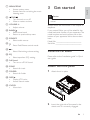
Insert a card
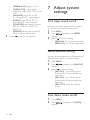
Play from iPod/iPhone
You can enjoy audio from iPod/iPhone through
this unit.
Note
• This unit supports SD and SDHC cards.
1
2
Press
3
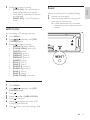
Insert the card into the card slot.
» The unit starts playing from the card
automatically.
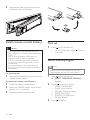
to release the panel.
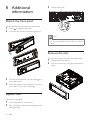
Push the left side of the panel rightward,
then pull the panel towards you to
disengage it from the chassis.
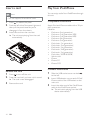
Remove the card
1
2
Press
3
Remove the card.
14
to turn off the unit.
Press the card until you hear a click sound.
» The card is now disengaged.
EN
Compatible iPod/iPhone
Apple iPod and iPhone models with a 30-pin
dock connector:
Made for.
• iPod nano (2nd generation)
• iPod nano (3rd generation 4GB)
• iPod nano (3rd generation 8GB)
• iPod nano (4th generation)
• iPod nano (5th generation)
• iPod classic (1st generation)
• iPod classic (2nd generation)
• iPod touch (1st generation)
• iPod touch (2nd generation)
• iPod touch (3rd generation)
• iPod video (30GB & 80GB)
Works with.
• iPhone
• iPhone 3G
• iPhone 3GS
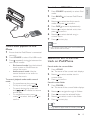
Connect iPod/iPhone
1
Slide the USB socket cover marked
to the left.
2
Insert USB adaptor on one end of iPod/
iPhone cable to the USB socket on the
main unit.
3
Insert the other end of the iPod/iPhone
cable to the iPod/iPhone socket.
» The unit starts playing from the USB
device automatically.