1
192
Sharing and publishing
the accompanying Reset Password and Register buttons. For the
latter, you'll be directed to the Registration page on the website.
Complete the registration details and click Create Account.
4.
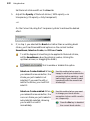
(Optional) Reduce the upload Quality to 96dpi to speed up file
transfer if your Internet connection is 56k dial-up modem (at the
expense of zoom quality). Otherwise, use the default 300 dpi for
broadband and all other faster Internet connections.
If you change your account details on the website at a later date, you'll also need
to make these account changes in Scrapbook Artist.
Uploading
Once you've successfully created your account you can upload your scrapbook,
with the option of including only specific or all pages.
To upload your scrapbook:
1.
On the Standard toolbar, click
2.
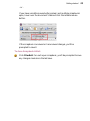
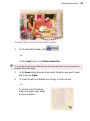
In the Share dialog, uncheck pages you don't want to upload (use the
scroll bar to view all pages).
3.
(Optional) For the upload you can choose a different account to
upload to. Enter a different Username and Password.
4.
Click
5.
On upload, a progress bar indicates upload status. On completion,
click OK to close the dialog or click View to immediately see your
uploaded scrapbook on the website.
.
to transfer your selected pages.