1
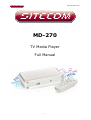
Full Manual MD-270
User Manual
Revision 1.0
Table of Contents
1
2
3
4
Key Features.............................................................................. 4
Package Contents ....................................................................... 5
Product Layout ........................................................................... 6
Getting Started ........................................................................ 10
Transfer Media files to USB storage...............................................................10
Connecting the MD-270...............................................................................10
Connect power to the MD-270......................................................................13
Connect USB storage to the MD-270 .............................................................13
Connect Ethernet to the MD-270 (Optional) ...................................................14
5
6
7
8
9
10
11
12
Navigating the menu................................................................. 15
Playing Videos.......................................................................... 16
Playing Music ........................................................................... 18
Showing Photos........................................................................ 20
Network Media ......................................................................... 22
Online content.......................................................................... 24
Search .................................................................................... 25
Settings .................................................................................. 26
System .....................................................................................................26
Network ....................................................................................................30
Playback....................................................................................................31
Slideshow ..................................................................................................32
Audio/Video ...............................................................................................33
-2-