1
1/92
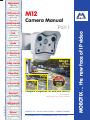
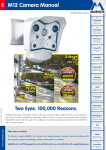
M12 Camera Manual Part 1
M12 CAMERA MANUAL PART 1
1
INTRODUCTION
6
1.1
MOBOTIX Cost Benefits
8
1.2
MOBOTIX Technical Advantages
9
1.3
The Concept Behind the MOBOTIX M12
10
1.4
Product Advantages of the MOBOTIX M12
14
1.5
Feature List
16
1.6
MOBOTIX M12 Lens Options
18
1.7
Hard- and Software Differences of the MOBOTIX M10/M12
19
1.8 Important Notes
1.8.1 MOBOTIX M12—Weatherproof to IP65
1.8.2 Password for the Administration Menu
1.8.3 Password for ISDN Dial-In
1.8.4 Irreversibly Deactivating the Microphone
1.8.5 Starting the Camera Using the Factory IP Address
1.8.6 Resetting the Camera to Factory Defaults
1.8.7 Activating Event Control for Security Applications
1.8.8 Deactivating Text and Logo Options
1.8.9 Deactivating the Daily Reboot of the Camera
1.8.10 ISDN Compatibility Note
1.8.11 Using Internet Browsers
1.8.12 Cleaning Instructions – Cleaning the Lenses
1.8.13 Safety Notes for Operating MOBOTIX Cameras
1.8.14 Maximum Cable Lengths
1.8.15 Additional Information
20
20
20
21
21
21
21
21
22
22
22
22
22
23
23
23
2
24
MOUNTING THE CAMERA
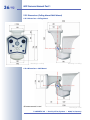
2.1 Delivered Parts, Camera Components and Dimensions
2.1.1 Standard Delivery
24
24
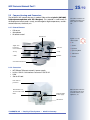
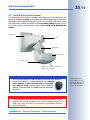
2.2 Camera Housing and Connectors
2.2.1 External Sensors
2.2.2 Connectors
25
25
25
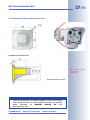
2.3
Optional Accessories
26
2.4
2.4.1
2.4.2
2.4.3
Wiring, Fire Prevention, Lightning and Surge Protection
Wiring
Fire Prevention
Lightning and Surge Protection
28
28
28
28
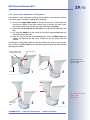
2.5
Providing the Connections (Network/ISDN)
29
© MOBOTIX AG • Security-Vision-Systems • Made in Germany
www.mobotix.com • [email protected]