1
MAYA44
ESI
4. Driver Software Installation
After completing the hardware installation of MAYA44, you must install the MAYA44 driver software. This
manual contains step by step guide for driver software installation for Windows XP. If you have any
difficulties installing drivers for other operating systems please contact ESI technical support.
NOTE:
Before starting the driver software installation, locate your original Windows CD, as you may need it during
installation. Also please make sure that you have installed a recent version of the chipset drivers and patches
provided by your main-board manufacturer for your main-board.
4.1. Installation
Always try to download the latest MAYA44 driver available from the ESI web site (www.esi-audio.com) .
The latest driver may have reported bug fixes and updated features.
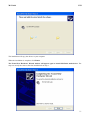
Turn on your computer. Windows will automatically detect a new device installation and the “Found New
Hardware Wizard” window will appear.
Choose Install from a list or specific location (Advanced) and click Next.
Insert the MAYA44 driver CD into the CD-ROM drive.
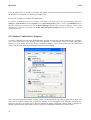
Choose Search for the best driver in these locations. Select Include this location in the search, click the
Browse button, and locate the MAYA44 driver folder on the driver CD. (CD letter may vary depending on
which computer you have).
9