1
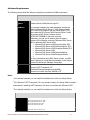
VMM agent Virtual machine host server requirements The minimum hardware requirements for each virtual machine host will vary depending on the number and type of guest operating systems, the applications you plan to install on the virtual machines, and the anticipated workload. For additional information, see the Virtual Server 2005 Deployment Guide on Microsoft TechNet or Windows Server 2008: Hyper-V Planning and Deployment Guide athttp://download.microsoft.com/download/8/1/5/81556693-1f05-494a-8d45cdeeb6d735e0/HyperV_Deploy.doc. Library server The minimum hardware requirements for a library server vary widely depending on the number and size of virtual machine templates, virtual hard disks, virtual floppy disks, ISO images, scripts, hardware profiles, guest operating system profiles, and stored virtual machines. The recommended hard disk capacity for a computer with a VMM library is 200 GB. Network Requirements This section details network requirements and considerations for installing Virtual Machine Manager. Connections – Due to the size of virtual machines, at least a 100MB Ethernet connection is suggested to connect all computers in a VMM configuration. A 1GB Ethernet connection will ensure adequate bandwidth and improved performance. However, if you use a 1GB Ethernet connection, you will likely see further performance enhancements if you use a more powerful processor for the VMM server than the recommended processor. Domains – Before installing the VMM server, you must join the computer to a domain in Active Directory® Domain Services (AD.) Virtual machine hosts may be part of a domain but they do not need to be. AD supports hosts in the DMZ, as well as VMware ESX hosts that are not AD-joined. Firewalls – If you want to manage a host across a machine-specific firewall, you must install the VMM agent locally on the host, which automatically opens port 80. The agent also uses port 443 by default. In order to manage hosts across a network firewall, you need to open the ports in that firewall manually to allow communication between the VMM server and the host. Once you open the ports, you can add the host to the VMM server. Microsoft System Center Virtual Machine Manager 2008 R2 Reviewer’s Guide 16