1
12
Integrated LCD KVM Switch Installer/User Guide
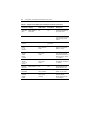
Table A.1: Integrated LCD KVM Switch Quick Reference Guide (Continued)
Command Hotkeys
OSD Control
Front-panel
Description
Show OSD
Menu
ScrLk + ScrLk +
(Space Bar)
N/A
N/A
Activate the OSD Menu on
the console screen
Autoscan
ScrLk + ScrLk + S
N/A
N/A
Autoscan through every
connected channel for quick
screen browsing of each
channel
Stop
Autoscan
Any key
N/A
Press any
push-button
Terminate Autoscan activity
Autoscan
Period
[5 ~ 95
seconds]
N/A
Main Menu /
Setup / Autoscan
period
N/A
Specify delay time within a
range of 5 ~ 99 seconds
[default = 10 sec]
Auto Logout
Timeout
Enable/
Disable
0~ 99 min
N/A
Main Menu /
Setup / Auto
Logout
N/A
Specify the time out for auto
logout screen /keyboard/
mouse locked after timeout
period for security (default
= 0 = Disable)
OSD Menu
Timeout
0 ~ 60 ~ 95
seconds
N/A
Main Menu /
Setup / OSD
Timeout
N/A
Specify the timeout for OSD
menu [default = 60 seconds;
0 = disable]
OSD Title
Bar On/Off
ScrLk + ScrLk + T
N/A
N/A
Enable/disable the OSD
Title Bar [default = ON]
OSD Title
Bar Position
Setup
Password
[Disable/
Enable]
Main Menu /
Setup / Title Bar
N/A
Main Menu /
Setup / Setup
Password
Select the OSD title bar
position on your screen
N/A
Enable/disable password
protection [default =
Disable; password length
<= 8 characters]