1
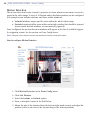
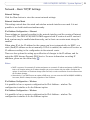
AXIS 207W / AXIS 207MW
Network Camera
User’s Manual
About this Document
This manual is intended for administrators and users of the
AXIS 207W and AXIS 207MW Network Cameras, and is
applicable for firmware release 4.44 and later. It includes
instructions for using and managing the camera on your
network. Previous experience of networking will be of use
when using this product. Some knowledge of UNIX or
Linux-based systems may also be beneficial, for developing
shell scripts and applications. Later versions of this document
will be posted to the Axis Website, as required. See also the
product’s online help, available via the Web-based interface.
Safety Notices Used In This Manual
Caution! - Indicates a potential hazard that can damage the
product.
Important! - Indicates a hazard that can seriously impair
operation.
Do not proceed beyond any of the above notices until you
have fully understood the implications.
Intellectual Property Rights
Axis AB has intellectual property rights relating to
technology embodied in the product described in this
document. In particular, and without limitation, these
intellectual property rights may include one or more of the
patents listed at http://www.axis.com/patent.htm and one or
more additional patents or pending patent applications in the
US and other countries.
This product contains licensed third-party software. See
“About” in the product’s user interface for more information.
This product contains source code copyright Apple Computer,
Inc., under the terms of Apple Public Source License 2.0 (see
http://www.opensource.apple.com/apsl/).
The source code is available from:
http://developer.apple.com/darwin/projects/bonjour/
EN 301 489 General EMC requirements for radio equipment,
ETS 300 328 Technical requirements for radio equipment.
Canada - This device complies with RSS-210 of Industry
Canada. Operation is subject to the following conditions:
(1) This device may not cause interference, and
(2) this device must accept any interference, including
interference that may cause undesired operation of the device.
Japan - This is a class B product based on the standard of the
Voluntary Control Council for Interference from Information
Technology Equipment (VCCI). If this is used near a radio or
television receiver in a domestic environment, it may cause radio
interference. Install and use the equipment according to the
instruction manual.
Australia - This electronic device meets the requirements of the
Radio communications (Electromagnetic Compatibility) Standard
1998 AS/NZS 4771.
Safety
Complies to EN 60950, Safety of Information Technology
equipment.
Equipment Modifications
This equipment must be installed and used in strict accordance
with the instructions given in the user documentation. This
equipment contains no user-serviceable components.
Unauthorized equipment changes or modifications will invalidate
all applicable regulatory certifications and approvals.
Liability
Video and audio surveillance can be prohibited by laws that
vary from country to country. Check the laws in your local
region before using this product for surveillance purposes.
This product includes one (1) MPEG-4 decoder license. To
purchase further licenses, contact your reseller.
Every care has been taken in the preparation of this manual.
Please inform your local Axis office of any inaccuracies or
omissions. Axis Communications AB cannot be held responsible
for any technical or typographical errors and reserves the right to
make changes to the product and manuals without prior notice.
Axis Communications AB makes no warranty of any kind with
regard to the material contained within this document, including,
but not limited to, the implied warranties of merchantability and
fitness for a particular purpose. Axis Communications AB shall
not be liable nor responsible for incidental or consequential
damages in connection with the furnishing, performance or use of
this material.
Radio Transmission Regulatory Information & EMC
Trademark Acknowledgments
Legal Considerations
This equipment generates and radiates radio frequency
energy, and must be installed and operated while maintaining
a minimum body-to-camera distance of 3 feet (1 meter).
If this equipment causes harmful interference to radio or
television reception, which can be determined by turning the
equipment off and on, the user is encouraged to try to correct
the interference by one or more of the following measures:
Re-orient or relocate the receiving antenna. Increase the
separation between the equipment and receiver. Connect the
equipment to an outlet on a different circuit to the receiver.
Consult your dealer or an experienced radio/TV technician
for help. Shielded (STP) network cables must be used with
this unit to ensure compliance with EMC standards.
Tested to comply with FCC Standards FOR HOME OR OFFICE
USE. This product must be installed and used in strict
accordance with the instructions given in the user
documentation. This Axis product complies with the
following radio frequency and safety standards:
USA - Federal Communications Commission FCC
This device complies with Part 15 of FCC Rules. Operation of
the device is subject to the following two conditions:
(1) This device may not cause harmful interference
(2) This device must accept any interference that may cause
undesired operation.
Europe - EU Declaration of Conformity. This device
complies with the requirements of the R&TTE Directive
1999/5/EC with essential test suites as per standards:
AXIS COMMUNICATIONS
<Product
Name> Quick User’s Guide
ActiveX, Apple, Boa, Ethernet, Internet Explorer, Linux,
Microsoft, Mozilla, Netscape Navigator, OS/2, Real, QuickTime,
UNIX, Windows, WWW are registered trademarks of the
respective holders. Java and all Java-based trademarks and logos
are trademarks or registered trademarks of Sun Microsystems, Inc.
in the United States and other countries. Axis Communications
AB is independent of Sun Microsystems Inc.
UPnPTM is a certification mark of the UPnPTM Implementers
Corporation. Bonjour is a trademark of Apple Computer Inc.
Support
Should you require any technical assistance, please contact your
Axis reseller. If your questions cannot be answered immediately,
your reseller will forward your queries through the appropriate
channels to ensure a rapid response. If you are connected to the
Internet, you can:
• download user documentation and firmware updates
• find answers to resolved problems in the FAQ database. Search
by product, category, or phrases
• report problems to Axis support by logging in to your private
support area
• visit Axis Support at www.axis.com/techsup/
AXIS 207W/ AXIS 207MW User’s Manual Rev.3.2
January 2007
Part No. 33158
Copyright© Axis Communications AB, 2005-2007
AXIS 207W/207MW
Contents
Product Features . . . . . . . . . . . . . . . . . . . . . . . . . . . . . . . . . . . . . . . . . . . . . . . . . . . . . . . . . . . . . . . . . 5
Key features . . . . . . . . . . . . . . . . . . . . . . . . . . . . . . . . . . . . . . . . . . . . . . . . . . . . . . . . . 5
Overview . . . . . . . . . . . . . . . . . . . . . . . . . . . . . . . . . . . . . . . . . . . . . . . . . . . . . . . . . . . . 6
LED indicators . . . . . . . . . . . . . . . . . . . . . . . . . . . . . . . . . . . . . . . . . . . . . . . . . . . . . . . . 7
Accessing the Camera . . . . . . . . . . . . . . . . . . . . . . . . . . . . . . . . . . . . . . . . . . . . . . . . . . . . . . . . . . . . 8
Access from a browser . . . . . . . . . . . . . . . . . . . . . . . . . . . . . . . . . . . . . . . . . . . . . . . . 8
Setting the Password . . . . . . . . . . . . . . . . . . . . . . . . . . . . . . . . . . . . . . . . . . . . . . . . . . 9
Accessing the camera from the Internet . . . . . . . . . . . . . . . . . . . . . . . . . . . . . . . . . . 9
3GPP Compatibility . . . . . . . . . . . . . . . . . . . . . . . . . . . . . . . . . . . . . . . . . . . . . . . . . . . 9
Focusing . . . . . . . . . . . . . . . . . . . . . . . . . . . . . . . . . . . . . . . . . . . . . . . . . . . . . . . . . . . 10
Video recording. . . . . . . . . . . . . . . . . . . . . . . . . . . . . . . . . . . . . . . . . . . . . . . . . . . . . . 12
Video Streams . . . . . . . . . . . . . . . . . . . . . . . . . . . . . . . . . . . . . . . . . . . . . . . . . . . . . . . . . . . . . . . . . . 13
How to stream MPEG-4 . . . . . . . . . . . . . . . . . . . . . . . . . . . . . . . . . . . . . . . . . . . . . . . 13
MPEG-4 clients. . . . . . . . . . . . . . . . . . . . . . . . . . . . . . . . . . . . . . . . . . . . . . . . . . . . . . 14
Motion JPEG . . . . . . . . . . . . . . . . . . . . . . . . . . . . . . . . . . . . . . . . . . . . . . . . . . . . . . . . 14
Alternative methods of accessing the video stream . . . . . . . . . . . . . . . . . . . . . . . . 15
Configuration . . . . . . . . . . . . . . . . . . . . . . . . . . . . . . . . . . . . . . . . . . . . . . . . . . . . . . . . . . . . . . . . . . 16
Accessing the Setup link . . . . . . . . . . . . . . . . . . . . . . . . . . . . . . . . . . . . . . . . . . . . . . 16
AXIS Media Control . . . . . . . . . . . . . . . . . . . . . . . . . . . . . . . . . . . . . . . . . . . . . . . . . . 16
Video and Image settings. . . . . . . . . . . . . . . . . . . . . . . . . . . . . . . . . . . . . . . . . . . . . . 17
Advanced. . . . . . . . . . . . . . . . . . . . . . . . . . . . . . . . . . . . . . . . . . . . . . . . . . . . . . . . . . . 18
Audio . . . . . . . . . . . . . . . . . . . . . . . . . . . . . . . . . . . . . . . . . . . . . . . . . . . . . . . . . . . . . . 19
Live View Config . . . . . . . . . . . . . . . . . . . . . . . . . . . . . . . . . . . . . . . . . . . . . . . . . . . . . . . . . . . . . . . . 20
Layout . . . . . . . . . . . . . . . . . . . . . . . . . . . . . . . . . . . . . . . . . . . . . . . . . . . . . . . . . . . . . 20
Event Config . . . . . . . . . . . . . . . . . . . . . . . . . . . . . . . . . . . . . . . . . . . . . . . . . . . . . . . . . . . . . . . . . . . 24
Port Status . . . . . . . . . . . . . . . . . . . . . . . . . . . . . . . . . . . . . . . . . . . . . . . . . . . . . . . . . 27
System Options . . . . . . . . . . . . . . . . . . . . . . . . . . . . . . . . . . . . . . . . . . . . . . . . . . . . . . . . . . . . . . . . . 28
Security . . . . . . . . . . . . . . . . . . . . . . . . . . . . . . . . . . . . . . . . . . . . . . . . . . . . . . . . . . . . 28
Date & Time . . . . . . . . . . . . . . . . . . . . . . . . . . . . . . . . . . . . . . . . . . . . . . . . . . . . . . . . 29
Ports & Devices. . . . . . . . . . . . . . . . . . . . . . . . . . . . . . . . . . . . . . . . . . . . . . . . . . . . . . 39
LED Settings . . . . . . . . . . . . . . . . . . . . . . . . . . . . . . . . . . . . . . . . . . . . . . . . . . . . . . . . 39
Maintenance . . . . . . . . . . . . . . . . . . . . . . . . . . . . . . . . . . . . . . . . . . . . . . . . . . . . . . . . 39
Support . . . . . . . . . . . . . . . . . . . . . . . . . . . . . . . . . . . . . . . . . . . . . . . . . . . . . . . . . . . . 40
Advanced. . . . . . . . . . . . . . . . . . . . . . . . . . . . . . . . . . . . . . . . . . . . . . . . . . . . . . . . . . . 41
3
4
AXIS 207W/207MW
The I/O Terminal Connector . . . . . . . . . . . . . . . . . . . . . . . . . . . . . . . . . . . . . . . . . . . . . . . . . . . . . . . 42
Troubleshooting . . . . . . . . . . . . . . . . . . . . . . . . . . . . . . . . . . . . . . . . . . . . . . . . . . . . . . . . . . . . . . . . 44
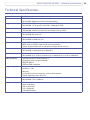
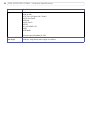
Technical Specifications . . . . . . . . . . . . . . . . . . . . . . . . . . . . . . . . . . . . . . . . . . . . . . . . . . . . . . . . . . 49
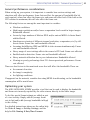
General performance considerations . . . . . . . . . . . . . . . . . . . . . . . . . . . . . . . . . . . . 53
Optimizing your system . . . . . . . . . . . . . . . . . . . . . . . . . . . . . . . . . . . . . . . . . . . . . . . 53
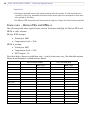
Frame rates - Motion JPEG and MPEG-4 . . . . . . . . . . . . . . . . . . . . . . . . . . . . . . . . . 54
Glossary of Terms . . . . . . . . . . . . . . . . . . . . . . . . . . . . . . . . . . . . . . . . . . . . . . . . . . . . . . . . . . . . . . . 55
Index . . . . . . . . . . . . . . . . . . . . . . . . . . . . . . . . . . . . . . . . . . . . . . . . . . . . . . . . . . . . . . . . . . . . . . . . . 62
AXIS 207W/AXIS 207MW - Product Features
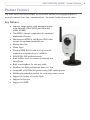
Product Features
The AXIS 207W and AXIS 207MW are the world’s smallest true megapixel MPEG-4
network cameras, from Axis communications - the market leader in network video.
Key features
• Superior image quality, with maximum resolutions 640x480 (AXIS 207W) and1280x1024
(AXIS 207MW)
• True MPEG-4 image compression for optimized
bandwidth efficiency
• Simultaneous MPEG-4 and Motion JPEG video
streams for optimum bandwidth use
• Motion detection
• Alarm input
• Wireless (IEEE 802.11b and 802.11g) network
connection at speeds of up to 54 Mbit/s
• WPA/WPA2-PSK wireless security
• Built-in Web server for remote monitoring and
surveillance
• Built-in microphone for one-way audio
• Excellent low light performance down to 1 lux
• Compatible with PDAs/cell phones using 3GPP media players
• Multilevel password protection for restricting camera access
• Support for Quality of Service (QoS)
• Support for Bonjour
• Support for SNMP
5
6
AXIS 207W/AXIS 207MW - Product Features
Overview
I/O terminal
connector
Antenna
Focus ring
Status
indicator
(outer ring)
Lock ring
Network
indicator
Product ID &
serial number
(S/N) label
Control
button
Wireless indicator
Microphone
Network
connector
Power
indicator
Power
connector
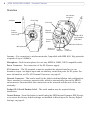
Antenna - For connection to wireless networks. Compatible with IEEE 802.11b/g networks
at speeds of up to 54 Mbit/s.
Microphone - Built-in microphone for one way MPEG-4, ISMA, 3GPP compatible audio.
Power Connector - For connection of the PS-H power supply.
I/O Connector - The I/O terminal connector provides the physical interface to one
transistor output, one digital input and an auxiliary connection point for DC power. For
more information, see The I/O Terminal Connector, on page 42.
Network Connector - This can be used for the initial wired installation and configuration.
Uses a standard or crossover network cable, which is automatically detected by MDI-X
autocrossover. Once installed, this connection can be removed and the unit can be run
wirelessly.
Product ID & Serial Number Label - The serial number may be required during
installation.
Control Button - Press this button to install using the AXIS Internet Dynamic DNS Service,
or to restore the factory default settings, as described in Resetting to the Factory Default
Settings, on page 41.
AXIS 207W/AXIS 207MW - Product Features
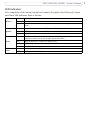
LED indicators
After completion of the startup and self test routines, the multi-colored Network, Status,
and Power LED indicators flash as follows:
Unlit
Wireless
Network
Status
Power
Wired mode.
Green
Steady for connection to a wireless network. Flashes for network activity.
Red
Steady for no wireless network connection. Flashes when scanning for wireless networks.
Amber
Steady for connection to a 10 Mbit/s network. Flashes for network activity.
Green
Steady for connection to a 100 Mbit/s network. Flashes for network activity.
Unlit
No wired network connection, or when in wireless mode.
Green
Steady for normal operation. Can be configured to flash green at intervals whenever the
camera is accessed. See the online help for more information.
Unlit
When configured for “no flash” on camera access.
Amber
Steady during startup, reset to factory default or when restoring settings.
Red
Slow flash for failed upgrade.
Green
Normal operation.
Amber
Flashes green/amber during firmware upgrade.
7
8
AXIS 207W/AXIS 207MW - Accessing the Camera
Accessing the Camera
Before accessing the camera it must first be installed. Please see the installation guide
supplied with the product.
The camera can be used with most operating systems and browsers. The recommended
browser is Microsoft Internet Explorer with Windows, Safari with Macintosh, and Firefox
with other operating systems.
Notes: • To view streaming video in Microsoft Internet Explorer, set your browser to allow ActiveX controls and
allow the AXIS Media Control (AMC) to be installed on your computer.
• QuickTimeTM and Real PlayerTM are also supported for viewing streaming MPEG-4 video and audio.
• If your computer restricts the use of additional software components, the camera can be configured to use
a Java applet for viewing motion JPEG.
• The AXIS 207W/AXIS 207MW includes one (1) decoder license for viewing MPEG-4 video streams. This is
automatically installed with AMC. The administrator can disable the installation of the MPEG-4 decoder, to
prevent unlicensed copies being installed.
Access from a browser
1. Start a browser.
2. Enter the IP address or host name of the
camera in the browser’s Location/Address field.
To access the camera from a Macintosh computer (Mac OSX), simply click on the
Bonjour tab and select the camera from the drop-down list.
3. If this is the first time the camera is accessed, see Setting the Password, on page 9.
Otherwise enter your user name and password, as set by the administrator.
4. If required, click Yes to install the AXIS Media Control (AMC). You will need
administrator rights on the computer to do this.
5. The camera’s Live View page is now displayed in your browser.
Note: The layout of the Live View page may have been customized to specific requirements. Consequently, some
of the examples and functions featured here may differ from those displayed on your own Live View page.
AXIS 207W/AXIS 207MW - Accessing the Camera
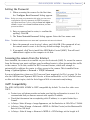
Setting the Password
1. When accessing the camera for the first time,
the ‘Configure Root Password’ dialog appears.
Note: Before you enter your password at this point, you can secure
configuration of the root password via HTTPS by creating a
self-signed certificate. To do so, click the Create self-signed certificate... button in the Create Certificate window, and then
proceed as follows.
2. Enter a password and re-enter, to confirm the
spelling. Click OK.
3. The ‘Enter Network Password’ dialog appears. Enter the User name: root
Note: The default administrator user name root is permanent and cannot be deleted.
4. Enter the password as set in step 2 above, and click OK. If the password is lost,
the camera must be reset to the factory default settings. See page 41.
5. If prompted, click Yes to install the AXIS Media Control (AMC). You will need
administrator rights on the computer to do this.
Accessing the camera from the Internet
Once installed, the camera is accessible on your local network (LAN). To access the camera
from the Internet you must configure your broadband router to allow incoming data traffic
to the camera. To do this, enable the NAT-traversal feature, which will attempt to
automatically configure the router to allow access to the camera. This is enabled from
Setup > System Options > Network > TCP/IP Advanced.
For more information, please see NAT traversal (port mapping) for IPv4, on page 34. See
also the AXIS Internet Dynamic DNS Service at www.axiscam.net or, for Technical notes
on this and other topics, visit the Axis Support Web at www.axis.com/techsup
3GPP Compatibility
The AXIS 207W/AXIS 207MW is 3GPP compatible by default. To view live video over
3GPP:
• Contact your cell phone provider and make sure that the configuration is correct. It is
recommended that you have an account with a public IP address.
• Check that the camera has a completely public IP address, i.e. no ports blocked by a
firewall.
• In Setup > Video & Image > Image Appearance, set the Resolution to 160x120 or 176x144
• In Setup > Video & Image > Advanced > MPEG-4 > Bit Rate Control, set the Maximum Bit
Rate to 64 or 128 kbit/s
• In Setup > Video & Image > Advanced > MPEG-4 > GOV Settings, set the Length to 8.
9
10 AXIS 207W/AXIS 207MW - Accessing the Camera
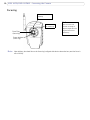
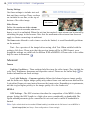
Focusing
Small dot above the lens
assembly.
Raised line
on focus ring.
Focus Ring
(inner ring)
To focus:
Open a browser and
examine the image. If
required, adjust the focus
ring until the focus is
satisfactory.
Status Indicator
(outer ring)
Note: Upon delivery, the raised line on the focus ring is aligned with the dot above the lens, and the focus is
set to infinity.
AXIS 207W/AXIS 207MW - Accessing the Camera
The Live View Page
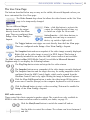
The buttons described below may or may not be visible; this would depend on how you
have customized the Live View page.
The Video Format drop-down list allows the video format on the Live View
page to be temporarily changed.
The two different Output
buttons control the output
directly from the Live View
page. These are configured from
Setup > Live View Config >
Layout.
Pulse - click this button to activate the
output for a defined period of time, e.g.
to switch on a light for 20 seconds.
Active/Inactive - click these buttons to
manually start and stop a connected
device, e.g. switch a light on/off.
The Trigger buttons can trigger an event directly from the Live View page.
These are configured under Setup > Live View Config > Layout.
The Snapshot button shows a snapshot of the video image currently displayed.
Right-click on the video image to save it in JPEG format. This button is
primarily intended for use when the AMC viewer toolbar is not available.
The AMC viewer toolbar (AXIS Media Control) is available in Microsoft Internet
Explorer only. It can display the following buttons:
The Play/Stop button starts and stops the live video stream.
The Snapshot button saves a snapshot of the video image currently displayed.
The Snapshot function and the target directory for saving snapshots can be
configured from the AMC Control Applet, which can be opened from the
Windows Control Panel or by right-clicking the image in Internet Explorer.
Click the View Full Screen button to make the video image fill the entire
screen area. Press Esc (Escape) on the computer keyboard to exit full screen.
Click the Record button to start a video recording. This must be enabled in
Setup > Live View Config > Layout
AMC audio controls
These control the client computer’s speaker output. The controls are only available in
MPEG-4 video format and when audio is enabled, see Audio, on page 19.
Click the Mute/Sound button to switch the sound off and on.
Use the slider to control the volume. The volume can be set between 0
and 100.
11
12 AXIS 207W/AXIS 207MW - Accessing the Camera
Video recording
To record video sequences:
• The Record button must be enabled (see above)
• The Video format on the Live View page must be set to MPEG-4.
Click the button to start the recording and click again to stop.
To view recordings, the PC used for viewing requires:
• an MPEG-4 decoder installed
• a media player that can play ASF files (e.g. Windows Media Player)
To define other settings, such as where to save recordings, right-click in the video image
and select Settings.
See also the AMC User’s Manual, available on the CD supplied with this product, or from
www.axis.com/techsup
Note: Play/Stop buttons are also available when viewing the video stream in other browsers.
AXIS 207W/AXIS 207MW - Video Streams
Video Streams
The AXIS 207W/AXIS 207MW provides several different image and video stream formats.
The type you choose depends on your requirements and on the properties of your network.
The Live View page in the camera provides access to MPEG-4 and Motion JPEG video
streams, as well as to single JPEG images. Other applications and clients can also access
these video streams/images directly, without going via the Live View page.
How to stream MPEG-4
This video compression standard makes good use of bandwidth, and can provide
high-quality video streams at less than 1 Mbit/s. Note that the image settings of the
MPEG-4 stream are the same for all clients.
Deciding on the combination of protocols and methods to use depends on your viewing
requirements, and on the properties of your network. The available options in AMC are:
Unicast RTP
RTP over RTSP
This unicast method (RTP over UDP) should be
your first consideration for live unicast video,
especially when it is important to always have
an up-to-date video stream, even if some
images are dropped.
This unicast method (RTP tunneled over RTSP) is
useful as it is relatively simple to configure firewalls to allow RTSP traffic.
Unicasting is used for video-on-demand broadcasting, so that there is no video traffic on the
network until a client connects and requests the
stream.
Note: There is a maximum of 10
simultaneous unicast connections.
RTP over RTSP over
HTTP
This unicast method can be used to traverse firewalls. Firewalls are commonly configured to
allow the HTTP protocol, thus allowing RTP to be
tunneled.
Multicast RTP
This method (RTP over UDP) should be used for live multicast video. The video stream is always
up-to-date, even if some images are dropped.
Multicasting provides the most efficient usage of bandwidth when there are large numbers of clients
viewing simultaneously. A multicast broadcast cannot however, pass a network router unless the
router is configured to allow this. It is thus not possible to multicast over e.g. the Internet.
Note also that all multicast viewers count as one unicast viewer in the maximum total of 10 simultaneous connections.
When the Reconnect Strategy is not enabled, AMC will negotiate with the camera to
determine exactly which transport protocol to use, in the order listed above. This order can
be changed and the options disabled, to suit specific requirements. See also the AMC User’s
manual, available from the Network Video link in www.axis.com/techsup
Important!
MPEG-4 is licensed technology. The AXIS 207W/AXIS 207MW includes one viewing
client license. Installing additional unlicensed copies of the viewing client is prohibited. To purchase additional licenses, contact your Axis reseller.
13
14 AXIS 207W/AXIS 207MW - Video Streams
MPEG-4 clients
AXIS Media Control (AMC)
The recommended method of accessing live video (MPEG-4
and Motion JPEG) from the AXIS 207MW is to use the
AXIS Media Control (AMC) in Microsoft Internet Explorer
in Windows.
The AMC control panel can be used to configure various
video and audio settings. Please see the readme file
included in the tool for more information, and also the
AMC User’s Manual, available on the CD supplied with this
product, or from www.axis.com/techsup
The AMC control panel is automatically installed on first use and can then be opened:
• From the Windows Control Panel (from the Start menu)
• By right-clicking the image in Internet Explorer and clicking Settings in the menu.
QuickTime™ & Real Player™
To access the video stream from QuickTime™ or Real Player™ for example, the following
paths can be used:
• rtsp://<ip>/mpeg4/media.amp
• rtsp://<ip>/mpeg4/media.3gp
Notes: • The AXIS 207W/AXIS 207MW supports QuickTime 6.5.1 (or later) and Real Player 10.5 (or later)
• QuickTime adds latency to the video and audio stream (up to 3 seconds)
• It may be possible to use other players to view the MPEG-4 stream using the paths above, although this is
not guaranteed by Axis
• <ip> = IP address
Motion JPEG
This format uses standard JPEG still images for the video stream. These images are then
displayed and updated at a rate sufficient to create a stream that shows constantly updated
motion.
The Motion JPEG stream uses considerable amounts of bandwidth, but provides excellent
image quality and access to every image contained in the stream. The recommended
method of accessing Motion JPEG live video from the AXIS 207W/AXIS 207MW is to use
the AXIS Media Control (AMC) in Microsoft Internet Explorer in Windows.
Note also that multiple clients accessing Motion JPEG streams can use different image
settings.
AXIS 207W/AXIS 207MW - Video Streams
Alternative methods of accessing the video stream
Video/images from the AXIS 207MW can also be accessed in the following ways:
• 3GPP - enter the following path:
• rtsp://<ip>/mpeg4/media.3gp
Refer to 3GPP Compatibility, on page 9 for more information.
• Motion JPEG server push (if supported by the client, e.g. Firefox). This option maintains
an open HTTP connection to the browser and sends data as and when required, for as
long as required. See HTML Examples, on page 23.
• Still JPEG images in a browser. Enter e.g. the path:
http://<ip>/axis-cgi/jpg/image.cgi?resolution=320x240
• Windows Media Player. This requires that you install AMC and the MPEG-4 viewing client. The paths that can be used are listed below in the order of preference.
• Unicast via RTP: axrtpu://<ip>/mpeg4/media.amp
• Unicast via RTSP: axrtsp://<ip>/mpeg4/media.amp
• Unicast via RTSP, tunneled via HTTP: axrtsphttp://<ip>/mpeg4/media.amp
• Multicast: axrtpm://<ip>/mpeg4/media.amp
Note: <ip> = IP address
15
16 AXIS 207W/AXIS 207MW - Configuration
Configuration
This section describes how to configure the camera, and is intended for product
Administrators, who have unrestricted access to all the configuration tools, within the
Setup link; and Operators, who have access to the settings for Video & Image, Audio, Live
View Config and Event Configuration.
The camera is configured from the Setup link, from a standard browser.
Below are examples of the features available in the AXIS 207MW. For details of each
setting, please refer to the online help available from the Setup link. Click
to access the
online help.
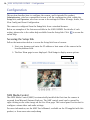
Accessing the Setup link
Follow the instructions below to access the Setup link from a browser.
1. Start your browser and enter the IP address or host name of the camera in the
location/address field.
2. The Live View page is now displayed. Click Setup to display menu options.
Setup link
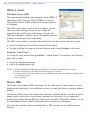
AXIS Media Control
The AXIS Media Control (AMC) is automatically installed the first time the camera is
accessed from Microsoft Internet Explorer. The AMC control panel can be opened by
right-clicking on the video image on the Live View page. The control panel can be used to
configure various video and audio settings.
For more information, see the AMC User’s Manual, available on the CD supplied with this
product, or from www.axis.com/techsup
AXIS 207W/AXIS 207MW - Configuration
Video and Image settings
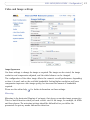
Image Appearance
Use these settings to change the image as required. The image can be rotated, the image
resolution and compression adjusted, and the white balance can be changed.
The configuration of the video image affects the camera’s overall performance, depending
on how it is used, and on the available bandwidth. Setting higher resolution and lower
compression improves video image quality, but increases the amount of bandwidth
required.
Please see the online help
for further information on these settings.
Mirroring
Mirroring is the horizontal flipping of an image, that gives you another image perspective.
This is a useful function when you need a direct view of the image, for example, in ATMs
and door phones. The mirroring settings should be defined before you define the
parameters for privacy masks and motion detection.
17
18 AXIS 207W/AXIS 207MW - Configuration
Overlay Settings
Use these settings to include text and
date and time overlays. These overlays
are included in one line, at the top or
bottom of the video image.
Video Stream
Text, date and
time overlay
Define the maximum video stream
time per session in seconds, minutes or
hours, or set it as unlimited. When the set time has expired, a new stream can be started by
refreshing the page in the browser. Note that the maximum video stream time does not
apply to clients connecting via multicast.
The frame rate allowed to each viewer can also be limited, to avoid bandwidth problems
on the network.
Test - For a preview of the image before saving, click Test. When satisfied with the
settings, click Save. Please note that the preview image will be in JPEG format, even
though the settings are valid both for Motion JPEG and MPEG-4. Please refer to the online
help for more information.
Advanced
Camera
Lighting Conditions - These settings help fine-tune the video image. They include the
color level, brightness, sharpness and exposure control. Please see the online help
for
further information on these settings.
Low Light Behavior - Exposure priority defines the balance between image quality
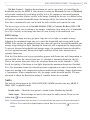
and the frame rate. Higher image quality may reduce frame rate and increase motion blur.
A prioritized frame rate may instead increase the image noise. Depending on requirements,
use this to give higher priority to the image quality or to the frame rate.
MPEG-4
GOV Settings - The GOV structure describes the composition of the MPEG-4 video
stream. Setting the GOV-length to a high value saves considerably on bandwidth. The
Cyclic refresh parameter gives a smoother bit rate and can be useful if bandwidth is
limited.
Note: Cyclic refresh should not be enabled if Event handling is enabled and the file format is set to MPEG-4 in
Upload images/video (see Setup > Event configuration > Event settings).
AXIS 207W/AXIS 207MW - Configuration
Bit Rate Control - Limiting the maximum bit rate is a good way of controlling the
bandwidth used by the MPEG-4 video stream. Leaving the Maximum bit rate as Unlimited
will provide consistently good image quality, but at the expense of increased bandwith
usage whenever there is more activity in the image. Limiting the bit rate to a defined value
will prevent excessive bandwidth usage, but images will be lost when the limit is exceeded.
Note that a maximum bit rate can be used for both variable and constant bit rates.
The bit rate type can be set as Variable Bit Rate (VBR) or Constant Bit Rate (CBR). VBR
will adjust the bit rate according to the images' complexity, thus using a lot of bandwidth
for a lot of activity in the image and less for lower activity in the monitored area.
MJPEG Settings
Sometimes the image size may get quite large due to low light or complex scenery.
Adjusting the maximum frame size can control the bandwidth and storage used by the
MJPEG video stream. An unlimited frame size value will result in increased bandwidth and
storage usage during low light. Limiting the frame size will compromise the image quality.
To prevent increase in bandwidth and storage usage, the maximum frame size should be
set to an optimal amount. During ideal light conditions follow these instructions to
optimize frame size:
Click the View button and a pop-up window appears with Frame size and Compression in
the text field. Note the current frame size. To calculate a maximum frame size add 10 20% to the current frame size. Enter the calculated frame size in the Limited to… field.
Verify the quality of the image in low light. Increase the maximum frame size if needed.
Note: The maximum frame size allowed increases compression in order to maintain a low
frame size, starting at the compression value set under Image Settings > Image Appearance
> Compression. When compression is 100, the image cannot be made smaller. You may
also need to adjust the Resolution setting if a smaller frame size is needed.
Audio
The built-in microphone in the AXIS 207W/AXIS 207MW provides one-way MPEG-4,
ISMA, 3GPP compatible audio.
Enable audio - Check the box option to enable Audio (disabled by default).
Audio input - These settings are used to fine-tune the audio stream. Please see the
for more information,
online help
Note: To receive synchronized video and sound, it is recommended that the camera time is synchronized with an
NTP Server. This is enabled under System Options > Date & Time. See the online help
mation.
for more infor-
19
20 AXIS 207W/AXIS 207MW - Live View Config
Live View Config
Layout
Here you can define the layout of the Live View page.
The layout can be set in two ways:
• Use Axis look - the layout is unchanged.
• Use custom settings - modify the Axis look, with your own colors, images. Click the
Configure button. See Customizing the default page, on page 21.
The other settings on this page concern other features you can configure, such as action
button, output button, default video stream and viewer. See page 21 for more information.
AXIS 207W/AXIS 207MW - Live View Config
Customizing the default page
The appearance of the default Live
View page can be customized to suit
your requirements, or you can upload
and use your own home page. To
upload your own files, click the
Upload button in the Custom
Settings window, and see the
description below.
Upload Own Web Files
Your own web files, or background
pictures, must first be uploaded to the
camera in order to be available for
selection in the Custom Settings setup dialog. Once uploaded, the files are shown in the
drop-down lists.
1. Click the Upload/Remove button.
2. Enter the path to the file located on your computer, or click the Browse button.
3. Select the user level for the uploaded file. Setting the user access level means that
you have complete control over which pages can be viewed by users.
4. When the path is shown correctly in the text field, click the Upload button.
All uploaded files are shown in the list in the lower section of the page. To remove a file,
check the box provided next to it and then click the Remove button.
Unchecking the Show setup link box option will remove the setup link from the product's
Home Page. You can then access the menus within the Setup link by entering the full setup
address into the address/URL field of a browser.
If the setup link is hidden, setup can be reached at this URL: http://<ip address>/operator/basic.shtml.
Own Home Page - To use a previously uploaded web page as the default page,
check this box option, select the page from the drop-down list, and click OK.
Default Video Format
Select the default video format to use on the Live View page. Checking the Show video
format selection box option displays a drop-down list on the Live View page allowing you
to temporarily change the format.
When using MPEG-4 video format, the default viewer is AXIS Media Control with Internet
Explorer.
Note: It is also possible to view Motion JPEG when MPEG-4 is chosen as default and vice versa.
21
22 AXIS 207W/AXIS 207MW - Live View Config
Default Viewer
From the drop-down lists, select the default method for viewing video images for your
browser. The camera will attempt to show the video images in the selected video format
and viewer. If this is not possible, the camera will override the settings and select the best
available combination.
Browser
Windows
Internet Explorer
Other browsers
Viewer
Description
AMC
Recommended viewer in Windows Internet Explorer (MPEG-4 /Motion JPEG).
QuickTime
MPEG-4 only.
Java applet
A slower imaging alternative to AMC - no download required (Motion JPEG only).
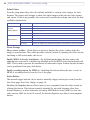
Still image
Displays still images only. Hit the Refresh button in your browser to view a new image.
Server Push
Recommended viewer for other browsers (Motion JPEG).
QuickTime
MPEG-4 only.
Java applet
A slower imaging alternative to Server Push (Motion JPEG only).
Still image
Displays still images only. Hit the Refresh button in your browser to view a new image.
Viewer Settings
Show viewer toolbar - Check this box option to display the viewer toolbar under the
image in your browser. The toolbar provides various controls for pausing the video stream,
switching to full screen mode, and so on.
Enable MPEG-4 decoder installation - By checking/unchecking this box option, the
administrator can enable or disable the installation of the MPEG-4 decoder included with
AMC. This is used to prevent the installation of unlicensed copies. Further decoder licenses
can be purchased from your Axis dealer.
Enable recording button for MPEG-4 - Enabling this button allows the user to start an
MPEG-4 recording directly from the Live View page.
Action Buttons
The manual trigger buttons can be used to manually trigger and stop an event from the
Live View page. See Event Config, on page 24.
Enabling the Snapshot button allows users to save a snapshot from the video stream by
clicking the button. This button is mainly intended for use with browsers other than
Internet Explorer, or when otherwise not using AXIS Media Control (AMC) to view the
video stream. AMC (an ActiveX control) for Internet Explorer provides its own snapshot
button.
AXIS 207W/AXIS 207MW - Live View Config
HTML Examples
You can add live video from the AXIS 207W/AXIS 207MW to your own web site. The
camera can transmit a Motion JPEG stream to up to 10 simultaneous connections,
although an administrator can restrict this to fewer.
Select the preferred video format from the drop down list. The available options are Motion
JPEG, MPEG-4 using AMC and MPEG-4 using QuickTime. If MPEG-4 is set as the video
format, note that a separate MPEG-4 license is required for each viewer.
The Motion JPEG selection has additional settings for Image Type, Image size and other
optional settings to configure the video stream to suit your Web page. Click Update when
satisfied with the video stream.
The camera generates the required source code for your configuration. Copy this code and
paste it into your own Web page code.
23
24 AXIS 207W/AXIS 207MW - Event Config
Event Config
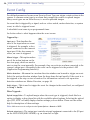
Pre-defined parameters, known as an Event or Event Type can trigger certain actions in the
camera. A common event type is an alarm that prompts the camera to upload images.
Many event types use an Event Server, to receive uploaded images.
An event that is triggered by a signal, such as a door switch, motion detection, or system
event, is called a triggered event.
A scheduled event runs at pre-programmed times.
An Action refers to what happens when the event occurs.
Triggered by...
Input port - This describes the
state of the input when an event
is triggered; for example, a door
sensor connected to the camera’s
input port. If the door sensor is
active, an event is triggered.
Manual trigger - This option makes
use of the action buttons on the
live view page, which are used to
start or stop the event manually. For example, they can activate an alarm connected to the
camera’s output port. Alternatively the event can be triggered via the product's API
(Application Programming Interface).
Motion detection - Movement in a motion detection window can be used to trigger an event.
Select the motion detection window from the drop-down list and specify if the event is to
be triggered at the stop or start of motion. For information on how to set up motion
detection windows see Motion Detection, on page 26.
Audio trigger - This is used to trigger the event for changes in the sound level, as configured
in Setup > Audio.
When Triggered...
Upload images/video - To upload images when the event type is triggered, check this box
option to display a drop-down list with the available upload options. Selecting the upload
type (FTP, HTTP or Email) displays further settings you can define. Please see the online
help for descriptions of these settings.
Note: Mail servers must be configured under System Options > Network > SMTP
Activate output port - The output port controls external equipment connected to the I/O port
on the AXIS 207W/AXIS 207MW, e.g. an alarm bell or light.
AXIS 207W/AXIS 207MW - Event Config
Send HTTP notification - This method sends notification messages to an HTTP notification
server that listens for these. Click the HTTP server settings... button to set up the
destination server.
Send TCP notification - This method sends notification messages to an HTTP notification
server that listens for these. Click the TCP server settings... button to set up the destination
server.
Please see the online help
for more information.
25
26 AXIS 207W/AXIS 207MW - Event Config
Motion Detection
The motion detection feature is used to generate an alarm whenever movement occurs (or
stops) in the video image. A total of 10 Include and/or Exclude windows can be configured
(for example seven include windows, and three exlude windows).
• Included windows target specific areas within the whole video image
• Excluded windows define areas within an Include window that should be ignored
(areas outside Include windows are automatically ignored)
Once configured, the motion detection windows will appear in the list of available triggers,
for triggering events. See the section on Event Config above.
Note: Using the motion detection feature may decrease the camera’s overall performance.
How to configure Motion Detection
1. Click Motion Detection in the Event Config menu.
2. Click Add Window.
3. Select the Include, or Exclude option.
4. Enter a descriptive name in the field below.
5. Adjust the size of the window (drag the bottom right-hand corner); and adjust the
position (click on the text at the top and drag to the desired position).
AXIS 207W/AXIS 207MW - Event Config
6. Adjust the Object size, History and Sensitivity profile sliders (see table below for
details). Any detected motion within an active window is then indicated by red
peaks in the Activity window (the active window has a red frame).
7. Click Save.
To exclude parts of the Include window, click the Configure Excluded Windows button
and position the Exclude window as required, within the Include window.
Please see the online help
for descriptions of each available option.
Object Size
History
Sensitivity
High level
Only very large objects trigger motion detection
An object that appears in the
region will trigger the motion
detection for a long period
Ordinary colored objects on ordinary backgrounds will trigger the motion detection
Low level
Even very small objects trigger motion detection
An object that appears in the
region will trigger motion
detection for a very short
period
Only very bright objects on a dark background
will trigger motion detection
Default value
Low
Medium to High
Medium to High
Examples:
•
•
•
Avoid triggering on small objects in the video image by setting the object size level to high.
To reduce the number of triggers if there is a lot of movement during a short period of time, select a high
history level.
To only detect flashing light, low sensitivity can be selected. In other cases, a high sensitivity level is
recommended.
Port Status
Under Event Configuration > Port Status there is a list showing the status for the camera’s
input and output. This is for the benefit of Operators, who have no access to the System
Options section.
Example: If the Normal state for a push button connected to an input is set to Open circuit - as long as the button is not pushed, the state is inactive. If the button is pushed, the state of the input changes to active.
27
28 AXIS 207W/AXIS 207MW - System Options
System Options
Security
The user access control in the AXIS 207W/AXIS 207MW allows an administrator to set up
and modify all users, by providing user names and passwords. It is also possible to allow
anonymous viewer login, which means that anybody may access the Live View page, as
described below:
Users - the user list displays the authorized users and user groups (levels):
User group
Access privileges
Viewer
Provides the lowest level of access, which only allows access to the Live View page.
Operator
An Operator can view the Live View page, create and modify events and adjust certain other settings.
Operators have no access to the System Options.
Administrator
An administrator has unrestricted access to the Setup Tools and can determine the registration of all
other users.
The AXIS 207W/AXIS 207MW supports different methods of user authentication:
HTTP Basic Authentication - This authenticates the user by requesting a user name and a
password. The exchange of network credentials is in simple base64 coding and is not
encrypted.
HTTP Digest Authentication - This method also requests a user name and password, but the
exchange of credentials is encrypted, which secures it against eavesdropping.
User Settings - check the relevant box options to enable the following:
• Anonymous viewer login - allows any viewer direct access to the Live View
page.
• Maximum number of simultaneous viewers - enter a value here to restrict the
number of Motion JPEG and MPEG-4 viewers accessing the unit. This is useful if
you need to save on bandwidth. Note that within the limit of 10 viewers, all multicast viewers count as 1 viewer.
IP Address Filter
Enable IP Address Filtering to allow or deny access to the camera. Once enabled, the IP
addresses in the list are allowed or denied access according to the choice made in the
drop-down list Allow/Deny the following IP addresses.
The administrator can add up to 256 IP address entries to the list (a single entry can
contain multiple IP addresses). The users from these IP addresses need to be specified in the
user list with the appropriate access rights. This is done from Setup > System Options >
Security > Users.
AXIS 207W/AXIS 207MW - System Options
Referrals. To prevent unauthorized clients from including the video stream from the
cameras into external Web pages, check the Referrals checkbox and enter the IP address or
Host name of the computer that hosts the Web pages with the included video stream.
Several IP addresses/host names can be defined and are separated by semicolons (;). This
option is only applicable to Motion JPEG video streams.
Notes:
•If the referrals feature is enabled and you wish to also allow normal access to the Live View
page, the product's own IP address or host name must be added to the list of allowed referrers.
•Restricting referrers has no effect on an MPEG-4 video stream. To restrict an MPEG-4 stream, IP
address filtering must be enabled.
•Restricting referrers is of greatest value when not using IP address filtering. If IP address filtering is used, then the allowed referrers are automatically restricted to those allowed IP
addresses.
HTTPS
The AXIS 207W/AXIS 207MW supports encrypted browsing using HTTPS.
A self-signed certificate can be used until a Certificate Authority-issued certificate has
been obtained. Click the Create self-signed Certificate button to install a self-signed
certificate. Although self-signed certificates are free and offer some protection, true
security will only be implemented after the installation of a signed certificate issued by a
certificate authority.
A signed certificate can be obtained from an issuing Certificate Authority by clicking the
Create Certificate Request button. When the signed certificate is returned, click the Install
signed certificate button to import the certificate. The properties of any certificate request
currently resident in the camera or installed can also be viewed by clicking the
Properties... button. The HTTPS Connection Policy must also be set in the drop-down lists
to enable HTTPS in the camera.
For more information, please refer to the online help
.
Date & Time
Current Server Time - displays the current date and time (24h format). The time can be
displayed in 12h clock format in the Overlay (see below).
New Server Time - Select your Time Zone from the drop-down list. If you want the server
clock to automatically adjust for daylight savings time, select the Automatically adjust for
daylight saving time changes.
From the Time Mode section, select the preferred method to use for setting the time:
• Synchronize with computer time - sets the time from the clock on your
computer.
• Synchronize with NTP Server - the camera will obtain the time from an NTP
server every 60 minutes.
29
30 AXIS 207W/AXIS 207MW - System Options
Set manually - this option allows you to manually set the time and date.
Date & Time Format Used in Images - specify the formats for the date and time (12h or
24h) displayed in the video streams.
Use the predefined formats or use your own custom date and time formats. See Advanced
File Naming & Date/Time Formats in the online help
for information on how to create
your own file formats.
AXIS 207W/AXIS 207MW - System Options
Network - Basic TCP/IP Settings
Network Settings
Click the View button to view the current network settings.
Network Interface Mode
This setting controls how the wired and wireless network interfaces are used. It is not
possible to use both interfaces simultaneously.
IPv4 Address Configuration - Ethernet
These settings are grouped according to the network interface and the version of Internet
Protocol (IP). The AXIS 207W/AXIS 207MW supports both IP version 4 and IP version 6.
Both versions may be enabled simultaneously, and at least one version must always be
enabled.
When using IPv4, the IP address for the camera can be set automatically via DHCP, or a
static (fixed) IP address can be set manually. If IPv6 is enabled, the camera will receive an
IP address according to the configuration in the network router.
There are also options for setting up notification of changes in the IP address, and for
using the AXIS Internet Dynamic DNS Service. For more information on setting IP
addresses, please see the online help
.
Notes:
• DHCP is a protocol for automatic IP address assignment on a network. IP address assignment via DHCP may
lead to the situation where the IP address changes and you lose contact with the camera. Configure the
options for notification of IP address change (under Services) to receive notification from the camera when
the IP address changes.
• Alternatively, if your DHCP server can update a DNS server, you can access the AXIS 207W/AXIS 207MW by
host name, which is always the same, regardless of the IP address.
IPv4 Address Configuration - Wireless
It is possible to have a separate configuration for IPv4 Address - wireless. The
configuration is similar as for the Ethernet option.
IPv6 Address Configuration - Wireless
It is possible to have a separate configuration for IPv6 Address - wireless. The
configuration is similar as for the Ethernet option.
31
32 AXIS 207W/AXIS 207MW - System Options
Services
Enable ARP/Ping setting of IP address - The IP address can be set using the ARP/Ping
method, which associates the unit's MAC address with an IP address. Check this box option
to enable the service. Leave disabled to prevent unintentional resetting of the IP address.
Notes: • The ARP/Ping service is automatically disabled 2 minutes after the unit is started, or as soon as an IP address
is set.
• Pinging the unit will still be possible when this service is disabled.
Options for notification of IP address change - If the IP address for the camera changes,
e.g. automatically by DHCP, you can choose to be notified of the change. Click Settings...
and enter the required information.
AXIS Internet Dynamic DNS Service - use the AXIS Internet Dynamic DNS service to
assign a host name for easy access to your camera. Click Settings... to register your camera
with the service, or to modify the existing settings. The domain name currently registered
at the Axis Internet Dynamic DNS service for your product can be removed at any time.
For more information, please see the online help
.
AXIS 207W/AXIS 207MW - System Options
Network - Advanced TCP/IP Settings
DNS Configuration
DNS (Domain Name Service) provides the translation of host names to IP addresses on your
network.
Obtain DNS server address via DHCP - automatically use the DNS server settings provided
by the DHCP server. Click the View button to see the current settings.
Use the following DNS server address - enter the desired DNS server by specifying the
following:
Domain name - enter the domain(s) to search for the host name used by the AXIS
207W/AXIS 207MW. Multiple domains can be separated by semicolons (;). The host name
is always the first part of a Fully Qualified Domain Name, e.g. myserver is the host name
in the Fully Qualified Domain Name myserver.mycompany.com where mycompany.com
is the Domain name.
DNS servers - enter the IP addresses of the primary and secondary DNS servers.
NTP Configuration
Obtain NTP server address via DHCP - check this radio button to automatically look up
and use the NTP server settings as provided by DHCP. Click the View button to see the
current settings.
Use the following NTP server address - to make manual settings, check this radio button
and enter the host name or IP address of the NTP server.
Host Name Configuration
The AXIS 207W/AXIS 207MW can be accessed using a host name, instead of an IP
address. The host name is usually the same as the assigned DNS Name.
For more information, please see the online help
.
Link-Local IPv4 Address
This is enabled by default and assigns the camera an additional IPv4 IP address for use
with UPnP™. The camera can have both a Link-Local IP address and a static or
DHCP-supplied IP address at the same time - these will not affect each other.
HTTP
The default HTTP port number (80) can be changed to any port within the range
1024-65535. This is useful for e.g. simple security port mapping.
HTTPS
The HTTPS port number. The default is 443.
33
34 AXIS 207W/AXIS 207MW - System Options
NAT traversal (port mapping) for IPv4
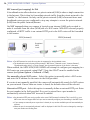
A broadband router allows devices on a private network (LAN) to share a single connection
to the Internet. This is done by forwarding network traffic from the private network to the
“outside” i.e. the Internet. Security on the private network (LAN) is increased since most
broadband routers are pre-configured to stop any attempts to access the private network
(LAN) from the public network/Internet.
Use NAT traversal when your camera is located on an intranet (LAN) and you wish to
make it available from the other (WAN) side of a NAT router. With NAT traversal properly
configured, all HTTP traffic to an external HTTP port in the NAT router will be forwarded
to the camera.
LAN (intranet)
WAN (internet)
Broadband
(NAT)
router
ISP
Notes: • For NAT traversal to work, this must also be supported by the broadband router.
• The broadband router has many different names: “NAT router”, “Network router“, Internet Gateway”,
“Broadband sharing device” or “Home firewall” but the essential purpose of the device is the same.
When enabled, the AXIS 207W/AXIS 207MW will attempt to configure port mapping in a
NAT router on your network, using UPnP™. Note that UPnP™ must be enabled in the
camera (see System Options > Network > UPnP).
Use manually selected NAT router - Select this option to manually select a NAT router
and enter the IP address for the router in the field provided.
If a router is not manually specified, the camera will automatically search for NAT routers
on your network. If more than one router is found, the default router will be selected.
Alternative HTTP port - Select this option to manually define an external HTTP port. Enter
the port number in the field provided. If no port is entered here a port number is
automatically selected when NAT traversal is enabled.
Notes: • An alternative HTTP port can be used/be active even if NAT traversal is disabled. This is useful if e.g. your
NAT router does not support UPnP and you need to manually configure port forwarding in the NAT router.
• If you attempt to manually enter a port that is already in use, another available port will automatically be
selected.
• When the port is automatically selected it will be displayed in this field. This can be changed by entering a
new port number and clicking Save.
AXIS 207W/AXIS 207MW - System Options
FTP
The FTP server running in the AXIS 207W/AXIS 207MW enables the upload of e.g. new
firmware, user applications, etc. Check the box to enable the service.
RTSP
The RTSP protocol allows a connecting client to start an MPEG-4 stream. Check the box to
enable the RTSP server and enter the RTSP port number to use. The default setting is 554.
Note that MPEG-4 streams will not be available if this is not enabled.
Network Traffic
Connection Type - The default setting is Auto-negotiate, which means that the correct
speed is automatically selected. If necessary, you can set the connection speed by selecting
it from the drop-down list.
Maximum bandwidth - To minimize the impact on other services running on your
network, it is possible to configure the maximum network bandwidth the product will be
allowed to use. Specify the maximum bandwidth (in Mbit/s or kbit/s) allowed, or set to
Unlimited.
For more information, please see the online help
.
Wireless
These settings should always be made first in the camera and in the wireless access point
second. This ensures that the camera is always accessible when making changes.
Using a wired connection and/or HTTPS ensures greater secrecy while making these
settings.
35
36 AXIS 207W/AXIS 207MW - System Options
Status of Wireless Networks
This list is the result of a network scan. Access points with a disabled SSID Broadcast will
not appear unless the camera is associated with it. The network currently associated to is
shown in blue. A network using unsupported security is shown in grey. The following
information is provided:
• SSID - The name of a wireless network (or ad-hoc device). If the same name occurs several
times this means that several access points for that network were found. The camera
cannot be configured to only associate with one particular access point.
• Mode - Shows if the network type is Master (access point or router) or Ad-Hoc (another
client).
• Security - Shows which type of security the network uses. See below for the security types
supported by the camera.
• Channel - Shows the wireless channel currently in use.
• Signal strength - Shows the signal strength.
• Bit rate - Shows the bit rate in Mbit/s. This can only be shown for the access point
currently in use. Note that the bit rate shown is the current rate, and that this value may
vary over time.
Wireless Settings
These settings control how the camera interacts with the wireless network. Apart from
identifying the wireless network, it is also possible to enable wireless encryption.
SSID - This is the name of the wireless network the camera is configured for. The field
accepts up to 32 alphanumeric characters. The name must be exactly the same as that used
in the wireless access point or the connection will not be established.
Leaving this field blank means the camera will attempt to access the nearest open network.
Note: SSID is sometimes written as ESSID.
Network type - Setting this to Master means the camera will attempt to access the nearest
open access point. The Ad-hoc option allows the camera to connect to other wireless
devices (clients).
Note that using Ad-hoc settings means that WPA-PSK/WPA2-PSK encryption will not be
available (see below).
Security - The AXIS 207MW supports two security methods:
• WPA-PSK/WPA2-PSK (recommended method)
• WEP
Notes: • WPA-PSK is also known as WPA-Personal, and WPA2-PSK is also known as WPA2-Personal.
• WPA-Enterprise is not supported.
AXIS 207W/AXIS 207MW - System Options
WPA-PSK/WPA2-PSK (Wi-Fi Protected Access - Pre-Shared Key)
The AXIS 207W/AXIS 207MW uses a pre-shared key (PSK) for key management. The
pre-shared key can be entered either as Manual hex, as 64 hexadecimal (0-9, A-F)
characters, or as a Passphrase, using 8 to 63 ASCII characters.
WEP (Wired Equivalent Protection)
WEP - Authentication - Select Open or Shared Key System Authentication, depending on the
method used by your access point. Not all access points have this option, in which case
they probably use Open System, which is sometimes known as SSID Authentication.
WEP - Key length - This sets the length of the key used for the wireless encryption, 64 or 128
bit. The encryption key length can sometimes be shown as 40/64 and 104/128.
WEP - Key Type - The key types available depend on the access point being used. The
following options are available:
• Manual - Allows you to manually enter the hex key.
• ASCII - In this method the string must be exactly 5 characters for 64-bit WEP and 13
characters for 128-bit WEP.
• Passphrase - The passphrase can contain up to 31 characters. In 64-bit WEP, the
Passphrase generates 4 different keys. For 128-bit WEP, only 1 key is generated, which is
then replicated for all 4 keys. Key generation is not standardized and can differ from brand
to brand. Check that the generated keys are identical to those in your access point - if not,
they must be entered manually.
WEP - Active Transmit Key - When using WEP encryption, this selects which of the 4 keys
the camera uses when transmitting.
SOCKS
SOCKS is a networking proxy protocol. The AXIS 207W/AXIS 207MW can be configured
to use a SOCKS server (version 4 or 5) to reach networks on the other side of a
firewall/proxy server. This is useful if the camera is located on a local network behind a
firewall, but notifications, uploads, alarms, etc., need to be sent to a destination outside the
local network (e.g. to the Internet).
QoS (Quality of service)
Quality of Service (QoS) provides the means to guarantee a certain level of a specified
resource to selected traffic on a network. Quality can be defined as e.g. a maintained level
of bandwidth, low latency, no packet losses, etc. The main benefits of a QoS-aware
network can be summarized as:
• The ability to prioritize traffic and thus allow critical flows to be served before
flows with lesser priority.
• Greater reliability in the network, thanks to the control of the amount of bandwidth an application may use, and thus control over bandwidth races between
applications.
37
38 AXIS 207W/AXIS 207MW - System Options
The QoS in Axis network video products marks the data packets for various types of
network traffic originating from the product. This makes it possible for network routers
and switches to e.g. reserve a fixed amount of bandwidth for these types of traffic. The
following types of traffic are marked:
• live video
• live audio
• event/alarm traffic
• management network traffic.
QoS Settings
For each type of network traffic supported by your Axis network video product, enter a
DSCP (Differentiated Services Codepoint) value. This value is used to mark the traffic’s IP
header. When the marked traffic reaches a network router or switch, the DSCP value in the
IP header tells the router or switch which type of treatment to apply to this type of traffic,
for example, how much bandwidth to reserve for it.
Note that DSCP values can be entered in decimal or hex form, but saved values are always
shown in decimal.
For more information on Quality of Service, please see the Axis support web at
www.axis.com/techsup
SMTP (email)
Enter the host names (or IP addresses) and port numbers for your primary and secondary
mail servers in the fields provided, to enable the sending of notifications and image/video
email messages from the camera to predefined addresses via SMTP.
If your mail server requires authentication, check the box for Use authentication to log in
to this server and enter the necessary information.
SNMP
The Simple Network Management Protocol (SNMP) allows remote management of network
devices. Depending on the level of security required, select the version of SNMP to use. The
three levels of security are:
• SNMP V1 - includes no security.
• SNMP V2c - uses very simple security. The community name can be specified as a password for read or read/write access to all supported SNMP objects. The community is the
the group of network devices using SNMP.
• SNMP V3 - provides encryption and secure passwords. HTTPS must be enabled.
AXIS 207W/AXIS 207MW - System Options
UPnP™
The camera includes support for UPnP™, which is enabled by default. If also enabled on
your computer, the camera will automatically be detected and a new icon will be added to
“My Network Places.”
Note: UPnP must also be enabled on your Windows XP. To do this, open the Control Panel from the Start Menu
and select Add/Remove Programs. Select Add/Remove Windows Components and open the Networking
Services section. Click Details and then select UPnP as the service to add.
RTP
These settings are the port range, IP address, port number (video and audio), and
Time-To-Live value to use for the video stream(s) in multicast MPEG-4 format. Only
certain IP addresses and port numbers should be used for multicast streams. For more
information, please see the online help.
Bonjour
The AXIS 207MW includes support for Bonjour. When enabled, the camera is
automatically detected by operating systems and clients that support this protocol.
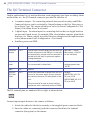
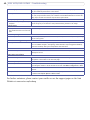
Ports & Devices
I/O Ports - the pinout, interface support and the control and monitoring functions
provided by this connector are described in The I/O Terminal Connector, on page 42.
LED Settings
The Status indicator LED on the front of the camera can be set to flash at a configurable
interval (or to not light up at all) whenever the unit is accessed. For a listing of all LED
behavior, see page 7, or the online help.
Note: The LED does not flash when the stream is retrieved using MPEG-4 multicast.
Maintenance
• Restart - The camera is restarted without changing any of the settings.
• Restore - The unit is restarted and most current settings are reset to factory default values. The settings that will not be reset are as follows:
• the boot protocol (DHCP or static)
• the static IP address
• the default router
• the subnet mask
39
40 AXIS 207W/AXIS 207MW - System Options
• the wireless settings
• Default - The default button should be used with caution. Pressing this will return
all of the camera's settings to the factory default values (including the IP address)
Upgrade Server - See Upgrading the Firmware, on page 44.
Backup - To take a backup of all of the parameters, and any user-defined scripts, click this
button. If necessary, it will then be possible to return to the previous settings, if settings
are changed and there is unexpected behavior.
Restore - click the Browse button to locate the saved backup file (see above) and then click
the Restore button. The settings will be restored to the previous configuration.
Note: Backup and Restore can only be used on the same unit running the same firmware. This feature is not
intended for the configuration of multiple units or for firmware upgrades.
Support
The support overview page provides valuable information on troubleshooting and contact
information, should you require technical assistance.
Logs & Reports - when contacting Axis support, please be sure to provide a valid Server
Report with your query.
View Information - The Log file, the Server Report and the Parameter List all provide
valuable information for troubleshooting and when contacting Axis support.
Configuration
Log Level for Log Files - from the drop-down list, select the level of information to be
added to the Log file
Log Level for Email - from the drop-down list, select the level of information to send as
email and enter the destination email address.
AXIS 207W/AXIS 207MW - System Options
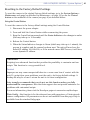
Resetting to the Factory Default Settings
To reset the camera to the original factory default settings, go to the System Options >
Maintenance web page (as described in Maintenance, on page 39) or use the Control
button on the underside of the camera (see page 6) as described below:
Using the Control Button
To reset the camera to the factory default settings using the Control Button:
1. Disconnect the power adapter.
2. Press and hold the Control button while reconnecting the power.
3. Keep the Control button pressed until the Status Indicator color changes to amber
(this may take up to 15 seconds).
4. Release the Control button.
5. When the Status Indicator changes to Green (which may take up to 1 minute), the
process is complete and the camera has been reset. The unit will now have the
default IP address 192.168.0.90, or if the network uses a DHCP server, it will have
a new dynamic IP address.
Advanced
Scripting is an advanced function that provides the possibility to customize and use
scripts. This function is a very powerful tool.
Caution!
Improper use may cause unexpected behavior or even cause loss of contact with the
unit. If a script does cause problems, reset the unit to its factory default settings. A
backup file may be of use to return the unit to its latest configuration.
Axis strongly recommends that you do not use this function unless you fully
understand the consequences. Note that Axis support does not provide assistance for
problems with customized scripts.
For more information, please visit the Developer pages at www.axis.com/developer
Plain Config - this function is for the advanced user with experience of Axis network
camera configuration. All parameters can be set and modified from this page. Help is
available from the standard help pages.
41
42 AXIS 207W/AXIS 207MW - The I/O Terminal Connector
The I/O Terminal Connector
Used in applications for e.g. motion detection, event triggering, time lapse recording, alarm
notifications, etc., the I/O terminal connector provides the interface to:
• 1 transistor output - For connecting external devices such as relays and LED:s.
Connected devices can be activated by Output buttons on the Live View page or
by an Event Type. The output will show as active (in Event Configuration > Port
Status) if the alarm device is activated.
• 1 digital input - An alarm input for connecting devices that can toggle between
an open and closed circuit, for example: PIRs, door/window contacts, glass break
detectors, etc. When a signal is received the state changes and the input becomes
active (shown under Event Configuration > Port Status).
• Auxiliary power and GND
Function
Pin No.
Notes
Specifications
Transistor
Output
Pin 4
Uses an open-collector NPN transistor with the
emitter connected to the GND pin. If used with
an external relay, a diode must be connected in
parallel with the load, for protection against
voltage transients.
Max load = 100mA
Max voltage = 24V DC
(to the transistor)
Digital
Input
Pin 3
Connect to GND to activate, or leave floating
(or unconnected) to deactivate.
Must not be exposed to
voltages greater than
10V DC
GND
Pin 1
Ground
Auxiliary
DC Power
Input
Pin 2
Electrically connected in parallel with the connector for the power supply, this pin provides
an auxiliary connector for mains power to the
unit.
Voltage:
AXIS 207W: 4.9-5.1V
DC, max 3.5 W
AXIS 207MW: 4.9-5.1V
DC, max 4.0 W
This pin can also be used to power auxiliary
equipment, with a maximum current of 50mA.
The I/O terminal pins are numbered left to right, as shown below.
1
4
Connect input/output devices to the camera as follows:
1. Attach the cables for the device securely to the supplied green connector block.
2. Once the cables are connected, push the connector block into the terminal
connector (also green) on the camera.
AXIS 207W/AXIS 207MW - The I/O Terminal Connector
Terminal connectors
3.3V
Fuse 1A
Linear
Power
Supply
+2
o
Power Supply
o1
z
2
o
GND
o
1
o
3
4
o
z
Camera
e.g. push button
Relay
z
z
o
o
o
Device
oo
43
44 AXIS 207W/AXIS 207MW - Troubleshooting
Troubleshooting
Checking the Firmware
Firmware is software that determines the functionality of the AXIS 207W/AXIS 207MW.
One of your first actions when troubleshooting a problem should be to check the currently
installed firmware version. An updated version may contain a correction that fixes your
particular problem. The current firmware version in your camera can be seen on the page
Setup > Basic Configuration.
Upgrading the Firmware
When you upgrade the firmware with a file from the Axis Web site, your camera will
receive the latest available functionality. Always read the upgrade instructions and release
notes available with each new release, before updating the firmware.
Note: Preconfigured and customized settings will be saved when the firmware is upgraded (providing the features are available in the new firmware) although this is not guaranteed by Axis Communications. Always
read the instructions and release notes available with each new release, before upgrading the firmware.
1.
Save the firmware file to your computer. The latest version of the firmware is
available free of charge from the Axis Web site at www.axis.com/techsup
2. Go to Setup > System Options > Maintenance in the camera’s Web pages.
3. In the Upgrade Server section, browse to the desired firmware file on your computer.
Click Upgrade.
Notes:
•After starting the upgrade process, always wait at least 10-15 minutes before restarting the
camera, even if you suspect the upgrade has failed.
•Your dealer reserves the right to charge for any repair attributable to faulty upgrading by the
user.
AXIS 207W/AXIS 207MW - Troubleshooting
Emergency Recovery Procedure
If power or the network connection to the camera is lost during the upgrade, the process
will fail and the unit will become unresponsive. A flashing red Status LED indicates a failed
upgrade. To recover the unit, follow the steps below. The serial number is found on the
label attached to the bottom of the camera.
1.
This procedure is only possible to perform via the wired connection - connect the
camera to the network via a standard network cable.
2. Unix/Linux - From the command line, type the following:
arp -s <IP address of camera> <Serial number> temp
ping -s 408 <IP address of camera>
Windows - From a command/DOS prompt, type the following:
arp -s <IP address of camera> <Serial number>
ping -l 408 -t <IP address of camera>
3. If the unit does not reply within a few seconds, restart it and wait for a reply. Press
CTRL+C to stop Ping.
4. Open a browser and type in the camera’s IP address. In the page that appears, use the
Browse button to select the upgrade file to use, e.g. axis207mw.bin. Then click the
Load button to restart the upgrade process.
5. After the upgrade has completed (1-10 minutes), the unit will automatically restart and
show a steady green on the Power and Status LEDs and flashing green or amber on the
Network LED.
6. Referring to the installation guide, reinstall the camera.
If the emergency recovery procedure does not get the camera up and running again, please
contact Axis support at www.axis.com/techsup/
Axis Support
If you contact Axis support, please help us to help you solve your problems, by providing
the server report, the log file and a brief description of the problem.
Server Report - go to Setup > System Options > Support Overview. The server report
contains important information about the server and its software, as well as a list of the
current parameters.
The Log file is available from Setup > System Options > Logs & Reports. The Log file
records events in the unit since the last system restart and can be a useful diagnostic tool
when troubleshooting.
45
46 AXIS 207W/AXIS 207MW - Troubleshooting
Symptoms, Possible Causes and Remedial Actions
Problems setting the IP address
When using ARP/Ping
Try the installation again. The IP address must be set within two minutes after power has
been applied to the camera. Ensure the Ping length is set to 408. See the Installation
Guide.
The camera is located on a different
subnet
If the IP address intended for the camera and the IP address of your computer are located
on different subnets, you will not be able to set the IP address. Contact your network
administrator to obtain an appropriate IP address.
The IP address is being used by
another device
Disconnect the camera from the network. Run the Ping command. (In a Command/DOS
window, type ping and the IP address of the unit).
If you receive: Reply from <IP address>: bytes = 32; time = 10 ms..... - this means that
the IP address may already be in use by another device on your network. You must obtain a
new IP address and reinstall the unit.
If you see: Request timed out - this means that the IP address is available for use with
your camera. In this case, check all cabling and reinstall the unit.
Possible IP address conflict with
another device on the same subnet
The static IP address in the camera is used before the DHCP server sets a a dynamic
address. This means that if the same default static IP address is also used by another
device, there may be problems accessing the camera. To avoid this, set the static IP address
to 0.0.0.0.
The camera cannot be accessed from a browser
The IP address has been changed by
DHCP
1) Move the camera to an isolated network or to one with no DHCP or BOOTP server. Set
the IP address again, using the AXIS IP Utility (see the Installation Guide) or the ARP/Ping
commands.
2) Access the unit and disable DHCP in the TCP/IP settings. Return the unit to the main
network. The unit now has a fixed IP address that will not change.
3) As an alternative to 2), if dynamic IP address via DHCP or BOOTP is required, select the
required service and then configure IP address change notification from the network settings. Return the unit to the main network. The unit will now have a dynamic IP address,
but will notify you if the address changes.
Other networking problems
Test the network cable by connecting it to another network device, then Ping that device
from your computer. See the instructions above.
The camera cannot be accessed on the wireless network from a browser
The wireless settings in the camera do
not match those in the wireless access
point.
Connect the network cable and check that the SSID and security settings are identical in
the camera and in the access point.
Unsupported/disabled protocols.
The AXIS 207MW supports the 802.11b and 802.11g wireless standards. Check that the
wireless access point supports at least one of these and is enabled.
Wireless access point requires MAC
address registration.
Check if the camera’s MAC address (this is the same as the product’s serial number) needs
to be registered in the wireless access point before being allowed to access the wireless
network. Check the access point’s settings and/or documentation.
Camera is accessible locally, but not externally
Broadband router configuration
To configure your broadband router to allow incoming data traffic to the camera: Enable
the NAT-traversal feature which will attempt to automatically configure the router to
allow access to the camera.
This is enabled from Setup > System Options > Network > TCP/IP Advanced.
Firewall protection
Check the Internet firewall with your system administrator.
Default routers required
Check if you need to configure the default router settings.
AXIS 207W/AXIS 207MW - Troubleshooting
Problems with the MPEG-4 format
No MPEG-4 displayed in the
client
Check that the correct network interface is selected in the AMC control panel applet (network tab).
Check that the relevant MPEG-4 connection methods are enabled in the AMC control
panel applet (network tab).
In the AMC control applet, select the MPEG-4 tab and click the button Set to default
MPEG-4 decoder.
No multicast MPEG-4 displayed in
the client
Check with your network administrator that the multicast addresses used by the
camera are valid for your network.
Check with your network administrator to see if there is a firewall preventing viewing.
Multicast MPEG-4 only accessible by Check if your router supports multicasting, or if the router settings between the client and
local clients
the server need to be configured. The TTL (Time To Live) value may need to be increased.
Poor rendering of MPEG-4 images
Color depth set incorrectly on clients. Set to 16-bit or 32-bit color.
If text overlays are blurred, or if there are other rendering problems, you may need to
enable Advanced Video Rendering from the MPEG-4 tab in the AMC control panel applet.
Ensure that your graphics card is using the latest device driver. The latest drivers can usually be downloaded from the manufacturer's web site.
Color saturation is different in
MPEG-4 and Motion JPEG
Modify the settings for your graphics adapter. Please see the adapter's documentation for
more information.
Lower frame rate than expected
Reduce number of applications running on the client computer.
Limit the number of simultaneous viewers. This is done in System Options > Security >
Users.
Check with the system administrator that there is enough bandwidth available. See also
the online help.
Check in the AMC control panel applet (MPEG-4 tab) that video processing is not set to
Decode only I frames.
Lower the image resolution.
Lost or poor images in pre-trigger
buffer (MPEG-4 video stream)
Make sure that Cyclic refresh under Setup > Video & Image > Advanced > MPEG-4
is disabled.
Image degeneration
Decrease the GOV length, see the online help for more information.
The Power indicator is not constantly lit
Faulty power adapter
Check that you are using an AXIS PS-H adapter.
The Status and Network indicator LEDs are flashing red rapidly
Hardware failure
Contact your Axis dealer.
The Status indicator LED is flashing red and the camera is inaccessible
A firmware upgrade has been inter- See the Emergency Recovery Procedure above.
rupted or the firmware has otherwise
been damaged
No images displayed on web page
Problem with AMC.
(Internet Explorer only)
To enable the updating of video images in Microsoft Internet Explorer, set your browser to
allow ActiveX controls. Also, make sure that AXIS Media Control (AMC) component is
installed on your computer.
Installation of additional ActiveX
component restricted or prohibited
Configure your camera to use a Java applet for updating the video images under
Live View Config > Layout > Default Viewer for Internet Explorer. See the online help for
more information.
Video/Image problems, general
Image too dark or too light
Check the video image settings. See the online help on Video and Image Settings.
Missing images in uploads
This can occur when trying to use a larger image buffer than is actually available. Try
lowering the frame rate or the upload period.
47
48 AXIS 207W/AXIS 207MW - Troubleshooting
Slow image update
Configuring, e.g. pre-buffers, motion detection, high-resolution images, high frame rates,
etc, will reduce the performance of the camera.
Poor performance
Poor performance may be caused by e.g. heavy network traffic, multiple users accessing
the unit, low performance clients, use of features such as Motion Detection or Event handling. A poor wireless environment may also affect performance.
Poor quality snapshot images
Screen incorrectly configured on your In Display Properties, configure your screen to show at least 65000 colors, i.e. at least
computer
16-bit. Using only 16 or 256 colors will produce dithering artifacts in the image.
Browser freezes
Netscape 7.x or Mozilla 1.4 (or later) Lower the image resolution.
can sometimes freeze on a slow computer
Problems uploading files
Limited space
There is only limited space available for the upload of your own files. Try deleting existing
files to free up space.
Motion Detection triggers unexpectedly
Changes in luminance
Motion detection is based upon changes in luminance in the image. This means that if
there are sudden changes in the lighting, motion detection may be triggered mistakenly.
Lower the sensitivity setting to avoid problems with luminance.
No audio
Incorrect setup
Check the sound card in the PC. Ensure that the mute button is not pressed and the volume
settings are correct.
Audio volume too low/high
Volume settings incorrect
The volume of the microphone is either too high or too low. Change the volume for the
microphone in the toolbar on the Live View page.
Poor audio quality
Too many users
Too many users/clients connected to the camera may affect the sound quality adversely.
Try limiting the number of clients allowed to connect under Basic Configuration > Users.
CPU overloaded
Reduce the number of listeners and viewers and decrease the image resolution and compression.
Unsynchronized audio and video
It is recommended that the camera's time setting is synchronized with an NTP Server. This
is enabled under System Options > Date & Time.
For further assistance, please contact your reseller or see the support pages on the Axis
Website at www.axis.com/techsup
AXIS 207W/AXIS 207MW - Technical Specifications
Technical Specifications
Item
Specification
Model
• AXIS 207W: VGA, wired and wireless interface
• AXIS 207MW: Megapixel, wired and wireless interface
Image sensor
• AXIS 207W: ¼” Micron Progressive Scan RGB VGA CMOS
• AXIS 207MW: 1/3” Progressive Scan RGB; 1.3 Megapixel CMOS
Lens
• AXIS 207W: 4.0 mm, F2.0, fixed iris, focus range: 0.5 m to infinity
AXIS 207MW: 3.6 mm, F1.8, fixed iris, focus range: 0.5 m to infinity
Angle of view
• AXIS 207W: Horizontal: 55°
• AXIS 207MW: Horizontal: 74°
Illumination
• AXIS 207W: 1-10000 lux, F2.0
• AXIS 207MW: 2-10000 lux, F1.8
Video compression
• Motion JPEG
• MPEG-4 Part 2 (ISO/IEC 14496-2) with motion estimation,
• Profiles: Simple Profile level 0-3 and Advanced Simple Profile level 0-5
Resolutions
• AXIS 207W: 7 resolutions up to 640x480
• AXIS 207MW: 15 resolutions up to1280x1024
Frame rates
• AXIS 207W: Up to 30 fps in all resolutions
• AXIS 207MW: up to 14 fps in resolutions up to 1280x720, up to 12 fps in 1280x1024
Video streaming
• Simultaneous Motion JPEG and MPEG-4
• Controllable frame rate and bandwidth
• VBR/CBR MPEG-4
• 3GPP and ISMA compatible
Image settings
• Compression levels: 100
• Rotation: 0º, 180º
• Mirroring
• Configurable color level, brightness, contrast, white balance
• Overlay capabilities: time, date, text
Shutter time
• AXIS 207W:1/2-1/10000 sec
• AXIS 207MW: 1/10-1/10000 sec
Audio
• Built-in microphone for one-way audio
• Audio compression:
AAC LC 8-32 kbit/s
G.711 PCM 8 kHz
G.726 ADPCM 8 kHz
49
50 AXIS 207W/AXIS 207MW - Technical Specifications
Item
Specification
Wireless interface
• IEEE 802.11g 6-54 Mbps
• IEEE 802.11b 1-11 Mbps
• RF Output power FCC
• 802.11b: +20dBm (Peak, without antenna gain)
• 802.11g: +22dBm (Peak, without antenna gain)
• RF Output power CE (ETSI)
• 802.11b: +13dBm ±1dBm (Average, without antenna gain)
• 802.11g: +12.5dBm ±1.5dBm (Average, without antenna gain)
• Receiver Sensitivity: -90dBm at 1Mb
• Channels (US, Canada, Argentina): 11
• Channels (Europe, Australia, Korea, Japan): 13
• Antenna gain: 1.6dBi (Average) 2.14 dBi (Max)
• Infrastructure and ad-hoc modes
Security
• Multiple user access levels with password protection
• IP address filtering
• HTTPS encryption
• WEP 64/128 bit, WPA-PSK*, WPA2-PSK*
• Digest authentication
Users
• 10 simultaneous unicast users
• Unlimited users using multicast (MPEG-4)
Alarm and event
management
• Events triggered by video motion detection, audio detection, external input
• Image upload over FTP, email and HTTP
• Notification via TCP, email, HTTP and external output
• Pre- and post alarm buffering in MPEG-4 file:
AXIS 207W: up to 4 MB
AXIS 207MW: up to 2 MB
Connectors
• Ethernet 10BaseT/100BaseTX, Auto-MDIX, RJ-45
• Terminal block for 1 alarm input, 1 output and alternative power connection
Processors, memory,
clock
• CPU, video processing and compression: ARTPEC-A
• RAM: 32 MB
• Flash memory: 8 MB
Power
• AXIS 207W: 4.9-5.1V DC, max 3.5 W
• AXIS 207MW: 4.9-5.1V DC, max 4.0 W
*infrastructure mode only
Operating conditions • +5 to +50 ºC (+41 to +122 ºF)
• Humidity 20-80% RH (non-condensing)
Installation,
management and
maintenance
• Installation tool on CD and Web-based configuration
• Configuration backup and restore
• Video management software for recording
• Firmware upgrades over HTTP or FTP, firmware available at www.axis.com
Video access from
Web browser
• Camera live view
• Video recording to file (ASF)
• Customizable HTML pages
AXIS 207W/AXIS 207MW - Technical Specifications
Item
Specification
Minimum web
browsing
requirements
• Pentium III CPU 500 MHz or higher, or equivalent AMD
• 128 MB RAM
• AGP graphics card 32 MB RAM, Direct Draw, DirectX 9.0 or later
• Windows Vista, Windows XP, 2000,
• Internet Explorer 6.x or later
• Mac OS X 10.3 or later and Safari 1.3 or later with QuickTime plugin
• Other MPEG-4/AAC players supported: Packet Video, QuickTime, RealPlayer standalone
and browser plug-ins, Windows Media Player
For other operating systems and browsers, see www.axis.com/techsup
System integration
support
• Open API for application integration including the VAPIX® API*, AXIS Media Control SDK*,
event trigger data in video stream, embedded scripting, NAT traversal
• Quality of Service (QoS) Layer 3, DiffServ Model
• Embedded Linux operating system
* Available at www.axis.com
Supported protocols
IPv4, IPv6, HTTP, TCP, ICMP, QoS, RTSP, RTP, UDP, IGMP, RTCP, SMTP, FTP, DHCP, UPnP, ARP,
DNS, DynDNS, SOCKS, NTP, HTTPS, SSL/TLS*, SNMPv1/v2c/v3 (MIB-II)
More information on protocol usage available at www.axis.com
* This product includes software developed by the Open SSL Project for use in the Open SSL
Tool kit (www.openssl.org)
Video management
software
(not included)
• AXIS Camera Station: Surveillance application for viewing, recording and archiving up to
25 cameras
• AXIS Camera Management - Efficient installation and management tool for Axis network
video products.
See www.axis.com/partner/adp_partners.htm for further software applications from
partners.
Accessories
(included)
• Power supply
• Stand
• Clamp
• Connector block
• Installation Guide
• CD with installation tool, software and User’s Manual
• MPEG-4 licenses (1 encoder, 1 decoder)
• MPEG-4 decoder (Windows)
• AAC licenses (1 encoder, 1 decoder)
Accessories
(not included)
AXIS MPEG-4 Decoder multi-user license pack
51
52 AXIS 207W/AXIS 207MW - Technical Specifications
Item
Specification
Approvals
• EN 300328
• EN 301489
• FCC Part 15 Subpart B & C Class B
• ICES-003 Class B
• RSS210
• VCCI Class B
• TELEC
• C-tick AS/NZS 4771
• MIC
• EN 60950
• Power supply: EN 60950, UL, CSA
Dimensions (HxWxD) • 85x55x40mm (3.3” x 2.2” x 1.5”) antenna not included
• Weight: 182g (0.4 lb) power supply not included
and weight
AXIS 207W/AXIS 207MW - Technical Specifications
General performance considerations
When setting up your system, it is important to consider how various settings and
situations will affect performance. Some factors affect the amount of bandwidth (the bit
rate) required, others can affect the frame rate, and some will affect both. If the load on the
CPU reaches its maximum, this will also affect the frame rate.
The following factors are among the most important to consider:
• Wireless conditions.
• High image resolutions and/or lower compression levels result in larger images.
Bandwidth affected.
• Access by large numbers of Motion JPEG and/or unicast MPEG-4 clients. Bandwidth affected.
• Simultaneous viewing of different streams (resolution, compression, etc.) by different clients. Frame rate and bandwidth affected.
• Accessing both Motion JPEG and MPEG-4 video streams simultaneously. Frame
rate and bandwidth affected.
• Heavy usage of event settings affects the camera’s CPU load. Frame rate affected.
• Enabled motion detection. Frame rate and bandwidth affected.
• Heavy network utilization due to poor infrastructure. Bandwidth affected
• Viewing on poorly performing client PC’s lowers perceived performance. Frame
rate affected.
There are also factors in the monitored scene that will affect the bandwidth. These are:
• the amount of motion
• the image’s complexity
• the lighting conditions.
If supported on the network, consider also using MPEG-4 multicasting, as the bandwidth
consumption will be much lower.
Optimizing your system
The AXIS 207W/AXIS 207MW provides a tool that can be used to display the bandwidth
and frame rate currently required by the video stream, directly in the video image.
To do this, special format strings are added as part
of a text overlay. Simply add #r (average frame
rate in fps) and/or #b (average bandwidth in kbps)
to the overlay.
For detailed instructions, please see the online help
for Video & Image > Overlay Settings, and the
help for File Naming & Date/Time Formats.
53
54 AXIS 207W/AXIS 207MW - Technical Specifications
Important!
•The figures displayed here are the values as delivered by the camera. If other restrictions are
currently in force, (e.g. bandwidth limitation) these values might not correspond to those actually received by the client.
•For Motion JPEG, these values will be accurate as long as no frame rate limit has been specified.
Frame rates - Motion JPEG and MPEG-4
The following table show typical frame rates in frames/second (fps) for Motion JPEG and
MPEG-4 video streams.
Motion JPEG settings:
• Viewing in AMC
• Compression level = 30%
MPEG-4 settings:
• Viewing in AMC
• Compression level = 30%
• GOV length = 30
Note that these values are guidelines only - actual values may vary. See also the section
General performance considerations, above.
Frame rates AXIS 207MW
Resolution
Motion JPEG (fps)
1280 x 1024
12
1280 x 960
Frame rates AXIS 207W
MPEG-4 (fps)
Motion JPEG (fps)
MPEG-4 (fps)
7
-
-
12
7
-
-
1280 x 720
14
10
-
-
640 x 480
15
15
30
30
640 x 360
20
20
-
-
480 x 360
15
15
30
30
480 x 270
20
20
-
-
352 x 288
15
15
30
30
320 x 240
15
15
30
30
320 x 180
20
20
-
-
240 x 180
15
15
30
30
240 x 135
20
20
-
-
176 x 144
15
15
30
30
160 x 120
15
15
30
30
160 x 90
20
20
-
-
AXIS 207W/AXIS 207MW - Glossary of Terms
Glossary of Terms
ActiveX - A standard that enables software components to
interact with one another in a networked environment,
regardless of the language(s) used to create them. Web
browsers may come into contact with ActiveX controls,
ActiveX documents, and ActiveX scripts. ActiveX controls
are often downloaded and installed automatically as
required.
AF (Autofocus) - A system by which the camera lens
automatically focuses on a selected part of the subject.
Angle - The field of view, relative to a standard lens in a
35mm still camera, expressed in degrees, e.g. 30°. For
practical purposes, this is the area that a lens can cover,
where the angle of view is determined by the focal length of
the lens. A wide-angle lens has a short focal length and
covers a wider angle of view than standard or telephoto
lenses, which have longer focal lengths.
ARP (Address Resolution Protocol) - This protocol is used
to associate an IP address to a hardware MAC address. A
request is broadcast on the local network to discover the
MAC address for an IP address.
ARTPEC (Axis Real Time Picture Encoder) - This chip is
used for image compression.
ASF (Advanced Systems Format) - The file format used by
Windows Media. Audio and/or Video content compressed
with a wide variety of codecs can be stored in an ASF file
and played back with the Windows Media Player (provided
the appropriate codecs are installed), or they can be
streamed with Windows Media Services.
ASF is an extensible file format designed to store
synchronized multimedia data. It supports data delivery
over a wide variety of networks and protocols while still
proving suitable for local playback.
ASIC (Application Specific Integrated Circuit) - A circuit
designed for a specific application, as opposed to a general
purpose circuit, such as a microprocessor.
Aspect ratio - A ratio of width to height in images. A
common aspect ratio used for television screens and
computer monitors is 4:3. High-definition television (HDTV)
uses an aspect ratio of 9:16.
Autoiris (or DC-Iris) - This special type of iris is electrically
controlled by the camera, to automatically regulate the
amount of light allowed to enter.
AVI (Audio Video Interleave) - A video format that
supports simultaneous playback of audio and video.
Bitmap - A bitmap is a data file representing a rectangular
grid of pixels. It defines a display space and color for each
pixel (or "bit") in the display space. This type of image is
known as a "raster graphic." GIFs and JPEGs are examples
of image file types that contain bitmaps.
Because a bitmap uses this fixed raster method, it cannot
easily be rescaled without losing definition. Conversely, a
vector graphic image uses geometrical shapes to represent
the image, and can thus be quickly rescaled.
Bit rate - The bit rate (in kbit/s or Mbit/s) is often referred
to as speed, but actually defines the number of bits/time
unit and not distance/time unit.
Bluetooth - Bluetooth is an open standard for wireless
transmission of voice and data between mobile devices (PCs,
handheld computers, telephones and printers).
Bonjour - Also known as zero-configuration networking,
Bonjour enables devices to automatically discover each
other on a network, without having to enter IP addresses or
configure DNS servers. Bonjour is a trademark of Apple
Computer, Inc..
Broadband - In network engineering terms, this describes
transmission methods where two or more signals share the
same carrier. In more popular terminology, broadband is
taken to mean high-speed data transmission.
CCD (Charged Coupled Device) - This light-sensitive image
device used in many digital cameras is a large integrated
circuit that contains hundreds of thousands of photo-sites
(pixels) that convert light energy into electronic signals. Its
size is measured diagonally and can be 1/4", 1/3", 1/2" or
2/3".
CGI (Common Gateway Interface) - A specification for
communication between a web server and other (CGI)
programs. For example, a HTML page that contains a form
might use a CGI program to process the form data once it is
submitted.
CIF (Common Intermediate Format) - CIF refers to the
analog video resolutions 352x288 pixels (PAL) and 352x240
pixels (NTSC). See also Resolution.
Client/Server - Client/server describes the relationship
between two computer programs in which one program, the
client, makes a service request from another program, the
server, which fulfils the request. Typically, multiple client
programs share the services of a common server program. A
web browser is a client program that requests services (the
sending of web pages or files) from a web server.
CMOS (Complementary Metal Oxide Semiconductor) - A
CMOS is a widely used type of semiconductor that uses both
negative and positive circuits. Since only one of the circuit
types is on at any given time, CMOS chips require less
power than chips using just one type of transistor. CMOS
image sensors also allow processing circuits to be included
on the same chip, an advantage not possible with CCD
sensors, which are also much more expensive to produce.
Codec - In communications engineering, a codec is usually
a coder/decoder. Codecs are used in integrated circuits or
chips that convert e.g. analog video and audio signals into a
digital format for transmission. The codec also converts
received digital signals back into analog format. A codec
55
56 AXIS 207W/AXIS 207MW - Glossary of Terms
uses analog-to-digital conversion and digital-to-analog
conversion in the same chip.
Codec can also mean compression/decompression, in which
case it is generally taken to mean an algorithm or computer
program for reducing the size of large files and programs.
Compression - See Image Compression.
Contrast - Defines the degree of difference between the
lightest and darkest parts of an image or video stream.
DC-Iris - This special type of iris is electrically controlled
by the camera, to automatically regulate the amount of light
allowed to enter.
DHCP (Dynamic Host Configuration Protocol) - DHCP is a
protocol that lets network administrators automate and
centrally manage the assignment of Internet Protocol (IP)
addresses to network devices in a network.
DHCP uses the concept of a "lease" or amount of time that a
given IP address will be valid for a computer. The lease time
can vary, depending on how long a user is likely to require
the network connection at a particular location.
DHCP also supports static addresses for e.g. computers
running web servers, which need a permanent IP address.
DNS (Domain Name System) - DNS is used to locate and
translate Internet domain names into IP (Internet Protocol)
addresses. A domain name is a meaningful and
easy-to-remember name for an Internet address. For
example the domain name www.example.com is much
easier to remember than 192.0.34.166. The translation tables
for domain names are contained in Domain name servers.
Domain Server - Domains can also be used by
organizations who wish to centralize the management of
their (Windows) computers. Each user within a domain has
an account that usually allows them to log in to and use
any computer in the domain, although restrictions may also
apply. The domain server is the server that authenticates the
users on the network.
Duplex - See Full-duplex.
Ethernet - Ethernet is the most widely installed local area
network technology. An Ethernet LAN typically uses special
grades of twisted pair wires. The most commonly installed
Ethernet systems are 10BASE-T and 100BASE-T10, which
provide transmission speeds up to 10 Mbps and 100 Mbps
respectively.
ETRAX (Ethernet Token Ring AXIS) - Axis' own
microprocessor.
Factory default settings - These are the settings that
originally applied for a device when it was first delivered
from the factory. If it should become necessary to reset a
device to its factory default settings, this will, for many
devices, completely reset any settings that were changed by
the user.
Firewall - A firewall works as a barrier between networks,
e.g. between a Local Area Network and the Internet. The
firewall ensures that only authorized users are allowed to
access the one network from the other. A firewall can be
software running on a computer, or it can be a standalone
hardware device.
Focal length - Measured in millimetres, the focal length of
a camera lens determines the width of the horizontal field of
view, which in turn is measured in degrees.
FTP (File Transfer Protocol) - An application protocol that
uses the TCP/IP protocols. It is used to exchange files
between computers/devices on networks.
Frame - A frame is a complete video image. In the 2:1
interlaced scanning format of the RS-170 and CCIR formats,
a frame is made up of two separate fields of 262.5 or 312.5
lines interlaced at 60 or 50 Hz to form a complete frame,
which appears at 30 or 25 Hz. In video cameras with a
progressive scan, each frame is scanned line-by-line and
not interlaced; most are also displayed at 30 and 25 Hz.
Frame rate - The frame rate used to describe the frequency
at which a video stream is updated is measured in frames
per second (fps). A higher frame rate is advantageous when
there is movement in the video stream, as it maintains
image quality throughout.
Full-duplex - Transmission of data in two directions
simultaneously. In an audio system this would describe e.g.
a telephone systems. Half-duplex also provides
bi-directional communication, but only in one direction at a
time, as in a walkie-talkie system. See also Simplex.
Gain - Gain is the amplification factor and the extent to
which an analog amplifier boosts the strength of a signal.
Amplification factors are usually expressed in terms of
power. The decibel (dB) is the most common way of
quantifying the gain of an amplifier.
Gateway - A gateway is a point in a network that acts as an
entry point to another network. In a corporate network for
example, a computer server acting as a gateway often also
acts as a proxy server and a firewall server. A gateway is
often associated with both a router, which knows where to
direct a given packet of data that arrives at the gateway,
and a switch, which furnishes the actual path in and out of
the gateway for a given packet.
GIF (Graphics Interchange Format) - GIF is one of the
most common file formats used for images in web pages.
There are two versions of the format, 87a and 89a. Version
89a supports animations, i.e. a short sequence of images
within a single GIF file. A GIF89a can also be specified for
interlaced presentation.
GOV (Group Of VOPs) - A group of VOPs is the basic unit
of an MPEG-4 video stream. The GOV contains different
types and numbers of VOPs (I-VOPs, P-VOPs, etc) as
determined by the GOV length and GOV structure. See also
VOP.
GOV length - The GOV length determines the number of
AXIS 207W/AXIS 207MW - Glossary of Terms
images (VOPs) in the GOV structure. See also GOV and VOP.
Protocol (TCP) - puts them in the right order. See also TCP.
GOV structure - The GOV structure describes the
composition of an MPEG-4 video stream, as regards the type
of images (I-VOPs or P-VOPs) included in the stream, and
their internal order. See also GOV and VOP.
Internet Protocol version 6 - IPv6 follows IPv4 (see IP
(Internet Protocol) above) as the second version of the
protocol to be formally adopted for general use. IPv6 is
intended to provide further IP addresses for the increasing
number of networked devices, and supports 3.4x1038 IP
addresses.
Half-duplex - See Full-duplex.
HTML (Hypertext Markup Language) - HTML is the set of
"markup" symbols or codes inserted in a file intended for
display in web browser. The markup tells the browser how
to display the page's words and images for the user.
HTTP (Hypertext Transfer Protocol) - HTTP is the set of
rules for exchanging files (text, graphic images, sound,
video, and other multimedia files) on the web. The HTTP
protocol runs on top of the TCP/IP suite of protocols.
Hub - A (network) hub is used to connect multiple devices
to the network. The hub transmits all data to all devices
connected to it, whereas a switch will only transmit the data
to the device it is specifically intended for.
IEEE 802.11 - A family of standards for wireless LANs.
802.11b supports a data rate of 11 Mbit/s on the 2.4 GHz
band, 802.11a allows up to 54 Mbit/s on the 5 GHz band,
and 802.11g allows up to 54 Mbit/s on the 2.4 GHz band.
Image compression - Image compression minimizes the file
size (in bytes) of an image. Two of the most common
compressed image formats are JPEG and GIF.
Interlacing - Interlaced video is video captured at 50
pictures (known as fields) per second, of which every 2
consecutive fields (at half height) are then combined into 1
frame. Interlacing was developed many years ago for the
analog TV world and is still used widely today. It provides
good results when viewing motion in standard TV pictures,
although there is always some degree of distortion in the
image.
To view interlaced video on e.g. a computer monitor, the
video must first be de-interlaced, to produce progressive
video, which consists of complete images, one after the
other, at 25 frames per second. See also Progressive scan.
IP (Internet Protocol) - The Internet Protocol is a method
for transmitting data over a network. Data to be sent is
divided into individual and completely independent
"packets." Each computer (or host) on the Internet has at
least one address that uniquely identifies it from all others,
and each data packet contains both the sender's address and
the receiver's address.
The Internet Protocol ensures that the data packets all arrive
at the intended address. As IP is a connectionless protocol,
which means that there is no established connection
between the communication end-points, packets can be sent
via different routes and do not need to arrive at the
destination in the correct order.
Once the data packets have arrived at the correct
destination, another protocol - Transmission Control
IP Address - An IP address is simply an address on an IP
network used by a computer/device connected to that
network. IP addresses allow all the connected
computers/devices to find each other and to pass data back
and forth.
To avoid conflicts, each IP address on any given network
must be unique. An IP address can be assigned as fixed, so
that it does not change, or it can be assigned dynamically
(and automatically) by DHCP.
An IP address consists of four groups (or quads) of decimal
digits separated by periods, e.g. 130.5.5.25. Different parts
of the address represent different things. Some part will
represent the network number or address, and some other
part will represent the local machine address.
See also IP (Internet Protocol).
I-VOP - See VOP.
JPEG (Joint Photographic Experts Group) - Together with
the GIF file format, JPEG is an image file type commonly
used on the web. A JPEG image is a bitmap, and usually has
the file suffix '.jpg' or ".jpeg." When creating a JPEG image,
it is possible to configure the level of compression to use. As
the lowest compression (i.e. the highest quality) results in
the largest file, there is a trade-off between image quality
and file size.
kbit/s (kilobits per second) - A measure of the bit rate, i.e.
the rate at which bits are passing a given point. See also Bit
rate.
LAN (Local Area Network) - A LAN is a group of
computers and associated devices that typically share
common resources within a limited geographical area.
Linux - Linux is an open source operating system within
the Unix family. Because of its robustness and availability,
Linux has won popularity in the open source community
and among commercial application developers.
MAC address (Media Access Control address) - A MAC
address is a unique identifier associated with a piece of
networking equipment, or more specifically, with its
interface with the network. For example, the network card
in a computer has its own MAC address.
Manual iris - This is the opposite to an autoiris, i.e. the
camera iris must be adjusted manually to regulate the
amount of light allowed to reach the image sensor.
Mbit/s (Megabits per second) - A measure of the bit rate,
i.e. the rate at which bits are passing a given point.
Commonly used to give the "speed" of a network. A LAN
57
58 AXIS 207W/AXIS 207MW - Glossary of Terms
might run at 10 or 100 Mbit/s. See also Bit rate.
delivers 525 lines at 60 half-frames/second.
Monitor - A monitor is very similar to a standard television
set, but lacks the electronics to pick up regular television
signals.
OEM (Original Equipment Manufacturer) - This is a
designation for companies that manufacture equipment
which is then marketed and sold to other companies under
their own names.
Motion JPEG - Motion JPEG is a simple
compression/decompression technique for networked video.
Latency is low and image quality is guaranteed, regardless
of movement or complexity of the image. Image quality is
controlled by adjusting the compression level, which in turn
provides control over the file size, and thereby the bit rate.
High-quality individual images from the Motion JPEG
stream are easily extracted. See also JPEG.
Megapixel - See Pixel.
MPEG (Moving Picture Experts Group) - The Moving
Picture Experts Group develops standards for digital video
and audio compression. It operates under the auspices of the
International Organization for Standardization (ISO). The
MPEG standards are an evolving series, each designed for a
different purpose.
MPEG-2 - MPEG-2 is the designation for a group of audio
and video coding standards, and is typically used to encode
audio and video for broadcast signals, including digital
satellite and Cable TV. MPEG-2, with some modifications, is
also the coding format used by standard commercial DVD
movies.
MPEG-4 - MPEG-4 is a group of audio and video coding
standards and related technology. The primary uses for the
MPEG-4 standard are web (streaming media) and CD
distribution, conversational (videophone), and broadcast
television.
PAL (Phase Alternating Line) - PAL is the dominant
television standard in Europe. PAL delivers 625 lines at 50
half-frames/second.
PEM (Privacy Enhanced Mail) - An early standard for
securing electronic mail. The PEM-format is often used for
representing an HTTPS certificate or certificate request.
Ping - Ping is a basic network program used diagnostically
to check the status of a network host or device. Ping can be
used to see if a particular network address (IP address or
host name) is occupied or not, or if the host at that address
is responding normally. Ping can be run from e.g. the
Windows Command prompt or the command line in Unix.
Pixel - A pixel is one of the many tiny dots that make up a
digital image. The color and intensity of each pixel
represents a tiny area of the complete image.
PoE (Power over Ethernet) - Power over Ethernet provides
power to a network device via the same cable as used for
the network connection. This is very useful for
IP-Surveillance and remote monitoring applications in
places where it may be too impractical or expensive to
power the device from a power outlet.
PPP (Point-to-Point Protocol) - A protocol that uses a
serial interface for communication between two network
devices. For example, a PC connected by a phone line to a
server.
Most of the features included in MPEG-4 are left to
individual developers to decide whether to implement them
or not. This means that there are probably no complete
implementations of the entire MPEG-4 set of standards. To
deal with this, the standard includes the concept of
"profiles" and "levels", allowing a specific set of capabilities
to be defined in a manner appropriate for a subset of
applications.
PPTP (Point-to-Point Tunnelling Protocol) - A protocol
(set of communication rules) that allows corporations to
extend their own corporate network through private
"tunnels" over the public Internet. In this way a corporation
can effectively use a WAN (Wide Area Network) as a large
single LAN (Local Area Network). This kind of
interconnection is known as a virtual private network
(VPN).
Multicast - Bandwidth-conserving technology that reduces
bandwidth usage by simultaneously delivering a single
stream of information to multiple network recipients.
Pre/post alarm images - The images from immediately
before and after an alarm. These images are stored in a
buffer for later retrieval.
Multiplexer - A multiplexer is a high-speed switch that
provides full-screen images from up to 16 analog cameras.
Multiplexers can playback everything that happened on any
one camera with no interference from the other cameras on
the system.
Progressive scan - Progressive scan, as opposed to
interlaced video, scans the entire picture, line by line every
sixteenth of a second. In other words, captured images are
not split into separate fields as in interlaced scanning.
Network connectivity - The physical (wired or wireless)
and logical (protocol) connection of a computer network or
an individual device to a network, such as the Internet or a
LAN.
NTSC (National Television System Committee) - NTSC is
the television and video standard in the United States. NTSC
Computer monitors do not need interlace to show the
picture on the screen, but instead show them progressively,
on one line at a time in perfect order, i.e. 1, 2, 3, 4, 5, 6, 7
etc., so there is virtually no "flickering" effect. In a
surveillance application, this can be critical when viewing
detail within a moving image, such as a person running. A
high-quality monitor is required to get the best from
progressive scan. See also Interlacing.
AXIS 207W/AXIS 207MW - Glossary of Terms
Protocol - A special set of rules governing how two entities
will communicate. Protocols are found at many levels of
communication, and there are hardware protocols and
software protocols.
RTSP (Real Time Streaming Protocol) - RTSP is a control
protocol, and a starting point for negotiating transports
such as RTP, multicast and Unicast, and for negotiating
codecs.
Proxy server - In an organization that uses the Internet, a
proxy server acts as an intermediary between a computer
user and the Internet. This provides security, administrative
control, and a caching service. Any proxy server associated
with a gateway server, or part of a gateway server,
effectively separates the organization’s network from the
outside network and the local firewall. It is the firewall
server that protects the network against outside intrusion.
RTSP can be considered a "remote control" for controlling
the media stream delivered by a media server. RTSP servers
typically use RTP as the protocol for the actual transport of
audio/video data.
A proxy server receives requests for Internet services (such
as web page requests) from many users. If the proxy server
is also a cache server, it looks in its local cache of previously
downloaded web pages. If it finds the page, it is returned to
the user without forwarding the request to the Internet. If
the page is not in the cache, the proxy server, acting as a
client on behalf of the user, uses one of its own IP addresses
to request the page from another server over the Internet.
When the requested page is returned, the proxy server
forwards it to the user that originally requested it.
Router - A device that determines the next network point to
which a packet should be forwarded on its way to its final
destination. A router creates and/or maintains a special
routing table that stores information on how best to reach
certain destinations. A router is sometimes included as part
of a network switch. See also switch.
Server - In general, a server is a computer program that
provides services to other computer programs in the same or
other computers. A computer running a server program is
also frequently referred to as a server. In practice, the server
may contain any number of server and client programs. A
web server is the computer program that supplies the
requested HTML pages or files to the client (browser).
QoS (Quality of Service) - By marking data packets for
various types of network traffic, QoS provides the means to
guarantee a certain level of a specified resource to selected
traffic on a network. Quality can be defined as e.g. a
maintained level of bandwidth, low latency, no packet
losses, etc.
Sharpness - This is the control of fine detail within a
picture. This feature was originally introduced into color TV
sets that used notch filter decoders. This filter took away all
high frequency detail in the black and white region of the
picture. The sharpness control attempted to put some of that
detail back in the picture. Sharpness controls are mostly
superfluous in today's high-end TVs. The only logical
requirement for it nowadays is on a VHS machine.
A QoS-aware network allows critical flows to be served
before flows with lesser priority and promotes better
reliability in the network.
Simplex - In simplex operation, a network cable or
communications channel can only send information in one
direction.
Resolution - Image resolution is a measure of how much
detail a digital image can hold: the greater the resolution,
the greater the level of detail. Resolution can be specified as
the number of pixel-columns (width) by the number of
pixel-rows (height), e.g. 320x240.
SMTP (Simple Mail Transfer Protocol) - SMTP is used for
sending and receiving e-mail. However, as it is "simple," it
is limited in its ability to queue messages at the receiving
end, and is usually used with one of two other protocols,
POP3 or IMAP. These other protocols allow the user to save
messages in a server mailbox and download them
periodically from the server.
P-VOP - See VOP.
Alternatively, the total number of pixels (usually in
megapixels) in the image can be used. In analog systems it
is also common to use other format designations, such as
CIF, QCIF, 4CIF, etc.
RTCP (Real-Time Control Protocol) - RTCP provides
support for real-time conferencing of groups of any size
within an intranet. This support includes source
identification and support for gateways like audio and video
bridges as well as multicast-to-unicast translators.
RTCP offers quality-of-service feedback from receivers to
the multicast group as well as support for the
synchronization of different media streams.
RTP (Real-Time Transport Protocol) - RTP is an Internet
protocol for the transport of real-time data, e.g. audio and
video. It can be used for media-on-demand as well as
interactive services such as Internet telephony.
SMTP authentication is an extension of SMTP, whereby the
client is required to log into the mail server before or during
the sending of email. It can be used to allow legitimate users
to send email while denying the service to unauthorized
users, such as spammers.
SNMP (Simple Network Management Protocol) - SNMP
forms part of the Internet Protocol suite, as defined by the
Internet Engineering Task Force. The protocol can support
monitoring of network-attached devices for any conditions
that warrant administrative attention.
Sockets - Sockets are a method for communication between
a client program and a server program over a network. A
socket is defined as "the endpoint in a connection." Sockets
are created and used with a set of programming requests or
59
60 AXIS 207W/AXIS 207MW - Glossary of Terms
"function calls" sometimes called the sockets application
programming interface (API).
SSL/TSL (Secure Socket Layer/Transport Layer Security)
These two protocols (SSL is succeeded by TSL) are
cryptographic protocols that provide secure communication
on a network. SSL is commonly used over HTTP to form
HTTPS, as used e.g. on the Internet for electronic financial
transactions. SSL uses public key certificates to verify the
identity of the server.
Subnet/subnet mask - A subnet is an identifiably separate
part of an organization's network. Typically, a subnet may
represent all the machines at one geographic location, in
one building, or on the same local area network (LAN).
Having an organization's network divided into subnets
allows it to be connected to the Internet with a single shared
network address.
The subnet mask is the part of the IP address that tells a
network router how to find the subnet that the data packet
should be delivered to. Using a subnet mask saves the router
having to handle the entire 32-bit IP address; it simply
looks at the bits selected by the mask.
Switch - A switch is a network device that connects
network segments together, and which selects a path for
sending a unit of data to its next destination. In general, a
switch is a simpler and faster mechanism than a router,
which requires knowledge about the network and how to
determine the route. Some switches include the router
function. See also Router.
TCP (Transmission Control Protocol) - TCP is used along
with the Internet Protocol (IP) to transmit data as packets
between computers over the network. While IP takes care of
the actual packet delivery, TCP keeps track of the individual
packets that the communication (e.g. requested a web page
file) is divided into, and, when all packets have arrived at
their destination, it reassembles them to re-form the
complete file.
TCP is a connection-oriented protocol, which means that a
connection is established between the two end-points and is
maintained until the data has been successfully exchanged
between the communicating applications.
Telnet - Telnet is a simple method with which to access
another network device, e.g. a computer. The HTTP protocol
and the FTP protocols allow you to request specific files
from remote computers, but do not allow you logon as a
user of that computer. With Telnet, you log on as a regular
user with whatever privileges you may have been granted
for specific applications and data residing on that computer.
TVL (TV Lines) - A method of defining resolutions in
analog video.
UDP (User Datagram Protocol) - UDP is a communications
protocol that offers limited service for exchanging data in a
network that uses the Internet Protocol (IP). UDP is an
alternative to the Transmission Control Protocol (TCP). The
advantage of UDP is that it is not required to deliver all data
and may drop network packets when there is e.g. network
congestion. This is suitable for live video, as there is no
point in re-transmitting old information that will not be
displayed anyway.
Unicast - Communication between a single sender and a
single receiver over a network. A new connection is
established for each new user.
URL (Uniform Resource Locator) - An "address" on the
network.
USB - (Universal Serial Bus) A plug-and-play interface
between a computer and peripheral devices, e.g. scanners,
printers, etc.
Varifocal lens - A varifocal lens provides a wide range of
focal lengths, as opposed to a lens with a fixed focal length,
which only provides one.
VPN (Virtual Private Network) - This creates a secure
"tunnel" between the points within the VPN. Only devices
with the correct "key" will be able to work within the VPN.
The VPN network can be within a company LAN (Local Area
Network), but different sites can also be connected over the
Internet in a secure way. One common use for VPN is for
connecting a remote computer to the corporate network, via
e.g. a direct phone line or via the Internet.
VOP (Video Object Plane) - A VOP is an image frame in an
MPEG-4 video stream. There are several types of VOP:
- An I-VOP is complete image frame.
- A P-VOP codes the differences between images, as long as
it is more efficient to do so. Otherwise it codes the whole
image, which may also be a completely new image.
WAN (Wide-Area-Network) - Similar to a LAN, but on a
larger geographical scale.
W-LAN (Wireless LAN) - A wireless LAN is a wireless local
area network that uses radio waves as its carrier: where the
network connections for end-users are wireless. The main
network structure usually uses cables.
Web server - A Web server is a program, which allows
Web browsers to retrieve files from computers connected to
the Internet. The Web server listens for requests from Web
browsers and upon receiving a request for a file sends it
back to the browser.
The primary function of a Web server is to serve pages to
other remote computers; consequently, it needs to be
installed on a computer that is permanently connected to
the Internet. It also controls access to the server whilst
monitoring and logging server access statistics.
WEP (Wireless Equivalent Privacy) - A wireless security
protocol, specified in the IEEE 802.11 standard, which is
designed to provide a wireless local area network (WLAN)
with a level of security and privacy comparable to that
usually expected of a wired LAN. Security is at two different
levels; 40-bit and 128-bit encryption. The higher the bit
AXIS 207W/AXIS 207MW - Glossary of Terms
number, the more secure the encryption.
WINS (Windows Internet Naming Service) - Part of the
Microsoft Windows NT Server, WINS manages the
association of computer names and locations with IP
addresses, without the user or administrator having to be
involved in each configuration change.
WPA-PSK (Wi-Fi Protected Access - Pre-Shared Key) Also known as WPA-Personal, this wireless encryption
method uses a pre-shared key (PSK) for key management.
Keys can usually be entered as manual hex values, as
hexadecimal characters, or as a Passphrase. WPA-PSK
provides a greater degree of security than WEP.
WPA2-PSK is an improved and more secure version.
WPA-Enterprise - In WPA-Enterprise mode, the
authentication process uses 802.1X RADIUS servers and the
Extensible Authentication Protocol (EAP).
Zoom lens - A zoom lens can be moved (zoomed) to enlarge
the view of an object to show more detail.
61
62 AXIS 207W/AXIS 207MW - Index
Index
G
Numerics
H
3GPP 9, 15
A
Access point 36
Action buttons 22
Active Transmit Key 37
Alarm 42
AMC 8
AMC Viewer Toolbar 11
ARP/Ping 32
Authentication 37
B
Backup 40
Bit Rate 19
Bonjour 8
C
GOV Settings 18
Host Name 33
HTML Examples 23
I
I/O Ports 39
I/O Terminal Block 6, 42
IP address change 32
IP Address Filtering 28
K
Key length 37
Key Type 37
L
Live View 11, 16
Live View Config 20
Logs & Reports 40
Configuration 16
Control Button 6, 41
Customize 21
Customizing 21
M
D
N
Motion Detection 24, 26
MPEG-4 Recording 12
MPEG-4 Settings 18
Date & Time 29
Default Viewer 22
DNS Configuration 33
DNS Server 33
Domain Name 33
NAT traversal 9, 34
Network Connector 6
Network Settings 31
NTP Server 29
E
Output Buttons 21
Own Home Page 21
Own Web Files 21
Emergency Recovery 45
Enable ARP/Ping 32
Encryption 37
Events 24
F
Factory Default Settings 41
Frame rates 14
O
P
Port Status 27
Ports & Devices 39
Power Connector 6
Pulse 11
AXIS 207W/AXIS 207MW - Index 63
Q
QuickTime 8, 14, 22
R
Real Player 8, 14
Recovery 45
Referrals 29
Restore 39, 40
S
Scan wireless networks 36
Security 28, 36
Server Time 29
SSID 36
Support 40
System Options 28
T
TCP/IP Settings 31
Terminal Block 42
Time Mode 29
Troubleshooting 44
U
Upgrade Server 40
UPnP 39
Users 28
V
Video Stream 18
W
WEP 36
WPA-PSK 36