1
6
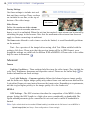
AXIS 207W/AXIS 207MW - Product Features
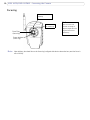
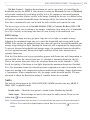
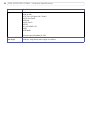
Overview
I/O terminal
connector
Antenna
Focus ring
Status
indicator
(outer ring)
Lock ring
Network
indicator
Product ID &
serial number
(S/N) label
Control
button
Wireless indicator
Microphone
Network
connector
Power
indicator
Power
connector
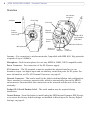
Antenna - For connection to wireless networks. Compatible with IEEE 802.11b/g networks
at speeds of up to 54 Mbit/s.
Microphone - Built-in microphone for one way MPEG-4, ISMA, 3GPP compatible audio.
Power Connector - For connection of the PS-H power supply.
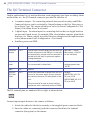
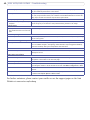
I/O Connector - The I/O terminal connector provides the physical interface to one
transistor output, one digital input and an auxiliary connection point for DC power. For
more information, see The I/O Terminal Connector, on page 42.
Network Connector - This can be used for the initial wired installation and configuration.
Uses a standard or crossover network cable, which is automatically detected by MDI-X
autocrossover. Once installed, this connection can be removed and the unit can be run
wirelessly.
Product ID & Serial Number Label - The serial number may be required during
installation.
Control Button - Press this button to install using the AXIS Internet Dynamic DNS Service,
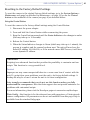
or to restore the factory default settings, as described in Resetting to the Factory Default
Settings, on page 41.