1
AXIS 70U/7000 User’s Guide
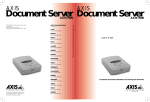
Physical Description
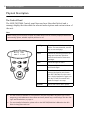
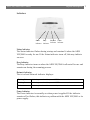
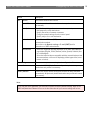
Indicators
Network Power
Status
Busy
Indicator Indicator Indicator Indicator
Status Indicator
The Status indicator flashes during startup and remains lit when the AXIS
70U/7000 is ready for use. If the Status indicator turns off, this may indicate
an error.
Busy Indicator
The Busy indicator turns on when the AXIS 70U/7000 is allocated for use and
remains on during the scanning process.
Network Indicator
The tri-colored Network indicator displays:
Flashing Yellow
Indicating network activity on a 10MB Ethernet network.
Flashing Green
Indicating network activity on a 100MB Ethernet network.
Red
Indicating that the unit is not correctly connected to the network.
Power Indicator
The Power indicator is normally on when power is applied. If the indicator
remains off or flashes, this indicates a problem with the AXIS 70U/7000 or its
power supply.
7