1
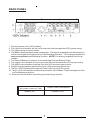
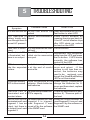
The ON BATT (green) LED illuminates in a steady state when the UPS is operating in the Battery mode. The ON BATT LED will extinguish when operating in
the On-Line and the Bypass modes.
The BATT LOW (yellow) LED illuminates in a steady state when the UPS reaches
a low battery condition. The BATT LOW LED is extinguished when the UPS is
in the On-Line mode and when the battery is not in a low battery condition.
The REPLACE BATT (red) LED illuminates in a steady state when the UPS
detects a weak battery, bad battery or if the battery is disconnected. The
REPLACE BATT LED is extinguished when the battery's condition is good.
The Load Level Bar Graph operates as follows:
25% Load (green) LED will be illuminated when there is approximately 25% of
the rated capacity.
50% Load (green) LED will be illuminated when there is approximately 50% of
the rated capacity.
75% Load (green) LED will be illuminated when there is approximately 75% of
the rated capacity.
100% Load (green) LED will be illuminated when there is approximately 100%
of the rated capacity.
The Battery Capacity Bar Graph operates as follows:
100% Battery Capacity (green) LED will be illuminated until the battery’s capacity drops below 100% capacity and then it will extinguish.
75% Battery Capacity (green) LED will be illuminated until the battery’s capacity drops below 75% capacity and then it will extinguish.
50% Battery Capacity (green) LED will be illuminated until the battery’s capacity drops below 50% capacity and then it will extinguish.
25% Battery Capacity (green) LED will be illuminated until the battery’s capacity drops below 25% capacity and then it will extinguish.
When the following events occurred, the corresponding LEDs will illuminate as
followings:
Battery Test: All of the LEDs will be constantly on.
EPO function: All of the LEDs will be off.
Output short circuit: The OVERLOAD LED will flash.
ON/TEST Button has three functions:
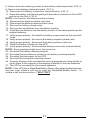
1. Press for 1-beep (2-seconds) to turn the UPS on.
2. AC mode: Press for 1-beep (2-seconds) to perform a battery test.
3. Battery mode: Press for 1-beep (2-seconds) to silence the alarm.
OFF Button:
Press for 1-beep (2-seconds) to turn the UPS off.
6