1
UR2050 operating instruction of English
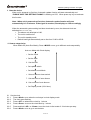
3.7 Using Aux function
Turn on your sound source device, connect audio cable with 3.5mm jack from source
•
device output into hole of “ AUX”
Select output levels refer to “3.8 Output level control” to select a sound output you want.
•
• Control your source device to play back it.
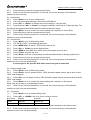
3.8 Output Level control (Electronics Volume Control)
• When radio, CD or Aux was on,
Press <VOL+> once, to increase speaker volume by one step. Hold for continually.
•
Press <VOL-> once, to decrease speaker volume by one step. Hold for continually.
•
Protect your ear, don’t make it too loud!
3.8 Battery Backup( Battery not include)
• Open cover of battery compartment.
• Place battery into compartment, tune clockwise to close and lock door.
• The backup battery will keeping preset data and clock running.
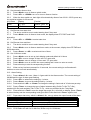
3.9 LCD Dimmer
At the any mode, press <DIM> 2 seconds to select dimmer On or dimmer Off.
•
• Select dimmer On with turn on the back light, select dimmer off with turn off the back light.
3.10 Key-lock
Press and hold the <Lock>, key-lock has been switched ON, the “KEYLOCK” goes solid.
•
Press and hold the <Lock> for 3 seconds again, key-lock has been switched Off, the
•
“KEYLOCK” goes off
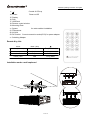
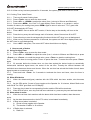
3.11 Using Remote
• Press each button same as unit to control the device.
10 Of 10