1
SON_
4-097.503-22
FD Trinitron
Operating Instructions
@2002 Sony Corporation
WARNING
To reduce the risk of fire or shock hazard,
to rainor moisture.
do not expose
the TV
Use of this television receiver for other than private viewing of
programs
broadcast on UbIF or VbtF or lransmmed
by cable
companies
for tee use of the general public may require
a uthori_ tion from the broadcasler/cable
company and/or
program
owIte_
NOTiFiCATION
Tbis equipment
has been tested and found to compl_ with tbe
]ima_ for a Class B digital device pursuant
to Part 15 of the PCC
Rules. These [imies are designed to provide reasonable proteeBon
against harmful interference
in a rosiden tial instdl]ation.
This
equipment generates, uses, and can radiate radio frequency energ]_
and, if not installed and used in accordance
with the instructions,
may cause harmful interference
with radio communications.
] towe_ er, there is no guarantee that interIurence wi]] not occur in a
particular
instdllation.
If this equipment
does cause harmful
interIerence
to radio or television reception,
which can be
de_ermJned by turning the equipment off and on, tbe user is
encouraged
to tr_ to correct the interIeronce
by one or moro of the
following measure<
ATTENTION
RISQUE
DECH_
ELECTRIQUK
NK PAS OUVR]R
PRECAUCION
R]ESGO
DE CH_UE
ELECTRICO
NO ABR]R
CAUTION: TO REDUCE THE RISK OF ELECTRICSHOCK,
Reorient or roloca le the receiving antennas.
Increase the separation between the equipment and receiver
Connect the equipment into an outlet on a circuit dKferent
from that to wbieb tho receiver is eonnectod.
DO NOT REMOVE COVER (OR BACK).
NO USER-SERVICEABLE PARTS INSIDE.
REFERSERVICING TO QUALIFIED SERVICE PERSONNEL.
_his symbol is inte_ded to alert the
presence of uninsula[ud
"dangerous
within tee product's
enclosure
that
s ufflcient magnitude
lo conslitute a
electric sbo_k to persons¸
user to the
voltage"
may be of
risk of
This symbol is intended to alert the user to the
presence of important operati_g and m ain[enanee
(servicing) lnstrucSons
in the literature
accompanying
the appliance.
Consult the dealer or an experienced
radio/TV
technician for
help
You are cautioned
that any changes or modifications
not
expressly approved
in this manual could void your authority
to operate this equipment.
_nstaNng
To pl'event internal beat buildup, do not block the ventilation
oponings.
Do not install tbo TV in a hot or humid place, or in a place
subject to excessive dust or mechanical vibration.
The AC power cord is attached to the rear of the TV with
hooks Do not attempt _o remove the cord from lhese hooks
Doing so eouJd cause damage to the TV.
CAUTION
70 PREVENT ELECTRIC SbIOCK, MATCH WIDE BLADEOP
PLUG TO WIDE SLOT, POLLY INSERT.
As an ENERGY STAR_i;Part fief,
Sony
has
product
that
determined
or product
models
CAUTION
the
When using TV games, computers, and simiIar product_ wah your
q'V, keep the brightness and contrast functions a_low settings, if a
fixed (non-moving)
pattern is left on the screen for long periods of
time at a bigh brightness or contrast setBng, the image can be
permanently
imprinted
onto the screen. Continuously
watching
the same program can cause tee imprint of s_alJon logos onto the
q'V screen. These types of imprints aro not covered by your
warranfy because tbey are the result of misuse.
for energy
Ow_ler'8
Note on Caption Vision
Trademark
_his lelevisioI_ receiver provides display of television closed
captioning
in accordance
with §15.119 of the PCC rules
TruSurround
and the _°
symbol are trademarks
Inc. TruSurround
technology
is incorporated
under
SRS Labs, inc.
Note on Geanin9 the TV
Clean the TV witba sof_ dry cloth.
as tbim_er or benzine, whichmight
cabinet
Note
to CMV
System
Never use s_ong solvents
damagethe
finish ofthe
sucb
Installer
_his reminder is provided to call the CATV system installer's
attention
to ArtD]e 820-40 of the National Electrical Code (NEC)
that provides guidelines
for proper grounding
and, in particular,
specifies that the cab]o ground shall be connected
_o the grounding
syMem of tbe buJ]ding, as dose to the point of cable entry as
practical
ENH{GY _[AR;
EMRGY SIAl<_ is a U.S. registered
this
meets
guidelines
efficiency
mark
Record
The model and serial numbers are provided on tee Dont of this
instruction manual and at the rear of the T_A Refer lo teem
whenever
you cMl upo_ your Sony dealer regarding
this product.
Irff0rmati0n
of SRS Labs,
hcense from
BBE and BBE Symbol are trademarks
of Bf3E Sound, Inc. and are
licensed by BBE Sound, Inc. under U.S. Patont No. 4,638,258 and
4,482,866.
Wega, FD Trinitron, Steady Sound, Digital Reality Creation,
Caption Vision, CineMotion,
Memory Stick, and Twin View are
registered
trademarks
of Sony Corporation
ClearEdge
VM and
liD Detailer are lrademarks
of Sony Corporation.
1
For your protection,
please read these instructions
keep this manual for future reference¸
corn plete]}) and
To protect small children from injury from Memory Stick Media,
remove all Memory Stick media from the TV's Memory Stick slot
and store it in a safv location wben it is not in use.
Carefully observe and corn ply with all warnings,
cau_ons and
instructions
placed on lhe set, or described
in the operating
instructions
or
service
Memory Stick
manual¸
Object and Liquid Entry
WARNING
_o guard agains_ injm'y, the [ollowing basic safety precautions
shouldbeobserved
M tho]nstMlanon,
uso,andservidng
oftheset
U_e
Power
or P01ar
"_;_L_t_%
could result in a fire or electric shock. Never spill
liquid
of anyx oltage
kind on
the set.
dangerous
points
or short out par ts that
/_/_
Attachments
Sou_ces
Do not use attachments
no[ recommended
manufacturer,
as they may cause hazards.
This set should be operated only from the type
of power source indicated on the serial/model
plate, if you are not sum of the type of electa ca]
power supplied to your home, consult your
dealer or local power compan_ For those sets
designed to operate from battery power, refer
to the o_ra_ng ins_ucfions.
Grounding
Never pusb objects of any kind into the set
through the cabinet slots as they may touch
Do not place any object>, especially beavy obiects,
on top of the set. The object may fMl from the set,
causing injury:
cleaning
Unplug the set from the wall outlet before
cleaning or polishing it. Do not use liquid
cleaners or aerosol cleaners. Use a cloth lightly
dampened
with water for c]ea ning the exterior
of the set.
zati0n
This set is equipped
with a polarized AC power cord plug (a plug
having one blade wider than the other), or with a three wire
grounding
type plug (a plug }laving a tbird pin for grounding).
FoIlow the instructions
below:
For the set with a p01arized AC power cord plug
way.
a safety
If yououget
are unable
7his This
plug is
will
fit intofeature.
the power
only oneto _
insert the plug fully into the outlet, try reversing
the plug. If the plug should still fail to fit, contact your electridan
have a suitable outlet installed.
Do not defeat the safety purpose
the polarized plug by forcing it in.
For the set with a three-wire grounding type AC plu9
Ibis plug >,'ill ordy fit into a grounding-type
power outlet. TbJs is a safety feature. If you ale
unable to insert the plug into the outlet, contdct
your electrida n to have a suaable outlet installed.
Do not defeat the safety purpose of the grounding
by the
to
of
If a snapping
or popping sound from a TV set is
continuous
or frequent while the TV is operating,
unpIug tbe TV and consult your dealer or service
technician. It is normal for some TV sets _o make
occasional snapping
or popping sounds,
particularly
when being turned on or off.
_staHatie_
Always use lwo or more people to lift or move the set The set is
beavy and the bottom surface is flat. Serious injury can l'esuJt from
trying to move the set by yourself a]ono, or from unsteady
bandiing.
Install tbe set oil a stable, level surface
Water
plug.
and
Moisture
Do not use powerdine
operated sets near
water
fur example, near a bathtub,
washbowl,
kachon sink, or laundry tub, in a
wet basement,
or near a swimming
pooi, etc
Overloadingl
Do not overload wall outlets, ex [elision cords or
convenience
receptacles
beyond their capacJty_
since this can rosult in fire or electric shock.
Always turn the set off when it is *lot to be
used. When the set is left unallended
and
unused for long periods of time, unplug it
from the wall ouget as a precau_on
against
the possibility of an inlerna] malfunction
that
could create a fire bazard.
Do not disconnect
the antenna or tile power cord during a heavy
storm. Lightning may strike while you are holding the cable or
cord, causing serious iniury. Turn off your TV and wait for lhe
weather to improve.
Accessogies
Do not place the set on an uns_ble cart, stand,
tripod, bracket, _ble or shelf. The set may fall,
causing serious injury to a child or an adult, and
serious damage to the so4 Use only a cart or s_nd
recommended by the manu_cturer
[or the
specific model of T_ Any mounting of the
product should follow the manu_cturer's
instructions, and should use a moun_ing
accessory recommended by the manu_cture_
An
appliance and cart combination should be moved
with care. Quick stops, excessive force, and
uneven sur_ces may cause lhe appliance and cart
combinalJon
to overturn.
Disconnect
move the
all cables
set
and
cords
from
the set
before
attempting
Do not allow children or pets to climb up onto, or push against,
set. The set may fall, causing serious iniury.
2
to
the
Ventilatio_r
Lightning
7he slots and openings in the cabinet and in the back or bottom m'e
provided for necessary ventilation.
To ensure reliable operation of
the set, and {o protect it from overheating,
these slots and openings
must never be blocked or covered.
]'or added protection for this television receiver during a lightning
storm, or when it is ]eft unattended
and unused for long periods of
timo, unplug it from the wall outJel and disconnecl
g_e antonna.
This will prevont damage to the receiver due to lightning and
power line surge_
3
Never
cover the slots and openings
cloth or other
3
with a
materials.
_p
Never block the slots and openings
by
placing the set on a bed, sofa, rug or other
similar surface.
Service
Damage Requiring Service
Unplug the set from the wall outlet and rr4er servicing
service personne] under the fo]lowing conditions:
to qualified
When lbe power cord or plug
Never place the set in a confined space, such
as a bookcase, or bui]tan cabinet, unless
proper venti]aBon is provided.
damagod
orfrayed.
Do not place the set near or over a radiator
or heat register, or where it is exposed to
direct sunlight.
If liquid has been spilled into
the set or objects have fallen into the
product¸
Power Cord Protection
Do not allow anything to rest on or roll over the
power cord, and do not place time set where the
power cord is subject to wear or abuse.
If the set has been exposed
water.
I[_i
Antennas
Outdoor
Antenna
Grounding
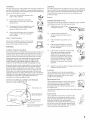
If aimoutdoor antenna is instMled, follow lhe precautions below. An
outdoor an[enna syslem should not be ]oca_ed in lbe vicinity of
overhead
power Iine£ or other electric light or power circuit_, or
where it can come h_ contact with sud_ power lines or circuits
WHEN INSTALLING
AN 0 UTILK)OR ANTENNA
SYSTEM,
EXTREME CARE SHOULD BE TAKEN TO KEEP FROM
CONTACTING
SUCH POWER LINES OR CIRCUITS AS
CONTACT WITII TtfEM IS ALMOST INVARIABLY FATAL.
Be sure the antenna system is grounded
so as to provide some
protection
against voltage surges and built-up static charges
Section 810 of the National Electrical Code (NEC) in USA and
Section 54 of the Canadian
Electrical Code in Canada provide
informaBon
with respect to proper grounding
of the mast and
supporting
structure, grounding
of the ]eadqn wire to an antenna
discharge
unit, size of grounding
co_duclors,
location of antenna
discharge
unit, connection to grounding
electrodes, and
requirements
for the grounding
electrode.
Antenna Grounding According to the National
E_estrical Code, ANS_/NFPA70
NEC:Nat0na lecNcal Code
If the set has been subject to excessive
shock by being dropped,
or the cabinet
has been damaged
If the set doe_ not operate normally when
following the operating instructions.
Adjust only those controls lbat are
specified in g_e operating
instructions.
Improper adjustment
of other controls
may result in damage and will often
require extensive work by a qualified
technician
to restore the set to normal
operation.
When the se_ exhibits a distinct
indicates a need for service
i ounding conductors
(NECSection810 21)
Ground camps
,_-
PuwerserwcegrouTdir _ electrode
system{NECA_ 20 Part b)
change
in performance,
it
Servicing
Do not attmnpt to service the set }ourself since
opening the cabinet may expose you lo dangerous
voltage or other hazards. Refer all ser_ icing to
qualified service personnel
Rep_a(ement
Parts
When replacement
parts are required, be sure lhe
service [echnician certifies in writing that he has
used replacement
partb specified by the
manufacturer
that have the same characteristics
as
the original parts.
Unauthorized
other haaards.
Groundclamp
ElectricseMce
equipment
lo rain or
substitutions
may result
in fire, electric
shock or
Upon corn p]etion of any service or repairs to the
set, ask the service technician
to perform routine
safer} checks (as specified by the manufacturer)
to
determine
that the set is in safe operating
condition, and to so certify. When the set reaches
the end of its useful life, improper
disposal could
result in a picture tube implosion
Ask a qualified
service technician
to dispose of the set.
3
Introducing
Setting
Using
the
Up the
the
FD Tr_nitron
Wega
Overview .......................................................................................................
Presenting the FD Trinitron Wega ...............................................................
Package Contents ..............................................................................
Features ............................................................................................
7
7
7
8
Overview .......................................................................................................
About the AC Power Cord .................................................................
TV Controls and Connectors .......................................................................
Front Panel .....................................................................................
Rear Panel .......................................................................................
Basic Connections: Connecting a Cable or Antenna .................................
Cable or Antenna Only ....................................................................
CaMe and Antenna Only .................................................................
CaMe Box and Cable Only ...............................................................
Cable Box Only ................................................................................
Connecting Optional Equipment ...............................................................
About Using SVIDEO ......................................................................
VCR and Cable ................................................................................
VCR and Cable Box .........................................................................
Two VCRs for Tape Editing ..............................................................
Satellite Receiver..............................................................................
Satellite Receiver and VCR ...............................................................
9
9
10
10
12
14
15
16
18
20
21
21
22
24
26
28
30
DVD Player with Component Video Connectors ...............................
DVD Player with SVIDEO and Audio Connectors .............................
Camcorder ......................................................................................
Audio Receiver ................................................................................
Using the CONTROL S Feature ...................................................................
Setting Up the Channel List .......................................................................
Using Auto Setup ............................................................................
32
34
35
36
37
38
38
TV
Remote
ControE
Overview
.....................................................................................................
39
Inserting Batteries .......................................................................................
Button Descriptions ....................................................................................
Outside Panel ..................................................................................
Inside Panel .....................................................................................
39
40
40
42
Programming
43
the Remote Control
............................................................
S
Using
Using
the
the
Features
Overview .....................................................................................................
Watching TV ................................................................................................
Using Twin View .........................................................................................
DispLayingTwirl Pictures ..................................................................
Factors Affectklg Twirl View ............................................................
Activating the Picture ......................................................................
Changing the Picture Size................................................................
Using Favorite Channels .............................................................................
Creating a List of Favorite Channels .................................................
Displaying a List of Favorite Channels ..............................................
Using the Freeze Function ..........................................................................
Using the Memory Stick Picture Viewer ....................................................
About Memory Stick ........................................................................
Supported Image Types ...................................................................
Unsupported Image Types ...............................................................
Inserting and Removing a Memory Stick ..........................................
Displaying the Memory Stick Menu ..................................................
Using the Memory Stick Index .........................................................
Using the Memory Stick Slideshow ..................................................
Changing the Memory Stick Setup Options .....................................
Using the Rotate Picture Screen .......................................................
Using Other Equipment with Your TV Remote Control ...........................
45
45
46
46
46
47
48
49
49
49
50
51
5t
51
52
53
54
55
56
56
57
58
Overview
61
Menus
.....................................................................................................
Navigating
Through
Menus
.......................................................................
62
Using the Audio
64
Menu
Using the Channel
Using the Parent
...............................................................................
Menu
............................................................................
66
Menu ...............................................................................
68
Using the Timer Menu ................................................................................
71
Using the Setup
72
Menu ................................................................................
Overview
.....................................................................................................
75
Glossary
.......................................................................................................
76
Notes
on Using Memory
Contacting
Specifications
Stick Media
........................................................
Sony ..........................................................................................
Troubleshooting
..........................................................................................
..............................................................................................
Optional A ccessories ...................................................................................
In dex ............................................................................................................
6
61
Using the Video Menu ................................................................................
77
78
78
82
82
83
This chapter describes
shipped
and provides
Pres÷ntfng
the FD TrfnfCron
the contents
an overview
of the package
of the features
in which the TV is
of your Wega TV.
Wega
The FD Trinitron
Wega (pronounced
outstanding
contrast,
uncompromising
corner detail.
VAY-GAH)
accuracy,
is characterized
and corner-to-
by
You will recognize
the superiority
of Wega technology
almost
immediately.
The first thing you will probably
notice is minimal
glare
from the flat picture tube. This flat-screen
technology
improves
picture detail without
distortion,
unlike conventional
curved screens.
The FD Trinitron
delivers
outstanding
image detail not only at the
screen center, but also at the corners -- so you can enjoy a bright,
clear picture from any location in a room.
Package
Contents
Along with your new Trinitron
TV, the packing
control and two AA (R6) batteries.
These items
up and use the TV.
box contains
a remote
are all you need to set
7
Features
Some of the features
that you will enjoy with your new TV include:
DRC ® (Digital
Reality Creation)
Multifunction:
conventional
line doublers,
the DRC Multifunction
Unlike
feature
replaces
the signal's
NTSC waveform
with the HD equivalent,
while doubling
the number
of vertical
and horizontal
lines. This
results in four times the density for quality sources, such as DVD,
satellite,
and digital camcorders.
The Video Menu allows you to
select interlaced,
progressive,
or CineMotion
output.
TM
Twin ViewTM: Using the Multi-Image
Driver (MIDX), Twin View
allows you to watch two programs
side by side, with the ability
to zoom in one picture. You can watch pictures
from two different
sources
(1080i, 720p, 480p, and 480i) simultaneously.
(Only the
left Twin View window
can display
1080i, 720p, and 480p
sources.)
Favorite
of your
Channels:
Allows
favorite
channels.
ClearEdge
definition
Steady
output
you
to preview
VM
Velocity
Modulation:
by enhancing
vertical
lines.
Sound®:
between
TM
Equalizes
programs
and select
Sharpens
from
eight
picture
volume
levels so there
and commercials.
is consistent
Memory
Stick ® Picture Viewer:
Allows you to view on your
screen digital images that are stored on Memory
Stick media.
TV
Component
Video Inputs:
Offers the best video quality for DVD
(480p, 480i), and digital set-top box (HD1080i,
720p) connections.
HD Detailer_M: Wideband
video amplifier
has a high bandwidth
frequency
rating, which allows it to send more video information
to the screen, resulting
in finer picture
quality, especially
for HD
sources.
CineMotionTM:
Reverse 3-2 pulldown
optimal
picture quality for film-based
shot in 24 frames-per-second
format).
_16:9 is alsoreferredto as
widescreenformat.
processing
provides
sources
(media originally
16:9 Enhancement:
Vertical Compression
technology
that
maximizes
picture resolution
when playing
"anamorphic"
or
"enhanced
for widescreen"
sources,
including
many DVDs.
Parental
Control:
V-Chip
unsuitable
programming
technology
allows parents
from younger
viewers.
to block
Digital
Visual Interface
(DVI): Can accommodate
a copyprotected
digital connection
(HDCP*) to other devices (such as
digital set-top boxes) that have compatible
interfaces.
The DVIHDTV input terminal
is compliant
with the EIA-861 standard
and is not intended
for use with personal
computers.
*High-bandwidth Digital Content Protection
This chapter
TV Controls
includes
for setting
Connecting
up your
a Cable or Antenna
14-20
22
24
26
28
30
32
34
35
36
Using the CONTROL
S Feature
37
List
38
The AC power
cord
TV.
10-13
Connecting Optional Equipment
VCR and Cable
VCR and Cable Box
Two VCRs for Tape Editing
Satellite Receiver
Satellite Receiver and VCR
DVD Player with Component Video Connectors
DVD Player with S VIDEO and Audio Connectors
Camcorder
Audio Receiver
Setting Up the Channel
the AC
Cord
instructions
and Connectors
Basic Connections:
About
Power
illustrated
is attached
to the rear
of the TV with a hook.
Use
caution
when removing
the AC plug from its holder. Gently slide the
plug upward
to remove
it from the hook. Once removed,
the AC
power plug should
automatically
disengage
from its stored location.
You can detach
the cord from
this hook
9
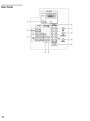
TV ConCrols
Front
Panel
and
Connec¢or_
I1_1
MEMORYSTICK
Memory Stick insertion
Viewer" on page 51.
13
MEMORYSTICK/.F:D
When lit, indicates that the Memory Stick is being read. (Do not remove
Memory Stick when the indicator is lit.)
13]
S VIDEO
VlDO 2 iNPUT
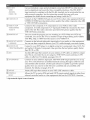
Connects to the S VIDEO OUT jack on your camcorder or other video
equipment that has S VIDEO. Provides better picture quality than composite
video (l_).
I_
VIDEO/L(MONO)-AUDIO
R
VDEO 2 iNPUT
Connects to the composite
video equipment.
]5_
M ENU
Press to display the Menu. Press again to exit from the Menu. For details,
"Using the Menus" on page 61.
]6_
_ _ ÷ ÷
Press _ _ ÷ ÷ to move the on-screen
+ SE/._.CT
slot. For details,
Press to select the on-screen
181
TV/VDF.O
Press repeatedly
video inputs.
191
-VOLUME+
Press to adjust the volume.
11i}]
CHAN_EL+
A/V output
jacks on your camcorder
Stick Picture
the
or other
see
cursor.
highlighted
to cycle through
see "Using the Memory
item.
the video equipment
Press to scan through channels. To scan quickly
hold down either CHANNELbutton.
through
connected
channels,
to the TV's
press and
11i]
TIMER/.F:D
When lit, indicates one of the timers is set. When the timer is set, this LED
will remain lit even if the TV is turned off. For details, see page 71.
]1_
STANDF3YI.ED
Blinks when the TV is turned on, then shuts off when the picture is displayed.
If the LED blinks continuously; this may indicate the TV needs service (see
"Contacting Sony" on page 78).
I_N]
Inflated Recewer(IR)
Receives
POWER
Press to turn on and off the TV.
IR signals from the TV's remote control.
ii
Rear Panel
_/6J
............
I
%--
VIDEO
AUDIO HIL
(VIDF:O7 IN)
Can accommodate
a copy-protected
digital copmection (ItDCP*) to other devices
(such as digital set-top boxes) that have compatible interfaces. The DVI-tIDTV
input terminal is compliant with the EIA-861 standard and is not intended for use
with personal computers.
See the instruction manual that came with your
equipment for details about connecting and using it with the TV.
% s VIDEOIN 1/;3
Connects to the S VIDEO OUT jack of your VCR or other video equipment
that has
S VIDEO. S VIDEO provides better picture quality than either composite video (13])
or VIIF/UtIF
(19]) connections.
Iq VDEO IN 1/3/4
Connect to the composite A/V output jacks on your VCR or other video
component.
A fourth component A/V input jack (VIDEO 2) is located on the front
panel of the TV. This video connection provides better picture quality than the
VttF/UtIF
([_) connection.
VDEO/L(MONO)
AUDIOR
% MOHITOHOUT
Lets you record the program you are watching to a VCR. When two VCRs are
connected, you can use the TV as a monitor for tape-to-tape editing (not available
with 480p, 720p, or 1080i when the input is set to VIDEO 5-7).
15_AL/DIDOLl/(V,4R/HX)
L (MONO)/H
Connects to the left and right audio input jacks of your audio or video equipment.
You can use these outputs to listen to your TV's audio through your stereo system.
16JHD/DVDIN5/6
Connect to your DVD player's or digital set-top box's component video (Y, PB, PR)
and audio (L/R) jacks. Component video provides the best picture quality (better
than Ls_, _d, or 19-),
(1080i/720p/480p/480i)
18Au×
TO CONVbHTER
% VEIF/UHF
Ifi}0
COHTROIS
IN/OUT
Auxiliary RF input that connects to your anterma, CATV cable, or cable box output
jack. This is convenient if you are using two VIIF/UtIF
sources (antenna, CATV
cable, or cable box). For details, see pages 16 to 19.
Connects to your cable box input jack. This VIIF/UtIF
output jack lets you set up
your TV to switch between _rambled
chamlels (coming through a cable box) and
unscrambled
cable channels. Use this jack instead of a splitter to get better picture
quality when you need to switch between scrambled and unscrambled
cable
channels. For details, see pages 18 to 19.
Primary
RF input
that connects
to your VtIF/UItF
antenna
or cable.
Allows the TV to receive (IN) and send (OUT) remote control signals to other Sony
infrared-controlled
audio or video equipment that has the CONTROL S function.
* High-bandwidth Digital Content Protection
13
Basic
Connecdon_:
Connecdng
a Cable
or Antenna
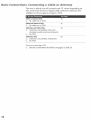
The way in which you will connect your TV varies, depending
on
how your home receives a signal (cable, cable box, antenna) and
whether or not you plan to connect a VCR.
Cable
or Antenna
15
Only
No cable box or VCR
Cable and Antenna Only
_
No cable box or VCR
16
Cable
18
i_
Box and Cable
Only
Cable box unscrambles
only some
channels (usually premium channels)
No VCR
Cable Box Only
Cable box unscrambles
No VCR
20
all channels
If you are connecting a VCR
3
See the connections
described
on pages
22 and
24.
Cable
Only
or Antenna
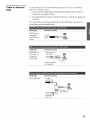
For best results, use one of the following connections if you are connecting a
cabHeor an antenna and you:
3
Do not need a cable box to unscramble
channels.
(If you have a
cable box, see pages 18-20.)
Do not intend
and 24.)
to connect
a VCR. (If you have
The connection
you choose depends
your home, as described
below.
Cable
Type
Connect
VIIF Only or
combined
75-ohm
Vt IF/Ut IF or
Cable
cable
Cable
Type
VHF Only or
UHF Only or
combined
VHF/UHF
Cable
Type
VHF and UtlF
on the cable
a VCR, see pages
type
you
22
have in
As Shown
F
Connect As Shown
300-ohm twin
Mead cane
Connect
As Shown
75-ohm
c_axia_cane
(not supp[ied)
300-ohmtwin
lead cable
1S
Cable
Only
and
Antenna
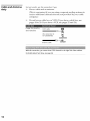
For best results, use this connection if you:
Have a cable and an antenna.
(This is convenient
receive additional
if you are using a separate
rooftop antenna
to
channels
that are not provided
by your cable
company.)
Do not have a cable box or VCR. (If you have a cable box, see
pages 18 to 20. If you have a VCR, see pages 22 and 24.)
Cable TV (CATV)
and Antenna
CAWcane
(No connect_o# to
TOCONVERTER)
CONVERTER
Ar_tenr_a
cable
VHFIUHF
With this connection, you cannot view CAW channelsin the right Twin View window.
Fordetails about Twin View, seepage 46.
Notes
onUsing
ThisConnection
Switch the TV's input
between the cable and
antenna
Press AN_ to switch
inputs.
Receive channels
using an
1
Press ANI"to switch
antenna,
of the cable
2
Set the CaNe option to Off. For details,
on page 66.
instead
back and forth between
the TV's VItF/UtIF
and AUX
to the AUX input.
Run the Auto Setup program,
page 38.
see "Selecting
as described
Charmel Options"
in "Using Auto Setup" on
17
Cable
Box
Cable
Only
and
For best results, use this eoooectior_ if:
Your cable company
scrambles
some channels,
such as premium
channels
(which requires
you to use a cable box), but does not
scramble
all channels.
You do not have
a VCR. (If you have
With this connection you can:
Use the TV remote control
to change
a VCR,
channels
see pages
22 and
coming
through
24.)
the cable box to the TV's AUX input jack. (You must first program
the remote control for your specific cable box; see "Programming
the Remote Control"
on page 43.)
Use the TV remote control to change channels
coming
directly
into the TV's VHF/UHF
input. (The TV's tuner provides
a better
signal than the cable box.)
With this connection, you can use all the Twin View features for unscrambledchannels
coming directly into the TV's VHFIUHFinput jack.
However,you can use only someof the Twin View features for channelscoming through
the cable box to the TV'sAUXinput jack. Forexample,when you switch the TV'sinput to
AUX-- to selectthe cable box input -- the picture displaysonly in the left window. If
you turn on Twin View, you canwatch cable channelscoming into the VHFIUHFjack in
the right window, but you cannot SWAPthe pictures betweenthe left and right
windows.
For details about Twin View, seepage 46.
Toconnect
thecable box and cable
1
Connect
the cable
VHF/UHF
jack.
from
your
cable
Z
Use a coaxial cable to connect the TV's TO CONVERTER
jack to
the cable box's input jack. (The TV's internal converter
lets you
switch between
unscrambled
signals coming straight
into the TV
and scrambled
signals coming
in through
the cable box,
eliminating
the need for an external
splitter.)
3
Use a coaxial cable
TV's AUX jack.
4
Run the Auto Setup program,
Channel
List" on page 38.
to connect
company
the cable
box's
as described
to the TV's
outcput
jack to the
in "Setting
Up the
Coaxia[cab[e
_N
(_
OUT
3
Coaxia_cabte
2
AUX
TO
CONVERTER
Cable (u_iscramb[ed char_rle[s) VHFIUHF
Notes on Using This Connection
,'mmmm
°
Use the cable box
Tune the TV to the channel the cable box is set to (usually
and then use the cable box to switch channels.
Set up the TV remote control
to operate the cable box
Activate the remote control to
Program the remote control. See "Pn)gramming
pages 43-44.
Press SAT/CA[_I.E
FUNCTION
operate
channel
3 or 4)
the Remote Control"
on
the cable box
Prevent the accidental
switching of TV channels
When using the cable box, you need the TV to stay on the channel the cable
box is set to (usually channel 3 or 4). You can use the TV s Channel Fix
feature to lock in a specific channel. For details, see "Using the Channel
Menu" on page 66.
Switch the TV's input
between the cable box and
cable
Press ANI to switch back and forth between the TV s VHF/UHF
(unscrambled
channels) and AUX (scrambled) inputs.
19
Cable
Box
Only
For best results, use this connection if:
Your cable company
to use a cable box.
You do not have
scrambles
all channels,
a VCR. (If you have
which
a VCR,
requires
see pages
you
22 and
24.)
With this connection you can:
Use the TV remote control to change channels
coming
through
the cable box to the TV's VHF/UHF
jack. (You must first
program
the remote control for your specific cable box.)
With this connection, all channelscomeinto the TVthrough your cable box and only one
unscrambledsignal is sent to the W, soyou cannot usethe TwinView feature. If someof
your channelsare scrambled, but othersare not, considerusing the "Cable Boxand
Cable" connection on page 18 instead. Fordetails about Twin View, see page46,
To connect the cable box
1
Connect
the CATV
cable
to the cable box's
2
Use a coaxial cable to connect
TV's VHF/UHF
jack.
the cable
3
Run the Auto Setup program,
Channel
List" on page 38.
CAW
Coaxialcable
cable
as described
input
box's
jack.
outcput
jack to the
in "Setting
Up the
Notes on Using This Connection
Use the cable box
Tune the TV to the channel the cable box is set to (usually
and then use the cable box to switch channels.
Set up the TV remote control
to operate the cable box
Activate the remote control to
Program the remote control. See "Programming
pages 43-44.
Press SAT/CA[_I.E
FUNCTION
operate
channel
3 or 4)
the Remote Control"
on
the cable box
Prevent the accidental
switching of TV channels
When using the cable box, you need the TV to stay on the channel the cable
box is set to (usually channel 3 or 4). You can use the TV's Channel Fix
feature to lock in a specific channel. For details, see "Using the Channel
Menu" on page 66.
Connec¢ing
Q ¢fonal
Equ men¢
Use the directions
in this section
to connect
the following
optional
equipment:
VCR and Cable
22
VCR and Cable Box
24
Two VCRs for Tape Editing
Satellite Receiver
26
28
Satellite Receiver and VCR
DVD Player with Component
Connectors
About
Using
S VIDEO
30
Video
32
DVD Player with S VIDEO and Audio
Connectors
34
Camcorder
35
Audio
36
Receiver
If the optional
equipment
you are connecting
has an S VIDEO
jack (shown at left), you can use an S VIDEO cable for
improved
picture quality (compared
to an A/V cable).
Because S VIDEO carries only the video signal, you
to connect
audio cables for sound, as shown below.
"tlDEO I_
S VIDEO
cable
also need
RlCtC
e _IDEO
VIDEO
©®
i E_
NIDiC
V
Audio cable
21
VCR and Cable
Fo, best _esu_ts,use this co_oection if:
3
Your cable
company
does
not require
you to use a cable
box.
With this connection, you can use all the features of Twin View. Fordetails about Twin
View, seepage 46.
To connect the VCR and cable
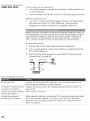
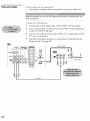
1
Connect
2
Use a coaxial cable to connect
to the TV's VHF/UHF
jack.
the CATV
cable
to the VCR's
3
Use an A/V cable to connect
TV's A/V input jacks.
4
Run the Auto Setup program,
Channel
List" on page 38.
VHF/UHF
the VCR's
the VCR's
input
VHF/UHF
A/V
as described
output
in "Setting
jack.
output
jacks
jack
to the
Up the
Coaxia_cable
g _DEO
iI
L
Rm
CAW cable
Notes
onUsin
9ThisConnection
Watch the VCR
Press TV/VlDE0repeatedly
illustration).
to select the VCR input (VIDEO 1 in the
Watch cable channels
Press TV/VlDE0repeatedly
illustration).
to select the cable input (VI tF/UI tF in the
Set up the TV remote control
to operate the VCR
If you have a non-Sony VCR, you must program the remote control. See
"Programming
the Remote Control" on pages 43-44.
Activate the TV remote
control to operate the VCR
Set the A/V slide switch to the position
Control VCR functions
the TV remote control
See "Operating
with
Label video inputs to easily
identify equipment connected
to the TV
you programmed
for the VCR. Then
a VCR" on page 58.
See the instructions
for setting up Video Labels on pages 72-73.
23
VCR
and
Cab_Box
For best results, use this eoooectior_ if:
Your cable company
scrambles
some channels,
such as premium
channels
(which requires
you to use a cable box), but does not
scramble
all channels.
With this conneaion, you can use all the features of Twin View. Fordetails about Twin
View, seepage 46.
With this connection you can:
Use the TV remote control to change channels
coming
through
the cable box. (You must first program
the remote control for
your specific cable box; see "Programming
the Remote
Control"
on page 43.)
Use the TV remote control to change channels
into the TV's VHF/UHF
jack. (The TV's tuner
signal
Record
coming
than
the cable
channels
directly
coaxial
One A/V
directly
a better
box.)
coming
through
into the TV.
the cable
To connect a VCR and cable box, you need:
A splitter, which is a small, inexpensive
purchase
at your local electronics
store.
Three
coming
provides
box and channels
device
that
you
can
cables.
cable
or one S VIDEO
cable
with
audio
cables.
To connect the VCR and cable box
1
Connect
2
Use a coaxial cable to connect
one of the splitter's
jacks to the TV's VHF/UHF
jack.
the CATV
cable
to the single
(input)
3
Use a coaxial cable to connect
the cable box's input jack.
the splitter's
4
Use a coaxial cable to connect
VCR's RF input jack.
the cable
box's
outcput
5
Use an A/V cable to connect
TV's A/V input jacks.
the VCR's
A/V
outcput jacks
6
Run the Auto Setup program,
Channel
List" on page 38.
as described
jack of the splitter.
other
two output
outcput
in "Setting
jack to
jack to the
to the
Up the
m
1
CAW
cable
4
AIV cable
_
_@
Notes on Using This Connection
Watch cable (unscrambled)
channels
Press TV/VIDEOrepeatedly
illustration).
Watch cable box (scrambled)
channels
Turn on the VCR and tune it to the channel the cable box is set to (usually
channel 3 or 4). Press TV/VDE0 repeatedly to select the VCR input (VIDEO 1
in the illustration). Use the cable box to change channels.
Watch the VCR
Press IV/VIDE0 repeatedly
illustration).
Set up the TV remote control
to operate the cable box or
VCR
If you have a non-Sony VCR, you must program the remote control.
"Programming
the Remote Control" on pages 4,3-44.
Activate the remote control to
operate the cable box or VCR
For the cable box, press SAT/CABLZFUNCTION,For the VCR, set the A/V slide
switch to the position you programmed
for the VCR. Then press VCR/DVD
FUNCTION,
Control specific cable box and
VCR functions with the TV
remote control
See
Label video inputs
identify equipment
to the TV
See the instructions
to easily
connected
Operating
to select the cable input (UIIF/VIIF
in the
to select the VCR input (VIDEO 1 in the
a Cable Box
on page 59 and
Operatilg
a VCR
See
on page 58.
for setting up Video Labels on pages 72-73.
25
Two
VCRs
for
Tape
Editing
Connecting two VCRs lets you record from one VCR to the other. By
connecting them as shown below, you can view (monitor) what is
being recorded.
To connect two VCRsfor tape editing
1
Use an A/V cable k_ connect the playback
jacks to the TV's A/V input jacks.
VCR's
A/V
output
2
Use an A/V cable to connect
acks to the TV's MONITOR
VCR's
A/V
input
the recording
OUT jacks.
m
2
IN
UNE
OUT
IN
OUT
UNE
iN
1/I,IF/IJI,IF
1 _
A/V cane
A/V cable
0_
Notes on Using This Connection
View (monitor)
recorded
what is being
Press W/VIDEOrepeatedly
illustration above).
to select the VCR input (VIDEO 1 in the
Set up the TV remote control
to operate the VCR(s)
If you have a non-Sony VCR, you must program the remote control.
"Programming
the Remote Control" on pages 43-44.
Activate the TV remote
control to operate the VCR(s)
Set the A/V slide switch to the position
Control VCR functions
the TV remote control
See "Operating
Label video inputs
identify equipment
to the TV
with
to easily
connected
you programmed
See
for the VCR. Then
a VCR" on page 58.
See the instructions
for setting up Video Labels on pages 72-73.
22
Satellite
Receiver
To connect _ s_teHite receiver
1
Connect
satellite
the satellite
input
antenna
cable
to the satellite
receiver's
jack.
2
Use an A/V cable to connect the satellite
jacks to the TV's A/V input jacks.
3
Connect
a CATV
VHF/UHF
jack.
4
Run the Auto Setup program,
Channel
List" on page 38.
cable
3
from
your
cable
receiver's
or antenna
as described
A/V
output
to the TV's
in "Setting
Up the
CAW cable
Satellite antenna
A/V cable
Notes on Using This Connection
Watch the satellite receiver
Press TV/VDEOrepeatedly to select the satellite receiver input
(VIDEO 1 in the illustration).
Set up the TV remote control to operate the
satellite receiver
If you have a non-Sony satellite receiver, you must program
the remote control. See "Programming the Remote Control"
on pages 43-44.
Activate the TV remote control to operate
the satellite receiver
Press SAT/CABLk
FUNCTION.
Control satellite receiver functions with the
TV remote control
See "Operating a Satellite Receiver" on page 58.
Label video inputs to easily identify
equipment connected to the TV
See the instructions for setting up Video Labels on pages 7273.
29
Satellite
Receiver
and VCR
To connect _ s_teHite receiver and VCR
1
Connect
satellite
the satellite
input
2
Connect
3
Use a coaxial
antenna
cable
to the satellite
jack.
the CATV
cable
cable
to the VCR's
to connect
to the TV's VHF/UHF
VHF/UHF
the VCR's
VHF/UHF
receiver's
Use an A/V cable
jacks to the VCR's
to connect the satellite
A/V input jacks.
5
Use an A/V
to connect
TV's A/V
cable
input
input
jack.
output
jack
jack.
4
6
receiver's
the VCR's
A/V
output
A/V
output
jacks
to the
jacks.
Run the Auto Setup program,
Channel
List" on page 38.
as described
in "Setting
Up the
CATV
cabte
Coaxia_
cable
A/V cable
_ _
_re:_:
....
etc.
Notes on Using This Connection
Watch
the satellite
receiver
Press TV/VIDEOrepeatedly
illustration).
to select the VCR input (VIDEO 1 in the
The VCR may need to be turned
on and set to the satellite
receiver
input.
Watch the VCR
Press TV/VIDE0 repeatedly to select the input to which the VCR is connected
(VIDEO 1 in the illustration).
Set up the TV remote control
to operate the satellite
receiver or VCR
If you have a non-Sony VCR or satellite receiver, you must program the
remote control. See "Programming
the Remote Control" on pages 43-44.
Activate the TV remote
control to operate the satellite
receiver or VCR
For the satellite receiver, press SAT/CABIF:FUNCT/0[I For the VCR, set the A/V
slide switch to the position you programmed
for the VCR. Then press
VCR/DVDFUNCTION.
Control satellite receiver and
VCR functions with the TV
remote control
See "Operating
page 58.
Label video inputs to easily
identify equipment connected
to the TV
See the instructions
a Satellite Receiver"
on page 58 and "Operating
a VCR" on
for setting up Video Labels on pages 72-73.
31
DVD Player with
Component
Video Connectors
For best results, use this connection
component video (Y, PB, PR) jacks.
if your DVD player has
Toconnect a DVD player with component video connectors
1
Use three separate
component
video cables to connect the
DVD player's
Y, PB and PR jacks to the Y, PB and PR jacks
(VIDEO 5) on the TV.
2
Use an audio cable to connect the DVD player's
jacks to the TV's VIDEO 5 audio input jacks.
tff,
I2
A_tdio cable
audio
output
Notes on Using This Connection
Watch
the DVD
player
Press
TV/VIDEO repeatedly
to select
the DVD
input
(VIDEO
5 in the
illustration).
Set up the TV remote
to operate
Activate
control
the DVD
control
player
the TV remote
to operate
the DVD
If you
have
a non-Sony
See "Programming
Set the A/V
slide
player.
press
Then
DVD
the Remote
switch
player,
you
Control"
to the position
must
program
on pages
the remote
control.
43-44.
you programmed
for the DVD
VCR/DVD FUP_CTIOP_.
player
Control
DVD
the TV remote
Label
video
functions
control
inputs
identify
equipment
to the TV
with
to easily
See "Operating
a DVD
See the instructions
Player"
on page
for setting
up Video
59.
Labels
on pages
72-73.
connected
33
DVD Player
with
S VIDEO
and Audio
Use this connection
if your
video (Y, PB, PR) jacks.
DVD player
does
not have
component
Connectors
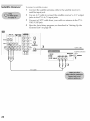
To connect a DVD player with A/V connectors
1
Use an audio cable to connect
the DVD player's
jacks to the TV's audio input jacks.
2
Use an S VIDEO cable to connect
to the TV's S VIDEO jack.
the DVD player's
audio
output
S VIDEO
jack
8 laDEC
/
_IDEO
SVIDEO
cane
kV_'JJI
,=_,
2
A_dio cable
Notes on Using This Connection
Watch the DVD player
Press W/VIDEOrepeatedly
illustration).
Set up the TV remote control
to operate the DVD player
If you have a non-Sony DVD player, you must program the remote control.
See "Programming
the Remote Control" on pages 43-44.
Activate the TV remote
control to operate the DVD
player
Set the A/V slide switch to the position you programmed
player. Then press VCR/DVDFUNCTION.
Control DVD functions
the TV remote control
See "Operating
Label video inputs
identify equipment
to the TV
with
to easily
connected
to select the DVD input (VIDEO 1 in the
a DVD Player"
See the instructions
for the DVD
on page 59.
for setting up Video Labels on pages 72-73.
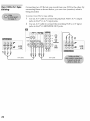
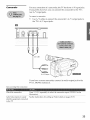
Camcorder
For easy connection
of a camcorder,
the TV has front A/V input jacks.
If you prefer, however,
you can connect
the camcorder
to the TV's
rear A/V
input
To con_lect
a camcorder
1
Use A/V
jacks.
cables
the TV's A/V
to connect
input
the camcorder's
A/V
output
jacks
to
jacks.
m
A/V came
To A/V oLtput
If you have a mono camcorder,
TV's L MONO audio jack.
connect
its audio output jack to the
Note on Using This Connection
Press TV/VIDEOrepeatedly
illustration).
Watch the camcorder
Label video inputs
identify equipment
to the TV
to easily
connected
See the instructions
to select the camcorder
input (VIDEO 2 in the
for setting up Video Labels on pages 72-73.
3S
Audio
Receiver
For improved sound quality, you may want to play the TV's audio
through your stereo system.
To connect an audio system
"_
Use an audio cable to connect
the TV's audio
audio receiver's
line input jacks.
2
Using
the TV's Audio
Menu,
set the Speaker option
the Audio Out option to Fixed or Variable, depending
to control the volume.
For details,
see "Using
on page
3
output
jacks
to the
to Off. Then
set
on how you want
the Audio Menu"
64.
Turn on the audio receiver, and then
to the jack into which you connected
set the receiver's
the TV.
line input
Usfng
the
CONTROL S Feature
CONTROL
S allows you to control your system and other Sony
equipment
with one remote control. In addition
to allowing
you to
control multiple
devices
with one remote control, the CONTROL
S
feature allows you to always point your remote control at your TV,
instead
of having
to point it at the other equipment,
which might be
hidden
or out of direct line of sight.
Use CONTROL
S IN to send
signals
Use CONTROL
S OUT to send
signals
to the TV.
to connected
equipment.
37
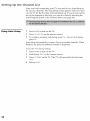
5ettfng
the
Channel
List
After you finish connecting
your TV, you need to run
set up your channels.
The Auto Setup screen appears
on your TV for the first time after hooking
it up. If you
set up the channels
at this time, you can do it later by
Auto Program
option in the Channel
Menu (see page
Using
Auto
Setup
1
Press
POWERto turn
2
Press
TVFUNC;ION on the remote
3
To continue
press CH_.
running
Auto Setup to
when you turn
do not want to
selecting
the
66).
on the TV.
Auto
Setup,
control.
press
CH+. To exit Auto
Auto Setup automatically
creates a list of receivable
finished,
the lowest numbered
channel
is displayed.
channels.
Setup,
When
To reset the TV to fa(tory settings
1
Press
POWF?Rto turn
2
Hold
down
3
Press
TVPOWERon the TV. (The TV will turn
RESETon the remote
on.)
4
Release
on the TV.
RF?SEL
control.
itself
off, then
back
This chapter describes
remote control.
Inserting
how to set up, program,
and use the TV's
Batteries
39
Button Descriptions
Outside Panel
Inside Panel
Programming
Inserting
40
42
the Remote Control
43
Batt÷r es
Remove
2
the battery
cover
from
Insert two size AA (R6) batteries
and • terminals
on the batteries
compartment.
Replace
the battery
the remote
control.
(supplied)
by matching
the O
to the diagram
inside the battery
cover.
39
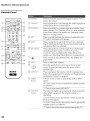
Bu on
Descripdons
Outside
Panel
[!
M
rill
i_]................
__t
G v_vv
MUTING
Sl_gaBI_
...............
i_
_
to mute
il
...............
!j_
the sound.
connected
r3
Pic MODE
[4
AP_I
...............
{i8
JUMP
...............
/1
to the TV's video
(]1
_
_
inputs.
to the
connected
IF and AUX inputs.
Press to jump back and forth between
The TV alternates
between
the current
that
was
two channels.
channel
and the
selected.
Interlaced, Progressive,
in the Video Menu. For
resolution
picture
modes:
CineMotiom Also available
[_
_
VO[+ to
..............
i_ressrepeated/y _; cyciett;r_;ugl_?t_; X_Xg_'i_;h2 .......
...............
{)0
_}................
_oo'
or press
Options"
on pages 62-63.
Press to switch
between
the sources
last channel
..............
!_
[?]................
again
Press repeatedly
to cycle through
the available
vide()
picture
modes:
Vivid, Standard., Movie, Ro. Also available
in the Vide() Menu. For details,
see "Selecting
Vide()
TV's VHF/UI
_5
Press
the sound.
l;_)JiJii;Ed
.......................
Press repeat eciiy t_)cycie thrl;ugh the _;idel) equipx_ent
...............
{)
H®® ®kr
Press
restore
POWEFt
_
_9
VOL +/_,_
Press
to turn
pages
46-48.
Press
to adjust
Move
the joystick
cursor.
To select
joystick
110_;:
CODE SET
Buttons
112 [-UNCTION
Buttons
View.
For details,
see
the volume.
_
÷ ÷ to move
an item,
press
the on-screen
the center
of the
(@).
Press
to program
Sony
video
the Remote
11I: POWER
on and off Twin
the remote
equipment.
Control"
VCR/DVD: Press
control
For details,
on page
to turn
to operate
non-
see "Programming
43.
on and off the VCR or DVD
player.
SAI_/CAI?12: Press
or cable box.
to turn
on and off the satellite
TV: Press
on and
off the TV.
to turn
The indicator
show
which
lights
up momentarily
when
the remote
control
equipment
receiver
pressed
to
is
operating:
V(R/DVD: Press
to have
the remote
control
operate
the
VCR or DVD player.
SA//CAB LE:Press
satellite
receiver
TV: Press
to have
to have the remote
or cable box.
the remote
control
control
operate
operate
the TV.
the
118"_'_
DISPLAY
Press once to display the current channel number and
current time and channel label (if set). Press again to
turn Display off.
114_:STEEP
Press repeatedly until the TV displays the time in
minutes (15, 30, 45, 60, or 90) that you want the TV to
remain on before shutting off automatically. To cancel
press until Sleep Off appears. While the Sleep feature is
set, press once to display the remaining time.
115_;0 - 9
ENTER
Press O 9 to select a channel; the channel changes
3 seconds. Press kN_kR to change channels
immediately.
11%[-AVORITES
Press to display
see page 49.
117_:_
M/S/SAP
Press repeatedly to cycle through the Multi-channel
TV Sound (MTS) options: Stereo, Auto SAP (Second
Audio Program), and Mono. Also available in the
Audio Menu. For details, see "Using the Audio Menu"
on page 64.
11%;FREEZE
Press to freeze the picture. Press again to restore the
picture. For details, see page 50.
119_(b
Press repeatedly to step through the Audio Effect
options. Also available in the Audio Menu. For details,
see page 64.
120:_MENU
Press to display the Menu. Press again to exit from the
Menu. For details, see "Using the Menus" on page 61.
12t_':CH +/
Press to .scan through channels. To scan quickly
through channels, press and hold down either (i}{
button.
the Favorite
Channels
after
list. For details,
122_''_
MEMORYSLICK Press to display the Memory Stick Menu. For details,
see "Using the Memory Stick Picture Viewer" on
page 51.
23 _,,,0_o
Use the A/V slide switch to control connected video
equipment.
You can program one video source for
each switch position. For details, see "Programming
the Remote Control" on page 43.
41
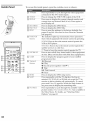
Inside
Panel
I_t access
the inside
panel,
connected
_
\
open
the outside
cover
as shown.
to the TV's video inputs.
_ij_,j_R
.....................
.....................
12GDISPLAY
Press once to display the current channel number and
current time and channel label (if set). Press again to
turn Display off.
2_ DISCMENU
128 DVt) FITLE
t..
129 RESET
Press to display the DVD Menu.
Press t ) &splay the DVD Title.
Press t >reset the settings to the fact try defaults. See
pages 62 and 64. Also used to clear Favorite Channels
(see page 49).
The indicator hghts up momentarily
when pressed to
show which equipment the remote control is operating:
}0: FUNCI"0 N
Buttons
VCR/I)VD:Press to have the remote control operate the
VCR or DVD player.
SAT/CABL2:Press to have the remote control operate the
satellite receiver or cable box.
MIITI_
TV:Press to have the remote control
POWEF
at once. (May not function
the TV.
with older Sony equipment.)
[3__UIt_........................
_ress_i;ai@_ _e _r;_5
program
operate
_uiae i_ _;i_ibsa_diF_...................
provider.
N ?/;,;;_;i:_
..........................
_ Rewfi_i...........................................................................
Buttons
Play
aec!!rd !presst(){_ e}t}er _v!
N Stop
_
Fast forward
I _ Pause
..........
:_1
_sJ
m
_
--
t35 51FEP
t}_ Pig MODF:
I
_
!...........................................................
Press repeatedly untd the TV displays the time m
minutes (15, 30, 45, 60, or 90) that you want the TV to
remain on before shutting off automatically.
To cancel
press until 51eep Off appears. While the Sleep feature is
set, press once to display the remaining time.
•
•
•
Press
repeatedly
to cycle through the available a video
picture modes: Vivid 5tan@rd Movie Pro Alsoaxailablein
the Video Menu. For details, see "Selecting Video
Options" on page 62.
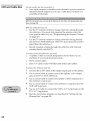
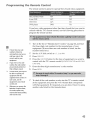
Programmfng
€he R÷mo¢÷
The remote
ConCrol
control
is preset to operate
AV1
303
8 mm VCR
AV2
302
V}IS VCR
AV3
301
DVD player
DVD
751
Turn to the list
the three-digit
equipment.
(If
number
listed
H
If more than one code
number is listed, tE/
entering them one by one
until you come to the
correct codefor your
equipment.
_3
_3
_3
If you entera new code
number,the code number
you previouslyentered at
that setting is erased.
II1 somecases,yOU may not
be able to operate your
equipment with the
supplied remote control. In
such cases,use the
equipment's own remote
control unit.
Wheneveryou removethe
batteries to replacethem,
the code numbersmay
revert to the factory setting
and must be reset.
video equipment.
Beta, Ed Beta VCRs
If you have video equipment
control with the TV's remote
program
the remote control.
_3
Sony brand
2
Set the A/V
Press
4
other than Sony brand that you want to
control, use the following
procedure
to
of "Manufacturer's
Codes" on page 44, and find
code number
for the manufacturer
of your
more than one code number
is listed, use the
first.)
slide
switch
to 1, 2, 3, or DVO.
CODESET.
Press the FUNC/IONbutton for the type of equipment
you want to
control with the TV's remote control (VCR/DVDFUNCTIONor SAT/CAF_/.E
5
Enter
the three-digit
6
Press
ENTER.
7
I_ check
manufacturer's
if the code number
works,
code number.
aim
the TV's remote
control
at the equipment
and press the POWLRbutton
that corresponds
with that equipment.
If it responds,
you are done. If not, try using
another
code listed for that manufacturer.
43
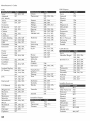
Ma_ufacturer's
Codes
VCRs
DVD Players
Admiral
(M. Ward)
Aiwa
Audio
327
Panasonic
Pentax
Philc{;
308, 3{)9, 3{}6,
307
305, 304
3()8, 3{)c)......................
General
755
Electric
Hitachi
758
]VC ...........................................
756 .......................................
338, 344
314, 337
Broksonic
Canon
Citizen
319, 317
309, 308
332
Pioneer
Quasar
RCA/
308
308, 3{)9, 3{}6
304, 305, 308,
Mitsubishi
Oritron
Panasonic
Cra!}_
Criterion
302!332 ......................
315
PROSCAN
309, 311,312,
313, 310, 329
pl_!!ips ........................
757 ..............................
Pioneer
752
Daew6t)
DBX
Dimensia
34_1;312; 3()_J........
314, 336, 337
304
335,324,338
314
52;}, 5i5, 5ii ......
Toshiba
754
Zenith ......................760 .......................
.............
............................
............
Sansui
Sai_sung
"_i_1_s_;_
...................
5_1 _i; 5i_,........
761
759
753
....................
_an_i{.....................................
3_;_3_ .....................................................................................
317, 318, 341
Scott
Fislaer
33(); 33,_
Funai ........................................
338 .......................................
312, 313, 321,
335, 323, 324,
325, 326
CaNe 8oxes
q_nY
......................................
2_q........................
c_r_i ................................
_29.3{}4;
309............sharp..............................
327328.............................
Itamlin/Regal
Electric
G{) Videii ..........................
322; 359; 34_0............
Signature
2000 (M.
G{iid;_ar
Ward)
3,_2
338, 327
H{tacla{..................................
306; 3i)4_3{J5;...........
338
SV2000
338
Syi;,;ania .............................
3(Jg; 3{)9; 338;........
JC Penney
Symphonic
Tashiro
Tatung
309, 305,304,
330, 314, 336,
337
310
338
332
314, 336, 337
222,223,224,
225, 226
Jerrold/G.
I.
201,202, 203,
204, 205, 206,
207, 208, 218
[)aJ_ ................................................
227; 228, 229 ...........
Pan£s6n{c ...............2T9_;22{J2"22"1
............
Pioneer
214, 215
Scientific
209, 210, 211
Atlanta
......................................................
.........
345, 346, 347
I(enw{){)d .........................
3iz_, 336_ 3321........
337
Technics
Toshiba
335,338
331,332
314, 330, 336,
337
331
Yamaha
Marantz
Marta
314, 336, 337
332
Zenith
Memorex
Min{)ita
309, 335
305; 304 ..................
kaserdisc Players
Mits_it;?stii/
.................
_23,324;32,_;
...........
MGA
326
Multiiecla ..................
32,_;'33g; 391 .......
(/)!ympic
Optimus
3{79!,308
327
"
337
309, 308
312, 311
"_ "
-"
Zenith
212, 213
Satellite Receivers
S!)ny
8{!1
Dish Network
810
Ed_{;star
81i) ........................................
General
802
Electric
i::iitachf ................................
805 ..................................
i::ii_iies................................
_ .............................
S{?py ..........................................
701 ...........................................
M{tsut_isl_i
g6g
Panasonic
704, 710
iSai_asi;nic ......... gg_ .......................................
PROSCAN
Toshiba
806, 807
Thischapterdescribes
howtousethefeatures
ofyourTV.
Watching
TV
UsingTwinView
UsingFavorite
Channels
UsingtheFreeze
Function
UsingtheMemory
StickPicture
Viewer
Using Other Equipment
Wa¢chfng
with Your TV Remote
45
46
49
50
51
Control
58
TV
_For a completelist of all
the functionsof the remote
Activate
control,seepages39-44.
operate
Turn
the remote
control
to
Press
TV FUNCTION
Press
TV POWER
the TV
on/off
the TV
seconds) or
Press CH+/
Adjust the volume
Press V0/. +/
Mute the volume
Press MUTING(press again to unmute)
Alternate
Press JUMe
back and forth
between
two channels
The TV alternates between the current
channel and the last chapalel tuned.
Display
number
the current channel
(and other information)
Press DISPIAYonce to display the channel
number and current time and channel
label (if set). Press DISPIAYagain to turn
Display off.
Switch the TV's input to the
VCR, DVD player, or other
connected equipment
Press TV/VDE0 repeatedly to cycle through
the video equipment
connected to the
TV's video inputs.
Change video and audio
options, customize the TV s
setup, set parental controls, and
more
Press MENUto display the Menu. For
details, see "Using the Menus" on
page 61.
Switch the TV's input between
sources connected to the TV's
VHF/UHF
and AUX inputs
Press ANI to alternate between sources
connected to the TV's VIIF/UttF
and
AUX inputs.
4S
Usfng
Vfew
Twin View lets you see two pictures
from two sources
antenna,
VCR, DVD, etc., -- on the screen at the same
-- from an
time. You hear
the sound from only one of the sources
at a time, but you can choose
which source's
sound is selected. You can also change the relative
size
of each of the pictures.
Displaying
Pictures
Twin
1
Tune the TV to a working
2
Press
channel.
CII-
A second
blue.
picture
appears.
The active
picture
/"ocanceH/"winViewand watch Lheactive picture
Press 1_ or O.
is highlighted
in
Activating
Picture
the
Toactivate the picture in the right
window
3
Move
the joystick
÷.
To activate the picture ir_the left
window
Move
the joystick
÷.
Functions AvailaNe in the Active (Highlighted) Window
Tune to a channel
Press 0-9 and then ENTER(or wait 3
seconds) or
Press CH+/-
Adjust the volume
Press VO/.+/
Mute the volume
Press MUTING(press again to unmute)
Switch the TV's input between
sources cormected to the TV's
VIIF/UHF
and AUX inputs
Press ANI_(left window
Switch the TV's input between
sources cormected to the TV's
A/V inputs
Press TV/VIDL0
Change
Move the joystick _ or _. (For details, see
"Changing the Picture Size" on page 48).
the picture
size
only)
47
Changing
the
Picture Size
The zoom feature
pictures.
lets you vary the relative size of the left and right
"[
Move the joystick ÷ or ÷ to
activate the picture that you
want to resize.
2
Move
the joystick
_ to enlarge
the picture.
3
Move
the joystick
picture
smaller.
_ to make
the
When you adjust the picture sizes, the TV memorizes the change. The
next time you use the Twin View function, the memorized sizes
appear.
Usfng
Favorite
Channels
The Favorite
Channels
feature lets you select programs
up to eight favorite channels
that you specify.
Creating
Favorite
_For
a List of
Channels
details on using the
ChannelMenu,seepage66.
from
a list of
1
Press
MENUto display
2
Move
the joystick
÷ or ÷ to highlight
3
Move
the joystick
_ to highlight
4
Move the joystick
_ or _ to highlight
(1-8) and press G.
5
Move the joystick
• or _ to highlight
a channel
you want to
assign to the Favorite Channel
number.
A preview
of the
highlighted
channel
appears
in the upper right of the screen.
Press _ to select that channel
as a Favorite
Channel.
6
To add
®.
more
channels
the Menu.
to your
the Channel
icon and press
Favorite Channels and press
a Favorite
favorites
Channel
list, repeat
Gnumber
steps
4-5.
_fb clear a Favorite
Channel,
move the joystick _ or _ to highlight
the channel
you want to clean Press _ and then press RF_SET.
7
Displaying
of Favorite
a List
Press
M_NU to exit the Menu.
Press
FAVORITES.The
Favorite
Channels
list
appears.
Channels
P_eview o_
Channel
_To
assignChannelLabels
(eg,,ABC,HBO,MTV,etc,)to
channelnumbers,asshown at
right, usethe ChannelLabel
feature in the ChannelMenu
Favorite
(seepage67).
2
Move the joystick
watch.
A preview
3
Press
_ or _ to highlight
of the highlighted
@ to select
the channel
the channel
Favorite
you want
Channel
you
want
to
appears.
to watch.
49
Usfng
€he Freeze
Func¢ion
The FREEZE
button allows you to temporarily
capture a program's
picture.
You can use this feature to write down information
such
phone numbers,
recipes, etc.
information
you want to capture
as
1
When the program
press FREEZE.
is displayed,
2
The TV switches to Twin View mode and displays the "frozen"
picture on the right, while the current program continues on the
left.
_rOZ@R
IJrogram
ir_progress
3
To cancel and return
to another
channel).
to normal
viewing,
press
FREEZE(or just tune
Using
About
Stick
the
Memory
Memory
Stick
Memory
versatile
Pictore
Stick (sold
Integrated
Vfe ÷r
separately)
is a new, compact,
portable,
and
Circuit recording
medium
with a data capacity
that exceeds that of a floppy disk. Memory
Stick is specially
designed
for exchanging
and sharing
digital data among Memory
Stick
compatible
products
such as digital cameras and digital video
cameras.
external
Because it is removable,
data storage.
Memory
Memory
Stick technology
you to view
allows
Stick can also be used
on your
for
TV screen
digital (jpeg) images that are stored on Memory
Stick media. You can
choose from an index of the images stored on the Memory
Stick, or
you can run a slideshow
of those images. You can also customize
the
features
of the slideshow
by selecting
the length of time that each
image is displayed,
toggling
the display of file information,
and
rotating
each image.
For more information about the using Memory Stick media, see
"Notes on Using Memory Stick Media" on page 77.
Supported
Types
Image
This TV's Memory
Stick viewer
have been recorded
on Memory
still and video cameras.
Recorded
can display
Stick media
only still images that
by Sony brand digital
images must also meet the following
Compression
specifications:
format: JPEG
File name format: DCF compliant
$I
About DCF File Names
Most Sony brand
digital
still and video
still images using DCF compliant
in the following
example:
Directory
IOOMSDCF
cameras
directory
automatically
and file names,
record
as shown
[_a me
File Names
Unsupported
Image
Types
This TV's Memory
Images
cameras
Stick viewer
cannot
display
recorded
on digital still cameras
that are not Sony brand
Images recorded
using
including
the following
any of the following:
and digital
products
that are not DCF compliant,
Sony products:
Digital still cameras
DSC-D7{X), DSC-D770
Digital video cameras
DCR-TRV900/DSR-PD100A
Images stored on a Memory
128MB
Images
stored
Images
in directories
Images
with less than
Images
dot
with more
video
Stick that has a capacity
in TIFF or any other
that
than
were
non-JPEG
renamed
16 horizontal
compression
format
on computer
and/or
4096 horizontal
that exceeds
vertical
and/or
lines per dot
vertical
lines per
Inserting
Removing
Memory
and
a
To ff_sert a Memory Stick
1
Stick
Locate the Memory
Stick slot (see page 10) and insert the
Memory
Stick into the Memory
Stick slot as illustrated
below.
When inserted
properly,
it should slide in with little resistance
and click into place.
To remove a Memory Stick
1
Check that the Memory
Stick indicator
on, this indicates
that the TV is reading
Stick.)
Z
Push the Memory
Stick gently into the slot, and
The Memory
Stick media is ejected.
3
Pull
the Memory
Stick completely
is off. (When the light is
data from the Memory
then
release
it.
out of the slot.
$3
Displaying
Memory
Menu
the
"[
Insert a Memory
Stick that contains
For details, see page 53.
2
Press the MEMORYSTICKbutton
Stick Menu appears.
3
To select an option,
press Q.
Stick
move
on the remote
the joystick
you want
control.
to highlight
to view.
The Memory
the option
and
Index
Displays an index of thumbnail images that are on
the Memory Stick. For details, see "Using the
Mem( ry St ck Index" on page 55.
%desh0w
Displays a slideshow of images that are on the
Memory Stick. For details, see "Using the Memory
Stick S1 deshow
on page 56.
Setup
Allows you to change slideshow options and rotate
images. For details, see "Changing the Memory
Se! p
4
the images
page
To exit the Memory
Stick Menu, press CH+/, TV/V[DEO,€_N/;or use
the 0-9 buttons
and ENTER(or wait 3 seconds)
to select a channel.
Using
Stick
the Memory
Index
The Memory
Stick Index lets you view
Memory
Stick in an index of thumbnail
•, ii
_The
images that are on the
images.
w,ii
1
Insert a Memory
Stick that contains
For details, see page 53.
2
Press the MEMORYSTICKbutton
Stick Menu appears.
3
Move the joystick to highlight
Stick Index appears.
the images
on the remote
Index and
press
you want
control.
to view.
The Memory
@. The Memory
Pageand folder (1'=-I)
buttonsareavailableonly if the
MemoryStickcontainsmore
imagesor foldersthan can be
displayedon onescreen.
ffdormation about the
seHectedima f_e
Move the joystick
• _ ÷ ÷ to highlight
an image and press @ to
select the image. Selecting
an image displays
that image at full
size. While an image is displayed
full size, you can do any of the
following:
Display
the previous
image
Display
the next image
Display the Memory
Stick Index
To return to the Memory
Menu._ and press O-
Move the joystick
÷.
Move the joystick ÷. If you move the
joystick ÷ while viewing the last image,
the first image is displayed. If you
move the joystick ÷ while viewing the
first image, the last image is displayed.
Press
Q.
Stick Menu,
move
the joystick
to
55
Using
the Memory
Stick Slideshow
The Memory
Stick Slideshow
lets you
images that are on the Memory
Stick.
1
Insert
a Memory
For details,
Changing
Memory
Setup
the
Stick that contains
see page
a slideshow
the images
Press
MEMORYSTICK.The Memory
3
Move the joystick
slideshow
starts.
4
I'o end the slideshow,
displayed.
1
Press the MEMORYSTICKbutton
Stick Menu appears.
2
Move the joystick
Stick Setup Menu
to highligh_
appears.
5et_p and press
3
Move
to highlight
an option
the joystick
to view.
to highlight
Stick Menu
%desh0w and
appears.
press
press @. The Memory
on the remote
Stick Menu is
control.
_.
The Memory
The Memory
and press
@.
Returns
Decrease or increase the length of time that each
image is displayed: 5 sec >nds, 10 sec >nds, 1 minute,
5 minutes, or 15 minutes.
%peat
to the Memory
@. The
Menu
Stick Menu.
Select Orsto set the slideshow to repeat after
displaying all the images recorded on the Memory
Stick. Select Of_to not repeat the slideshow.
File InfoHm_tion
Select Ot_to show file information of each image
while that image is being displayed.
%tare Picture
Displays the Rotate Picture screen. For details, see
"Using the Rotate Picture Screen" on page 57.
Move
the joystick
joystick * (or press
5
you want
%deshow Interval
%desh0w-
4
of the
53.
2
Stick
Options
watch
* (or press
@) to select
I_ exit the Memory
Stick Setup
IV!enu*,and press @.
@) to change
settings.
the changed
setting.
Menu,
move
M()ve the
the joystick
to
Using the Rotate
Picture Screen
The Rotate Picture Screen lets you rotate an image from an index of
thumbnails.
1
In the Memory Stick Setup Menu, move the joystick to highlight
RotatePictureand press O. The Rotate Picture screen appears.
2
Move the joystick ¢ ÷ ÷ ÷ to highlight
rotate.
3
Press @ to rotate an image 90 degrees in a clockwise
4
To return to the Memory Stick Setup Menu, move the joystick to
highlight Meuuand press @.
_The Pageandfolder (1_3)
buttonsareavailableonly if the
MemoryStickcontainsmore
imagesor foldersthan can be
displayedon onescreen.
an image that you want to
direction.
52
UMng
All
Other
Equipment
with
Your
TV Remote
Control
Equipment
Press TV/VDEO repeatedly to cycle
through the video equipment connected
to the TV's video inputs.
Switch the TV's input to the
VCR, DVD player, or other
connected equipment
Operating
Set up the TV remote control
operate non-Sony equipment
to
You must program the remote control the
first time you use it. See "Programming
the Remote Control" on pages 43 to 44.
Activate the remote control
to operate the VCR
Set the A/V slide switch to the position you
programmed
for the VCR. Then press VKR/DVD
FUNCTION,
Turn on/off
VCR/DVDPOWER
Change
CH +/_
a VCR
channels
Record
_
and @ simultaneously
Play
Stop
N
Fast forward
Rewind
_-_
the tape
Pause
H
Search the picture
or backward
Change
forward
input mode
_
or _
during playback
(release to resume normal playback)
TV/VCR
Operating
a
Satellite
Receiver
Activate the remote control
to operate the satellite
receiver
SAI'/CABLEFUNCHON
Turn on/off
SAT/CABEE
POWER
Select a charmel
0-9, ENIER
Change channels
Back to previous
CH +/_
channel
JUMP
Change
input mode
W/SAT
Display
channel
DISP/.,a/
Display
SAT Guide
GUIDE
Display
SAT Menu
M_NU
Move highlight
Select item
number
(cursor)
÷ ÷ ,@÷
@
Operating
a Cable
Box
Activate
the remote
to operate
Turn
box
on/off
Select
SAffCAFiLE POWER
a channel
Change
09,
channels
F.N_F:R
CH +/_
Back to previous
Operating
Player
SAI'/CABLE FUNC]ION
control
the cable
channel
JU MP
a DVD
Activate
the remote
to operate
Turn
control
Set the A/V
the DVD
slide
switch
to the position
programmed
for the DVD player,
VCR/DVD FUNCIION,
on/off
Then
you
press
VCR/DVD POWER
Play
Stop
m
Pause
H
Step through
different
tracks of the di_
_
Step through
CH+ to step forward
chapters
Select
tracks
Display
Menu
Operating
(Laserdisc
different
of a video
or _
to step
or CH- to step
backward
backward
disc
directly
the DVD
to step forward
0-9, EN _F}R
player
ME NU (inside
panel)
(Setup)
Display the DVD Menu
DISCMENU
Display the DVD Title
DVDr/T[ E
Activate
Set the A/V
an MDP
Player)
the remote
to operate
control
the MDP
programmed
slide
switch
to the position
for the MDP
player,
Then
you
press
VCR/DVD
FUNC/ION,
Turn
VCR/DVD POWER
on/off
Play
Stop
m
Pause
H
Search
the picture
forward
_
or backward
Search a chapter
backward
or _
(release
forward
or
during
to resume
playback
normal
playback)
CH +F
$9
The Menu
gives
you access
to the following
features:
Allows you to make adjustments to your picture
settings. It also allows you to customize the Picture
Mode based on the type of program you are viewing,
select DCR Mode options, and more.
62
Offers enhanced
64
audio
options
such as listening
to
second
audio programming
(SAP) or customizing
the Effect of the sound on your TV.
Allows
exit Menus.
you
to set up a Favorite
Auto Program
Lets you control
their ratings.
Navigating
Through
Channel
list, run the
66
based on
68
and more.
the viewing
of programs
Lets you set the clock on your TV and allows you to
program your TV for scheduled viewing using the
Timers.
71
Provides several options for setting up your
channels, labeling your vide() inputs, and
selecting the language of the on-screen Menus.
72
Menus
Display
_ Menusincludenavigation
help text that appearsat the
bottom of eachMenu.
function,
the Menu
MENU
Move through
the Menus
,_
Move through
the Menu options
÷ ÷
Change
an option's
settings
¢ e ÷ ÷
S(_I_ !_!!r_!!_!n! ct_anged sel_!!r_g
.....................................
@!_t
...............................................................
Exit the Menu
MENU
61
Using
the
Wd÷o
Menu
Toselect the Video Menu
1
Press
MENU.
2
Move
the joystick
highlight
the Video
÷ or ÷ to
icon
and
press @.
3
Move the joystick to highlight
an option. Press 0 to select an
option.
4
Move the joystick _ _ ÷ ÷ to
change settings. Press @ to select the changed
5
Press MENUto exit the Menu.
setting.
To restore the factory default settings for Picture, Brightness, Cobr, Hue,
Sharpness, Color Temp and VM.
3
Press RF?SET
on the remote control when in the Video Menu.
Selecting
Op tio n s
Video
_To changefrom one Mode
to another,usethe PICMODE
buttonon the remotecontrol.
_You
The Video Menu includes
Mode
Customized
Vivid
picture
Sia id_id ...................
can alter the Video
P_o
Menu settings(Picture,
Mode.
the following
options:
Select for enhanced
sharpness.
picture
contrast
and
....................................
Select to display
enhancements.
a picture with minimum
P etude
Adjust to increase picture contrast and deepen
decrease picture contrast and soften the color.
B_ightness
Adjust to brighten
Colo_
Adjust to increase or decrease
color intensity.
Itue
Adjust toincrease or decrease
the green tones.
Sharpness
Adjust tosharpen
Color Temp,
Cool
intensit!/
adjustment
@;iii_..................................
(NTSC-Standard).
or darken
the color, or
the picture.
or soften the picture.
Select to give the white colors a blue tint.
................................
IIIB
ClearEdge
VM
Sharpens
picture
Select
definition
from
to give every
VHocity
Modulation
edge.
To change quickly from one
DRC Mode to another, use the
DRC Mode
Creates
a high-resolution
picture
with
DRC MODE button on the remote
Digital
quality
sources
player,
satellite
control.
Reality
Creation
ir_teli_iced ................Rec()_:n_end
object
a sharp,
clean
High, Medium, Low, Of;r
(i.e., DVD
4x density,
ed f()r i_()':;ing
for high
receiver).
pictures
...............................
Progressive
Recommended
CineMofion
Provides
an optimized
automatically
detecting
display
by
film content
applying
pulldown
Moving
for still images
a reverse
pictures
3/2
will
appear
and
text.
and
process.
clearer
and
more
natural-looking.
63
Using
the Audio
l
Menu
Toselect the Audio Menu
1
Press MENU.
2
Move
the joystick
÷ or ÷ to
highlight
the Audio
press @.
3
icon and
Move the joystick to highlight
an option. Press O to select
an option.
4
Move the joystick ¢ ¢ * ÷ to
change settings.
Press @ to select
5
Press
the changed
setting.
MENUto exit the Menu.
To restore the factory default settings for Treble, Pass, and Balance
3
Press RESETon the remote control when in the Audio Menu.
Selecting
Audio
The Audio
Menu
includes
the following
options:
Op tio n s
Tochangequicklyfrom one
Effectto another,usethe @9
button on the remotecontrol.
Treble
Adjust
to decrease
or increase
higher-pitched
Bass
Adjust
to decrease
or increase
lower-pitched
Balance
Adjust
to emphasize
Steady Sound
,_LItO
Select
to stabilize
Off
Select
to turn
Effect
TruSu_rou Id Select
speaker
sounds.
balance.
the volume.
off Steady
for surround
Sound.
sound
(for stereo
programs
to mono
programs.
only).
M%
Tochangequicklyfrom one
MTSmodeto another,usethe
M IS/SAPbutton on the remote
control.
left or right
sounds.
Simuhted
Adds
Off
Normal
Stereo
Select
Enjoy stereo,
bilingual
a surround-like
program
stere()
effect
or mono
for ster_)
reception.
reception
broadcast
when
viewing
a
in stere().
and
.......
mono programs
audio
no SAP
Mono
programs
when
signal
is present,
Stere()
mode.)
Select
for mono
during
weak
a signal
reception.
stere()
is received.
the TV remains
(Use to reduce
broadcasts.)
(If
in
noise
Speake_
Audio
Out
Easy
controI
of
_ot,,,,_
On
Off
Select
toturnontheTVspeakers,
Select
toturnofftheTVspeakers
andlistento
theTV'ssoundonlythrough
yourexternal
audiosystem
speakers.
ThisoptioncanbesetonlywhentheSpeaker
optionisset
toOff.
v_i:_,i_;
.................
Th_T_;__ak_s _re_ur_,_d_ff but ti_e.............
adjustn_ents
volume
output
still be controlled
Fixed
from
your
audio
by the TV's
system
remote
can
control.
The TV's speakers
are turned
off and the
volume
output
of the TV is fixed. Use your
audio receiver's
volume
through
remote
control to adjust
your audio system.
the
65
Using
the Channel
Menu
Toselect the Cha_melMenu
1
Press MENU.
2
Move
the joystick
÷ or ÷ to
highlight
the Channel
and press @.
3
icon
Move the joystick to highlight
an option. Press O to select
an option.
Selecting
Op tio n s
Channel
4
Move the joystick _ _ ÷ ÷ to
change settings.
Press @ to select
5
Press
the changed
setting.
MENUto exit the Menu.
The Channel
Menu
includes
the following
options:
Favorite Charme[s
Lets you set up a list of your favorite charmels. For
•
•
details,
see jUs . ng Favorite. Channels ,l/ on page 49.
Cable
On
Select if you are receiving
with a CATV cable.
cable channels
0_!...........................................
Se!_} ff _!!u a{_ Ksing _n a}}}e_a: ..............................
Channel Fix
Off
Turns off Channel
Us@d when you
have a cable box
26
"Fix" your TV's channel setting to 2-6 and
use the cable box or satellite receiver to
or satellite
receiver
Auto Program
Fix.
change channels. Select one of these
settings if you connected the equipment
to
AUX26
Same as 2-6, except you select one of these
settings if you connected the equipment
to
the AUX jack (see page 13).
Video I
Use this setting if you have cormected
Automatically
sets up the channel
receivable channels.
the
list on the TV for all
_ Channelsthat you setto
be skippedcanbe accessed
only with the 09 buttons.
Channel
Channellabel
Allows you to customize the channel list that appears
when you use the (i}4+/buttons.
1
Move the joystick _ or _ to scroll through the
charmels until you find the channel you want to skip
or add. Then press O to select it.
2
Move the joystick _ or _ to toggle between Add or
Skip. Then press O to select.
To add or skip more channels, repeat steps 1 and 2.
4
Move the joystick
÷ to return to the Channel
Setup
Allows you to assign labels (such as station call letters) to
channel numbers. You can label up to 20 channels.
1
Move the joystick to highlight Channel and press @.
2
Move the joystick _ _ to scroll through the channel
numbers (1-125). Then press _ to select the channel
number that you want to assign a label.
Move the joystick to highlight
4
labe_ and press _.
Move the joystick • _ to scroll through
characters (A-Z, 0-9, etc). Then press _
highlighted
character.
Repeat to add up to 5 characters
5
To assign labels to more charmels,
the label
to select the
to the label.
repeat steps 1-4.
Move the joystick ÷ to return to the Channel
Menu, tyr press NfEN_3
_o exit the Menus.
Setup
6?
Using
the Parent
Menu
The Parent Menu allows you to
set up the TV to block programs
according to their content and
rating levels.
To select the Pare_t Menu
1
Press
MENU.
2
Move the joystick ,÷ or ÷ to
highlight
the Parent icon and
press @.
3
Use the 09 buttons
password.
4
If this is the first time you are creating
this password,
confirm
password
by entering
it again. (The Parent Menu options
on the remote
control
to enter
a four-digit
the
appear.)
5
Move
the joystick
the changed
6
Using
Menu
the
Parent
_lf you are not familiarwith
the ParentalGuidelinerating
system,you shouldselectChild,
• ÷ ÷ ÷ to change
Press
@ to select
Press MENUto exit the Menu.
The Parent
Menu
includes
the following
options:
Parer_tal lock
Turn ratings
Off
Parental lock is off. No programs
blocked from viewing.
on/offand select a
rating system
Child
Maximum ratings permitted
)
US: TV-Y, TV-G, G
Canada: C, G, TV-Y
'_buth
Maximum ratings permitted
are:
US: TV-PG, PG
Canada: C8+, PG, 8 alzs+, TV-PG
Y.Adult
Maximum ratings permitted
are:
US: TV-14, PG-13
Canada: 14+, 13 ans+, TV-14
Custoul
Select to set ratings manually.
US: See page 69 for details.
Canada: See page 70 for details.
simplify the rating selection. To
set more specific ratings, select
Custom.
_For
settings.
setting.
descriptionsof Child,
ratings,seepage 69.
Ch_tnge Password
For changing
Select Country
U.S.A.
Select to use USA ratings
Canada
Select to use Canadian
page 70).
are
are:
your password.
(see page 69).
ratings
(see
US Models:
Selecting
Rating
Custom
Options
For US models, the Custom
Rating Menu includes
options.
(For Canadian
models, see page 70.)
_J
Movie
Rating
_The Content-BasedRatings
are linkedto the levelof the
Age-BasedRating,Forexample,
a programwith an Age-Based
Ratingof TV-PGV (Violence)
rating maycontainmoderate
violence,while a TV-14V
(Violence)rating maycontain
moreintenseviolence.
G
All children
and General
PG
PG-13
Parental
Parental
R
Restricted
sugg_ted
NO17
and X
No one 17 or under allowed.
Guidance
Guidance
Age_Based
Block programs
by their rating,
content or both
TV_Y
All children.
TV_V7
Directed
TV_G
General
Audience.
TV_PG
Parental
Guidance
blockingcapability,set the AgeBasedRatings.
TVq 4
Parents
Strongly
TVMA
Mature
Audience
_lf
Content-Based
ensuremaximum
you blockunratedTV
programs,be awarethat the
following typesof programs
may be blocked:emergency
broadcasts,political programs,
sports, news,public service
announcements,religious
programsandweather.
Audience.
suggested.
for children
under
viewing, parental guidance
for children under 17.
TV Rating
_To
the following
13.
is
Ratings
to children
age 7 and older.
suggested.
cautioned.
only.
Ratings
}V
Fantasy
D
Suggestive
Violence.
Dialogue.
L
Strong Language.
S
Sexual situations.
g
Violence.
Unrated
Block
Blocks all programs
Block programs
or tnovies that
are broadcast
Allow
broadcast without a rating.
Allows programs and movies that are
broadcast without a rating.
and movies that are
without a rating
Viewing
Programs
Blocked
You can view blocked programs
by entering
the password.
Press the
ENTERbutton when tuned to a blocked program,
then enter the
password.
This temporarily
switches
off the Parental
Lock. To
reactivate
the Parental
Lock settings,
turn off the TV. When the TV is
turned on again, your Parental
Lock settings are reactivated.
69
Canadian
Models:
Selecting
Custom
Rating
For Canadian
models, the Custom
following
options.
(For US models,
FrenchRating
U,S_A.Rating
Viewing
the
Options
EnglishRating
Programs
Rating Menu includes
see page 69.)
Blocked
C
All children.
(18+
Children
G
General programming.
PC;
Parental
Guidance.
14+
Viewers
14 and older.
18+
Adult programming.
G
General programming.
8 ans+
Not recommended
for young
13 arm+
Not recommended
for ages under 13.
16 at]s+
Not recommended
for ages under 16.
18 ans+
Programming
See "US Models"
8 years and older.
restricted
children.
to adults.
on page 69 for details.
You can view blocked
programs
by entering
the password.
Press the
ENTERbutton when tuned to a blocked program,
then enter the
password.
This temporarily
switches
off the Parental
Lock. To
reactivate
the Parental
Lock settings,
turn off the TV. When the TV is
turned on again, your Parental
Lock settings
are reactivated.
Using
the Tfmer
Menu
To select the Timer Menu
1
Press MENU.
2
Move the joystick ÷ or ÷ to
highlight
the Timer icon and
press
@.
To reset the Ciock or rimers
Press RESETon the remote
Selecting
Timer
control,
when
Menu,
to reset
The Timer
•_=:iUl=l.J,.-==,om===_p
I
in the Timer
Menu
to the factory
includes
Op tio n s
defaults.
the following
options:
L
mlllL
Timel 1
Timer2
_To go directlyto
programmingTimer1 or 2 in
step 1, pressQ insteadof
movingthe joystick*.
_To
You can use the Timer to program the TV to turn on and
off and tune to a specific channel at two scheduled
viewing times.
Timer 1 and lilt er 2 are not available
the Current Time.
1
to be set until you set
Move the joystick _ or 4; to highlight TimerI or
Timer 2. To set the time, move the joystick ÷.
Move the joystick _ or ¢ to highlight
following options, then press @.
returnto the Timer
Menuafter programmingone
of the Timers,pressQ when
the highlight is inthe channel
numberfield,
4
Program
Select to set the Timer by day, time,
duration, and channel.
Off
Select to turn off the Timer. (Your previous
settings are saved.)
Move the joystick _ and _ to set the day(s), hour,
minute, duration, and channel number. Press @ or
÷ to confirm each setting and move to the next
setting. Move the joystick ÷ to go back to the
previous setting.
Press MENUto exit the Menu. An LED on the front
panel will light, indicating
2
one of the
the timer has been set.
(day, hour, and minute). Press _ (or move the
joystick ÷) to confirm each setting and move to the
next setting. Move the joystick ÷ to go back to the
previous setting.
Press MENUto exit the Menu.
71
Using
the Setup
1
2
Menu
Press
MENU.
Move
the joystick
highlight
press O.
3
_To
Selecting
Setup Options
icon and
Move the joystick to highlight
an option. Press O to select
an option.
movefrom within one
Menu to the main Menu of
icons,movethe joystick÷.
÷ or ÷ to
the Setup
4
Move the joystick • ¢ ÷ ÷ to change
the changed
setting.
5
Press
The Setup
settings.
Press
_
to select
MENUto exit the Menu.
Menu
Caption Vision
includes
Allows
the following
you
programs
CC1, CC2,
CC3, CC4
to select
from
options:
three
that are broadcast
closed
with
caption
closed
most
(Should
Displays
Text3,Text4
information
half
be set to CC1 for
programs.)
Text1 ,Text2,
network/station
presented
or the whole
Displays
using
screen
available).
For closed
set to CC1.
remaining
name
offers
this
service).
Displays
when
the
channel
button
is changed
is pressed.
off Caption
and
in the program
(if the broadcaster
Turns
either
(if
captioning,
the program
the time
Off
(for
Displays
a printed
version
of the
dialog or sound effects of a
program.
Into
modes
caption).
or the DISPLAY
Vision.
Video label
Allows
you to identify
the TV, such as a VCR,
a DVD player
select
A/V equipment
you connected
to
DVD, etc. For example,
if you have
connected
the label
to the VIDEO
DVD for the VIDEO
you press
the TV/VDEO button
Label
assigned
"_
you
Move
to change
to that input
the joystick
5 jack, you
5 input.
Then
inputs,
the Vide()
appears
on screen.
_ or _, to highlight
the video
(VIDEO 1-7) to which you want to assign
Then press Q to select the input.
Move
the joystick
displayed
inputs that do not have
equipment connected to
You can select
Vide()
them,
_ or _ to highlight
labels.
Then
from
can
when
press
the following
Q
one of the
to select
labels
input
a label.
the label.
for each
input:
VHS, DVD, Receive_,Satellite, Cable Box,
1/2/3/4
8ram, DTV,G4me, iD, Web, Fieta, Skip
Video
Tilt Correction
Allows
Move
DVD, S(_teilite, Cable Box, DTV, HD, Skp
5/6/7
you
to correct
the joystick
any tilt of the picture.
÷ or ÷ to choose
+7 and -7 and press
Normally,
tilt correction
first time you turn
to a new k)cation.
a correction
between
@.
only
needs
oft the unit
to be adjusted
and after
the unit
the
is moved
choice.
I6:9 F}nhanced
Provides
enhanced
(anamorphic)
with widescreenDVDs,set
your DVDplayerto 16:9
aspect ratio. (Aspect ratio is
the ratio of width to heightof
the screen,16:9is also
referredto aswidescreen
format,)
picture
sources,
only
option
is available
which
you can do by pressing
On
when
RurLs a demonstration
for widescreen
as selected
DVD
titles.
This
the TV is set to VIDEO
1-7,
the TV/VIDE0 button.
To activate
manually.
Auto when
you switch
video
Auto
Demo
resolution
such
input
or change
TO activate
automatically
16:9 signal
is received.
of on-screen
Returns
to
to another
channels.
when
a
Menus.
?3
This chapter
includes
the following
Glossary
topics:
76
Notes on Using Memory
Contacting
Sony
Stick Media
77
78
Troubleshooting
78
Specifications
82
Optional
82
Index
Accessories
83
7S
A signalingmethodthat usescontinuouschangesin the amplitudeor frequencyof an
electronictransmissionto conveyinformation.
a_pect
_'atie
Refers to the ratio between the width and height of the screen. This TV has a 4:3 aspect ratio,
as opposed to a 16:9 (widescreen) aspect ratio.
4:3 aspect ratio
_:e_pol_ellt videe
cempesite videe
1619aspect ratio
Componentvideois sentthrough threecables:two colorshade(chrominance)
signalsandone
brightness(luminance)signal Componentvideo achievesgreatercoloraccuracythan
compositevideo or SVIDEOby splitting chrominanceinto two separateportions.
Compositevideo is sentthrough a single cable.Compositevideocombinesthe colorshade
(chrominance)and brightness(luminance)informationinto onevideo signal.
A processthat demagnetizesthe metalcomponentsinthe TVmonitor,whicheliminatesimage
distortionthat can resultfrom magneticchargesacquiredbythe TV'scomponents.YourTV
degaussesautomaticallywhen it is turned on.
A new technologyfor transmittingand receivingbroadcasttelevisionsignals.DTVprovides
clearerresolutionand improvedsoundquality overanalog television.
Natie_al Televisie_ Syste_
Co_l_ittee {NTSC)
RF
A unit of the FederalCommunicationsCommission,Washington,DC,that establishes
televisionstandardsin the UnitedStates,suchasNTSCColor,the standardusedinthis TV.
RadioFrequency.
That part of the frequencyspectrumin which it is possibleto radiate
(transmit)electromagneticwaves.
S VIDEO
SVIDEOrequiresa singlecable,which carriesthe brightness(luminance)andcolor
(chrominance)signalsof the pictureseparately.SVIDEOprovidesbetter resolutionthan
compositevideo,whichcarriesthe signalstogether.
VHF/UHF
VHF(VeryHighFrequency)is the part of the radiospectrumfrom 30 to 300 megahertz.UHF
(Ultra HighFrequency)is the partof the radiospectrumfrom 300 to 3,000 megahertz.
480i
Provides480 linesof resolution.Displaysimagesusinginterlacedscanning,which first
transmitsall the odd lineson the TVscreenandthen the evenlines.
480p
Provides480 linesof resolution.Displaysimagesusingprogressivescanning,which transmits
eachlinefrom top to bottom.
720p
Provides720linesof resolution.Displaysimagesusingprogressivescanning,which transmits
eachlinefrom top to bottom.
10801
Provides1080 linesof resolution.Displaysimagesusing interlacedscanning,whichfirst
transmitsall the odd lineson the TVscreenandthen the evenlines. 1080iis oneof the
formatsusedby IqDTV(HighDefinitionTV).
No¢÷s on
Using
Memory
Stick
Precautions
Memory
When
$¢fck
using
Media
Memory
Stick media,
follow
these
precautions:
1`Oavoid permanent
damage
to still image data, do not turn off
the TV or remove
Memory
Stick media from the insertion
slot
while data is being read (as indicated
by the Memory
Stick
indicator
light being on).
Avoid touching
the terminal
of Memory
it into contact with a metal object.
Do not drop,
shock.
bend,
or submit
Do not disassemble
Avoid
getting
Apply
labels
1"o avoid
store
or modify
liquid
only
temperature
High
humidity
Direct
label area.
as near
data,
subject
a heater
do not use or
to:
or inside
a hot car)
substances
Magnetic
fields
Excessive
dust
Store and
protection
Stick media.
to still image
in a location
(such
to external
sunlight
Corrosive
Static
damage
or bringing
Stick media.
the designated
Stick media
High
Stick media
Memory
on Memory
within
permanent
Memory
Memory
Stick media
electricity
or electric
noise
carry Memory
Stick media
of stored data.
Save a backup
of stored
in its original
case to ensure
data.
77
Contactfng
5ony
If, after reading
these operating
instructions,
you have additional
questions
related to the use of your Sony television,
please call our
Customer
Information
Services Center at 1-800-222-SONY
(7669) (US
residents
Twin
only)
or (416) 499-SONY
(7669) (Canadian
residents
only).
View
I cannot get Twin View to
work
_
If you are using a cable box to unscramble all channels (as shown on
page 20), you cannot use the Twin View feature. This is because the cable
box can unscramble only one channel at a time. But if you need the cable
box to unscramble only some (usually premium) channels, you can use
Twin View for unscrambled
channels if you connect both a cable and cable
box, as shown on page 18.
You can use Twin View to view a signal from a different source that is
connected to the TV's A/V jacks (such as a VCR or DVD player) in the
second window by pressing the TV/VDEObutton while in Twin View.
Sources connected to the AUX, VIDEO 5, VIDEO 6, and VIDEO 7 inputs
There is no Twin View
window, or it is just static
_
Twin View cannot display
anything but TV channels
_
Be sure the Twin View window is set to a xr ideo• input or channel • that has a
signal airing.
You might be tuned to a x ideo input with nothing connected to it Try
cycling through the video inputs by pressing the TV/VIDEObutton.
If you connected equipment to the TV's AUX jack, it will display in the left
Twin View window, but not the right.
Try cycling through the video inputs by pressing the TV/VDEO button.
Check that the Video labe_option is not set to Skip. (See the Setup Menu on
page 73.)
Both Twin View windows might be set to the same channel. Try changing
channels in either window.
Twin View displays the same _
program in both windows
Remote
Remote
does
Control
control
not operate
_
The
_
Check
batteries
could
be weak.
the orientation
Press
Replace
the TV FUNCTION button.
5AT/CABI E FUNCTION button,
CABLE mode.
Make
sure
Locate
Cannot
change
channels
with the remote control
_
If you
(iharmel
page
another
Fix option
are using
to change
control
_
not operate
video
equipment
non-Sony
another
If you replaced
There
may
There
device
Image
not display
Blank
does
square
instead
appears
of a thumbnail
may
be more
outlet.
the TV FUNCTION
be sure you
have
3 or 4 setting.
on the hookup
not
Use the
you used
(see
than
Make
_1
Memory
Favorite
_
This
channels,
For example,
to press
the
your
cable
are using
box
the SAT/CABLE FUNCTION button.
to the remote
need
be sure
if you
recently,
the code
numbers
for
to be reset.
one code
for the equipment
that
you are
to operate.
is a possibility
_
image
to the wall
charalels,
based
the
to SAT or
lights.
first press
the channel
to change
to press
the batteries
that some
your Sony TV remote.You
remote
control.
Stick
securely
to change
pressed
control
fluorescent
channels,
the channel
be sure
equipment
attempting
Memory
from
TV from
for that device.
channels,
the video
_
device
your
to "fix"
FUIICliON button
does
is connected
3-4 feet away
switched
inadvertently
the remote
66).
If you
Remote
cord
have
changes
the TV to change
are using
inadvertently
You may
which
the TV's power
the TV at least
If you are using
button.
the batteries.
of the batteries.
sure
the image
non-Sony
may need
is supported
indicates
that
howe,_er,
indicate
that
the image
displays
both
does
while
using
not support
the full-size
the thumbnail
cannot
by the TV (see pages
Stick functions
are not ax affable
Channel
functions.
the icon,
equipment
be operated
to use the equipment's
and full-size
51-52).
Twin
a thumbnail
image
View,
Freeze
view.
Selecting
on the screen.
images
by
original
It could
are corrupted
or
also
or not
supported.
Cannot
rotate
thumbnail
image,
no
appears
_
Be sure
_
If a blank
that
Cannot
hear
audio
using
Memory
Image
file name
appear;
instead,
while
the LOCK
square
the image
_
There
_
Dashes
switch
appears
does
is no audio
on the Memory
instead
not support
ax ailable
Stick is sat to off.
of the thumbnail
a thumbnail
while
using
image,
view
Memory
and
this indicates
cannot
be rotated.
Stick
Stick
does
dashes
not
(---)
equipment
appear
instead
that is not
of the file name
if the image
was
recorded
using
DCF-compliant.
appear
79
Video
No picture
(screen
_
not lit), no sound
Dark,
poor
picture
or no
(screen
good
sound
Only
snow
lit),
and noise
If your
TV does
not
Call
turn
your
sure the power
cord is plugged
in.
the POWERbutton
on the front of the TV.
Press
the TVNIDE 0 button
_
Adjust
the Picture option
_
Adjust
the Bdght/_ess option
_
Check
the antenna/cable
the antenna/cable
3
Check
_
Try another
Dotted
lines
_
Adjust
_
Move the TV away
dryers.
r_
Using a highly
problem.
_
You have
selected
(See page
72 to reset
Double
images
"Black
box"
or ghosts
on screen
Sony
to cycle
Service
in the Video
feature
_
the connected
Menu
in the Video
flashing,
your
TV may
Center.
through
(see page
Menu
video
sources.
62).
(see page
62).
colmections.
cormections.
channel;
it could
be station
trouble.
the antenna.
from
noise
directional
sources
outdoor
a text option
Setup
If the Auto setting
does
select
not
such
antenna
player,
On to manually
Press
MUTING so that the word
turn
Menu
To turn
trying
automatically
DVD
as cars,
neon
or a cable
in the Setup
selections.)
Caption Vison option
to Off. If you were
select COl instead
oftEXT 14.
16:9 Enhanced
keeps
Make
Press
on the screen
local
a red light
service.
appear
or stripes
on, and
need
signs,
may solve
the
and no text is available.
off this feature,
to select
detect
or hair-
closed
set the
captioning,
the 16:9 signal
on the 16:9 Enhanced
from
your
feature.
For
Audio
Good
picture,
_
no sound
Muting disappears
.................................................................................
suretl e
Cannot
gain
enough
when using a cable
Sound seems weak
volume
(see page
box
or
the • volume
•
of the cable
t!!0!'
•
box using
aua! Men ! eePag f 5):
......
the cable
•
box ¢ s remote
Increase
_
Then_
.....................................................................................................
press [V _UNCT/0N and adjust the TV s.........................................................................................
volume.
The TV's audio might be set to Auto SAP or Mono, when it might be better set
control.
to Stereo. In the Audio
Menu (see page 64), set the MTS setting to Stereo. If
already
set to Stereo, switch to Mono (which may reduce background
noise
during
external
the screen
_
insufficient
Cannot
from
41)).
raise
audio
the volume
speakers
on
3
weak
stereo
If the Speaker option
order
to output
adjust
the sound
Audio Out option
broadcasts).
is set to Off and the Audio Out option
the sound
(see page
to your
audio
system)
use your
64). Or, to use the TV remote
is set to Fixed (in
audio
receiver
control,
set the
to
to Vad(_ble.
.............................................................................................................
T_! turn!!
th'_ TV sPeaker
s se_ th'_ _Pta I!t' !_F_t!!!_ t!)q!_ !se_ P agy61
) .......................
Channels
Cannot receive upper
channels (UttF) when
using an antenna
TV is fixed to one channel
_
_
Cannot receive any
channels when using
cable TV
Cannot receive or select
channels
_
3
_
3
Change the Cable option to Off (see page 66).
Use Auto P_ogr(_min the Channel Menu to add receivable channels that are
not presently in the TV's memory (see page 66).
Use Auto Rogr(_m in the Channel Menu to add receivable channels that are
not presently in the TV's memory (see page 66).
Check your Channel Fix settings (see page 66).
Use Auto P_ogr._min the Channel Menu to add receivable channels that are
not presently in the TV's memory (see page 66).
Make sure the CabFe option is set to On in the Channel Menu (see page 66).
Use Auto P_ogram in the Channel Menu to add receivable TV channels that
are not presently in TV memory (see page 66).
General
How to reset TV to
factory settings
_
Turn on the TV. While holding down the RESETbutton on the remote
control, press the POWF?R
button on the TV. (The TV will turn itself off, then
.................................................................................................
Re!e e R!S !Ibutt!! :
How to restore Vide() settings _
Press the RESETbutton
on the remote control while in the Vide() Menu (see
How to restore Audio
_
Press the RF:SET
button
on the remote control while in the Audio Menu (see
Cannot cycle through the
other vide() equipment
connected to the TV
rj
Be sure the Video label option
Cannot operate
r3
If a menu option appears in gray, this indicates that the TV is in a state in
which the menu option is not available.
In the password screen (see page 68), enter the following master password:
4357. The master password clears your previous password; it cannot be
used to temporarily
unblock channels.
Menu
Lost password
TV makes "popping"
when turned on
r3
sound
LED on front panel is lit
is not set to Skip (see page 73).
r3
This is a normal sound that results
each time it is turned on.
r3
The STAND BY LED (see page 11) blinks when the TV is turned on, then
shuts off when the picture is displayed. If the LED blinks continuously, this
may indicate the TV needs service.
The TIMER LED (see page 11) indicates that the timer is set (page 71).
When the timer is set, this LED will remain lit even when the TV is turned
off.
r3
from the TV automatically
degaussing
81
Picture
Tube
FD Trinit ton® tube
Antenna
75 ohm external
Television
Channel
System
NTSC, American
Coverage
terminal
for VHF/UI
IF
TV Standard
VIIF
UItF
2-13
14_69
CATV
1 125
Power Requirements
120V, 60 Hz
Inputs/Outputs
DVI IIDTV
1 terminal,
3.3V T.M.D.S., 50 ohms
The DVM {DTV input terminal is compliant with the EIA 861 standard
not intended for use wi[t_ personal computers.
and is
Video (IN)
4 total (1 on front panel)
1 Vp p, 75 ohms unbalanced,
S Video (IN)
3 total (1 on front panel)
Y: 1 Vp-p, 75 ohms unbalanced,
sync negative
C: 0.286 Vp-p (Burst signal), 75 ohms
Audio (IN)
7 total (1 on front panel)
500 mVrms (100% modulation)
Impedance: 47 kilohm
Y: 1.0 Vp p, 75 ohms unbalanced,
negative; PB: 0.7 Vp-p, 75 ohms
PR: 0.7 Vp_p, 75 ohms
Component
Video Input
2 (Y, PB, PR)
CONTROL
S (IN/OUT)
1
Variable/Fixed
Audio
(OUT)
1
sync negative
sync
More than 408 mVrms at the maximum
volume setting (Variable)
More than 408 mVrms (Fixed)
Impedance (output): 2 kilohms
Supplied
Accessories
Visible Screen Size
Actual CRT Size
Speaker
Output
Dimensions
(W x i{ x D)
Remote
Control
RM Y186
AA (R6) Batteries
2 supplied
KV-32I IS500
32 in (812.8 ram) picture
for remote
control
measured
diagonally
KV 36I IS500
36 in (914.4 ram) picture
measured
diagonally
KV 32I IS500
34 in (863.6 ram) picture
measured
diagonally
KV-36I IS500
38 in (965.2 ram) picture
measured
diagonally
7.5 W x 2 + 15 W subwoofer
KV 32I IS500
898 x 689 x 608 mm
(35 3/8 x 27 1/8 x 24 in)
1017 x 760 x 643 mm
KV 36I IS500
(40 x 30 x 25 3/8 in)
Mass
Power Consumption
KV 32I IS500
80 kg (176.5 Ibs)
KV 36I IS500
104.3 kg (230 lbs)
In Use
280 W
In Standby
Design
and
A/V
Audio
1W
specifications
Cable
(VMC-810/820/830
Cable
Component
TV Stand,
TV Stand,
are subject
to change
without
notice.
HG)
(RKC-515HG)
Video
Cable
(VMC-10/30
HG)
for KV-32HS500:SU-32HV1
for KV-36HS500:SU-36HV1
Memory
Stick media: 8 MB (MSA-8A);
16 MB (MSA-16A);
MB (MSA-32A);
64 MB (MSA-64A);
128 MB (MSA-128A)
32
Cir_eMntion 8, 63
ClearEdge VM 8, 63
clearing, Favorite Channels 49
closed caption modes 72
CODE SET button 40
color, adjusting 62
CONTROL S 37
CONTROL S IN/OUT jacks, described
Cool, Color Temperature
62
cursor movement buttons 11
0-9 buttons 41,45
16:9 (widescreen) 8, 73
A
ANT button
40, 45
antenna,
connecting
aspect ratio 73
Audio Menu 61, 64
Audio Out 65
audio
receiver,
15
cormectir_g
36
Auto Program
(channel
setup)
Auto SAP, MTS setting 64
AUX jack, described
13
AV1-3/DVD
slide switch 41
38, 66
bilingual
audio 64
blocking
programs.
brightness,
adjusting
D
degauss 81
Demo, Menus 73
B
balance,
adjusting
64
bass, adjusting
64
batteries,
inserting
in remote
13
39
See ratings.
62
C
cable
connecting 15
setting On/Off 66
with VCR, connecting 22
cable box
connecting with VCR 24
Twin View issues 46
using with TV _emote control 59
camcorder, connecting 35
Caption Vision 72
CATV. See cable
CH buttons 11,41, 45
changing picture size, in Twin View 48
Channel Menu 61, 66
Channel Skip/Add
67
channels
creating labels 67
setting up 38
Digital Reality Creation 8, 63
Digital Visual Interface (DVI) 8, 13
DISC MENU button 59
DISPLAY button 41, 42, 45
DRC MODE button 40
DRC. See Dilzitat Reality Creation.
DVD player
using with TV remote control 59
with A/V cormectors, connecting 34
DVD TITLE button 42, 59
DVI. See Digital Visual interface.
DVI-HDTV 13, 82
E
Effect button
41
ENTER button 41, 45
F
Fast-forward
button
Favorite
Channels
clearing 49
in Channel Menu
using 49
FAVORITES
button
features
8
42
66
41
Fixed audio setting 65
FREEZE button 41, 50
Freeze,
using
50
g3
G
GUIDE
button
Mono, MTS setting
Movie mode 62
MTS 64
42
}1
HD Detailer
MTS/SAP
MUTING
8
HD / DVD IN (1080i/720p
described
13
hue, adjusting
/ 480p/480i)
jacks,
41
40, 45
N
Neutral,
62
button
button
64
Color
Temperature
62
0
[
interlaced
off, turning
on, turning
8, 40, 63, 76
off the TV 11
on the TV 11
J
p
joystick 40
JUMP button
Parent
40, 45
Menu
61, 68
parental
control, described
password,
changing
68
Pause button 42
L
label
channels
67
PIC MODE
Language,
setting 73
LOCK switch, Memory
Stick
picture
Picture
57
button
MDP,
using
with
TV remote
control
59
Memory
Stick
Index 55
indicator (LED) 11
inserting 53
insertion slot 1 ]
Menu 54
precautions
77
Rotate Picture 57
Setup options 56
Slideshow 56
supported and unsupported
images
troubleshooting
79
using 51-57
Memory
Stick button 41
MENU button
11, 41, 42, 45, 61
Menus
Audio 61, 64
Channel 61, 66
Parent 61, 68
Setup 61, 72
Timer 61, 71
Video 61, 62
40, 42
contrast,
adjusting
62
in Picture. See Twin View.
Play button 42
POWER button
M
8
11
power cord, removing
from holder
powering
on/off,
the TV 11
presetting
channels
66
Pro (Video) mode 62
problems,
progressive
troubleshooting
8, 40, 63, 76
9
78-81
R
51
ratings,
ratings,
Record
remote
setting 68-70
viewing blocked
buttons
42
control
programs
inserting batteries 39
programming
43-44
removing,
Favorite
Channels
RESET button
42
49
resetting
Audio options 64
Timer options 71
Vide() options 62
Rewind button
42
rotate
picture,
Memory
Stick
57
69, 70
S VIDEO jack, described 11, 13, 21
SAT/CABLE FUNCTION button 40, 42
SAT/CABLE POWER button 40
satellite receiver, using with TV remote control
58
SELECT button 11
setting up channels 38
Setup Menu 61, 72
sharpness, adjusting 62
Simulated, Effect 64
sizing, picture in Twin View 48
SLEEP button 41, 42
slideshow 56
speakers
turning on/off 65
using external speakers 65
specifications
82
STAND BY indicator 11,81
Standard mode 62
Steady Sound, described 8
Steady Sound, setting 64
Stereo, MTS setting 64
Stop button 42
surround sound 64
SYSTEM OFF button 42
Variable
VCR
audio
setting
65
using with TV remote control 58
with cable box, connecting 24
with cable, connecting 22
with satellite receiver, connecting 30
VCR/DVD
FUNCTION
button 40, 42
VCR/DVD
POWER button 40
VHF/UHF
jack, described
13
VIDEO (L/R)/AUDIO
Video Menu 61, 62
Video modes, selecting
Vivid mode 62
VOL buttons
jacks,
described
13
62
11, 40, 45
W
Warm, Color Temperature
Wega, described
7
widescreen
8, 73
widescreen,
described
8
62
Z
zoom feature, with Twin View 48
T
tilt, correcting 73
Timer 71
TIMER indicator 11,81
Timer Menu 61, 71
timers, setting 71
transport buttons 42
treble, adjusting 64
troubleshooting
78-81
TruSurround
64
TruSurround,
Effect 64
turning on/off the TV 11
TV FUNCTION button 40, 42, 45
TV POWER button 40, 45
TV/VCR button 42
TV/VIDEO button 40, 45
Twin View
deKribed 8
factors affecting 46
using 46--48
Twin View button 40
85