1
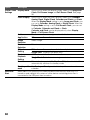
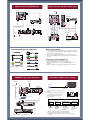
Type 2: Secured network
without Wi-Fi Protected
Setup™ (WPS)
To set up a wireless LAN, SSID (wireless
network name) and security key (WEP or
WPA key) will be required. If you do not
know them, consult the instruction manual
of your router.
1 Press HOME, then select Settings >
Setup> Network > Network Setup.
2 IP Address setting/Proxy server:
– automatic setting:
Setup network connection > Auto
– manual setting:
Setup network connection >
Custom > Wireless Setup
3 Select Scan, then select a network
from the list of scanned wireless
networks.
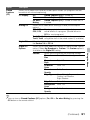
Type 3: Unsecured network
with any type of wireless
LAN router
To set up a wireless LAN, SSID (wireless
network name) will be required.
1 Press HOME, then select Settings >
Setup > Network > Network Setup.
2 IP Address setting/Proxy server:
– automatic setting:
Setup network connection > Auto
– manual setting:
Setup network connection >
Custom > Wireless Setup
3 Select Scan, then select a network
from the list of scanned wireless
networks.
4 Follow the instructions on the set-up
screen.
4 Follow the instructions on the set-up
screen.
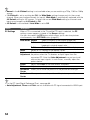
• If you use WPS for network set-up, the
security settings of the wireless LAN router
activate, and any equipment previously
connected to the wireless LAN in a nonsecure status will be disconnected from the
network.
In this case, activate the security settings of
the disconnected equipment and then
reconnect. Or, you can deactivate the
security settings of the wireless LAN router,
and then connect the equipment to a TV in a
non-secure status.
• Security key (WEP or WPA key) will not be
required because you do not need to select
any security method in this procedure.
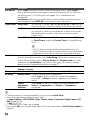
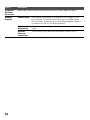
Type 4: Wired network
set-up
Enter the respective alphanumeric values
for your router if necessary. The items that
need to be set (e.g. IP Address, Subnet
Mask, DHCP) may differ depending on
the Internet service provider or router. For
details, refer to the instruction manuals
provided by your Internet service
provider, or those supplied with the router.
1 Press HOME, then select Settings >
Setup > Network > Network Setup.
42