1
For KDL-60EX645 only
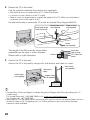
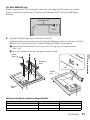
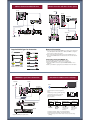
When you install the TV on the wall, make sure you align the AC power cord in the
groove, and do not pinch the AC power cord between the TV and the Wall-Mount
Bracket.
AC power cord
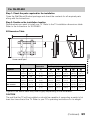
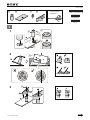
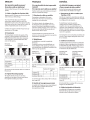
4 Secure the Mounting Hook to the rear of the TV.
Determine the screw locations and secure the Mounting Hooks to the rear of the TV.
Refer to the “Screw and Hook Locations Diagram/Table” shown below.
1 Secure the Mounting Hooks to the rear of the TV using only the supplied screws
(M6 × 16).
2 Be sure to tighten the screws with equal torque strength.
Screw
(M6 × 16)
Other Information
Mounting
Hook
Tab
Square
hole
Square
hole
x Screw and Hook Locations Diagram/Table
TV Model
Screw location
Hook location
KDL-60EX645
e, j
a
KDL-50EX645
d, j
b
KDL-55EX645/46EX645/46EX641/40EX645
e, j
b
(Continued)
71