1
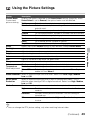
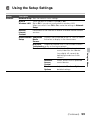
Using the Setup Settings
Description
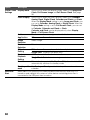
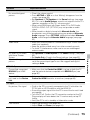
Network
Network Setup Sets the network status settings.
Built-in
Turns the built-in wireless LAN On or Off.
Wireless LAN Set to Off, if you do not use the built-in wireless LAN.
When you switch from Off to On, make the settings in Network
Setup.
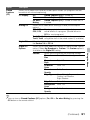
Refresh
Reconnects to the Internet to receive available Internet content
Internet
services.
Content
Home Network Show/Hide Displays the connected server list. You can select
Setup
Media
the server to display in the Home menu.
Servers
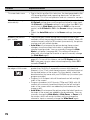
Media Server
Diagnoses whether the TV can connect to each
Troubleshooting server on the home network.
Renderer
Renderer
Enables the TV to play photo/
music/video files on a device
(e.g. digital still camera) by
operating the device via the
network.
Renderer
Allows access from a specified
Access
control device.
Control
Renderer
Adjusts the Renderer Options
Options
detailed settings.
(Continued)
59
Using the Menus
Option