1
Controls and Functions
2.4
DHD Controller Rear
Panel
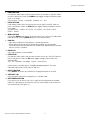
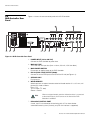
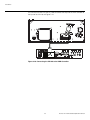
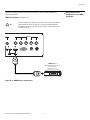
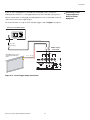
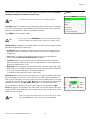
Figure 2-4 shows the rear connector panel on the DHD Controller.
14
13
EL
IM
IN
A
R
I
1 2 3
4
5 6
II
WIRED
REMOTE
RS-232 / 485
SYSTEM CONTROL INTERFACE
7
Vs
Y/G
III
SERVICE ONLY
HD2 (BNC)
Hs
I
INPUTS
Pr / R
II
Service port.
Not for user
access
Pb / B
Y
HD1 (RCA)
Y/G
TRIGGERS
HDMI
8
9
Pb / B
Pr / R
Hs
Vs
HD3 (VGA / Y-Pb-Pr)
COMPOSITE
S-VIDEO
11
12
Figure 2-4. DHD Controller Rear Panel
1. POWER INPUT (100 to 240 VAC)
Connect the DHD Controller to power here.
PR
2. MAIN AC FUSE
This is the main AC input fuse (5mm x 20mm, 500 mA, 250V slow-blow).
3. MAIN POWER SWITCH
Disconnects or applies power to the DHD Controller.
4. DVI-DL (DUAL-LINK) OUTPUT (1080p)
Connect this to the DHD Input at the rear of the VX-22d (see Figure 2-2).
5. SERVICE ONLY
For future use.
6. WIRED REMOTE
Wired input from an external remote control or infrared receiver. It is a 3.5-mm, mini
phono jack, wired as follows:
Ring = +5V
Tip = IR Input (TTL level)
Sleeve = Ground
Note
When an external remote control or infrared receiver is connected
to the wired IR input, the IR sensor on the front of the DHD
Controller is disabled.
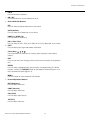
7. RS-232/485 CONTROL PORT
A male, 9-pin D-sub connector for interfacing with a PC or home theater
automation/control system. (Currently, only RS-232 interface is supported.)
10
Runco VX-22d Installation/Operation Manual