1
Special Pathfinder Tools
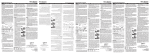
The following sequences are new insertable Tools to use with the CE Applications.
They have been stored on your device.
ICON 1
ICON 2
FUNCTION
Brings your Pathfinder screen back so you can communicate normally.
Stored as: <SHOW-PATHFINDER>
Hides your Pathfinder screen so you can see the CE applications.
Stored as: <HIDE-PATHFINDER>
Hides the Text Area of your Pathfinder screen so you can see through
to the CE application behind. ÂIf the Activity Row or Word
Prediction are open in the Pathfinder, they will remain visible in an
Application when you select this sequence.
Stored as: <HIDE-TEXT-AREA>
Allows you to toggle your Activity Row On and Off – useful
sometimes when you want to see the whole screen of a CE application.
Stored as: <ACTIVITY-MENU>1 OK
Allows you to turn word prediction on and off.
Stored as: <WORD-PREDICTION-MENU>1 OK
Use these sequences when you are working with CE Applications.
Using Pathfinder with Windows CE Applications
5