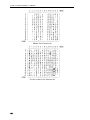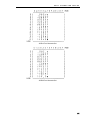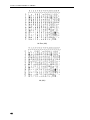
1
PrintMaster 860 Series
Operator’s Manual
©
Printek, Inc. 2002
1517 Townline Road
Benton Harbor, MI 49022
(800) 368-4636
www.printek.com
Part Number 6809 Rev. B
This equipment has been tested and found to comply with the limits for a Class A Digital Device, pursuant to Part 15 of the
FCC Rules. These limits are designed to provide reasonable protection against harmful interference when the equipment is
operated in a commercial environment. This equipment generates, uses, and can radiate radio frequency energy and, if not
installed and used in accordance with the instruction manual, may cause harmful interference in which case the user will be
required to correct the interference at his own expense.
The user is cautioned that any changes or modifications not expressly approved by the party responsible for compliance could
void the user's authority to operate the equipment.
This digital apparatus does not exceed the Class A limits for radio noise emissions as set out by the ICES-003 standard, of the
Canadian Department of Communications.
Cet appareil numérique n’émet pas de bruits radioélectroiques depassant les limites de Classe A prescrites dans la norme
NMB-003 Édictée par le Ministre des Communications du Canada.
Detachable European Power Cord Requirements (Not Included with Printer)
Type/Model – H03 or H05 Series or Equivalent
Minimum Ratings – 300VAC, 60°C, 3 Conductor 1.0mm2 (18 AWG) with Certified IEC 60320-C13 Female Plug and
Certified Country Specific Male Plug
Standard – IEC/EN 60227 (IEC53)
Mark(s) of Conformity – VDE or HAR or Equivalent
Acknowledgments:
IBM, Proprinter, and IPDS are registered trademarks of International Business Machines Co.; DEC is a registered trademark
of Digital Equipment Corporation; Epson is a registered trademark of Seiko Epson; Printek is a registered trademark of
Printek, Inc.; Genicom is a registered trademark of Genicom Corporation;
Specifications are subject to change without notice.
ii
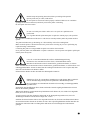
Read all setup and operating instructions before proceeding with operation.
Operate printer only on a firm, solid surface.
Do not operate in an enclosure unless properly ventilated. Make sure no ventilation
openings are blocked or obstructed, which may result in the printer overheating.
Do not operate near a heat source.
No user-serviceable parts inside. Refer service or repairs to a qualified service
professional.
Use of genuine Printek replacement parts is required to warrant proper, safe operation.
Any alteration or modification of this device voids the user warranty and may make the product unsafe to
operate.
The print head and motors get hot during use. Wait until they cool before touching them.
Make certain the printer is disconnected from AC power before removing any covers or performing any
required cleaning or maintenance.
Connecting this printer to an ungrounded receptacle can result in electrical shock.
Never place the printer near inflammable or explosive substances. Do not operate near liquid or spill liquid
into the printer at any time.
Lesen Sie vor der Inbetriebnahme die Aufbau- und Bedienungsanleitung.
Der Drucker muss zum Betrieb auf einer festen, soliden Oberfläche stehen.
Betreiben Sie den Drucker nicht in einem kleinen, geschlossenen Raum, es sei denn
dieser wird Betreiben Sie den Drucker nicht in einem kleinen, geschlossenen Raum, es sei denn dieser wird
ordnungsgemäß belüftet. Achten Sie darauf, dass die Lüftungen nicht blockiert oder versperrt sind, denn
dies kann zum Überhitzen des Druckers führen.
Nehmen Sie den Drucker nicht in der Nähe einer Wärmequelle in Betrieb.
Enthält keine Teile, die vom Bediener instandgesetzt werden können. Bitte wenden Sie
sich bei Instandsetzung oder Reparatur an qualifiziertes Kundendienstpersonal.
Die Verwendung von echten Printek Ersatzteilen ist notwendig, um ordnungsgemäßen,
sicheren Betrieb zu gewährleisten.
Änderungen oder Modifikationen dieses Geräts machen die Garantie ungültig und können den sicheren
Betrieb des Produkts gefährden.
Während des Druckens werden Druckerkopf und Motoren heiß. Warten Sie, bis sich die Teile abgekühlt
haben, bevor Sie sie berühren.
Vergewissern Sie sich, dass der Drucker nicht mehr an die Stromquelle angeschlossen ist, bevor Sie
Abdeckungen abnehmen oder das Gerät reinigen bzw. warten.
Schließen Sie diesen Drucker nicht an eine ungeerdete Steckdose an; dies kann zum Elektroschock führen.
Setzen Sie den Drucker niemals in die Nähe von feuer- oder explosionsgefährlichen Stoffen. Betreiben Sie
den Drucker nicht in der Nähe von Flüssigkeiten und lassen Sie keine Flüssigkeiten in den Drucker
gelangen.
iii
TABLE OF CONTENTS
INTRODUCTION
1
Models and Options
Manual Contents
1
1
GETTING STARTED
3
Installation
Interface Set Up
3
4
RS-232C Serial Interface
Parallel Interface
Ethernet 10/100BaseT
4
4
4
Installing The Ribbon Cartridge
5
Loading Paper
7
Why Use Only Printek® Brand Ribbons
PrintMaster 860 Single Tractor Model
PrintMaster 862 Dual Tractor Model
Printer Self-Test
5
7
8
9
DAILY OPERATION
11
Introduction
Control Panel Features
11
11
LCD Display and Online Status Indicator LED
Exposed Buttons – Most commonly used functions
Selecting and Loading Forms
Selecting a Form Already Loaded in the Tractors
Loading a New or Different Form In the Tractors
Ejecting and Tearing Off a Form
Aligning Print
Common Error Conditions
PRINTER CONFIGURATION
Introduction To Setup
Setup Buttons
Entering Setup
Using the MENU Button
Using the SUBMENU Button
Using the ALIGN/ITEM and UP/DOWN ARROW Buttons
Exiting Setup
Forms Menu
Forms Menu Items
Interface Menu
Entering the Interface Menu
RS-232C Serial Interface Items
Parallel/LAN Interface Items
Options Menu
Test Menu
FORM CONSTRUCTION AND LAYOUT TIPS
Form Construction
Form Layout Considerations
MAINTENANCE AND TROUBLESHOOTING
Error Messages
Preventive Maintenance
Obtaining Service
11
12
14
14
14
15
16
17
19
19
19
19
20
20
20
20
21
21
25
25
25
28
30
34
35
35
35
37
37
37
37
v
ADVANCED SETUP FEATURES
Security Menu
USING REMOTE SETUP
Remote Setup via Windows Application
Remote Setup via Generic Text File
USING THE OPTIONAL SETUP MODULE
Introduction
Setup Module Installation
39
39
41
41
41
47
47
47
PRINTER RESET CONDITIONS
51
CONTROL CODE AND ESCAPE SEQUENCE SUMMARIES
53
Genicom 3840 and 3410 Emulation
ANSI x3.64 Emulation
Epson FX Emulation
IBM Proprinter Emulation
LA-120/210 Emulation
Simple TTY Emulation
Printek Emulation
53
54
54
56
57
58
58
ASCII CHARACTER TABLES
59
SPECIFICATIONS
63
GLOSSARY OF TERMS
67
vi
INTRODUCTION
Thank you for purchasing a Printek Printer. This printer has been designed to provide years of service
handling your most demanding printing requirements.
In addition, an easy to use front panel combined with the ability to store ten different form configurations
makes handling multiple forms as simple as a button press for the operator.
MODELS AND OPTIONS
The PrintMaster 860 is a rear feed single tractor path, 85 Column printers.
The PrintMaster 862 has both a rear feed tractor path and a bottom feed tractor path.
Options available for all models include:
Ethernet 10/100BaseT Interface (Internal)
Printstand
Setup Module
MANUAL CONTENTS
*Unless specifically noted, all instructions and information herein is valid for all models in the
PrintMaster 860 series.
•
GETTING STARTED provides instructions for installation, setting up the computer interface, installing
the ribbon cartridge, loading paper, and performing a printer self-test.
•
DAILY OPERATION provides
•
PRINTER CONFIGURATION
•
FORM CONSTRUCTION AND LAYOUT TIPS
•
MAINTENANCE AND TROUBLESHOOTING lists more serious error messages than discussed in the
Daily Operation section, preventive maintenance, and how to obtain service.
•
ADVANCED SETUP FEATURES
•
USING REMOTE SETUP
•
USING THE SETUP MODULE
describes how the optional Setup Module can be used to copy Setup
parameters from one printer to another or be used to backup your printers’ settings.
•
PRINTER RESET CONDITIONS describes
•
CONTROL CODE AND ESCAPE SEQUENCE SUMMARIES
more detailed descriptions of the features that are used most frequently.
These include the “every day” buttons and indicators on the control panel, selecting or loading new
forms, ejecting forms, changing the ribbon cartridge, aligning print with preprinted forms, and causes
for common error conditions.
provides detailed information on how to use Setup to permanently store
parameters for each of the ten forms, parameters for the standard and optional interfaces, and
parameters for other options.
provides tips for form construction and layout.
provides information on how to set menu security.
describes how to “set up” default parameters from a host computer.
the state of the printer after power up or reset.
lists the commands supported for each
printer emulation.
•
ASCII CHARACTER TABLES
•
SPECIFICATIONS
•
GLOSSARY OF TERMS
show the characters for each character set.
list the operating ranges and ratings of the printer.
provides definitions for terms used in this manual.
1
GETTING STARTED
This chapter will use the fewest possible steps to get the first time user up and running quickly. You will
be guided through the following steps:
•
Finding a suitable location and installing the printer
•
Setting up a host interface if necessary
•
Installing the ribbon cartridge
•
Loading paper
•
Performing a printer self-test
Installation
Before installation, a suitable site must be chosen. Suitable sites include offices, computer rooms, and
most factory environments. Printek printers have been designed to be rugged, heavy-duty printers. As
such, they will handle most harsh environments, but should not be placed in direct sunlight or in areas that
will exceed the rated temperature, humidity, or power requirements. For details, refer to
“SPECIFICATIONS” on page 63.
Once a site has been selected, the printer should be placed on a countertop, desk or Printek Printstand.
The printstand should be located in an area large enough to provide easy access to both the front of the
printer and the rear for accessing printed output. Unpack the printer as described in the “PrintMaster
860/862 Unpacking Instructions” and place the printer on the printstand or counter top.
Caution: Before connecting power, make sure that all shipping materials have been removed. These
materials include an internal brace that secures the print head carriage (open front lid to access).
Now connect the computer cable(s) to the appropriate interface. Next, connect the power cord supplied
with the printer to the printer and an appropriate power outlet. The pictures below show the location of the
interface connectors on the rear panel of the printer.
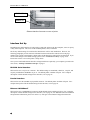
PARALLEL I/O
SERIAL I/O
Standard Interface Connectors on rear of printer
3
G E T T I N G
S T A R T E D
ETHERNET I/O
SERIAL I/O
Ethernet Interface Connectors on rear of printer
Interface Set Up
Depending upon which interface is being used to connect the printer to the host computer, some set up may
or may not be required. This is true of the standard parallel, serial, or Ethernet.
The factory default settings for each interface should work well for most installations. However, the
following paragraphs provide some basic information about each interface and also refer to the page
number in the “Printer Configuration” chapter where all the details for each interface are described. If you
need to make changes to the default settings, please refer to “Introduction To Setup” on page 19 for
instructions on how to access the printer’s Setup menus.
Once you are comfortable that the interface settings match those required by your computer, proceed to the
next section, “Installing a New Ribbon Cartridge” on page 6.
RS-232C Serial Interface
This interface uses a 25 pin “D” connector. The default settings are 9600 baud, 8 data bits, 1 stop bit, and
no parity with hardware handshake on pin 11. The default printer emulation is Epson. For a complete
description of all the default settings for this interface, refer to page 25.
Parallel Interface
This interface uses the standard 36 pin parallel connector. The default printer emulation is Epson. For a
complete description of all the default settings for this interface, refer to page 28.
Ethernet 10/100BaseT
This interface uses a standard RJ-45 connector and the default printer emulation is Epson. For a complete
description of all the default settings for this interface, refer to page 28. For additional software installation
and operational information, please refer to the Troy XCD Quick Install Manual shipped with the unit.
4
G E T T I N G
S T A R T E D
Installing The Ribbon Cartridge
The Printek printer has been designed to make installing Printek brand ribbons a simple, clean process.
Unlike other printers, there is no need to touch the ribbon fabric or deal with difficult to position ribbon
guides. The following sections explain why the use of Printek brand ribbons should be important to you
and will guide you through installing the ribbon cartridge.
Why Use Only Printek® Brand Ribbons
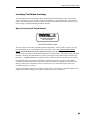
REORDER NUMBER 90899
FOR NEAREST DISTRIBUTOR
CALL 1-800-368-4636
Printek® Brand Ribbon Label
The above label on each ribbon can identify Printek brand ribbons. There are many reasons to use only
Printek brand ribbons in your PrintMaster 860 Series printer. First of all, using only Printek brand
ribbons will automatically extend the printhead warranty to two years instead of one year.
The reason this is possible is that Printek brand ribbons are manufactured to much higher quality standards
than those offered by other manufacturers. This provides not only longer print head life, but also longer
ribbon life… 15 million characters as compared to only 5 million characters from some generic ribbons.
Remember that using only Printek brand ribbons is important because the wear that is started and the
contamination that remains from even one inferior ribbon will continue to damage the print head. Also,
damage to other printer components, which is caused by the use of non-Printek ribbons, will not be
covered by the printer’s warranty.
Using inferior ribbons would be like using poor quality fuel in your automobile. Premature engine failure
and poor performance leading up to the failure would be the best you could expect.
5
G E T T I N G
S T A R T E D
Installing a New Ribbon Cartridge
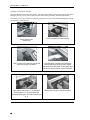
Open the ribbon lid at the front of the printer. The printer automatically positions the print head for ribbon
loading by moving it away from the platen surface and centering it laterally within the compartment.
If necessary, remove the old ribbon cartridge by grasping the cassette with both hands and pulling straight
up and out of it’s detented seat.
6
Lift the ribbon cover.
Unload form.
Push noseshield to forward detent.
Take up slack in the ribbon by turning the
blue knob counter clockwise.
Hold the ribbon cassette with both hands
with the ribbon end pointing down slightly,
and insert it into the printer so the ribbon lays
flat across the top portion of the noseshield.
Align ribbon with position c on sideplate.
Rotate ribbon to d, to slide ribbon into
Printhead/Shield gap. Pull ribbon toward you
to e.
Push down to snap the ribbon into place.
G E T T I N G
Note: DO NOT take up the ribbon slack or
reposition noseshield after seating cassette.
The printer will do his automatically when the
ribbon cover is closed.
S T A R T E D
Close lid and put printer ONLINE to
automatically tension the ribbon.
Loading Paper
When shipped from the factory, the basic configuration for all ten forms is an eleven-inch form, six lines
per inch, and ten characters per inch. If the forms you are loading do not match these requirements, please
refer to the printer Configuration” chapter on page 19 and review the “Introduction To Setup” and “Forms
Menu” sections.
Please refer to the appropriate section below for loading paper in the PrintMaster 860 or PrintMaster 862.
PrintMaster 860 Single Tractor Model
Loading the Form in the Tractors
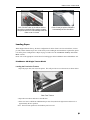
1. Open the paper door (rear lid) of the printer. This will provide access to the tractors as shown below.
Rear Feed Tractors
2. Open the tractor doors and remove the old form.
3. If the new form is a different width than the previous form, unlock the right tractor and move it to
approximately the new position.
Note: The left tractor position is fixed and may not be moved.
7
G E T T I N G
S T A R T E D
4. The form should be face down as shown in the picture. Place the left edge of the new form in the left
tractor with the holes aligned with tractor pins. Make sure that the top edge of the form does not
extend above the top of the tractors.
5. Close the left tractor door.
6. Now position the paper in the right tractor in the same fashion. If necessary, the position of the right
tractor may be adjusted. To do so, move the lever on the side of the tractor back to unlock the tractor
and slide the tractor sideways on the shafts.
7. After the paper is placed in the tractor and the door is closed, position the tractor far enough to the
right so that there is no buckle in the paper between the tractors, but not so tight that the holes in the
paper are distorted. Lock the tractor in place by returning the lever to the forward position.
Informing the Printer That the New Form is Loaded
1.
Press the LOAD/FEED button. The display will now show that the new form has been “loaded”.
2.
Close the paper door.
3. Make sure the correct form to be positioned for printing is selected and press either the LOAD/FEED
button or the ONLINE button. The LOAD/FEED button will position the form for printing but will not
place the printer on line. The ONLINE button will both position the form and place the printer on
line.
PrintMaster 862 Dual Tractor Model
Loading the Form in the Bottom Feed Tractors
8
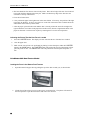
1.
Open the bottom feed paper door by pulling the top of the door towards you, as shown below.
2.
Lift the front of the printer up to access the tractors, as shown below. The printer will remain in
this raised position. Open the tractor doors and remove the old form.
G E T T I N G
3.
S T A R T E D
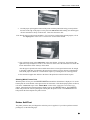
Feed the paper up through the bottom of the printer with the printed side facing you and position
the holes in the edge of the paper over the pins in the left tractor while making sure that the paper
will not extend above the top of the tractors. Then close the tractor door.
Note:The left tractor position is not adjustable. If it is necessary to adjust where printing begins, refer to
the “Aligning Print” in the “DAILY OPERATION” section of this manual.
5. Now position the paper in the right tractor in the same fashion. If necessary, the position of the
right tractor may be adjusted. To do so, move the lever on the side of the tractor down to unlock the
tractor and slide the tractor sideways on the shafts
After the paper is placed in the tractor and the tractor door is closed, position the tractor far enough
to the right so that there is no buckle in the paper between the two tractors, but not so tight that the
holes in the paper are distorted. Lock the tractor in place by returning the lever to the up position.
6. Close the bottom paper door and lower the front of the printer down until it latches in place.
Selecting Which Form to Print
With the printer off line, press the UNLOAD/CHANGE button until the desired form is displayed. To use the
bottom path, the word “Bottom” must appear below the form name. If the desired paper path is not shown,
refer to the “Tractor Path” topic in the “Forms Menu” section of the “PRINTER CONFIGURATION”
chapter. When the desired form and path are displayed, press the LOAD/FEED button. The LOAD/FEED
button will position the form for printing but will not place the printer on line. The ONLINE button will
both position the form and place the printer on line.
Printer Self-Test
The printer performs many self-diagnostics each time power is applied. If you wish to perform an actual
printing test, use the following steps.
9
G E T T I N G
S T A R T E D
1. Make sure the printer is powered on with ribbon and paper loaded. The test pattern to be printed will
use the current form settings and in the PrintMaster 862, the current paper path. Select the desired
form settings and paper path before proceeding to the next step.
2. Open the front lid and press the MENU button until the display reads TEST MENU on the front panel.
3. Press the ALIGN/ITEM button until Test Mode is displayed on the top line.
4. Press the UP/DOWN ARROW buttons until Barber Pole is displayed on the bottom line.
5. Close the front lid and press the ONLINE button.
6. The printer will now exit Setup and begin printing a rotating character pattern using the current form
settings. To stop or restart printing the test pattern, press the ONLINE button.
7. To take the printer out of the test mode, stop the test by pressing the ONLINE button.
8. Open the front lid and press the MENU button until the display reads TEST MENU.
9. Press the ALIGN/ITEM button until Test Mode is displayed on the top line.
10. Press the UP/DOWN ARROW buttons until Off is displayed on the bottom line.
11. Close the front lid and press the ONLINE button.
10
DAILY OPERATION
Introduction
This chapter describes how to use the “everyday” features of the PrintMaster 860 Series printer. The items
covered are:
Control Panel Features
– describes the most commonly used features of the printer’s control
panel.
– describes how to insert paper or forms into the tractors and how to
inform the printer of which forms are “loaded”.
Selecting and Loading Forms
Ejecting and Tearing Off a Form
– describes how to remove printed documents from the printer.
Installing a New Ribbon Cartridge
Aligning Print
– describes first time installation of the ribbon cartridge.
– describes how to precisely align where data is printed on a form.
Common Error Conditions
– describes errors that may occur during normal printing operations.
Control Panel Features
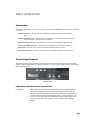
The following picture shows the printer’s control panel. The control panel consists of a two-line LCD
display, a status indicator LED, 6 push button switches or “buttons”, and an Audible Alarm. Each of these
items is described below
Control Panel
LCD Display and Online Status Indicator LED
LCD Display
This two line by sixteen-character display is used to convey several types of
information. When the printer is on line and printing, or ready to print, the
display will show the currently selected form, and in the case of the PM862, it
will also show the selected path. When the printer is off line, the display will
continue to show this information, additional information depends upon other
buttons being pressed by the operator, or error conditions such as Check
Paper.
11
D A I L Y
O P E R A T I O N
ONLINE Status
This is a multicolored LED which is used to display the following information:
Indicator LED
Green:
Flashing Green:
Flashing Red:
Yellow:
Flashing Yellow:
Audible Alarm:
The printer is on line and ready to print.
The printer is in the process of going back on line. Typically occurs after a new
form has been loaded while the printer is confirming which forms are loaded in
the tractors.
The printer is currently off line and cannot print. This may be due to the
operator taking the printer off line or the printer may have detected an error
condition, such as running out of paper, which requires operator intervention. If
due to an error condition, the cause of the error will periodically be shown on the
LCD display. After the cause of an error condition has been resolved, press the
ONLINE button to clear the error. This will also place the printer back on line and
allow printing to resume.
The printer is in the process of exiting the Setup mode and saving Setup values,
or the printer is currently busy performing an operation with the optional Setup
Module.
The user has pressed the MENU button and entered the Setup mode (may be
exited by pressing the ONLINE button after the desired changes have been made).
For more information, see the chapter on “PRINTER CONFIGURATION”.
This device produces various tones to alert the operator when different error
conditions occur. It may also be used to produce a tone when a bell character
(ASCII BEL) is received from a host computer.
Exposed Buttons – Most commonly used functions
Power ON/ONLINE
This button acts as the power switch for the printer. When the printer is OFF,
pushing this button will turn the printer ON. If the printer is ON, the button
implements the functions described below. When held for 5 seconds, this button
will turn the printer OFF.
This button also toggles the printer between the on line and off line state. When
the printer is on line, it may be printing or may begin printing at any time. To
stop the printing or prevent printing from starting, use this button to take the
printer off line (see “ONLINE Status Indicator”) above. The printer must be off
line in order to use the other control panel buttons.
This button is also used to place the printer back on line following any error
condition (ONLINE indicator is flashing Red), such as paper out. When pressed
to go on line, the printer will first attempt to clear any errors. For example, if
there is a paper out condition, the printer will attempt to load the form in the
currently selected tractors and, if successful, go on line.
12
D A I L Y
LOAD/FEED
O P E R A T I O N
This button performs a number of different form feeding functions. The printer
will automatically select the correct function to perform based upon the current
position of the form.
LOAD:
•
Loads the form that is presently selected.
If the selected form is already recognized as “loaded” in the tractors, the
printer will advance the form to the print position.
If the selected form is not currently considered to be loaded in the tractors
(display shows <Not Loaded>), this button will change the status of this
form to “loaded”.
FORM FEED:
UNLOAD/CHANGE
•
If a form is currently loaded and perhaps partially printed, this button will
advance the bottom of the current form to the tear bar so that it may be torn
off.
•
If a form has already been advanced to the tear bar, this button will advance
the next form to the tear bar.
This button is used to access up to ten different forms, which have been
previously configured with the Setup menus (see the chapter on “PRINTER
CONFIGURATION” for more information).
When this button is pressed, one of two functions will be performed.
UNLOAD:
•
If a form is currently in position to be printed, this button will pull the form
down until the top of the form is in the tractors.
CHANGE:
•
If the form has already been pulled down to the tractors as described above,
this button will cycle through all the available form choices. Forms which
are not considered to be “loaded” in the tractors will flash <Not Loaded>
on the bottom line of the display. For more information, see the following
section on “Selecting and Loading Forms”.
“HIDDEN” (UNDER LID) Buttons – SETUP AND CONFIGURATION
MENU
This button is used to set up the various operating parameters of the printer for
forms, interfaces, etc. This button is not used on a daily basis. For more
information see the chapter on “PRINTER CONFIGURATION”.
SUB MENU
This button is used in conjunction with the MENU button to navigate the menus
for setting up operating parameters, forms definitions, interface information, etc.
For more information, see the chapter on “PRINTER CONFIGURATION”.
13
D A I L Y
O P E R A T I O N
ALIGN/ITEM
This button will access the horizontal and vertical print adjustment settings for
the selected form, when not in set up mode.
When ALIGN/ITEM is pressed, the ALIGN PRINT MENU is displayed. Press
ALIGN/ITEM again to enter the horizontal adjustment. Pressing the UP/DOWN
ARROW buttons will move the print position on the line left or right by 0.01
inches for each press of a button as indicated on the display. The arrows to the
side of the number will indicate the direction the print will be moved.
To access the vertical adjustment, press the ALIGN/ITEM button. Pressing the
UP/DOWN ARROW buttons will now move the print up or down on the page by
0.01 inches for each press of a button as indicated on the display. The arrow to
the right of the number will indicate the direction the print will be moved.
To exit ALIGN mode, press the ONLINE button.
For a more detailed description, see “Aligning Print” later in this chapter.
Selecting and Loading Forms
Note: A form is not considered “loaded” by merely placing the form in the tractors. To prevent
printing on the wrong form, the printer must be made aware of what form(s) are currently
loaded. When a new form is placed in the tractors, the form must be “loaded” using the control
panel as described in the next section, “Loading a New or Different Form in the Tractors”.
Selecting a Form Already Loaded in the Tractors
To select a form that is already physically in the tractors, take the printer off line and press the
UNLOAD/CHANGE button until that form is displayed (a form that is not considered to be loaded will flash
<Not Loaded> on the bottom line of the display). The form selection will be displayed as FORM 0
through FORM 9 or as the actual name of the form if that has been set up.
To position the form for printing, you may press the LOAD/FEED button, which will position the form, or
you may press the ONLINE button, which will both position the form and place the printer on line.
Loading a New or Different Form In the Tractors
This section describes how to “load” a form in the tractors. This involves physically placing the paper or
form in the tractor mechanism and then informing the printer that the new form is present.
Select the Form to be Loaded
1. Take the printer off line by pressing the ONLINE button. The ONLINE indicator should now be
flashing red.
2. Press the UNLOAD/CHANGE button. This will move the current form from the print position to the
tractors for removal.
3. Continue to press the UNLOAD/CHANGE button until the desired form name is shown on the top line
of the display. The form name will be FORM 0 through FORM 9 or the actual name of the form if
the name has been set in SETUP. If the desired form is not considered to be “loaded” by the printer,
<Not Loaded> will flash on the bottom line of the display.
Loading the Form in the Tractors
(Refer to “PrintMaster 860 Single Tractor Model” page 7)
14
D A I L Y
O P E R A T I O N
EJECTING AND TEARING OFF A FORM
When most print jobs are complete, the printer will command the paper to be positioned at the top of the
next form so that the printer is ready for the next job. This is, however, dependent solely upon how the
programmer chose to write your particular application software. If your software does position the paper at
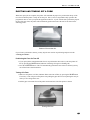
the top of the next form, the printer will automatically position the form at the tear bar as shown in the
following picture.
Bottom of form at tear bar
If your form is positioned as shown, you may skip the next section on positioning and proceed with
“Tearing off a Form”.
Positioning the Form for Tear Off
1. If your print job has completed and the form is not positioned as shown above, take the printer off
line by pressing the ONLINE button (indicator will change from green to flashing red).
2. Press the LOAD/FEED button. This will automatically position the form at the tear bar and you may
tear off the form as described below.
Tearing off a Form
1. Make sure the printer is off line (indicator flashes red when off line) by pressing the ONLINE button
if necessary. This will prevent the printer from pulling the paper down to start printing the next job
while you are tearing off this one.
2. Pull the paper toward the front of the printer and toward one side of the printer as shown.
Tearing off a form
15
D A I L Y
O P E R A T I O N
3. Place the printer back on line with the ONLINE button (indicator changes to green). The form will
automatically be pulled down into position for printing the next time the printer receives data to be
printed.
Aligning Print
When a new form is loaded into the printer for the first time, it may be necessary to adjust where printing
begins. If the print position needs to be adjusted, the following discussion will describe how this is
accomplished. Note that the alignment for the selected form is permanently stored in the printer’s memory
and does not have to be readjusted each time the form is loaded.
To align print on a particular form, open the front lid and select that form with the UNLOAD/CHANGE button
and then press the ALIGN/ITEM button. If the form selected were named “Invoices”, the display would now
show the following.
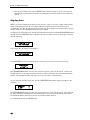
Aligning Print
On INVOICES
After a short time, the display would change to:
ALIGN/ITEM MENU
On INVOICES
Press ALIGN/ITEM. Be sure to remember that you are moving where the print is placed on the page.
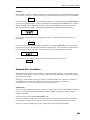
Left/Right
←0.00”→
The UP/DOWN ARROW buttons will move the print left or right in 1/100th inch increments. Note that the
left and right arrows will change according to which way the print has been moved from the normal print
position. The maximum distance print may be moved is 9.99 inches in either direction.
To move the print vertically on the page, press the ALIGN/ITEM button and the display will change to the
following.
Down/Up
0.00”
^
v
The UP/DOWN ARROW buttons will move the print up or down in 1/100th inch increments. Note again that
the arrow will change according to the direction the print is to be moved from the normal print position.
The maximum distance print may be moved is 9.99 inches in either direction.
To exit ALIGN mode press the ONLINE button.
16
D A I L Y
O P E R A T I O N
Example
In this example, a number needs to be printed in a box on a preprinted form. This form could be a packing
list, an invoice, a check, etc. The first time the page is printed, the number misses the box as shown below.
12345
In this case, the print needs to be moved to the right and down. To accomplish this, press ALIGN/ITEM and
access the Left/Right option. First move the print to the right using the UP ARROW button. It appears
that the text needs to move about three characters. If the text is being printed at 10 cpi (characters per
inch), this would be 0.30 inches. After making this adjustment the display would look as follows.
Left/Right
⎯0.30”→
If you were to print this form now, it would appear as follows, showing that the print still needs to be
moved down.
12345
To move the print down, access the Down/Up option by pressing the ALIGN/ITEM button. It appears that
the print needs to be moved down nearly the height of the characters. These characters are approximately
0.10 inches tall, so move the print down about 0.08 inches. The display should look as follows.
Down/Up
0.08” ↓
Now when the form is printed again, the text will be printed in the box as shown here.
12345
Common Error Conditions
Whenever the printer detects an error condition, it will automatically go off line. User correctable errors
are “flashed” on the display. These errors can typically be recovered without loss of data and are listed in
this section of the manual.
Other errors, which typically result in loss of data, are considered fatal errors. These errors display the
word ERROR on the top line of the display and do not flash. These errors are listed in the
“MAINTENANCE AND TROUBLESHOOTING” section of this manual.
Check Paper
This error is caused either by running out of paper or by a paper jam. The printer will attempt to determine
the cause of a paper problem and accompany the “Check Paper” message with “Paper Jam”, or
“Paper Out/Jam”.
It is not necessary to press the UNLOAD/CHANGE button.
If the error is caused by a paper jam, remove the jammed form. If the form remaining in the tractors has
tears along the top edge, remove it from the tractors, tear it off, and place the next form in the tractors.
If the error is caused by running out of paper, simply load a form as previously described.
17
D A I L Y
O P E R A T I O N
Finally, place the printer back on line by pressing the ONLINE button. This will automatically load the new
form and begin printing. Depending upon how the printer has been set up, the printer may start printing
where it left off or it may start at the beginning of the page where the error occurred and reprint the entire
page. See “Paper Out Fault Action” on page 31 for more information.
No Paper to Load
This error occurs when the LOAD/FEED button has been pressed and there is no paper or form in the
tractors. Place paper in the tractors and press LOAD/FEED again.
Too Much Paper to Unload
This error occurs when the UNLOAD/CHANGE button has been pressed and there is paper present too far
beyond the tear bar. This error serves as a warning that you may be putting forms that have already been
printed on back into the printer. Tear off any printed forms past the tear bar and press UNLOAD/CHANGE
again. This error also occurs if the LOAD/FEED button has been pressed and the current form cannot be
unloaded.
Selected Form is not Loaded
This error occurs when ONLINE has been pressed and the currently selected form is displaying <Not
Loaded>. Either press LOAD/FEED to load the selected form or select a different form, then press
LOAD/FEED and then press ONLINE.
Ribbon Lid Open
This error occurs when ONLINE has been pressed and the ribbon lid has been left open. Close the lid and
press ONLINE again.
Other Errors
If other errors occur, it is possible that they may not be resolved without the aid of a factory trained service
technician. Please refer to the “MAINTENANCE AND TROUBLESHOOTING” section on page 37.
18
PRINTER CONFIGURATION
Introduction To Setup
The PrintMaster 860 Series printers feature simple, easy to use menus for setting the various operating
parameters for the printer. The parameters available in these menus usually only need to be set one time,
either when the printer is first installed or perhaps when a new form is to be used. These values are stored
in nonvolatile memory, which means that they will remain set even if the printer is turned off. Please note
that, in an effort to minimize the total number of buttons and provide an uncluttered control panel, most
buttons on the PrintMaster 860 Series printers are “context-sensitive”, i.e., their specific function is
dependent on the present state of the printer or the menu level you happen to be in. For example, the
Unload/Change button is used to unload forms or change the loaded form in the printer, depending on
whether a form is loaded already. When in the Menu system with the Front Lid open, this same physical
button serves as a “Down Arrow” button, allowing you to modify the settings of various printer
parameters. The following sections give detailed descriptions of the buttons and the different functions
they perform depending on the context. Following this introduction are complete, detailed descriptions of
each menu item.
Setup Buttons
For your convenience, the MENU button and the other buttons used while in the Setup mode are labeled in
yellow on the control panel. Once in Setup, these buttons are the MENU, SUBMENU, ALIGN/ITEM, and
UP/DOWN ARROW buttons. The ONLINE indicator will flash yellow whenever the printer is in the Setup
mode as a reminder to use the yellow labels. The buttons used for Setup are shown on the next page.
Control Panel Setup Buttons
Note that the menu system works on a “what you see is what you get” basis. This means that whatever
value is last displayed for an item is the value that will be saved when Setup mode is exited.
Entering Setup
To enter Setup, open the front lid, and press the MENU button. The ONLINE indicator will begin to flash
yellow and the display will temporarily show the following.
Entering
Setup Menus
19
P R I N T E R
C O N F I G U R A T I O N
After the above message has been shown, the display will change to the first menu available, which is the
FORMS MENU as shown below. In this case the display will also show the first submenu, which will be
the form that was selected when Setup was pressed.
FORMS MENU
Form 0
Using the MENU Button
At this time you may select a different menu by pressing the MENU button. Other menus available are the
INTERFACE MENU, the OPTIONS MENU, and the TEST MENU. Continue to press the MENU button to
select the desired menu. The MENU button may be pressed at any time to select a different menu.
Using the SUBMENU Button
The SUBMENU button selects additional menus that are related to the selected menu. For instance, if the
FORMS MENU has been selected, the SUBMENU button will select which form (Form 0 through Form
9) is to be set up. Note that not all menus have submenus. If no submenu is available, the bottom line will
be blank and the SUBMENU button will not be used.
Using the ALIGN/ITEM and UP/DOWN ARROW Buttons
Once the correct menu and submenu (if available) is selected, pressing the ALIGN/ITEM button will cause
the various items and their current values to be displayed. Note that the items and their values are right
justified. To scroll through the items available, repeatedly press the ALIGN/ITEM button. To change the
value of the displayed item, use the UP/DOWN ARROW buttons to step through the possible choices.
Remember to leave the correct value displayed before selecting a different item or menu, since “what you
see is what you get” when Setup Mode is exited.
Exiting Setup
To exit Setup Mode and automatically go on line, just close the lid . The display will now show one of the
messages below and automatically go on line.
Exiting Menus
Saving Changes
Exiting Menus
No Changes
20
P R I N T E R
C O N F I G U R A T I O N
FORMS MENU
Most form printing applications use several different forms such as packing lists, bills of lading, invoices,
checks, and green bar paper for reports. Not all of these forms require the same printer settings for things
such as font, character size, line spacing, or form length. The PrintMaster 860 Series printers store up to
ten complete sets of form parameters including the name of the form. These ten sets of parameters, or
“forms”, are permanently stored in the printer’s memory and are referred to as “Form 0” through “Form
9”. These forms can be accessed from a single button on the printer’s control panel or by a command sent
from the host computer.
To access the FORMS MENU, enter Setup by pressing the MENU button. After the “Entering Setup
Menus” message has been displayed, the following will appear.
FORMS MENU
Form 0
Note that the actual form number will be for the form that was active prior to entering Setup. To select a
different form, press the SUBMENU button until the desired form is displayed. Next press the ALIGN/ITEM
button to begin displaying the various items for that form. The items available for each form are described
on the following pages. The factory default values are indicated with an asterisk (*) in this manual (the
asterisk does not appear on the printer’s display).
Forms Menu Items
Form Name
FORM 0
Form Name
Possible Values: Up to 16 characters of A through Z,
Space, 0 through 9
When shipped from the factory, the Form Names will be set to “FORM 0” through “FORM 9”. This name
may be changed to any combination of capital letters (A-Z), numerals (0-9), or spaces. The name may be
up to 16 characters in length.
Entering a name uses the SUBMENU and UP/DOWN ARROW buttons. The SUBMENU button will advance
the cursor, a flashing block, which is used to indicate the character that is to be changed. The UP/DOWN
ARROW buttons will change the character where the cursor is currently flashing.
The order of characters that may be selected is “ABCDEFGHIJK LMNOPQRSTUVWXYZ, Space,
0123456789”. Even though the name will be right justified while being entered, it will be automatically
centered on the display when not in Setup Mode, so there is no need to try to center it with spaces.
Tractor Path
(862 only)
Tractor Path
Rear
Possible Values: Rear, Bottom, Bottom +Rear
This item is only available in the PrintMaster 862 and is used to set the tractor path to be used for the
currently selected form. Typically, most forms are only loaded in one tractor path and the value will be set
to Rear or Bottom. However, a form can also be set to use both paths (Bottom+Rear). This may be
desirable when printing long print jobs where a paper out condition needs to be avoided. This is often true
if the job is to be run overnight or at a remote and perhaps unattended location. When a form’s tractor path
21
P R I N T E R
C O N F I G U R A T I O N
is set to Bottom +Rear, the printer will automatically switch to the rear path when the bottom path is empty
and continue printing until both paths are empty. In this mode, printing must begin on the bottom path.
Lines Per Inch
Lines/Inch
6
Possible Values: 6*, 8
This item sets the line pitch to 6 or 8 lines per inch (LPI).
Form Length
Form Length
66 Lines
Possible Values: 1 … 66* … 227 Lines
This item sets the form length in lines at the current line pitch (LPI). For example: for an eleven-inch
form, enter 66 if you are using six lines per inch or 88 if you are using eight lines per inch.
Top Margin
Top Margin
0 Lines
Possible Values: 0* … 226 Lines
This item sets the top margin in lines. Setting a top margin will reduce the size of the printable area of the
page by the number of lines set. Printing will not be allowed above the top margin.
Note:In most cases changing where printing begins on a form should be accomplished with ALIGN/ITEM
rather than with a top margin. Adding a top margin may cause some programs to print the first
form correctly and then print following forms too far down the page if the program sending the
data does not require the margin.
Bottom Margin
Bottom Margin
0 Lines
Possible Values: 0* … 226 Lines
This item sets the bottom margin in lines. Setting a bottom margin will reduce the size of the printable area
of the page by the number of lines set. When the bottom margin is reached, the remainder of the page will
be skipped and printing will resume at the beginning of the next page (or top margin if one is set). Adding
a bottom margin may cause some data to be printed on the wrong page if the program sending the data
does not require the margin.
Characters Per Inch
Characters/Inch
10
Possible Values: 10*, 12, 13.3, 15, 16.74, 17.14, 20
This item sets the default character pitch in Characters Per Inch (CPI). (Note that OCR-A and OCR-B
characters are only valid at 10 CPI and will always print at 10 CPI regardless of this setting.)
22
P R I N T E R
C O N F I G U R A T I O N
Left Margin
Column 0
Left Margin
Possible Values: Column 0* … 166
This item sets the left margin in columns (characters) relative to the left edge of the paper. The column
width is based upon the current character pitch (CPI). The left margin must be less than the right margin.
The left margin may be used to cause printing to begin farther to the right on a form. In many cases using
ALIGN/ITEM may be preferable to using a left margin (see “Aligning Print” on page 16).
Right Margin
170
Right Margin
Possible Values: Column 4 … 170*
This item sets the right margin in columns (characters) relative to the left edge of the paper. The right
margin must be greater than the left margin. Text characters that would have printed to the right of the
margin will be “wrapped around” and printed at the beginning of the next line. Any text, which would
print before the right margin but beyond the usable right edge of the platen, will be wrapped around also.
Text characters that would have printed to the right of the margin or beyond the usable right edge of the
platen will be truncated when the Truncate Lines Option is set to Yes. Refer to the Options Menu
topic in this section for details. Graphic data that would have printed to the right of the margin will be
truncated (not wrapped around).
Font
Epson FX FD
Font
Possible Values: Epson FX FD*, DF, LQ;
PC English FD, DF, LQ;
PC Latin 2 FD, DF, LQ;
DEC LA120 FD, DF, LQ;
EBCDIC FD, DF, LQ;
OCR-A OQ;
OCR-B OQ;
Roman-8 FD, DF, LQ ML
Euro (858) FD, DF, LQ
ML (850) FD, DF, LQ
This item selects the default font to be used.
Draft Speed
Draft Speed
Normal
Possible Values: Normal*, Fast
This item selects whether the Draft Font (DF) or the Fast Draft (FD) font will be selected when the printer
receives a “select draft font” command from the host computer. This will allow the Fast Draft font to be
used with programs, which would not be able to otherwise.
23
P R I N T E R
C O N F I G U R A T I O N
Impact Force
Normal
Impact Force
Possible Values: Normal*, High
This item may be used to select High Impact for improved printing on multipart forms that do not
otherwise print well on the back copies.
Language
USA
Language
Possible Values: USA*, France, Germany, England, Denmark, Sweden, Italy, Spain,
Japan, Finland
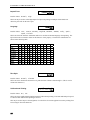
This item selects the character substitution table to be used for an alternate language when printing. The
Epson font must be selected in order for this feature to work properly. The character substitutions are
shown in the following table.
Char Value
USA
France
Germany
England
Denmark
Sweden
Italy
Spain
Japan
35
#
#
#
£
#
#
#
PTS
#
36
$
$
$
$
$
¤
$
$
$
64
@
à
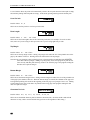
§
@
@
É
@
@
@
91
[
°
Ä
[
Æ
Ä
°
¡
[
92
\
ç
Ö
\
Ø
Ö
\
Ñ
¥
93 94 96 123 124 125 126
] ^ `
{
¦
}
˜
§ ^ `
é
ù
è
¨
Ü ^ `
ä
ö
ü
ß
] ^ `
{
¦
}
˜
Å ^ `
æ
ø
å
˜
Å Ü é
ä
ö
å
ü
é ^ ù
à
ò
è
ì
¿ ^ `
¨
ñ
}
˜
] ^ `
{
¦
}
˜
Zero Style
Zero
Normal
Possible Values: Normal*, Slashed
This item selects whether the numeral zero is printed with or without a slash through it. (This is true for
normal text characters.)
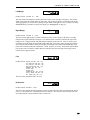
Unidirectional Printing
Unidirectional
No
Possible Values: No*, Yes
This item selects unidirectional printing instead of bi-directional printing. Fast Draft and Draft print speed
is reduced when unidirectional printing is selected.
This may be used to improve the straightness of vertical lines for critical applications such as printing form
boxes using PC Font line characters.
24
P R I N T E R
C O N F I G U R A T I O N
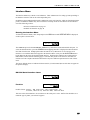
Interface Menu
The Interface Menu may contain several submenus. These submenus are for setting up items pertaining to
the hardware interfaces such as the serial and parallel ports.
In addition to the standard parallel interface and the RS-232C serial interface, which are furnished with the
printer, 10/100BaseT Ethernet may also be installed. The Setup items for each interface are described in
one of the following sections.
RS-232C Serial Interface on page 25
Parallel/LAN Interface on page 28
Entering the Interface Menu
To Enter the Interface Menu, enter Setup and press the MENU button until INTERFACE MENU is displayed
on the top line as shown below.
INTERFACE MENU
Serial
The SUBMENU options for the INTERFACE MENU always include the Serial and Parallel/LAN ports. To
select the desired interface, press the SUBMENU button until that interface is displayed on the bottom line.
Note that when the Lan Setup option under the Parallel/LAN item list is set to On, the serial
Interface is not available and will not appear in the Interface Menu. Next press the ALIGN/ITEM button to
begin displaying the items associated with that interface. Each interface and the items, which pertain to
that interface, are listed on the following pages. Note that many items are the same for more than one
interface since the computer attached to that interface may have different requirements for each of those
items.
The factory default values are indicated with an asterisk (*) in this manual (the asterisk does not appear on
the printer’s display).
RS-232C Serial Interface Items
INTERFACE MENU
Serial
Emulation
Emulation
Epson
Possible Values: Epson*, IBM Proprinter, DEC LA120/LA210, TTY,
Printek, ANSI X3.64, Genicom 3840, Genicom 3410
This item selects the emulation to be used whenever the serial port is active. Emulation should be set to
match the type of printer your software supports.
25
P R I N T E R
C O N F I G U R A T I O N
Automatic Carriage Return
Auto CR
On
Possible Values: Off, On*
This item enables or disables automatic Carriage Returns (CR) whenever a Line Feed (LF), Vertical Tab
(VT), or Form Feed (FF) is received.
Automatic Line Feed
Auto LF
Off
Possible Values: Off*, On
This item enables or disables automatic Line Feeds (LF) when a Carriage Return (CR) is received.
Perform Host Form Feed
at Top-of-Form
Host FF at TOF
No
Possible Values: No*, Yes
This item selects whether Form Feeds (FF) will be performed when received from the host computer if the
paper is already positioned at the top of form (TOF). Setting this item to No will help prevent blank pages.
Characters
Characters
Control
Possible Values: Control*, Printable
This item selects whether certain control character symbols will be printed or be treated as control
characters. The effect of this is dependent upon the Emulation selected.
Minimum Buffer
Minimum Buffer
No
Possible Values: No*, Yes
This item selects whether the smallest possible I/O buffer should be used. Setting this item to No will
allow the printer to make maximum use of the I/O buffer (see “Paper Out Fault” on page 31 for more
information on buffer size). Setting this to Yes may decrease performance, but is useful when using the
printer with operating systems that try to keep track of which page is currently being printed by the printer.
This may also be useful when using serial I/O with systems that do not respond quickly enough to
handshake signals.
Baud Rate
Baud Rate
9600
Possible Values: 110, 150, 300, 600, 1200, 2400, 4800, 9600*
This item selects the baud rate for the serial interface. This must be set to match the baud rate setting on
the host computer.
26
P R I N T E R
C O N F I G U R A T I O N
Data Bits
8
Data Bits
Possible Values: 8*, 7
This item selects the number of data bits in the serial character frame. This must be set to match the
character size setting on the host computer.
Stop Bits
1
Stop Bits
Possible Values: 1*, 2
This item sets the number of stop bits to be used at the end of the serial character frame. This must be set
to match the stop bit setting on the host computer.
Parity
None
Parity
Possible Values: None*, Even, Odd
This item selects the parity checking requirements for the serial data bits. This must be set to match the
parity setting on the host computer.
Busy Signal Polarity
Busy Polarity
Low
Possible Values: Lo*, Hi
This item selects the polarity of the busy signal (pin 11 of the RS-232C interface). Busy is set whenever
the printer is offline, the serial input buffer is full, or another interface port is currently active.
Data Terminal Ready
DTR
Power On/Off
Possible Values: Power On/Off*
Online/Offline
Busy/Not Busy
Selects the condition to be reflected by the DTR signal (pin 20 of the RS-232C interface). In most cases,
especially those involving a MODEM, this signal should be set to indicate Power On/Off. Selecting
Online/Offline will reflect only the condition indicated and does not reflect a buffer full condition.
Busy/Not Busy will cause DTR to indicate both the online/offline status and buffer full condition (see
“Busy Polarity” above).
XON/XOFF Handshaking
XON/XOFF
Off
Possible Values: Off*, On
27
P R I N T E R
C O N F I G U R A T I O N
Enables or disables the transmission of the XON and XOFF characters from the printer to the host to
control data flow to the printer. XOFF will be sent whenever the printer goes offline or the serial buffer is
full. XON will be sent when the printer is again ready to receive characters.
ETX/ACK Handshaking
ETX/ACK
Off
Possible Values: Off*, On
Enables or disables the ACK response to receipt of the ETX character. This handshake method is useful
for conditions where there are long transmission line delays such as telephone lines, which may be routed
through satellites. An ACK character will be returned to the host computer after an ETX character is
received and processed. ETX characters used for handshaking cannot be part of an escape sequence.
RTS/CTS Handshaking
RTS/CTS
OFF
Possible Values: Power On/Off*
If your Host system requires or supports hardware handshaking for data flow control, it may be useful to
change this parameter to ON. This may apply especially to older Host systems using Full-duplex
communications.
Parallel/LAN Interface Items
Since the optional LAN interface goes into the Parallel port, these interface parameters are the same.
INTERFACE MENU
Parallel/LAN
Emulation
Epson
Emulation
Possible Values: Epson*, IBM Proprinter, DEC LA120/LA210, TTY,
Printek, ANSI X3.64, Genicom 3840, Genicom 3410
This item selects the emulation to be used whenever the parallel port is active. The emulation should be set
to match the type of printer your software supports.
LAN Setup
LAN Setup
Off
Possible Values: On, Off*
This item enables or disables the ability to control the optional Ethernet interface card from the front panel.
When set to On, the Serial Interface is not available, and menu items for the Ethernet card follow. Consult
your Network Administrator before changing any of these items.
Note: Setting this item to On when the optional Ethernet interface card is not present may result in the
printer appearing to “hang” when exiting the Setup Menus. After 15 seconds, a LAN Timeout error will
be displayed. Press ONLINE, then enter the Setup Menus and correct the problem.
28
P R I N T E R
IP Address Method
C O N F I G U R A T I O N
IP Address
Auto
Possible Values: Auto*, Static
This item controls how the optional Ethernet interface card receives its network address. When set to
Auto, the Ethernet card will receive its network address from a network DHCP server (typical
installation). When set to Static, the user sets the TCP/IP address, Subnet Mask and TCP/IP Gateway
address as follows:
IP Address
IP Address
192.160.0.27
Possible Values: 000.000.000.000 … 255.255.255.255
To set the TCP/IP address, use the SUBMENU key to select which digit group you wish to change, and
then use the UP/DOWN ARROW keys to change the value. The value will change rapidly if the key is held
down.
Subnet Mask
Subnet Mask
255.255.255.0
Possible Values: 000.000.000.000 … 255.255.255.255
To set the Subnet Mask, use the SUBMENU key to select which digit group you wish to change, and then
use the UP/DOWN ARROW keys to change the value. The value will change rapidly if the key is held down.
Gateway Address
IP Gateway
192.168.0.0
Possible Values: 000.000.000.000 … 255.255.255.255
To set the TCP/IP Gateway address, use the Submenu key to select which digit group you wish to change,
and then use the UP/DOWN ARROW keys to change the value. The value will change rapidly if the key is
held down.
Automatic Carriage Return
Auto CR
On
Possible Values: Off, On*
This item enables or disables automatic Carriage Returns (CR) whenever a Line Feed (LF), Vertical Tab
(VT), or Form Feed (FF) is received.
Automatic Line Feed
Auto LF
Off
Possible Values: Off*, On
This item enables or disables automatic Line Feeds (LF) when a Carriage Return (CR) is received.
29
P R I N T E R
C O N F I G U R A T I O N
Perform Host Form Feed
at Top-of-Form
Host FF at TOF
No
Possible Values: No*, Yes
This item selects whether Form Feeds (FF) will be performed when received from the host computer if the
paper is already positioned at the top of form (TOF). Setting this item to No will help prevent blank pages.
Characters
Control
Characters
Possible Values: Control*, Printable
This item selects whether certain control character symbols will be printed or be treated as control
characters. The effect of this is dependent upon the emulation selected above.
Minimum Buffer
Minimum Buffer
No
Possible Values: No*, Yes
This item selects whether the minimum I/O buffer size should be used. Setting this item to No will allow
the printer to make maximum use of the I/O buffer (see “Paper Out Fault” on page 31 for more information
on buffer size). Setting this to Yes may decrease performance, but is useful when using the printer with
operating systems that try to keep track of which page is currently being printed by the printer.
OPTIONS MENU
The OPTIONS MENU contains items, which do not pertain only to a specific form or specific interface, but
rather affect how the printer works under all conditions. To access the options menu, enter Setup and then
press MENU until OPTIONS MENU is displayed
OPTIONS MENU
Note that the options menu has no submenus. Therefore, press the ALIGN/ITEM button to begin displaying
the items available. The factory default values are indicated with an asterisk (*) in this manual (the asterisk
does not appear on the printer’s display).
Maximum Form Allowed
Max Form Allowed
Form 1
Possible Values: Form 0 … Form 1* … Form 9
This item sets the last form number to be displayed for operator selection with the UNLOAD/CHANGE button
or while in the Forms Menu. This allows the operator to see only the forms that are in use rather than
having to sort through several unused forms.
30
P R I N T E R
C O N F I G U R A T I O N
Note that when setting this value that you may not select a value less than the form currently selected when
Setup was entered, or less than the form currently selected in the “Setup: FORMS” menu.
Automatic Scroll Delay
Auto-Scroll
1 Second Delay
Possible Values: Off, 1* to 15 Second Delay
This item sets the number of seconds to delay before scrolling the top of form to the tear bar when the
printer is idle (no additional data received since the last print operation) and a form boundary (bottom of
the form according to the Form Length setting for the current form) has been reached. If printing finishes
and the form boundary has not been reached, take the printer off line and the LOAD/FEED button may be
used to advance the form to the tear bar. This item may also be used to disable Auto-Scroll by setting the
value to Off. When disabled, the LOAD/FEED button must always be used to advance the form to the tear
bar.
Tear-Off Distance
Tear-Off
0.00 Inches
Possible Values: 0.00* … 9.99 Inches
This item sets the additional distance the paper will advance when scrolling to the tear bar. This allows the
printer to be placed under a slot in a counter and have the tear-off positioned at the counter surface. Leave
the distance set to 0.00 Inches to disable this feature. To set the value, use the UP/DOWN ARROW buttons
to change the value. Holding the buttons will cause the value to change rapidly. The paper will move
accordingly to allow verification of the setting. Note that the setup Menus will not terminate when closing
the lid while in this mode.
Paper Out Fault Action
Paper Out Fault
Finish Page
Possible Values: Finish Page*, Reprint Page, Break Page
This item selects what action is to be taken when a paper out condition occurs. The action taken for each
of the possible values is described in the following paragraphs.
When Finish Page is selected, the printer will attempt to print to the bottom of the page when a normal
paper out condition occurs. Conditions that will prevent this from happening are when the end of paper is
detected too far from the end of the form (the printer assumes there is not a complete page available), when
reverse paper motion is attempted within the last one inch of the form, or when a paper jam occurs. If the
printer is unable to finish printing the page, it will attempt to reprint the page as described below (also refer
to the Reprint Page Size option which follows). Note that if highly precise printing is required in the last 4
inches of the form in the rear feed path, and the last 5¼ inches of the form in the bottom feed path,
Finish Page may not provide accurate enough paper motion since the form is no longer controlled by
the tractor mechanism.
When Reprint Page is selected, the printer will stop printing as soon as the end of paper or a paper
jam condition is detected and the printer will go off line. After a new box of forms is loaded, the printer
will attempt to reprint the current page from the beginning. If the printer is able to reprint the page,
Reprinting Page! will be displayed when the new form is loaded (the previous partially printed page
should probably be discarded). If the printer is unable to reprint the page, the page will be broken,
Cannot Reprint - Page Too Large will be displayed, and printing will resume where it left off
as described in the next paragraph. The printer’s ability to complete the reprint successfully depends on
31
P R I N T E R
C O N F I G U R A T I O N
whether the data for the current page is still in the printer’s memory. Refer to the following Reprint Page
Size option for more information regarding how much data may be retained.
When Break Page is selected, the printer will stop printing and go off line as soon as a paper out or
paper jam condition is detected. After a new box of forms is loaded, printing will resume where it left off.
The Break Page setting is appropriate when you know a page is too large to reprint (exceeds available
buffer size, e.g. contains large graphic images). This will suppress the error message Cannot Reprint
before printing continues.
Character to Ignore
Char. To Ignore:
255
Possible Values: 0, ... 255*
This allows a single 8-bit character to be discarded as it is received. This is useful when the host
application is sending an unwanted control character, for example. Values are in decimal, with printable
characters displayed to the left of the decimal value.
To use this feature:
1) Press the UP/DOWN ARROW keys to select the desired character decimal value. Printable characters
will appear to the left of the number.
2) Press the ITEM button to display Ignore Character On/Off, then the UP/DOWN ARROW keys
to turn the feature On or Off.
This feature should not be turned on unless needed.
Top of Barcode
Off
Top of Barcode
Possible Values: On, Off*
In Genicom 3840 or 3410 Emulation, this feature repositions the print head at the top of a barcode after the
barcode has printed. When disabled, printing continues from the bottom of the barcode.
This feature has no meaning in other emulations.
Top of Oversized
Top of Oversized
Off
Possible Values: On, Off*
In Genicom 3840 or 3410 Emulation, this feature repositions the print head at the top of oversized
characters after the oversized characters have printed. When disabled, printing continues from the bottom
of the oversized characters.
This feature has no meaning in other emulations.
32
P R I N T E R
User Language
C O N F I G U R A T I O N
User Language
English
Possible Values: English*, French, German
This selects the front panel language that will be used by the printer's LCD screen. Press the UP/DOWN
ARROW keys to change the selection. Note: If you change the selected language, you may find it
difficult to return to this menu to correct it! Verstehen Sie?
Reprint Page Size
Page Size
8192 Characters
Possible Values: 0, …, 8192*, …, 28672
This item selects how much of the 32K byte input buffer is set aside for reprinting a page when Finish
Page or Reprint Page has been selected for the Paper Out Fault Action item (see above). The value
selected (0 to 28K bytes in 1K byte increments) should be set to accommodate the largest page expected,
but not unnecessarily large since the larger this is set, the smaller the effective I/O buffer. The 8K-byte
default setting should be large enough to hold most pages of text, but may not be large enough to hold
more complex or graphic filled pages. If the page size selected is not large enough, the page will be broken
as described under Paper Out Fault Action item above.
If the Paper Out Fault Action item is set to Break Page, the Reprint Page Size may be set to 0 to allow
the largest possible I/O buffer.
Truncate Long Lines
Truncate Lines
No
Possible Values: Yes, No*
When this item is set to Yes, long text lines that would wrap around to the next line will be terminated at
the right margin column or the right usable edge of the platen, whichever is reached first. The remainder
of the characters in the line are discarded. Graphics printing always truncates.
Bottom Paper Slew Rate
(862 only)
Bottom Slew
Fast
Possible Values: Normal, Fast*
In the PrintMaster 862, this item controls the speed of paper in the bottom paper path. When this item is
set to Fast, paper motion will take place at 12 inches per second. When set to Normal, this speed is the
same as the rear paper path. This setting may be necessary when using thick multi-part forms that tend to
de-laminate or have bulky perforation “tents”.
33
P R I N T E R
C O N F I G U R A T I O N
TEST MENU
The TEST MENU is used to access some testing as well as some record keeping items. To access the test
menu, enter Setup and press the MENU button until TEST MENU is displayed as shown below.
TEST MENU
Next press the ALIGN/ITEM button to access the test modes available.
Print the Menus
Print the Menus
No
Possible Values: No*, Current Values
This item may be used to print a list of current values.
Current Values will print only the items relevant to the current printer configuration and their current
values. This provides a means of record keeping or “backup”, so that the values can be checked and
restored in case an operator inadvertently changes one.
After setting this value, close lid and press ONLINE to begin printing. After printing is completed, the value
of this item will automatically return to No. Note that once printing begins, taking the printer off line for
any reason (ONLINE button pressed, ribbon lid opened, or a paper fault) will cause printing to be aborted.
Test Mode
Off
Test Mode
Possible Values: Off*, Barber Pole,
Hex Dump, Demos
When this item is set to Barber Pole, the printer will print a rotating character pattern. Printing may be
started and stopped with the ONLINE button.
When set to Hex Dump, the printer will print all received data in a special debug format, which may be
used by programmers to solve software problems. For more information, refer to the Hex Dump section of
the PrintMaster 860 Series Programmer’s Manual.
Note the when in Barber Pole mode and Hex Dump mode, if the printer is taken OFFLINE during printing,
the printer will remain in these modes. If the printer is put back ONLINE, printing will resume. To exit
either of these modes, return to the TEST MENU and use the UP/DOWN arrow keys to set “TEST MODE”
to OFF.
34
FORM CONSTRUCTION AND LAYOUT TIPS
Form Construction
Although the PrintMaster 860 Series printers have been designed to handle difficult forms, you may come
across a form that does not feed reliably or provide adequate print quality on all copies.
One of the main causes of paper misfeeds is a form that is “tented”. Tenting is a tent-like bulge at the
perforation when forms are unfolded from the box. The printer allows a maximum form thickness of 0.025
inches, which a badly tented form may exceed.
Tenting is usually caused by glue drying on the perforation after the forms maker puts the forms into the
box, or forms which are not glued at all. Forms with solid glue lines, which run vertically down the entire
form, are the most susceptible. If you experience such a problem, request “interrupted glue line” forms
from your vendor. This method stops the glue approximately three-quarters of the way down the form and
then resumes gluing at the top of the next form. The gluing should not begin too far below the top of the
form or pages of the form will be able to fan apart and be a potential cause of jamming.
Another area where not all forms are alike is in the quality of carbon paper used, or in the way carbonless
inks are applied. If the back copies of your form are too light, request a quick-release carbon or a higher
quality carbonless inking method.
Form Layout Considerations
When designing preprinted forms, the most common problem is forms that are designed “too tight”. This
means that boxes where data have to be printed are just barely large enough for the data, and that even the
slightest misalignment will cause characters to be printed on at least one of the lines that form the box.
While the print alignment can be adjusted on the PrintMaster 860 Series printer to 1/100th of an inch, this is
often too much to expect of the forms manufacturer. Where the preprinted information is placed in respect
to the tractor holes on the form often varies on every other form in a single box of forms, or from one box
of forms to the next.
To help avoid this situation, create larger areas for data by allocating blank lines in the printed data for
horizontal lines, and allocating blank columns for vertical lines. If this is not possible due to the amount of
data that has to be placed on the form, avoid using a dark color to form the preprinted lines and boxes. Use
a lighter color, preferably other than a gray that will allow the printed characters to still be read if
misalignment occurs.
35
MAINTENANCE AND TROUBLESHOOTING
Error Messages
This section provides a partial list of fatal errors. Fatal errors typically cannot be recovered from without
the loss of data. In each case, ERROR is shown on the top line of the display and alternated with one of the
following messages. Suggested solutions for each of these messages are listed to the right of each error
message in the table, which follows. To restart the printer after a fatal error, press the ONLINE button. The
printer will reset to the power-on state and any pending print data in the printer buffer is lost. If the
suggested solution does not solve the problem, please refer to “Obtaining Service” on page 37.
Note that none of these messages flash on the display. Messages which are flashed on the display are
discussed in the “Common Error Conditions” section on page 17.
Other errors which are not listed here or in “DAILY OPERATION” should be reported to the company where
you purchased your printer, or to your nearest Authorized Service Center. If you do not know the name or
number of your nearest Authorized Service Center, see “Obtaining Service” later in this section.
Error Message
Possible Solution
Head Blocked?
Check print head carriage area for obstructions.
Head Gap
Usually a result of a bad paper jam. Check for paper wedged in the print
head nose shield area.
I/O Overflow
Make sure handshaking parameters set in the printer and at the host
computer match each other.
Make sure interface cables are wired correctly.
I/O Parity Error
Make sure parity setting in the printer and at the host computer matches
each other.
Preventive Maintenance
Your PrintMaster 860 Series printer requires very little preventive maintenance. It is only suggested that
you periodically clear out any excessive paper dust, paying particular attention to cleaning the sensor
surfaces (at left tractor under the paper (rear) lid and at far left of carriage under the ribbon lid).
Also, the various bearings used in the PrintMaster 860 Series printers should not require any lubrication.
Obtaining Service
If your PrintMaster 860 Series printer should require service, please contact the company where you
purchased the printer. If you do not know where the printer was purchased, please call 800-368-4636 to
obtain the name and number of your nearest Printek Authorized Service Center or to arrange for factory
service.
37
ADVANCED SETUP FEATURES
Security Menu
The SECURITY MENU is for Information System managers who want to be able to set up a printer and
then “lock out” operator changes to the various menus. This method of security may be set independently
for the Align Print, the Forms menu, the Interface menu, or the Options menu.
When set to Edit Allowed, the user is allowed to make changes to any item in the menu selected.
When set to View only, the operator can look at the settings, but cannot edit, or change the values. When
set to Initialize, the printer will reset all values in that menu (and associated submenus) to the factory
default values and security will be set back to Edit Allowed.
The SECURITY MENU is more difficult to enter than other menus. To be able to access this menu, first turn
the printer off by holding the ONLINE button down for 5 seconds. Then hold the MENU button, press and
release the ONLINE button, and then release the MENU button. After the printer has finished its power up
self-tests, enter Setup and press the MENU button until SECURITY MENU is displayed on the top line. Next
press the ALIGN/ITEM button to begin setting security.
ALIGN/ITEM
ALIGN/ITEM
Edit Allowed
Possible Values: Edit Allowed, View Only, Initialize
This item selects whether values set using Align Print (see ALIGNING PRINT on page 16) can be edited
or only viewed by the operator. Initialize will reset the Align Print values for all forms to zero.
Forms Menu
Forms Menu
Edit Allowed
Possible Values: Edit Allowed, View Only, Initialize
This item selects whether items in the FORMS MENU can be edited or only viewed by the operator.
Initialize will reset the value of all the items for all forms to factory default values.
Interface Menu
Interface Menu
Edit Allowed
Possible Values: Edit Allowed, View Only, Initialize
This item selects whether items in the INTERFACE MENU can be edited or only viewed by the operator.
Initialize will reset the value of all the items for all interfaces to factory default values.
Options Menu
Options Menu
Edit Allowed
Possible Values: Edit Allowed, View Only, Initialize
This item selects whether items in the OPTIONS MENU can be edited or only viewed by the operator.
Initialize will reset the value of all the items in the options menu to factory default values.
39
USING REMOTE SETUP
The PrintMaster 860 Series printers may be completely configured for operation by using the front panel
buttons to access the printer setup menus. In addition, many of the items that can be configured via the
front panel setup menus can also be configured remotely as described in this chapter.
REMOTE SETUP VIA WINDOWS APPLICATION
Printek provides a remote setup program for Windows 95, 98, 2000 and NT users. This provides a
convenient method for graphically configuring the printer. Visit www.printek.com to download the free
application.
REMOTE SETUP VIA GENERIC TEXT FILE
Remote setup commands are placed in a remote setup file on a host computer. This file may then be sent to
the printer. The remote setup file must be a text only file* with each line terminated by a Line Feed (LF)
character.
The available commands listed below are shown with a combination of upper and lower case letters to
enhance readability. However, the commands are not case sensitive. All characters are converted to upper
case before processing (except for form names, which are contained in double quotes). White space may
also be inserted to enhance readability; it will be stripped from the commands before processing.
Each line of the file is processed individually, and must conform to one of four possible formats:
1. A blank line (ignored).
2. A comment line, which begins with a semicolon ";" (ignored).
3. A heading line, which is enclosed in square brackets "[]".
4. An item setup line, of the format item=value.
Each item setup line must appear under the appropriate heading line. The first heading line in the file must
be [BeginPrintekSetup]. The last heading line in the file must be [EndPrintekSetup]. All
other heading lines and item setup lines are optional.
If any errors exist in the remote setup file, no changes will be made to the printer configuration. When
possible, the printer will indicate the line number in the file where the first error occurred. Counting of
lines begins with 1 at the [BeginPrintekSetup] heading line. Any lines preceding this will not be
processed, and will not be counted.
Before sending the remote setup file to the printer, minimal setup is required via an escape sequence. The
I/O interface to be used for remote setup must be configured appropriately to communicate with the host
system, and printer must be placed in remote setup mode. This is done by sending a 3-byte escape
sequence to the printer. This sequence is ESC ESC ; or hexadecimal 1B 1B 3B. This sequence may be
included at the beginning of the text file.
After this is done, the printer will reset, beep the bell to alert the operator, and display the message
"Waiting For Remote Setup". The remote setup file may now be sent to the printer.
After the printer receives the remote setup file (without error), all specified configuration changes will be
made, the printer will reset. When this reset is complete, the printer will be ready for normal interaction
41
U S I N G
R E M O T E
S E T U P
with the host system. Errors in the setup file are handled as Fatal errors. Test the setup file before sending
it to a remote printer.
The available heading lines, and item setup lines, are documented below. Note that all the legal values are
shown for each item, but in use only one value may be supplied in the setup file. An example file follows
these definitions.
*Note: The 3-byte escape sequence can be included as the first 3 bytes in the remote setup file.
Remote Setup Line Definitions
[BeginPrintekSetup]
AlignPrint=FactoryDefaults
Forms=FactoryDefaults
Interfaces=FactoryDefaults
Options=FactoryDefaults
Security=FactoryDefaults
[Form0] ... [Form9]
MovePrintLeft=0.00 ... 9.99
MovePrintRight=0.00 ... 9.99
MovePrintUp=0.00 ... 9.99
MovePrintDown=0.00 ... 9.99
FormName="UPTO16CHARACTERS"
Tractor Path=Rear, Bottom, Bottom=Rear (862 only)
LinesPerInch=6,8
FormLength=1 ... 227
TopMargin=0 ... 226
BottomMargin=0 ... 226
CharactersPerInch=10,12,13.3,15,16.74,17.14,20
LeftMargin=0 ... 166
RightMargin=4 ... 170
Font=Epson_FX_FD,Epson_FX_DF,Epson_FX_LQ,
PC_English_FD,PC_English_DF,PC_English_LQ,
PC_Latin2_FD,PC_Latin2_DF,PC_Latin2_LQ,
DEC_LA120_FD,DEC_LA120_DF,DEC_LA120_LQ,
EBCDIC_FD,EBCDIC_DF,EBCDIC_LQ,
OCR_A_FD,OCR_B_FD
DraftSpeed=Normal,Fast
ImpactForce=Normal,High
Language=USA,France,Germany,England,Denmark,
Sweden,Italy,Spain,Japan,Finland
Zero=Normal,Slashed
Unidirectional=No,Yes
[SerialInterface]
Emulation=ANSI_X3.64,Epson,IBM_Proprinter,
DEC_LA120,TTY,Printek
AutoCR=Off,On
AutoLF=Off,On
HostFFatTOF=No,Yes
Characters=Control,Printable
MinimumBuffer=No,Yes
BaudRate=110,150,300,600,1200,2400,
4800,9600
DataBits=8,7
StopBits=1,2
Parity=None,Even,Odd
BusyPolarity=Low,High
DTR=Power,Online,Busy
42
U S I N G
R E M O T E
S E T U P
XON/XOFF=Off,On
ETX/ACK=Off,On
[ParallelInterface]
Emulation=ANSI_X3.64,Epson,IBM_Proprinter,
DEC_LA120,TTY,Printek
AutoCR=Off,On
AutoLF=Off,On
HostFFatTOF=No,Yes
Characters=Control,Printable
MinimumBuffer=No,Yes
[Options]
MaxFormAllowed=0 ... 9
AutoScroll=Off,1 ... 15
PaperOutFault=BreakPage,ReprintPage,FinishPage
PageSize=0K ... 28K
TopOfBarcode+Off,On
TopOfOversized=Off,On
IngnoreCharacter=Off,On
CharToIgnore=0 ... 255
TruncateLines=No,Yes
BottomSlew = Fast, Normal (862 only)
[Security]
AlignPrint=ViewOnly,EditAllowed
FormsMenu=ViewOnly,EditAllowed
InterfaceMenu=ViewOnly,EditAllowed
OptionsMenu=ViewOnly,EditAllowed
[EndPrintekSetup]
Remote Setup Example File
The following example will set up three forms. Before the forms are set up, “AlignPrint” and all “Forms”
will be reset to their factory default values so that only the “non-default” values have to be set.
The first form will begin printing one line from the top-of-form, be named “CHECKS”, have a form length
of 42 lines (7 inches at 6 LPI), and use the Epson FX Draft font.
The second form will begin printing two characters (at 10 CPI) from the left edge and two lines (at 6 LPI)
from the top edge of the form. The name will be “INVOICES” and will print using the Epson FX Draft
font.
The third form will begin printing at the left margin (at 12 CPI), two lines (at 8 LPI) from the top edge of
the form. The name will be “REPORTS”, and printing will be at 8 LPI with a form length of 8½ inches.
;
Example setup file for three forms.
[BeginPrintekSetup]
AlignPrint=FactoryDefaults
Forms=FactoryDefaults
[Form0]
MovePrintDown=0.17
FormName="CHECKS"
FormLength=42
Font=Epson_FX_DF
43
U S I N G
44
R E M O T E
S E T U P
U S I N G
R E M O T E
S E T U P
[Form1]
MovePrintRight=0.20
MovePrintDown=0.33
FormName="INVOICES"
Font=Epson_FX_DF
[Form2]
MovePrintDown=0.25
FormName="REPORTS"
LinesPerInch=8
FormLength=68
CharactersPerInch=12
[EndPrintekSetup]
45
USING THE OPTIONAL SETUP MODULE
INTRODUCTION
The optional Setup Module is a small cartridge that plugs directly into the RS-232 Serial connector on the
rear of any PrintMaster 860 Series printer. This module is used to store a second copy of the current Setup
configuration of the printer. This may then be used to restore settings after a printer is serviced or to copy
the same configuration settings to another printer. These uses are discussed immediately following the
installation instructions.
SETUP MODULE INSTALLATION
To install the Setup Module, perform the following steps.
1. Turn off power to the printer.
2. Disconnect the cable plugged into the serial port if one is present.
3. Plug the Setup Module into the serial port.
4. If a cable was present in step 2, reconnect it to the connector on the rear of the Setup Module.
5. Turn on power to the printer.
6. If this is not the first time the Setup Module has been connected to a printer, the printer will proceed
with step 7.
If this is the first time the Setup Module has ever been attached to a printer, the printer will
temporarily display the following message and the ONLINE indicator will be yellow. When the
message disappears, installation is complete and the printer will continue with its normal power up
procedure.
Initializing
Setup Module
7. The printer will now compare the configuration data in its internal memory to the data in the Setup
Module. If the data are not an exact match, the printer will proceed with step 8.
If the data in the printer and the data in the module are an exact match, installation is complete and
the printer will complete its power up procedure.
8. The printer has now determined that the data in the Setup Module does not exactly match the data in
the printer’s internal memory. The printer will now display the following message, the ONLINE
indicator will flash yellow and the bell will beep to get the operator’s attention. Proceed to step 9.
New Setup
Module Detected
47
U S I N G
T H E
O P T I O N A L
S E T U P
M O D U L E
9. Press the ONLINE button. The printer will now stop flashing the ONLINE indicator (will remain
yellow) and display the following message. You must now make one of the selections as described
below.
LOAD=READ
UNLOAD=WRITE
If you wish to copy the Setup data to the printer from the Setup Module, press the LOAD button. The
printer will display the following message and will now be configured according to the information that
was in the Setup Module.
Copying Setup
to Printer
If you wish to copy the Setup data to the Setup Module from the printer, press the UNLOAD button. The
printer will display the next message and the Setup Module will now contain a copy of the Setup
information in the printer.
Copying Setup
to Module
After one of the above selections is made, installation is complete, the ONLINE indicator will be turned off
and the printer will finish its power up procedure. If you are not sure which button to press, refer to either
of the following sections for more information.
Using the Setup Module to Maintain a
Backup Copy of Setup Information for a Single Printer
This use of the Setup Module provides a method of automatically maintaining a copy of the Setup
configuration in case a printer should ever need to be repaired or if it is replaced under a service contract.
To use the Setup Module in this manner, you only need to perform the installation procedure once and then
forget about it. The printer will automatically keep the Setup Module updated with any changes that are
made to the printer using the front panel Setup as described in “PRINTER CONFIGURATION” beginning
on page 19. As long as the Setup Module remains on the same printer, the installation procedure will not
have to be repeated.
If the printer does someday require repair or replacement, simply perform the installation procedure again
on the repaired or replacement printer and in step 9 press the LOAD button. Depending upon what was
repaired in the printer, the Setup information in the printer’s memory may not have been changed. In this
case the printer will power up normally and no message will be displayed.
Using the Setup Module to
Copy Setup Data From One Printer to Another
This use of the Setup Module is beneficial when installing or updating several printers that need to be
configured exactly the same. To do this, you will need to perform the installation procedure once for each
printer.
First, install the Setup Module on the printer where the Setup data is to be copied from. If the printer
determines that steps 8 and 9 are required, choose “Copy to Module” in step 9 and allow the printer’s
power up procedures to complete. If any additional changes need to be made to the configuration of this
48
U S I N G
T H E
O P T I O N A L
S E T U P
M O D U L E
printer, enter Setup and make them before removing the Setup Module. Any changes made will
automatically be stored both in the printer’s internal memory and the Setup Module.
You may now power off the printer and remove the Setup Module. Remember to reconnect the serial cable
if one was attached.
Now perform the installation procedure on each of the printers that are to be configured the same as the
first. In step 9 be sure to press the LOAD button to copy data to the printer. After the Setup Module is
removed, remember to reconnect the serial cable if one was attached.
Note: Setup modules for Printek FormsMaster 8000 Series printers and PrintMaster 860 Series
printers are not interchangeable. Data backup will not take place if the modules are used on the
wrong printer.
49
PRINTER RESET CONDITIONS
The following list describes conditions that are assumed whenever power is applied to the printer, changes
have been made in MENU, or a reset escape sequence is received (when the printer is operating in an
emulation mode that supports such a sequence).
This list includes all variables that you can modify for all emulations, even though some emulations cannot
modify all of the variables shown. Refer to the appropriate section of this manual for the emulation you
are using.
Variable
character pitch
left margin
right margin
line pitch
form length
top margin
bottom margin
font
impact mode
language
normal/slashed zero
auto cut mode
unidirectional mode
top of form
text in an incomplete line
input buffer
control of data bit 8
control character symbols
italics
double high
double strike
double wide
emphasized
superscript/subscript
underline
horizontal tabs
vertical tabs
Reset Condition
according to current form setup
according to current form setup
according to current form setup
according to current form setup
according to current form setup
according to current form setup
according to current form setup
according to current form setup
according to current form setup
according to current form setup
according to current form setup
according to current form setup
according to current form setup
set to current position
discarded
cleared (unless reset from host)
accepted as received
according to interface setup
off
off
off
off
off
off
off
to every eight columns
cleared
51
CONTROL CODE AND
ESCAPE SEQUENCE SUMMARIES
Genicom 3840 and 3410 Emulation
BEL
BS
CR
CSI
ESC D
ESC E
ESC ESC n
ESC H
ESC J
ESC K
ESC L
ESC P <graphics> ESC \
ESC [(p1);(p2)<SP>B
ESC [(p1);(p2)<SP>G
ESC [(p)`
ESC [(p)a
ESC [(p)d
ESC [(p)e
ESC [(p1);(p2)f
ESC [(Ps)g
ESC [(p)h
ESC [(p)j
ESC [(p)k
ESC [(p)l
ESC [(p1);...(pn)m
ESC [(p1)p
ESC [(p1)q
ESC [(p1);(p2);(p3)r
ESC [(p1);(p2)s
ESC [(p1)t
ESC [(p1);(p2);...(p22)u
ESC [(p1);(p2);...(p12)v
ESC [(p1);(p2)<SP>{
ESC [(p1);(p2);...(p12)}
ESC ]6;4;(p3);(p4)ESC\
ESC c
ETX
FF
HT
HTS
IND
LF
NEL
PLD
PLU
VT
VTS
Bell
Backspace
Carriage Return
Control Sequence Introducer
Line Feed
New Line
Select Software Interface n
Set Horizontal Tab
Set Vertical Tab
Subscript Printing
Superscript Printing
6 Pin Graphics Mode
Oversize Font / Graphic Size Modification
Line / Character Spacing
Horizontal Position Absolute
Horizontal Position Relative
Vertical Position Absolute
Vertical Position Relative
Vertical and Horizontal Position Absolute
Clear Tabs
Set Auto CR on LF
Horizontal Position Backwards
Vertical Position Backwards
Reset Auto CR on LF
Font and Print Modes
Paper Path
Graphics Density
Forms Setup
Margins Setup
Oversized Font / Barcode Mode
Set Horizontal Tabs at Certain Positions
Set Vertical Tabs at Certain Positions
Paper Shear
Set Barcode Parameter
Straps and Options
Reset
End of Text
Form Feed
Horizontal Tab
Set Horizontal Tab Stop
Index
Line Feed
Next Line
Partial Line Down (Subscript)
Partial Line Up (Superscript)
Vertical Tab
Set Vertical Tab Stop
53
C O N T R O L C O D E A N D
E S C A P E S E Q U E N C E S U M M A R I E S
ANSI X3.64 Emulation
BEL
BS
CR
CSI
ESC D
ESC E
ESC ESC n
ESC H
ESC J
ESC K
ESC L
ESC [ n1 ; n2 SP G
ESC [ n `
ESC [ n a
ESC [ n d
ESC [ n e
ESC [ g
ESC [ 0 g
ESC [ 1 g
ESC [ 2 g
ESC [ 3 g
ESC [ 4 g
ESC [ 20 h
ESC [ 20 l
ESC [ n m
ESC c
ETX
FF
HT
HTS
IND
LF
NEL
PLD
PLU
VT
VTS
Bell
Backspace
Carriage Return
Control Sequence Introducer
Line Feed
New Line
Select Software Interface n
Set Horizontal Tab Stop
Set Vertical Tab Stop
Partial Line Down
Partial Line Up
Set Character and Line Spacing
Absolute Horizontal Tab
Relative Horizontal Tab
Absolute Vertical Tab
Relative Vertical Tab
Clear Horizontal Tab Stop
Clear Horizontal Tab Stop
Clear Vertical Tab Stop
Clear All Horizontal Tab Stops
Clear All Horizontal Tab Stops
Clear All Vertical Tab Stops
Select Automatic Carriage Return
Cancel Automatic Carriage Return
Select Graphic Rendition
Reset
End of Text
Form Feed
Horizontal Tab
Set Horizontal Tab Stop
Line Feed
Line Feed
New Line
Partial Line Down
Partial Line Up
Vertical Tab
Set Vertical Tab Stop
Epson FX Emulation
BEL
BS
CAN
CR
DC2
DC3
DC4
DEL
ESC ! n
ESC #
ESC $ n1 n2
ESC * m n1 n2 data
ESC - n
ESC 0
ESC 1
ESC 2
54
Bell
Backspace
Cancel Line
Carriage Return
Cancel Condensed Mode
Deselect Printer
Cancel Double-Wide Mode (one line)
Delete Character
Master Print Mode Select
Cancel MSB Control
Absolute Horizontal Tab
m DPI Graphics
Underline Mode
Select 8 LPI
Set Line Spacing to 7/72"
Select 6 LPI
C O N T R O L C O D E A N D
E S C A P E S E Q U E N C E S U M M A R I E S
ESC 3 n
ESC 4
ESC 5
ESC 6
ESC 7
ESC <
ESC =
ESC >
ESC @
ESC A n
ESC B n1 n2 ... nx NUL
ESC C NUL n
ESC C n
ESC D n1 n2 ... nx NUL
ESC E
ESC EM n
ESC ESC n
ESC F
ESC G
ESC H
ESC I n
ESC J n
ESC K n1 n2 data
ESC L n1 n2 data
ESC M
ESC N n
ESC O
ESC P
ESC Q n
ESC R n
ESC S n
ESC SI
ESC SO
ESC T
ESC U n
ESC W n
ESC Y n1 n2 data
ESC Z n1 n2 data
ESC \ n1 n2
ESC g
ESC j n
ESC k n
ESC l n
ESC t n
ESC w n
ESC x n
ETX
FF
HT
LF
SI
SO
VT
XOFF
Set Line Spacing to n/216"
Select Italic Mode
Cancel Italic Mode
Enable Printing of High Symbols
Disable Printing of High Symbols
Unidirectional Mode (one line)
Set MSB to 0
Set MSB to 1
Reset
Set Line Spacing to n/72"
Set Vertical Tab Stops
Set Form Length in Inches
Set Form Length in Lines
Set Horizontal Tab Stops
Select Emphasized Mode
Load Form
Select Software Interface n
Cancel Emphasized Mode
Select Double-Strike Mode
Cancel Double-Strike Mode
Printing of Low Symbols
Variable Distance Line Feed
60 DPI Graphics
120 DPI Graphics
Select 12 CPI
Set Perforation Skip
Cancel Perforation Skip
Select 10 CPI
Set Right Margin
Select International Character Set
Select Subscript or Superscript Mode
Select Condensed Mode
Select Double-Wide Mode (one line)
Cancel Subscript and Superscript Mode
Unidirectional Mode
Double-Wide Mode
High Speed 120 DPI Graphics
High Speed 240 DPI Graphics
Relative Horizontal Tab
Select 15 CPI
Variable Distance Reverse Line Feed
Select Font
Set Left Margin
Character Table (Italic vs. Extended)
Double-High Mode
Select Draft or Letter Quality
End of Text
Form Feed
Horizontal Tab
Line Feed
Select Condensed Mode
Select Double-Wide Mode (one line)
Vertical Tab
Deselect Printer
55
C O N T R O L C O D E A N D
E S C A P E S E Q U E N C E S U M M A R I E S
IBM Proprinter Emulation
BEL
BS
CAN
CR
DC2
DC4
ESC - n
ESC 0
ESC 1
ESC 2
ESC 3 n
ESC 4
ESC 5 n
ESC 6
ESC 7
ESC :
ESC A n
ESC B n1 n2 ... nx NUL
ESC C NUL n
ESC C n
ESC D n1 n2 ... nx NUL
ESC E
ESC ESC n
ESC F
ESC G
ESC H
ESC I n
ESC J n
ESC K n1 n2 data
ESC L n1 n2 data
ESC N n
ESC O
ESC Q n
ESC R
ESC S n
ESC SI
ESC SO
ESC T
ESC U n
ESC W n
ESC X n1 n2
ESC Y n1 n2 data
ESC Z n1 n2 data
ESC [ @ n1 n2 m1 m2 m3 m4
ESC \ n1 n2
ESC ^ n
ETX
FF
HT
LF
SI
SO
VT
56
Bell
Backspace
Cancel Line
Carriage Return
Select 10 CPI
Cancel Double-Wide Mode (one line)
Underline Mode
Select 8 LPI
Set Line Spacing to 7/72"
Start Line Spacing
Set Line Spacing to n/216"
Set Top of Form
Automatic Line Feed
Select Character Set 2
Select Character Set 1
Select 12 CPI
Set Line Spacing to n/72"
Set Vertical Tab Stops
Set Form Length in Inches
Set Form Length in Lines
Set Horizontal Tab Stops
Select Emphasized Mode
Select Software Interface n
Cancel Emphasized Mode
Select Double-Strike Mode
Cancel Double-Strike Mode
Select Print Mode
Variable Distance Line Feed
60 DPI Graphics
120 DPI Graphics
Set Perforation Skip
Cancel Perforation Skip
Deselect Printer
Reset Horiz. and Vertical Tab Stops
Select Subscript or Superscript Mode
Select Condensed Mode
Select Double-Wide Mode (one line)
Cancel Subscript and Superscript Mode
Unidirectional Mode
Double-Wide Mode
Set Left and Right Margin
High Speed 120 DPI Graphics
High Speed 240 DPI Graphics
Double-High Mode
Print Characters
Print Single Character
End of Text
Form Feed
Horizontal Tab
Line Feed
Select Condensed Mode
Select Double-Wide Mode (one line)
Vertical Tab
C O N T R O L C O D E A N D
E S C A P E S E Q U E N C E S U M M A R I E S
LA-120/210 Emulation
BEL
BS
CR
CSI
DEL
ESC ( a
ESC 1
ESC 2
ESC 3
ESC 4
ESC D
ESC E
ESC ESC n
ESC H
ESC J
ESC [
ESC [ n `
ESC [ n a
ESC [ c
ESC [ 0 c
ESC [ n d
ESC [ n e
ESC [ g
ESC [ 0 g
ESC [ 1 g
ESC [ 2 g
ESC [ 3 g
ESC [ 4 g
ESC [ 20 h
ESC [ 20 l
ESC [ n m
ESC [ n1 ; n2 r
ESC [ n1 ; n2 s
ESC [ n t
ESC [ n1 ; n2 ; ... nx u
ESC [ n1 ; n2 ; ... nx v
ESC [ n w
ESC [ n z
ETX
FF
HT
HTS
IND
LF
NEL
VT
VTS
Bell
Backspace
Carriage Return
Control Sequence Introducer
Delete
Select International Character Set
Set Horizontal Tab Stop
Clear All Horizontal Tab Stops
Set Vertical Tab Stop
Clear All Vertical Tab Stops
Line Feed
New Line
Select Software Interface n
Set Horizontal Tab Stop
Set Vertical Tab Stop
Control Sequence Introducer
Absolute Horizontal Tab
Relative Horizontal Tab
Printer Identification
Printer Identification
Absolute Vertical Tab
Relative Vertical Tab
Clear Horizontal Tab Stop
Clear Horizontal Tab Stop
Clear Vertical Tab Stop
Clear All Horizontal Tab Stops
Clear All Horizontal Tab Stops
Clear All Vertical Tab Stops
Select Automatic Carriage Return
Cancel Automatic Carriage Return
Select Graphic Rendition
Set Top and Bottom Margins
Set Left and Right Margin
Set Form Length in Lines
Set Horizontal Tab Stops
Set Vertical Tab Stops
Set Character Spacing
Set Line Spacing
End of Text
Form Feed
Horizontal Tab
Set Horizontal Tab Stop
Line Feed
Line Feed
New Line
Vertical Tab
Set Vertical Tab Stop
57
C O N T R O L C O D E A N D
E S C A P E S E Q U E N C E S U M M A R I E S
Simple TTY Emulation
BEL
BS
CR
ESC ESC n
ETX
FF
HT
LF
VT
Bell
Backspace
Carriage Return
Select Software Interface n
End of Text
Form Feed
Horizontal Tab
Line Feed
Vertical Tab
Printek Emulation
BEL
BS
CR
DC3
ESC # m n1 n2 data
ESC %
ESC * m n1 n2 data
ESC @
ESC A n
ESC D n
ESC E n
ESC ESC n
ESC F n
ESC FF n
ESC G n
ESC H n1 n2
ESC HT n1 n2 ... nx NUL
ESC I n
ESC L n
ESC LF n
ESC Q n
ESC R
ESC S n
ESC SP n
ESC U n
ESC V n1 n2
ESC VT n1 n2 ... nx NUL
ESC W n
ESC \ n
ESC ^
ESC _ n
ETX
FF
HT
LF
VT
XOFF
58
Bell
Backspace
Carriage Return
Deselect Printer
m DPI Graphics
Line Feed Boundary
m DPI Graphics
Reset
Automatic Modes
Double-Strike Mode
Emphasized Mode
Select Software Interface n
Select Font
Set Form Length in Lines
Modify Print Head Gap
Set Left and Right Margin
Set Horizontal Tab Stops
Set Print Head Force
Load Form
Set Line Spacing to n/288"
Select Font Quality
Reset Horiz. and Vertical Tab Stops
Select Script Modes
Set character Spacing
Unidirectional Mode
Set Top and Bottom Margins
Set Vertical Tab Stops
Double-Wide Mode
Print Single Character
Reverse Line Feed
Underline Mode
End of Text
Form Feed
Horizontal Tab
Line Feed
Vertical Tab
Deselect Printer
ASCII CHARACTER TABLES
Epson FX Font Character Set
PC Font Character Set
59
A S C I I
C H A R A C T E R
T A B L E S
EBCDIC Font Character Set
PC Latin 2 (Slavic) Font Character Set
60
A S C I I
C H A R A C T E R
T A B L E S
OCR-A Font Character Set
OCR-B Font Character Set
61
A S C I I
C H A R A C T E R
T A B L E S
ML Euro (858)
ML (850)
62
SPECIFICATIONS
Print Speeds
Text Modes
Fast Draft
Draft
Fast Draft High Impact
Draft High Impact
Letter Quality
Optical Quality
Speed
530
400
250
200
100
65
Graphics Modes
8 Wire Graphics
8 Wire Fast Graphics
9 Wire Graphics
9 Wire Fast Graphics
Speed (up to) *
19,200 dps
25,600 dps
21,600 dps
28,800 dps
cps
cps
cps
cps
cps
cps
Character Matrix
Fast Draft 7x9 in 9x9 cell.
Draft 9x9 in 12x9 cell.
Letter Quality 18x18 in 24x18 cell.
Optical Quality 27x18 in 36x18 cell.
Graphics Density
60 to 240 dpi horizontally x 72 dpi vertically. *
Character Sets
Epson FX fast draft, draft and letter quality.
IBM Proprinter fast draft, draft and letter quality.
EBCDIC fast draft, draft and letter quality.
Latin II (Slavic) fast draft, draft, and letter quality.
OCR-A optical quality.
OCR-B optical quality.
MultiLingual (Code Page 858) fast draft, draft, and letter quality.
MultiLingual (Code Page 850) fst draft, draft, and letter quality.
Character Spacing
5, 6, 6.7, 7.5, 8.4, 8.6, 10, 12, 13.3, 15, 16.7, 17.1, and 20 cpi. *
Line Spacing
6 lpi, 8 lpi, or programmable in 1/216th or 1/288th of an inch. *
63
S P E C I F I C A T I O N S
Line Length
8.5 inches.
Control Code And Escape Sequence Emulations
Genicom 3840
Genicom 3410
ANSI X3.64
Epson FX
IBM Proprinter
DEC LA-120 and LA-210
Simple TTY
Printek
Basic Bar Code
Paper Handling
Rear feed or optional bottom feed; zero tear off distance; paper out/paper jam detection; fan fold,
continuous forms, edged punched.
Paper width: 2.5 to 8.5 inches.
Paper Slew Rate: 6 inches per second rear feed, 6 or 12 inches per second bottom feed.
Ribbon
15,000,000 character, mobius loop cartridge.
Special Forms Handling Features
Print up to nine part forms (.025" maximum thickness)
Easy access to tractors.
Front panel and host form selection.
Automatic head gap.
Paper out sensing.
Paper motion sensing.
Page reprint.
Automatic path switching for same form in more than one path (with optional bottom feed unit).
Nonvolatile memory for ten form setups. Parameters for each form include: custom form name, tractor
path (only with optional bottom feed unit), cpi, left margin, right margin, lpi, form length, top margin,
bottom margin, font, character impact mode, language*, slashed or nonslashed zero, and unidirectional
printing.
Computer Interfaces
Centronics Compatible Parallel.
Asynchronous RS-232: 110 to 9,600 baud; Even, Odd, or No parity; 7 or 8 data bits; 1 or 2 stop bits;
XON/XOFF, ETX/ACK, and Hardware handshake.
Optional 10/100 BaseT Ethernet Interface
Input Buffer Size: 32K bytes.
64
S P E C I F I C A T I O N S
Operator Controls/Indicators
Normal Operating Mode
Indicators:
Online/Status LED; 2x16 character LCD for current form selection, on/off line status and
error descriptions.
Controls:
Online, Load/Feed, Unload/Change, Align/Item.
Setup Mode
Indicators:
Online/Status LED indicates Setup mode is active.
Controls:
Menu, Submenu, Items, Up/Down Arrows.
Setup Features: Forms Menu for setting form and printing parameters, Interface Menu for setting all I/O
parameters, Option Menu for setting/installing option parameters, Test Menu, and
Security Menu for disabling changes to interface, form, Align Print, and option settings.
Reliability
Unit automatically measures and sets operating parameters each time unit is powered on.
MTBF 10,000 hours on electronics, 100% duty cycle.
Print head life of 500,000,000 draft mode (or equivalent) characters.
Printer life excluding print head of 1,000,000 pages.
Warranty
Printer:
Print Head:
One year limited warranty for defects in materials and/or workmanship.
500 million draft equivalent character life. One year limited warranty for defects in
materials and/or workmanship. Limited print head warranty may be extended to a two
years with the use of only Printek® brand ribbons.
Environmental Specifications
Power requirements:
Power consumption:
Audible noise:
Operating Temperature:
Relative Humidity:
Physical Size:
Weight:
100-250 VAC, 50-60 Hz Autoswitching.
18 W non-printing, 60 W printing, Energy Star compliant.
≤55 dBA
50°F to 95°F.
20% to 80% non-condensing.
6.4" High (9.9” High for 862 models) x 17.75" Wide x 16.25" Deep.
33 lbs (~ 38 lbs ship weight). 42 lbs for 862 model
Options
Ethernet 10/100BaseT Interface
Setup Module
Printstand
* May be emulation dependent.
Specifications subject to change without notice.
65
GLOSSARY OF TERMS
ANSI
American National Standards Institute.
ASCII
American Standard Code for Information Interchange.
baud rate
The bit rate at which characters are transmitted over a serial interface.
binary
Base two numbering system. Digits are represented by the characters 0 and 1.
bit
A single binary digit.
control code
A single, non-printing character, which is used to control the configuration or
operation of the printer.
character pitch
The horizontal spacing of characters. Measured in cpi.
cpi
Characters-per-inch.
cps
Characters-per-second.
current line
The line upon which the next character will be printed.
current print position
The column on the current line where the next character will be printed.
default
Value or configuration that is assumed when the printer is turned on or reset.
DF
Draft Font.
dpi
Dots-per-inch. Generally used to refer to graphics density or resolution.
draft
Refers to the draft font.
EBCDIC
Extended Binary Coded Decimal Interchange Code.
escape sequence
String of characters beginning with the escape (ESC) character, which is used to
control the configuration or operation of the printer. The characters, which are
part of this string, are not printed.
fast draft
Refers to the fast draft font.
FD
Fast Draft.
font
A group of characters of a given shape or style.
hexadecimal
Base sixteen numbering system. Digits are represented by the characters 0
through 9 and A through F.
interface
Generally refers to the connection between the printer and the host computer.
May also be used in reference to the user interface at the control panel of the
printer.
LCD
Liquid-Crystal Display.
LED
Light-Emitting Diode.
line pitch
The vertical spacing of characters. Measured in lpi.
lpi
Lines-per-inch.
LQ
Letter Quality.
MSB
Most-significant bit or byte. In a character, this refers to bit seven (of 0 to 7).
67
G L O S S A R Y
O F
T E R M S
octal
Base eight numbering system. Digits are represented by the characters 0
through 7.
offline
Refers to the state of the printer when the ONLINE indicator is not solid green
and the printer does not respond to the host computer.
online
Refers to the state of the printer when the ONLINE indicator is solid green and
the printer able to respond to the commands and text received from the host
computer.
OQ
Optical Quality.
parity
A method used for detecting errors within a single character transmitted or
received via an interface.
reset
Initialization of various operating parameters of the printer to the value or state
assumed when the printer is powered on (default value).
top of form
The vertical position where the first line is printed on the paper. Also the
position the paper is advanced to when a form feed (FF) character is received
from the host or the FORM FEED button is pressed on the printer's control panel.
tractors
Devices which control the movement of the paper through the printer.
68
69