1
Crestron CNXTA
CNX Telephone Audio Interface Card
SIMPL Windows is Crestron Electronics' software for programming Crestron control
systems. It provides a well-designed graphical environment with a number of
workspaces (i.e., windows) in which a programmer can select, configure, program,
test, and monitor a Crestron control system.
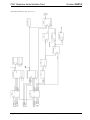
The next three sections describe the basic SIMPL Windows program that utilizes the
CNXTA. The sections detail how the program works with textual descriptions and a
block diagram.
NOTE: The following descriptions assume that the reader has knowledge of SIMPL
Windows. If not, refer to the extensive help information provided with the software.
NOTE: VisionTools™ Pro-e (VT Pro-e) is a Windows compatible software
package for creating Crestron touchpanel screen designs.
NOTE: VT Pro-e is required for the CNXTA Basic Touchpanel. The latest version
of VT Pro-e can be obtained from the Downloads page (TOUCHPNL Library) of
Crestron’s website (www.crestron.com). New users are required to register in order
to obtain access to the FTP site.
NOTE: There is no need to recreate the CNXTA basic touchpanel or SIMPL
Windows program. Both are available from the Downloads page (EXAMPLES
Library) of Crestron’s website (www.crestron.com). Search for CNXTA.ZIP, which
contains both the basic touchpanel and program.
CNXTA Basic Touchpanel
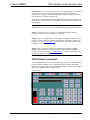
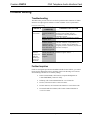
A basic touchpanel (similar to as shown below) is not required for CNXTA operation
but allows testing, checking, and verifying of the telephone, audio, and message
functions. The names of the viewport buttons and indicators correspond to the signal
names of the SIMPL Windows CNXTA symbol.
Basic Touchpanel
Operations & Installation Guide - DOC. 8144A
CNX Telephone Audio Interface Card: CNXTA • 17