1
3.4.2
Running Q-VET
You must run Q-VET on each partition in the system to verify the
complete installation.
Compaq recommends that you review the Testing Notes section of the Release
Notes before running Q-VET.
Follow the instructions listed under your operating system to run Q-VET in
each partition. Choose the Long IVP script rather than the Short one.
Tru64 UNIX
Graphical Interface
1. From the Main Menu, select IVP, Load Script and
select Long IVP (the IVP tests will then load into the
Q-VET process window).
2. Click the Start All button to begin IVP testing.
Command-Line
Interface
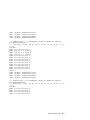
> vet -nw
Q-Vet_setup> execute .Ivp.scp
Q-Vet_setup> start
Note that there is a "." in front of the script name, and that
commands are case sensitive.
3-18
AlphaServer GS80 Installation Guide