1
In case Auto record is set as “NO”, it is available to record visitors’image manually only.
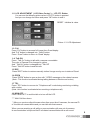
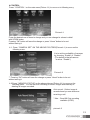
4-3. Press “ DECT SET” to move on the following menu(picture 4-1).
And then press “OK” button to proceed
it with “Proceeding Registration”messuge
Picture 4-4
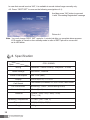
Note : You can’t change “DECT SET” again for 1 minute just after you complete above process.
LCD monitor is turned on from standby mode in case of DECT phone in use as well
as its LED blinks.
8. Specification
Model
CDV-1020AQ
Spec.
Wiring
Rated Voltage
Power Consumption
Display
Call Sound
On-Screen time
Recorded Image
Distance
Operating Temperature
Dimension
Weight
12
CAMERA : 4 wires Polarity, Telephone : 2 wires
100-240V~, 50/60Hz
Max. 25W (Max.)
25.65Cm(10.1") TFT-LCD
From Entrance (or Individual): SOL,MI,DO sound ,2 twice in arow
Monitoring : 30sec ( When talking 60sec)
68cuts (Quad)
Camera : 30m(ø0.5) / 50m(ø0.65)
/ 70m(ø0.8)
0℃+40℃ (32℉~104℉)
318(W)x215(H)x35(D)mm
1.7 kg