1
To send all calls to another station,
• Press “ITCM”
• Dial “*5”
• Dial the extension number of the station to receive calls.
• Press “ITCM” and dial “#5” to cancel.
To send intercom and prime line calls to another telephone,
• Press “ITCM”
• Dial “*05”
• Dial the extension number of the station to receive calls.
• Press “ITCM” and dial “#05” to cancel.
Messaging
The attendant station or central message desk can activate the message waiting
light at any telephone to alert the user to a message waiting.
To turn on MW light,
• Press “ITCM”.
• Dial “*3”.
• Dial the extension number of the station to be alerted.
Comdial 6414-PG
To cancel MW light,
• Press “ITCM”.
• Dial “#3”.
• Dial the extension number of the station that was alerted.
To turn off the MW light while delivering the message, press “ITCM”.
To respond to the message waiting alert, observe the display.
Wed 15
13:51
CallXXXX
Where
•
•
•
XXXX = the name of the party leaving the message.
Lift the handset.
Press “ITCM” and “HOLD”.
Connection to the message desk is established.
LCD Messaging
Pre-programmed messages can be set at a station to be displayed on a calling
LCD speakerphone. This informs the calling station of the called agent’s location and estimated
return time.
To turn on message,
• Press “ITCM”
• Dial “*02”.
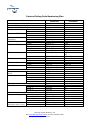
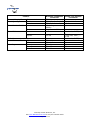
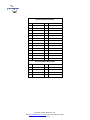
• Reference the message list.
Courtesy of Main Resource, Inc.
Visit www.MainResource.com for all your Comdial needs.
Page 7 of 14