1
4
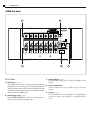
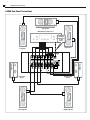
A-2000 Rear Panel
A-2000 7 Channel Amplifier
A-2000 Rear Panel
A
B
�������
���� �� �������� �����
�� ��� ����
���� ������ �� ���� ������������� ��� ������
��
��
��
��
�
�
������ ����� ������� ���������
�
�� �������
�����
������
�
�
����
�
�
����
����
�� ����������
����� ����������� �����
������ ���
���� �� ��������
C
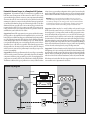
Rear Panel
A Audio Inputs (see page 5)
Use the INPUT jacks to connect to the outputs of a surround processor,
preamplifier, AV receiver with preout connections, DVD player with
discrete five channel outputs, or HDTV product with built-in surround
decoder.Whatever kind of unit you connect be sure that it has a built-in
volume control as the A-2000 does not.
B Remote Trigger Input (see page 7)
Use the REMOTE TRIGGER jack to connect to a compatible processor
or other product with a 3-32 VDC trigger output.
D
E
C Speaker Outputs (see page 5)
Use the OUTPUT binding posts to connect the amplifier to your
speakers.
D Product Serial Number
Write this number in the space provided on page 3 for future
reference.
E AC Input (see page 7)
Use the included power cord (or a comparable cord of equal or greater
wire gauge)to connect your amplifier to a compatible AC power
source.