1
3
Task List
Getting started . . . . . . . . . . . . . . . . . . . . . . . . . . . . . . . . . . . . . . . . . . . . . . . . . 9
Using CallPilot . . . . . . . . . . . . . . . . . . . . . . . . . . . . . . . . . . . . . . . . . . . . . . . . 15
Setting up your mailbox . . . . . . . . . . . . . . . . . . . . . . . . . . . . . . . . . . . . . . . . 23
To initialize your mailbox ...............................................................................................24
To check which mailbox interface you use ....................................................................25
To open an initialized mailbox - Norstar Voice Mail.......................................................26
To open an initialized mailbox - CallPilot .......................................................................26
To open your mailbox using Auto-Login ........................................................................26
To open your mailbox remotely .....................................................................................27
To change your password .............................................................................................28
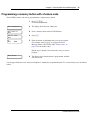
To record your name in the Company Directory............................................................29
To assign a personal Target Attendant .........................................................................30
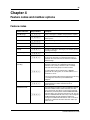
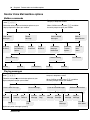
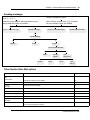
Feature codes and mailbox options . . . . . . . . . . . . . . . . . . . . . . . . . . . . . . 35
Greetings . . . . . . . . . . . . . . . . . . . . . . . . . . . . . . . . . . . . . . . . . . . . . . . . . . . . 43
To record a Primary or Alternate mailbox greeting ........................................................46
To choose a Primary or Alternate mailbox greeting ......................................................48
To record a Personalized mailbox greeting ...................................................................49
To delete a Personalized mailbox greeting ...................................................................51
Accessing your messages . . . . . . . . . . . . . . . . . . . . . . . . . . . . . . . . . . . . . . 53
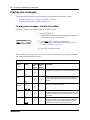
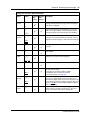
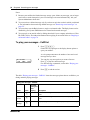
To play your messages - Norstar Voice Mail .................................................................54
To play your messages - CallPilot .................................................................................56
To retrieve an erased message - Norstar Voice Mail ....................................................58
To retrieve an erased message - CallPilot ....................................................................58
To use Call Screening ...................................................................................................59
To interrupt a caller........................................................................................................59
Sending messages . . . . . . . . . . . . . . . . . . . . . . . . . . . . . . . . . . . . . . . . . . . . 61
To record and send a message using the Open Mailbox feature - Norstar
Voice Mail ......................................................................................................................62
To record and send a message using the Open Mailbox feature - CallPilot .................63
To record and send a message using the Leave Message feature
- Norstar Voice Mail ......................................................................................................64
To record and send a message using the Leave Message feature - CallPilot ..............64
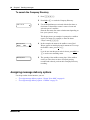
To search the Company Directory .................................................................................66
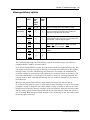
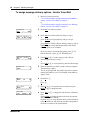
To assign message delivery options - Norstar Voice Mail .............................................68
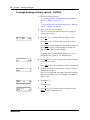
To assign message delivery options - CallPilot .............................................................70
To reply to an internal caller - Norstar Voice Mail..........................................................73
To reply to an internal caller - CallPilot ..........................................................................73
To reply to an external caller - Norstar Voice Mail.........................................................74
To reply to an external caller - CallPilot .........................................................................74
To place a Thru-Dial call................................................................................................75
To search the Company Directory while placing a Thru-Dial call ..................................76
CallPilot Reference Guide