1
Handset Features - Page 3
Handset Features
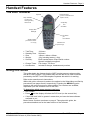
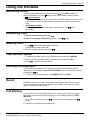
The 20DT Handset
Speaker
Lamp Indicates:
- Incoming Call
- Message Waiting
- Missed Calls
Volume Controls
(used to increase/decrease
earpiece volume)
Accept Key
and
Off Switch
Display With
Backlight
On Switch
plus
Hook Switch
Signal Indicator
(on when base station
is in range)
Headset Jack
(bottom edge)
•
•
•
•
•
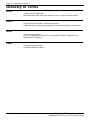
Talk Time:
Standby Time:
Size:
Weight:
Security:
• Charge Times:
• Accessories:
10 Hours.
90 Hours.
143mm x 48mm x 26mm.
121g including battery (±10g).
Each handset has a unique serial number.
Speech is digitally encrypted.
Full charge, 3.5 hours.
Includes a charger, headsets and pouches.
Using this Guide
This guide details the features that the 20DT handset supports when working
with an IP Office system. The handset may also be able to use other functions
provided by the DECT and PBX telephone systems with which it is working.
Refer to the manufacturer's instructions.
Within this guide, reference is made to the options in the Subscribing and Set-Up
procedures (see pages 6 and 8 respectively). Pressing the MENU key gains
access to the menu structure for these options. Two versions are available,
dependant upon the software issue of the 20DT.
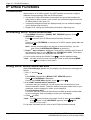
To determine which menu structure you have:
• Dial *99982*.
and the display will show the PCS level (on the second line).
• Press
• If the PCS level is 4K or greater it means that you have the latest software
available to you.
Both of these versions are shown on page 4. Throughout this guide, the
procedures detailed are for the latest version of the software.
IP Office - 20DT Handset User's Guide
40DHB0002UKCH Issue 4 (27th October 2003)
The 20DT Handset - Page 3