1
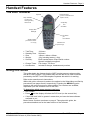
Handset Features - Page 5
Notes and Warnings
Equipment in some areas may cause interference with cordless handsets. Other
areas may have atmospheres that require the use of special "intrinsically safe"
equipment only. The 20DT handset is not classified as intrinsically safe and
must not be taken into these areas.
Unfortunately all types of cordless handset may cause background sound on
some hearing aids.
Batteries and Charging
The handset batteries* are non-removable. Charging takes approximately 3.5hrs.
The charger also acts as a desk stand. Whilst charging the handset can still
make/receive calls.
To check battery charge:
1. Press MENU
2. Press > until BATTERY appears.
3. Press . The battery charge is shown as a row of blocks.
(Recharge the battery if 3 or less solid blocks are shown).
4. Press MENU to finish.
* Note: When you first receive your 20DT handset, slide the back cover off and
check that the battery pack lead is inserted into it's socket.
IP Office - 20DT Handset User's Guide
40DHB0002UKCH Issue 4 (27th October 2003)
Notes and Warnings - Page 5