1
Contents
About this Tutorial ............................................................................................................................ 3
Intended Audience .............................................................................................................. 3
Prerequisites ....................................................................................................................... 3
Chapter 1:
Overview of WML and the WML browser .............................................................. 4
1.1
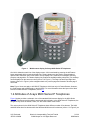
Attributes of Avaya 4600 Series IP Telephones .................................................... 4
1.2
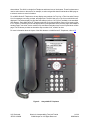
Attributes of Avaya 9600 Series IP Telephones .................................................... 5
Chapter 2:
2.1
Elements of WML................................................................................................... 7
Tags in WML .......................................................................................................... 7
2.1.1
2.1.2
2.1.3
2.1.4
2.1.5
2.1.6
2.1.7
2.1.8
2.1.9
2.1.10
2.1.11
2.2
Anchor Elements ....................................................................................... 7
Deck/Card Elements.................................................................................. 8
Text Elements of WML .............................................................................. 9
Event elements of WML ............................................................................ 9
Image Elements of WML ......................................................................... 11
Task Elements of WML ........................................................................... 12
Input Elements of WML ........................................................................... 13
Variable Elements in WML ...................................................................... 15
Wireless Telephony Applications Links ................................................... 16
Access Key Input Mode (AIM) ............................................................... 17
Unsupported WML Tags........................................................................ 19
Navigation between cards in WML ...................................................................... 20
Chapter 3:
Configuration Parameters .................................................................................... 22
Chapter 4:
User-Agent header............................................................................................... 23
References..................................................................................................................................... 25
KS; Reviewed:
SPOC 6/3/2008
Solution & Interoperability Test Lab Tutorial
©2008 Avaya Inc. All Rights Reserved.
2 of 26
WMLBasics