1
rev. May 29, 2007
Create a Brute Force Dictionary File
The MacOS X Terminal makes it rather easy to create a brute force dictionary for attacking various
encoded files. It certainly isn’t a guarantee, but it offers hope. Creating this dictionary is useful
when the source is not encrypted. For instance, if you try to make a dictionary file from a
sparseimage file, you will get nothing useful. However, making a dictionary from the entire device
may yield the password to a user’s login, a website, their keychain, and so-on.
The terminal command “strings” can create a text file with the useful words contained in a file or
raw device. The MAN entry for “strings” is as follows:
strings - find the printable strings in a object, or other binary, file
We can use this against a device file such as /dev/disk0 or against an unencrypted DMG file such as
/Evidence/sample.dmg and have a text file created with the useful strings. The command would
look like this:
Moofs-House:~ moof$ strings /Evidence/UnencryptedDMG.dmg > /Evidence/strings.txt
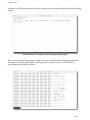
This command will output a text file that contains all of the useful strings contained in the DMG
file. You can now use this file as a “dictionary” in a brute force attack on passwords. It might be
further useful to take the repeated strings out of this file.
58 of 72