1
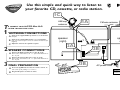
PLUG and PLAY
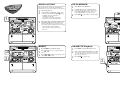
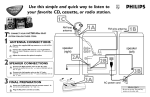
Plug and play automatically detects and programs all available radio stations (up to 40). Plug and Play will be
activated when you turn on the system for the first time.
Quick Use
Guide
1
1
2
DISC 2
DISC 1
OPENCLOSE
DISC 3
1
2
Press CD to select CD mode.
3
3 to play all discs in the disc changer.
Press PLAY3
“AUTO INSTALL—PRESS PLAY” will appear in
the display window. Press the PLAY 3 button.
• “INSTALL” will appear, followed by
“TUNER” then “AUTO”.
• “Prog” flashes as the tuner searches for
radio stations on the FM and AM bands.
THREE DISC DIRECT PLAY
DISC
CHANGE
Turn the system on.
CD PLAYBACK
Load the disc tray. Press OPEN•CLOSE to
open the disc tray. Place a disc in the disc tray.
Press DISC CHANGE to load the other tray.
Press OPEN•CLOSE to close the disc tray.
2
THREE DISC DIRECT PLAY
DISC
CHANGE
OPENCLOSE
DISC 3
CD/CDR/CD-RW COMPATIBLE
CD SYNCHRO RECORDING
The system stops searching and the last preset station plays when all radio stations with
sufficient signal have been programmed, or the
limit of 40 programmed stations has been reached.
CD/CDR/CD-RW COMPATIBLE
3
ECO POWER
1
ECO POWER
CLOCKTIMER
AUTO
REPLAY
DUBBING
CD 1-2-3
TUNER
PLAYPAUSE
DS
C
AX SOUND
SOURCE
AR
CH-T U NIN
JOG
G
AUX
EV
DEMO
STOP/
CLEAR
SE
AR
CD SYNCHRO RECORDING
MINI HIFI SYSTEM
VOLUME
1
ECO POWER
INTERACTIVE VU METER
DISPLAY
PROG
CLOCKTIMER
AUTO
REPLAY
DUBBING
NAVIGATION UN D
JOG
SO
REC
DS
C
PRESET NE
TUNER
MAX SOUND
G
AR
CH-T U NIN
TAPE
TAPE 1
-MAX BASS DYNAMIC AMPLIFICATION
CONTROL (DAC)
AUX
TAPE 1-2
TAPE
AUX
-MAX BASS DYNAMIC AMPLIFICATION
CONTROL (DAC)
-MAX BASS POR
-MAX BASS POR
CDR/DVD
B
DB
CDR/DVD
1
2
3
Press TUNER to select Tuner mode.
Press w or ∑ to tune to a programmed radio
station.
TAPE 1
CASSETTE Playback
1
2
Press 1 or ¡ breifly and repeatedly to manually tune to a radion station
THREE DISC DIRECT PLAY
DISC
CHANGE
DISC 2
DISC 1
OPENCLOSE
DISC 3
CD/CDR/CD-RW COMPATIBLE
Press TAPE to select the deck (1 or 2).
CD SYNCHRO RECORDING
FW-996
Place a tape in the selected deck. Press 0 to
open the tape deck door. tray. Insert a tape with
the open side down and the full spool on the left.
Close the tape deck door.
MINI HIFI SYSTEM
VOLUME
STANDBY-ON
3
ECO POWER
1
volume
INTERACTIVE VU METER
3
3 to play the tape.
Press PLAY3
DISPLAY
PROG
CLOCKTIMER
AUTO
REPLAY
DUBBING
REC
SO
UN D
NAVIGATION -
JOG
DS
C
CD 1-2-3
2
EV
PRESET NE
DEMO
STOP/
CLEAR
SE
AM-FM
AR
CD
MAX SOUND
TUNER
PLAYPAUSE
SOURCE
CH-T U NIN
G
VAC
SOURCE
DS
C
MAX SOUND
SOURCE
XT
CD
PLAYPAUSE
VAC
SE
AM-FM
INCREDIBLE
SURROUND
EV
XT
PR
CD 1-2-3
DEMO
STOP/
CLEAR
TUNER
G
PR
OPENCLOSE
CD/CDR/CD-RW COMPATIBLE
FW-996
ND NAVIGATION - J
OG
TAPE 1
RADIO
THREE DISC DIRECT PLAY
STANDBY-ON
SO U
B
DB
TAPE 1
DISC 3
volume
AM-FM
TAPE 1-2
DISC 2
REC
CD
CDR/DVD
DISC 1
DUBBING
PLAYPAUSE
CH-T U NIN
-MAX BASS POR
TAPE 1
DISC
CHANGE
AUTO
REPLAY
PRESET NE
B
DB
TAPE 1-2
CLOCKTIMER
PROG
CD 1-2-3
-MAX BASS DYNAMIC AMPLIFICATION
CONTROL (DAC)
TAPE
el
INTERACTIVE VU METER
DISPLAY
VAC
SE
NAVIGATION -
VAC
DEMO
STOP/
CLEAR
CD
UN D
AM-FM
PRESET NE
XT
EV
SO
REC
PR
PROG
INCREDIBLE
SURROUND
DISPLAY
XT
2
• If you skip Plug and Play installation,
it will reactivate next time you turn the
system on.
INTERACTIVE VU METER
PR
CD SYNCHRO RECORDING
INCREDIBLE
SURROUND
STANDBY-ON
3
VOLUME
INCREDIBLE
SURROUND
3
MINI HIFI SYSTEM
FW-996
2
3
DISC 2
DISC 1
-MAX BASS DYNAMIC AMPLIFICATION
CONTROL (DAC)
TAPE
AUX
-MAX BASS POR
B
DB
TAPE 1-2
TAPE 1
CDR/DVD
TAPE 1
TAPE 1