1
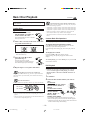
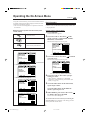
7 Monitor types
Changing the System Settings
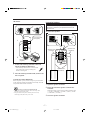
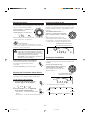
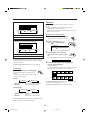
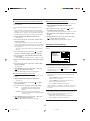
• 4:3 LB (Letter Box) : Select
this when viewing on TV whose
aspect ratio is 4:3.
While viewing a wide screen
picture, the black bars appear on
the top and the bottom of the
screen.
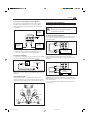
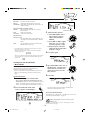
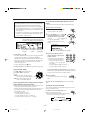
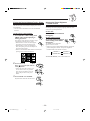
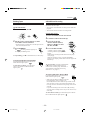
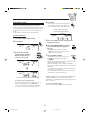
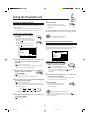
On SYSTEM menu, you can change the following settings.
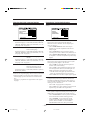
AUTO STANDBY
RESUME
OFF
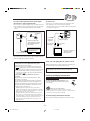
AV COMPULINK MODE
• 16:9 WIDE: Select this when
viewing on TV whose aspect
ratio is 16:9.
OFF
DVD 2
EXIT
PRESS
KEY
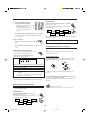
• AUTO STANDBY
• 4:3 PS (Pan Scan) : Select
this when viewing on TV whose
aspect ratio is 4:3.
While viewing a wide screen
picture, the black bars do not
appear, however, the left and
right edge sides of the pictures
will not be shown on the screen.
• Even if “4:3 PS ” is selected, the screen size may
become “4:3 LB ” while playing some DVDs. This
depends on how the DVD is programed and recorded.
• If a disc (or some portions of the disc) is recorded
with the video signals of 4:3 aspect ratio, this setting
does not take effect. The pictures are displayed with full
4:3 aspect ratio or with 4:3 Letter Box.
: You can turn off (into standby) the
unit automatically.
– Select “30” to turn off the unit automatically if no
operation is done for 30 minutes.
– Select “60” to turn off the unit automatically if no
operation is done for 60 minutes.
– Select “OFF” to deactivate this function.
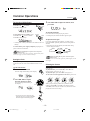
• RESUME :
This unit can memorize the stop-point where DVD or
VCD playback stops. When the playback is selected
again, it starts from where it has been stopped—Resume
play.
– Select “ON” to activate Resume play.
– Select “OFF” to deactivate Resume play. Playback
always starts from the beginning.
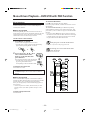
• AV COMPULINK MODE :
When connecting this unit to a JVC’s TV with the AV
COMPULINK remote control system, select the proper
setting.
– Select “DVD 1” when connecting this unit to the
COMPONENT VIDEO or INPUT-2 terminals on a
TV.
– Select “DVD 2” when connecting this unit to the
INPUT-1 terminals on a TV.
– Select “DVD 3” when connecting this unit to the
INPUT-2 terminals on a TV.
* For AV COMPU LINK control system, see page 42.
– 36 –
EN32-37.MX-DVA9[J,C]_f
36
01.7.3, 3:12 PM