1
SETTING UP YOUR GOLDTOUCH ADJUSTABLE KEYBOARD
Wrist Extension and Adapting your Workstation
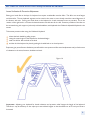
Another awkward posture to be avoided is the angling of the hand backwards at the wrist (like a stop signal) - this is
called wrist extension or dorsiflexion. When typing, the wrists should be kept straight with the hand and forearm aligned
together.
It is important to ensure that your set and desk heights are adjusted so that your elbows are 90° or slightly more when you
place your fingers on the keys. Ensure that your wrists are straight when you type. Wrists rests shouldn’t be used while
actually typing but can be used to rest between typing bouts.
Numeric Keypad and Function Lock
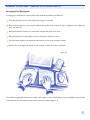
The Goldtouch Keyboard has an added “Function Lock” key (Fn Lock) to enable the use of the embedded numeric keypad.
When the Fn Lock is on, the keys (UIOP etc.) which usually generate letters will perform numeric character generation
(456*) and the arithmetic functions usually found on the numeric keypad.
This allows the keyboard to have a smaller footprint that lets you bring your mouse much close to the “comfort zone” in
front of you.
GENERAL GUIDELINES - OBSERVE GOOD WORK HABITS
Using a keyboard that may be adjusted to your individual needs, such as the Goldtouch Adjustable Keyboard, is on of the
factors that may assist in promoting comfort and enjoyment. The keyboard’s adjustable features can reduce awkward
postures associated with keyboard use and reduce the stresses and strains that holding these postures for prolonged
periods produces. The Goldotuch Adjustable Keyboard also allows you to shift posture periodically, thereby reducing the
cumulative stresses placed upon your muscles.
By observing good work habits you will find that it is easier to maintain a relaxed neutral posture when using your keyboard.
What Goldtouch ergonomists mean by good work habits are things like pacing yourself, varying your tasks, shifting your
posture to give your body a chance to use different muscle groups and taking appropriate rest breaks.
Arrange your workspace so that the tools you use most are within your “comfort zone”, the distance from elbow to hand,
because this plays an important part in remaining comfortable and productive. Continuously performing a task in the same
way increases the risk of over-exertion and injury. The following are important ergonomic factors for computer work,
comfort and productivity.
Arranging your workspace
Adjusting your seat height and work surface
Maintaining good posture
Taking frequent work breaks
Vision care
7