1
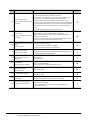
8.9.4
8.9.5
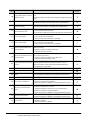
Parts name ......................................................................................................................... 8 - 13
Caution for compliance with EMC Directive........................................................................ 8 - 13
8.10 Panel-Mounted USB Port Extension.............................................................................................. 8 - 14
8.10.1 Applicable panel-mounted USB port extension .................................................................. 8 - 14
8.10.2 Parts name ......................................................................................................................... 8 - 14
8.10.3 Installing procedure ............................................................................................................ 8 - 14
8.11 RS-232/485 Signal Conversion Adapter........................................................................................ 8 - 16
8.11.1 Applicable RS-232/485 signal conversion adapter ............................................................. 8 - 16
8.11.2 Installing procedure of RS-232/485 signal conversion adapter .......................................... 8 - 16
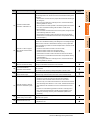
9. UTILITY FUNCTION
9.1
Utility Execution ............................................................................................................................... 9 - 1
9.2
Utility Function List........................................................................................................................... 9 - 2
9.3
Utility Display ................................................................................................................................... 9 - 4
9.3.1 Display operation of main menu ........................................................................................... 9 - 6
9.3.2 Utility basic configuration ...................................................................................................... 9 - 8
9.3.3 Basic operation of settings change....................................................................................... 9 - 9
10. COMMUNICATION INTERFACE SETTING (COMMUNICATION SETTING)
10.1
Communication setting .................................................................................................................. 10 - 1
10.1.1 Communication setting functions........................................................................................ 10 - 1
10.1.2 Display operation of Communication Setting...................................................................... 10 - 1
10.1.3 Communication setting contents ........................................................................................ 10 - 2
10.1.4 Communication setting operation ....................................................................................... 10 - 4
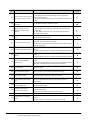
10.2
Communication Detail Setting ....................................................................................................... 10 - 8
10.2.1 Communication detail setting functions .............................................................................. 10 - 8
10.2.2 Display operation of Communication Detail setting ............................................................ 10 - 8
10.2.3 Display contents of Communication Detail setting............................................................ 10 - 10
10.3
Ethernet Setting ........................................................................................................................... 10 - 15
10.3.1 Ethernet setting functions ................................................................................................. 10 - 15
10.3.2 Display operation of Ethernet setting................................................................................ 10 - 15
10.3.3 Display contents of Ethernet setting ................................................................................. 10 - 16
11. DISPLAY AND OPERATION SETTINGS (GOT SET UP)
11.1
Display Setting............................................................................................................................... 11 - 1
11.1.1 Function of Display ............................................................................................................. 11 - 1
11.1.2 Display operation of Display ............................................................................................... 11 - 2
11.1.3 Display operations .............................................................................................................. 11 - 3
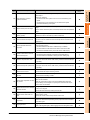
11.2
Operation Setting (Settings Regarding Operation) ........................................................................ 11 - 6
11.2.1 Operation setting functions ................................................................................................. 11 - 6
11.2.2 Display operation of Operation ........................................................................................... 11 - 7
11.2.3 Setting operation of operation ............................................................................................ 11 - 8
11.2.4 Security level change ......................................................................................................... 11 - 9
11.2.5 Utility Call Key Setting ...................................................................................................... 11 - 11
11.2.6 Adjusting the touch panel position (Touch panel calibration) ........................................... 11 - 13
11.2.7 USB mouse/keyboard setting ........................................................................................... 11 - 15
11.3
Transparent Mode Setting ........................................................................................................... 11 - 17
11.4
Backup/Restoration Setting ......................................................................................................... 11 - 18
11.5
Behavior of Duplicate IPs ............................................................................................................ 11 - 21
A-9