1
8 PLAYBACK
8 PLAYBACK
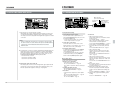
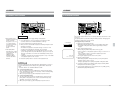
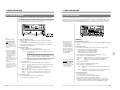
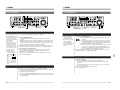
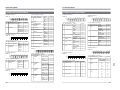
8-8 SHUTTLE SEARCH/JOG OPERATION
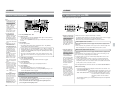
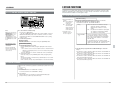
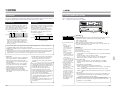
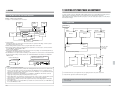
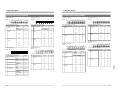
8-9 VARIABLE SLOW PLAYBACK
Noiseless variable slow playback from -1.0x to +1.0x is available. Triple-pair playback heads assure optimum
picture quality.
[SEARCH] button
VIDEO CASSETTE RECORDER
AUDIO
INPUT
CH1
SDI
Notes
● Selecting modes in which
Shuttle Search can be
engaged.
AUDIO
MONITOR
AES/EBU CH1
L
ANALOG CH1
R
X32, X17 or X6 speed can
be selected with menu
switch No. 340 <SEARCH
SPEED>.
● Use menu switch No. 221
<SEARCH PB AT 1+3/
2+4> to select whether or
not audio is recorded on
the cue track when menu
switch No. 219 <SEARCH
REC CH> is set to CH1+3/
CH2+4.
● Slow Picture mode
With menu switch No. 119
<SLOW PICTURE>
FRAME (0): Slow-motion
frame playback
FIELD (1): Slow-motion
field playback
CH4
CH3
[VAR/P.PLAY] button
BR-D95U
POWER
SIF
VIDEO CASSETTE RECORDER
CH2
CH3
CH4
LINE
CH2
CH3
CH4
CPN
ON
I
OFF
O
AUDIO
INPUT
COMPONENT DIGITAL
CH1
CH2
R
P
dB OVER dB
0
+4
–10
+2
R
P
dB OVER dB
0
+4
–10
+2
0
–20
–2
–30
–40
0
CH3
–20
–2
–30
–40
–4
CH4/TRACKING
R
P
dB OVER dB
0
+4
–10
+2
0
–20
–2
–30
–40
–4
–60
R
P
dB OVER dB
0
+4
–10
+2
0
–2
–4
–60
525
625
CTL TC UB DF SERVO CF GEN 16:9 AP
AUTO OFF P.READ V.VAR PB/EE REMOTE
CONDITION
COUNTER
RESET
VCON
MENU
SET
HOLD
REMOTE
VAR
SEARCH
CH1
CH2
REC
CH3
PB
PB/EE
VIDEO
DA1
S
DA2
DA3
CH4
CH3
CH4
LINE
CH3
CH4
CPN
CH1
+4
EJECT
REC
PLAY
0
X1
–20
–30
–40
–4
METER MODE
FINE
PLAY
ENTRY
OUT
CANCEL PREVIEW
TRACKING
SHIFT
REVIEW
AUTO EDIT
TC
PREROLL
USER
TOP
VIDEO
POWER
COMPONENT DIGITAL
REW
STOP
FF
TIME CODE
ON SCREEN
OTHERS
CH4/TRACKING
R
P
dB OVER dB
0
+4
–10
+2
0
–20
–2
–30
–40
–4
–60
Search dial
AUDIO
STAND BY
SERVO/SYS
R
P
dB OVER dB
0
+4
–10
+2
PAUSE/STILL
CH3
CH2
R
P
dB OVER dB
0
F
DA4
TRACKING
INSERT
BR-D95U
SIF
ON
I
OFF
O
Variable Motion
–2
CH4
IN
PULL FOR VARIABLE
PULL
RELEASE
CH3
PLAYER RECORDER
STILL
M
H
ASSEM
CH2
CH2
CH2
P.PLAY
–20
–30
–40
–60
CH1
UB
X-1
PHONES
VIDEO
INPUT
AUDIO INPUT / AUDIO MONITOR SELECT
AES/EBU CH1
L
ANALOG CH1
R
SDI
AUDIO
MONITOR
–60
● Maximum Search speed
CH2
Variable Motion
–4
With menu switch No. 301
<DIRECT SEARCH>
set to “OFF (0)”, Shuttle
Search starts only when
the [SEARCH] button is
pressed.
When set to “ON (0)”,
Search can start from any
mode except REC and
REC Pause mode.
VIDEO
INPUT
AUDIO INPUT / AUDIO MONITOR SELECT
R
P
dB OVER dB
0
0
–20
–2
–30
–40
–4
+2
0
–2
–4
–60
CONDITION
COUNTER
RESET
VCON
REMOTE
MENU
SET
HOLD
PB
PB/EE
VAR
SEARCH
PLAYER RECORDER
UB
–10
P.PLAY
–20
STILL
–30
–40
M
H
–60
ASSEM
VIDEO
DA1
ENTRY
OUT
S
DA2
DA3
F
DA4
EJECT
REC
PLAY
PAUSE/STILL
X1
X-1
PHONES
CH1
CH2
REC
CH3
CH4
TRACKING
IN
PULL
RELEASE
REV
525
625
CTL TC UB DF SERVO CF GEN 16:9 AP
AUTO OFF P.READ V.VAR PB/EE REMOTE
+4
–10
+2
–60
PULL FOR VARIABLE
FWD
METER MODE
FINE
PULL
RELEASE
PLAY
CANCEL PREVIEW
TRACKING
SHIFT
REVIEW
INSERT
AUTO EDIT
TC
PREROLL
USER
VIDEO
AUDIO
STAND BY
TOP
REW
STOP
FF
SERVO/SYS
TIME CODE
ON SCREEN
OTHERS
Search dial
PULL
RELEASE
REV
FWD
Jog dial
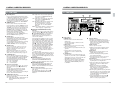
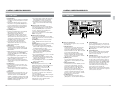
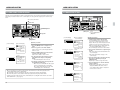
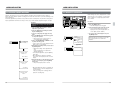
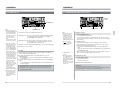
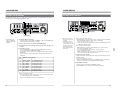
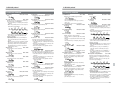
Rapid visual search can be performed with either of two concentric dials; the outer
one serving as a shuttle search dial and the inner one as a jog dial.
● Audio recorded on the tape’s longitudinal cue track or digital audio track is output
during shuttle search and jog operation. (Select the audio during search with
menu switch No. 216 <AUD SEL. AT SEARCH>.)
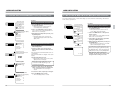
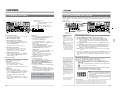
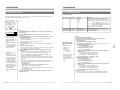
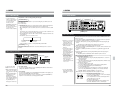
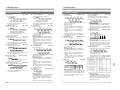
Variable slow playback can be executed using either of the two methods described
below.
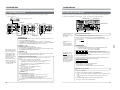
Method 1
1. Press the [VAR/P. PLAY] button to engage the Variable mode. The button
lights.
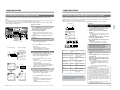
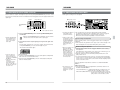
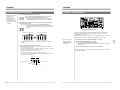
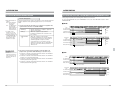
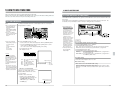
Shuttle search control
1. Turn the outer dial in the Play/Still/Stop/FF/REW modes.
Turn the dial to FWD (clockwise) to search in the forward direction and to REV
(counterclockwise) to search in the reverse direction.
[ Search starts. Search speed changes as given below in both forward and
reverse directions depending on how far the dial is turned.
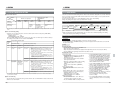
Center (STILL) 0[0.03[0.07[0.10[0.20[0.50[ 1.00 [2[4[ 6[
10 [ X32
The maximum search speed can be selected with the menu switch No. 340
<SEARCH SPEED>.
● The Still mode is engaged when the dial is set at the center still click position.
Play speed is X1 (normal) at the first click position in both forward and reverse
directions. Noiseless playback is available from about -1.0x to +1.0x.
In this case, the audio signals on the digital truck of tape are output.
2. To stop search operation
Press PLAY, STOP, FF, or REW depending on which mode is to be engaged
next.
[ The selected mode is engaged. There is no change in the dial position.
When the [SEARCH] button is pressed, search operation starts at the speed
corresponding to the current position of the dial.
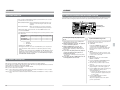
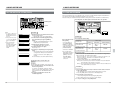
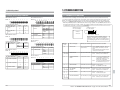
Jog operation
2. Turn the search dial.
Variable slow playback from -1 x to +1x is available.
• Turning the search dial all the way in the REV direction gives you -1x speed.
Turning it all the way in the FWD direction gives you +1x speed.
When the search dial is set to “STILL”, a still picture is displayed.
• The variable slow playback speed is shown on screen.
3. To stop variable slow playback
Press the operation button such as the [PLAY], [STOP], [PAUSE/STILL] and
[SEARCH] buttons.
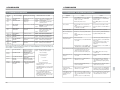
Cautions
● The V. fade function is enabled only in the Playback, Program Playback or
Variable Slow Playback +1x mode. Under the following conditions, the V. fade
function may also be disabled in the Variable Slow Playback +1x mode.
1. In the first15 seconds after the Variable Slow Playback +1x mode is
activated.
2. When playing a tape recorded on the BR-D40/DY-70 or some BR-D80/
D85s.
● When playback speed is changed from + to – and vice versa, gray lines may
appear at the top or bottom of the screen (except with normal D9-format video
signals). This is normal. It is not a malfunction.
● Noise may appear when the Variable Slow Playback +1x mode is activated.
This is normal. It is not a malfunction.
1. Turn the inner jog dial.
● Turn the dial in the FWD direction (clockwise) to advance the tape.
Turn the dial in the REV direction (counterclockwise) to reverse the tape.
Search speed corresponds to the speed with which the dial is turned.
● The Still mode is engaged whenever you stop turning the dial.
82
83