1
Adding and removing adapter cards
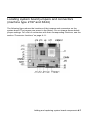
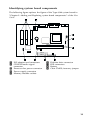
The system board includes three PCI adapter card connectors (only the low-profile
PCI cards will fit).
Note:
Make sure that you have followed the proper
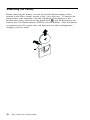
procedure in “Opening the system unit” on page 7-5.
This ensures that you discharge the static electricity
that you may have accumulated.
Installing adapter cards
Your computer provides expansion slots for PCI adapter cards only.
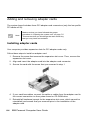
Follow these steps to install an adapter card:
1. Remove the screw that secures the expansion-slot cover. Then, remove the
expansion slot cover.
2. Align and insert the adapter card into the adapter card connector.
3. Secure the card with the screw that you removed in step 1.
4. If your card has cables, connect the cable or cables from the adapter card to
the correct connection on the system board or CD-ROM drive.
5. Reinstall all hardware (except for the expansion-slot cover, which cannot be
reinstalled) and screws that you removed prior to the installation of the
adapter card.
8-4
IBM Personal Computer User Guide