1
Learning about your new TV
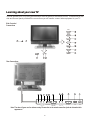
You can operate your TV by using the buttons on the front panel or the remote control. The terminals on the
side and the rear panel provide all the connections you will need to connect other equipment to your TV.
Side Controls /
Connections
MENU
SOURCE
VOL
VOL
10
CH
CH
1
7
22
Rear Connections
8
ANT.IN
S-VIDEO VIDEO Y PB/ C B P R/ C R
L
R
AUDIO IN 1
COMPONENT
L
R
AUDIO IN 2
19
AV OUT
20
21
PC IN
AC IN
Note: The above figures are for reference only. Please refer to the actual connection jacks to determine their
appearance.
-6-