1
Chapter 1
Setting Up the CoreModule 420
Setup Steps
It is important to follow the setup steps in this section in the exact order listed here, but skip any steps
that do not apply to your situation. References are provided to chapters within this guide or other Ampro
documents for more information about installation and use of the CoreModule 420 SBC.
Preparations
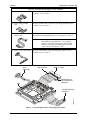
• Locate the QuickStart Kit Contents Sheet
1) Open shipping box
• Unpack the contents of the shipping box
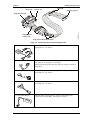
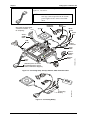
• Verify the contents of the shipping box against the QuickStart
Contents Sheet included with your CoreModule 420 SBC shipping
box.
2) Verify Contents
• If anything is missing or damaged, call your sales representative or
Tech Support.
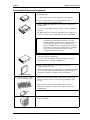
3) Support Documentation
(CoreModule 420
Documentation and
Support Software
(Doc & SW) CD-ROM)
CoreModule 420 QuickStart Guide
This hardcopy document describes how to setup, install, and power up
the CoreModule 420 found in the QuickStart Kit and this manual is also
provided as a PDF file on the CoreModule 420 Documentation and
Support Software (Doc & SW) CD-ROM.
CoreModule 420 Reference Manual
This document describes the CoreModule 420 and provides detailed
reference information for your CoreModule 420 and is found on the
CoreModule 420 Doc & SW CD-ROM as a PDF file.
Setting Up the Workspace
CAUTION
To prevent damage to the electronic components on the CoreModule 420 SBC, do
not handle the board until you have followed good Electro-Static Precautions.
Always touch a grounded, unpainted metal surface before touching the
CoreModule 420 SBC or any of the components on the board.
Always use an anti-static wrist strap connected to a grounding mat, which has staticdissipating characteristics and attached to earth ground.
4) Select workbench location
• The workbench location should have a static-free, non-conductive
mat (or the equivalent) to place the CoreModule 420 and its
cables for setup and operation (including the connection of the
power supply, peripherals, and support devices).
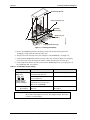
5) Connect an ESD strap to
your body
• Connect an ESD strap between your body (wrist or ankle) and ground
or the static-free mat.
6) Unpack CoreModule 420
2
If you do not have your own ESD strap, an ESD kit is provided in
the QuickStart Kit with an anti-static wrist strap.
• Remove the CoreModule 420 from its protective plastic case and
place it on static-free work surface.
QuickStart Guide
CoreModule 420