1
Front Panel Operation (Normal Mode)
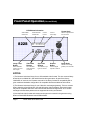
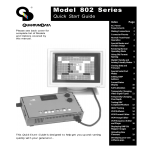
LCD Window Information
Vertical Rate
nearest Hz
822S
Horizontal Rate
nearest KHz
H31
V60
Current
Format
Format Knob
Current
Test Image
Selects a signal format
from knob list.
Image Knob
15=VGA_m3
35=SMPTE133
Image / Step
Button
Video Gate
Buttons
Sync Gate
Buttons
Outputs
Button
Draws alternate
versions of some
test images
Turn individual
video elements
on and off
Turn different sync
types on and off
Turns all signal
outputs on and off
Selects a test image
(pattern) from knob list.
NOTES:
1) The firmware includes a library of over 100 standard video formats. This is a common library
shared by all our Model 801, 802 and 822 series video generators. As part of the factory
initialization of each unit, the firmware scans all of the library formats for compatibility with a
given model and hardware configuration. All compatible formats are added to the knob list.
2) The firmware includes a library of over 100 built-in test images (patterns). This is a common
library shared by all our Model 801, 802 and 822 series video generators. Some test images
may not be compatible with some video formats and hardware configurations. An on-screen
message indicates these patterns are not supported when they are selected.
3) User defined video formats and custom test images can be stored in the generator using
Quantum Data’s MS-Windows® based VGM software.
Page 4
Model 822S Quick Start Guide