1
M-Series QuickStart Guide
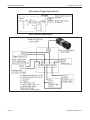
MX20 and MX40 Processor Power Supply Connection
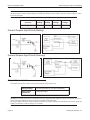
IMPORTANT: See Mounting Warning on Page 1
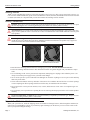
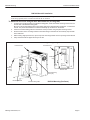
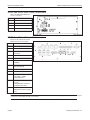
Processor front
Butterfly
Clip
Bottom View
Bracket Mounting
Screws (x2)
Plate
Mounting
Screws
(x4)
Mounting Bracket
DIN Rail Mounting (Front Up)
Bracket Holding Plate
Warning: To avoid electrical shock, disconnect all power to the power supply before working on it.
Avertissement: Pour éviter le choc électrique, débranchez toute la puissance à l'alimentation d'énergie avant de travailler à lui.
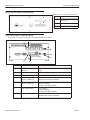
MX20 and MX40 Processor Power Supply Connection
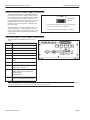
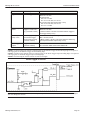
The MX20 and MX40 power inputs use standard
spade terminals to connect the power supply. The
ground terminal on the power input must be connected to the power supply’s grounded chassis/
enclosure. This connection is needed to insure
electromagnetic compliance and proper operation.
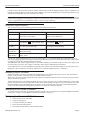
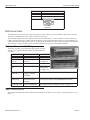
The MX20 and MX40 processors require approximately 10A @ 10VDC; 3.5A @ 24VDC; and 3A
@ 30VDC. Datalogic recommends using a 24
VDC power supply capable of providing 3.5A
current. The M-Series processor runs most efficiently at this voltage which is commonly used in
many manufacturing environments.
Page 7
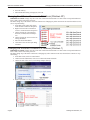
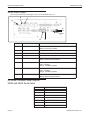
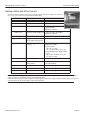
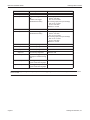
Power Connector
1
3
2
1
Connect Ground terminal to Power Supply Circuit Ground
2
Connect - terminal to Power Supply Minus
3
Connect + terminal to Power Supply 10 to 30VDC*
Datalogic Automation, Inc.