1
70810-IM
12/21/06
2:52 PM
Page 3
Removing The Existing Thermostat
1) CAUTION: Make certain the power to the system has been disconnected.
2) Remove the cover of the old thermostat and locate the wires that are connected to the terminal board.
IMPORTANT: Before removing these wires, NOTE (ON A PIECE OF PAPER) THE COLOR OF EACH WIRE
AND THE CORRESPONDING TERMINAL MARKING ON THE OLD THERMOSTAT.
3) Remove the wires from the terminals. Remove the old thermostat and mounting base from the wall.
Installing The New Thermostat
1) CAUTION: Make certain the power to the system has been disconnected.
2) If this is a new installation, locate the thermostat 4 to 5 feet above the floor in accordance with applicable
codes. Select a location that provides good airflow. Avoid locations in direct sunlight, near sources of heat,
or near air vents. NOTE: The display is designed to be best viewed from a front downward angle.
3) Remove the back plate of the thermostat by gently depressing the bottom locking tab and swinging the back
plate up and away.
4) Place the back plate against the wall in the desired mounting location with the thermostat wires protruding
from the wall through the large rectangular whole in the back plate.
5) Mark placement of the (2) mounting holes (oval shaped holes in back plate) on the wall, remove the back
plate, and drill (2) 3/16” holes.
6) Tap supplied plastic anchors into the holes.
7) Secure the back plate to the wall with the supplied screws making certain the thermostat wires have been
inserted through the large rectangular hole in the back plate.
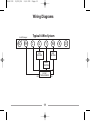
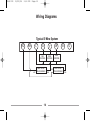
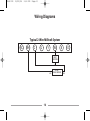
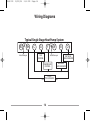
8) Carefully attach the thermostat wires to the appropriate connections on the terminal board on the back plate.
Use the notes taken from step 2 of Removing The Existing Thermostat to determine their location on the new
thermostat. Reference wiring diagrams are available in the back of this manual.
3