1
Table of Contents
Preface ...................................................................................................... iii
Audience .............................................................................................................. iii
Organization ........................................................................................................ iii
Documentation ......................................................................................................iv
Technical Support and Customer Service ..............................................................v
1 Steps for Getting Started............................................................................... 1-1
2 Hardware Installation ................................................................................... 2-1
Protecting Hardware ........................................................................................... 2-1
Network Requirements and Recommendations.................................................. 2-2
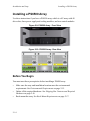
Installing a PS6000 Array................................................................................... 2-4
Before You Begin ........................................................................................ 2-4
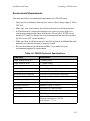
Environmental Requirements ................................................................ 2-5
Shipping Box Contents and Required Hardware................................... 2-6
Rack Mount Requirements .................................................................... 2-7
Installing the Hardware ................................................................................ 2-7
Step 1: Connect the Array to Power ...................................................... 2-8
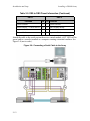
Step 2: Connect the Array to the Network ............................................ 2-9
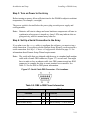
Step 3: Turn on Power to the Array..................................................... 2-11
Step 4: Set Up a Serial Connection to the Array ................................. 2-11
Installing a PS6500 Array................................................................................. 2-14
Before You Begin ...................................................................................... 2-14
Environmental Requirements .............................................................. 2-15
Shipping Box Contents and Required Hardware................................. 2-16
Rack Mount Requirements .................................................................. 2-17
Installing the Hardware .............................................................................. 2-17
Step 1: Connect the Array to Power .................................................... 2-18
Step 2: Connect the Array to the Network .......................................... 2-22
Step 3: Turn on Power to the Array..................................................... 2-24
Step 4: Set Up a Serial Connection to the Array ................................. 2-26
3 Software Configuration................................................................................. 3-1
Step 1: Choose a Configuration Method ............................................................ 3-1
About the Remote Setup Wizard.................................................................. 3-1
About the setup Utility ................................................................................. 3-2
Step 2: Collect Configuration Information ......................................................... 3-2
i